Week 3 - Solving second order ODEs
1. SOLVING SECOND ORDER ORDINARY DIFFERENTIAL EQUATION
PROBLEM: SOLVING MOTION EQUATION OF A SIMPLE PENDULUM WITH DAMPING
The following is the program written in MATLAB™, for solving the Simple pendulum motion ODE
clear all
close all
clc

%The system parameters
m=1;%mass of ball in kg
b=0.05;%Damping coefficient
l=1;% Length in metre
g=9.81; % Acceleration due to gravity in m/s^2

%Formula Simplified
r=g/l;
k=b/(m*l);

% Pendulum ODE
f=@(t,x)[x(2);-k*x(2)-r*sin(x(1))]; %Using function handle to avoid using separate function
%Help link - in.mathworks.com/help/matlab/matlab_prog/creating-a-function-handle.html

%Initial conditions for the pendulum
initial=[0;3];
time_span=linspace(0,20,250);

%Solve ODE [ Time interval set to 0 to 20 seconds]
[t,x]=ode45(f,time_span,initial);

%Plot the solution
figure('name', 'AMPLITUDE VS TIME');
%1st figure to plot the Amplitude vs Time
%subplot(2,1,1);
plot(t,x(:,1),'color','r');
hold on
plot(t,x(:,2),'color','b');
hold on
title('AMPLITUDE VS TIME');
xlabel('Time (s)');
ylabel('Amplitude');
legend('Angle (rad)','Angular speed (rad/s)');

figure('name','Motion of Simple Pendulum with Damping');
%2nd figure to plot the pendulum motion
ct=1;
for i= 1:length(x(:,1))

% x0,x1,y0,y1 are the co-ordinates for the pendulum
x0=0;
y0=0;
y1=-l*cos(x(i,1));
x1=l*sin(x(i,1));
%Defining the Pendulum String
plot([x0 x1],[y0 y1],'linewidth',1,'color','k')
hold on
%Defining Pendulum Ball
plot(x1,y1,'-o','markers',15,'markerfacecolor','k')
hold off
axis([-1.5 1.5 -1.5 0])
grid on
title('Motion of a simple pendulum with damping');
pause(0.001)
%Capturing frames
M(ct)=getframe(gcf);
%Framecounter increment
ct=ct+1;
end
%Saving as AVI movie file
movie(M)
videofile=VideoWriter('Pendulum.avi','Uncompressed AVI');
open(videofile)
writeVideo(videofile,M)
close(videofile)
Results :-
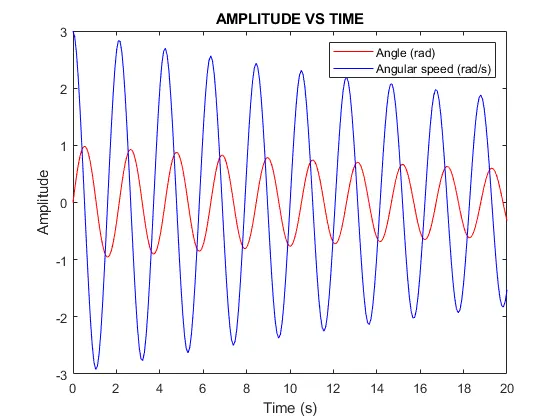
The pendulum motion continued but the pendulum angular velocity and pendulum swinging angle kept on reducing as per the solution of the ODE.
Video link for the Motion of the simple pendulum with damping :-
2. ERRORS FACED DURING PROPGRAMING
a) New pendulum plot frames getting plotted on top of the prevoius state plot
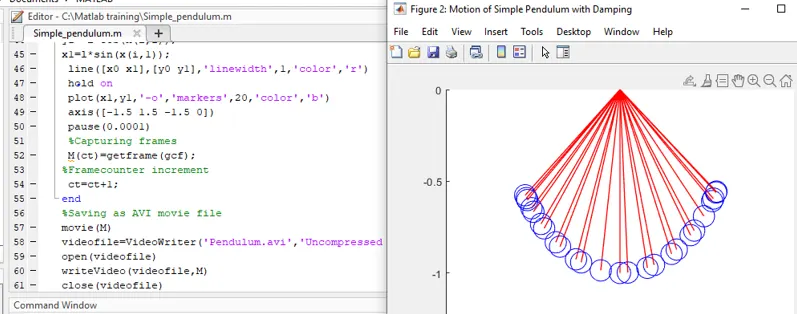
Error -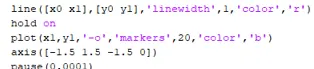
Correction - Added hold off command
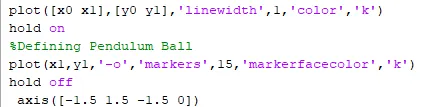
b) Ball was shown as circle
error -  - Only the circular marker color was mentioned
Correction -  - markerfacecolor was used instead of 'color'
c) Getting error while setting the axes
Error -  Y axis Min and Max value was interchanged
Correction - 
Learing - Understood the use of ODE45 solver, Plot using markers, generating video using matlab, usage of figure command, usage of function handler.