Week 3.2 - 2R Robotic Arm Challenge
CHALLENGE REPORT:
AIM:
To Write a program in Matlab to simulate the forward kinematics of a 2R Robotic Arm
OBJECTIVE:
*To calculate the position of link1,
*To calculate the position of link2,
*To calculate the position of link1 & link2 for multiple degree of theta.
* To simulate the forward kinematics of a 2R Robotic Arm.
code:
clear all
close all
clc
%Inputs
l1=1;
l2=0.5;
theta1 = linspace(0,90,10);
theta2 = linspace(0,90,10);
ct=1;
for i = 1:length(theta1)
THETA1 = theta1(i);
for j = 1:length(theta2)
THETA2 = theta2(j);
x0=0;
y0=0;
x1=l1*cosd(THETA1);
y1=l1*sind(THETA1);
x2=x1+l2*cosd(THETA2);
y2=y1+l2*sind(THETA2);
%Plotting
plot([x0,x1],[y0,y1],[x1,x2],[y1,y2],'linewidth',3)
axis([-0.5 1.5 0 1.5])
grid on
pause(0.1)
M(ct)=getframe(gcf);
ct=ct+1;
end
end
movie(M)
videofile=VideoWriter('kinematics.avi','Uncompressed AVI');
open(videofile)
writeVideo(videofile,M)
close(videofile)
output:
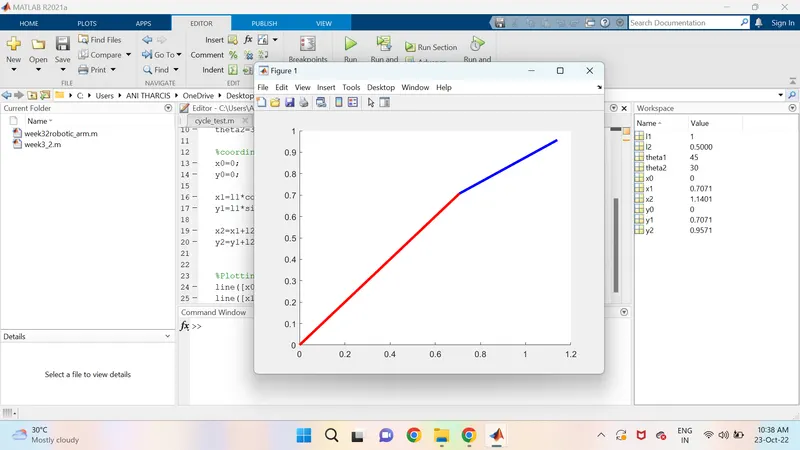
CODE EXPLANATION:
- I have used clear all, close all and clc to clear all the varaibles,,values and plots used in the previous code.
- At First, I have provided the inputs for length of the arm and the angle of the arm.
- I have provide the inputs values for theta1 and theta1 using linspace command.
- I have used the counter variable command.
- putting the length of theta1 & theta2 in for loop, as follows the coordinates((X0,Y0),(X1,Y1),(X2,Y2)).
- I have used the plot command plot the coordinates.
- I have given axis for the given cordinates and end up with end.
- I have used the pause command to play the video in a time interval of 0.3.
- I have used the getframe command to capture each frame,videofile helps to name the file and formate of video.
- The matlab can generate the movie with all the frame in 'M'.
- I have used the videofile command to save the video as 'Kinematics'(title) and in the 'Uncompressed AVI'(format).
- I have open the videofile using open command.
- I have write the videofile using write command.
- I have closed the videofile using close command.
google drive link:
https://drive.google.com/file/d/1J8-u-05mtCzmT3EWlvzWCyrFDjb8kW3c/view?usp=sharing