Week 3.2 - 2R Robotic Arm Challenge
clear
close
clc
% cration array for theta1 and theta2 by using range operator
theta1 = 10:10:90
theta2 = 10:10:90
% assumig length of robotics links
l1 = 1'
l2 = 0.5;

ct = 1;
% starting or initial co-ordinates of link first
x = 0'
y = 0'
% initiation of nested loop
for i = 1:length(theta1);
  for  j = 1:length(theta2);
% equation for end co-ordinates of link first
x1 = l1*cosd(theta1(i));
y1 = l1*sind(theta1(i));

% equation for end co-ordinates of link second
x2 = x1 + l2*cosd(theta2(j));
y2 = y1 + l2*sind(theta2(j));
% generating plot link first and second
plot([x,x1],[y,y1],[x1,x2],[y1,y2])

axis([-1 2 0 2])
% ANIMATION CREATION STEPS
%creation of array of frames and storing in M
M(ct) = getframe(gcf)
ct= ct + 1

  end
end
% VIDEO CREATION STEPS
movie(M)
videofile = VideoWriter('robotic arm.avi','Uncompressed AVI')
open(videofile)
writeVideo(videofile,M)
close(videofile)
Screenshot of code.
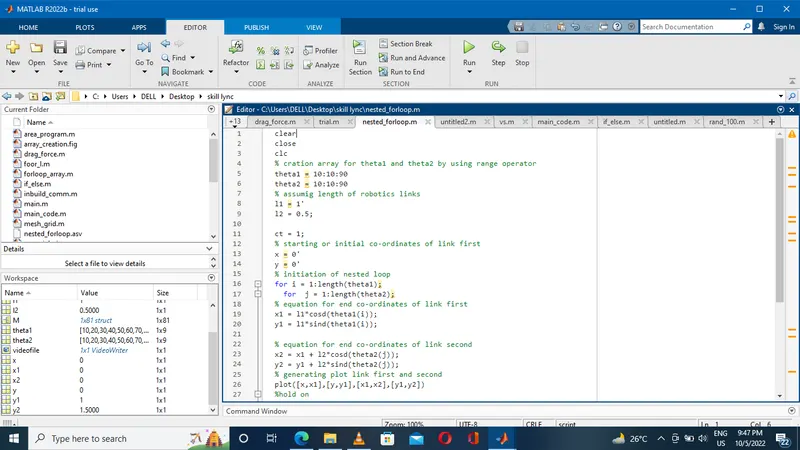
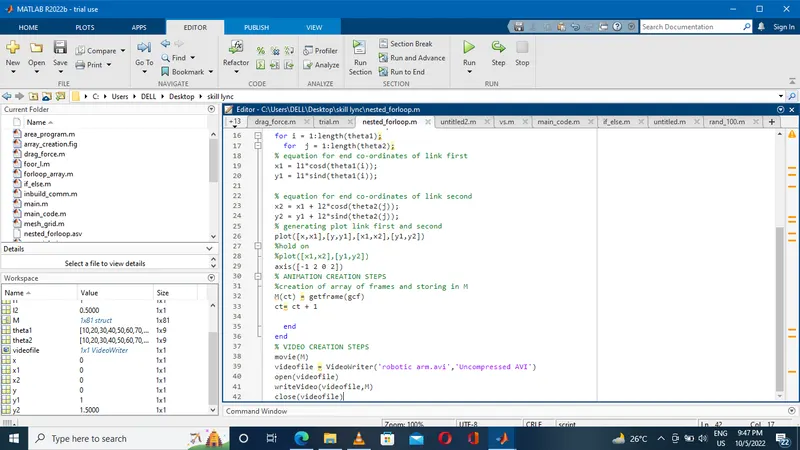
commands uesd to make animation :-
M(ct) = getframe(gcf)
ct= ct + 1
here M = name of variable in which array of fram get saved.
ct=called counter which represents each frame use for proper indexing.
commands uesd to make video file :-
movie(M) - generate move for array M
videofile = VideoWriter('robotic arm.avi','Uncompressed AVI') - uesd for giving the name to videofile
open(videofile) - used to open specified video file
writeVideo(videofile,M) - used for closing .
close(videofile)
Link of video - https://youtu.be/kfw0qCc6n94