Week 3.2 - 2R Robotic Arm Challenge
Aim:-
To write a program to simulate the Forward kinematics of a 2R Robotic arm.
Objective:
- To solve and understand the behavior of Translatory or rotary movement of a 2R Robotic arm
- To simulate the manipulator in Matlab
- To create a Movie/Animation video of a 2R Robotic arm manipulator
Theory:
A robotic arm is a type of mechanical arm, usually programmable, with similar functions to a human arm. The links of such a manipulator are connected by joints allowing either rotational motion or translational (linear) displaceme
A 2R robotic arm represents a robotic arm with two rotations. i.e. it has two links that rotate or work over a two-dimensional plane with each of the links having a single degree of freedom
If we are able to find out how the robotic arms move, we could specify the application of a robot. That is we can find out it's workspace (The possible location the robot can reach). For a 2R Robotic Arm, there are two links and two rotational joints. Link 1 makes an angle θ1">θ1 with the x-axis and link 2 makes θ2">θ2 with the x-axis. Let's assume the link length to be l1 andl2">l1 and l2 respectively. First, we need to specify the position of the manipulator if θ1 and θ2 are given/known.
Input Parameters:
l1 = length of the link-1 (Hinged or pivoted at base)
l2 = length of the link-2 (Jointed with link-1)
(x0,y0) = Starting point of link-1
(x1,y1) = End point of link-1/Starting point of link-2
(x2,y2) = End point of link-2
theta1 = Angle made by the link-1 with x-axis (Horizontal)
theta2 = Angle made by the link-2 with x-axis (Horizontal)
% Creating animation for Forward Kinematic of 2R Robotic Arm
% Here in the following program, we will write a code to animate the motion
% of the robotic arm changing with respect ot the chnage the link angle

clear all
close all
clc

%% Inputs

% Length of the first link in m
l1= 1;


%Length of the second link in m
l2=0.75;

% Angle between first link and horizontal changing from 1 to 90 degree with
]egree interval
theta1 = 1:5:90;


% Angle between second link and horizontal changing from 1 to 90 degree
% with 2 degree interval
theta2= 1:2:90;


%�lculating coordinate for End Manipulator and Plotting

% Nested for loop to calculate and creating plot of 2R robotic arm

for i = 1: length(theta1)
THETA1 = theta1(i);

    for j = 1: length(theta2)

THETA2 = theta2(j);

%Starting coordinate of first link
x0 = 0;  y0 = 0;

%End coordinate of first link

x1 = l1*cosd(THETA1);  y1 = l1*sind(THETA1);

% End coordinate for first link acts as starting coordinate for second link

%End coordinate for second link

x2 = x1 + l2*cosd(THETA2);  y2 = y1 + l2*sind(THETA2);


%% Plotting

plot([x0 x1],[y0 y1],[x1 x2],[y1 y2],LineWidth=5)
axis([0 2 -0 2])
grid on
pause(0.05);
M(j)=getframe(gcf);

    end
end

% Creating animation movie from the plot images

movie(M)
videofile = VideoWriter('Forward_Kinematic.avi','Uncompressed AVI');
open(videofile)
writeVideo(videofile,M)
close
Output:
Thus we have simulated the 2R Robotic arm by using Matlab programming and also created a Movie/Animation from the plots obtained from the program
- Below link is given for the Movie/Animation of a 2R Robotic arm Simulator
https://youtu.be/bRUiICjNBNQ?si=M8UpKwVHZ_XaqVRx
Errors Occurred During Execution:
- No Errors were found during the Execution
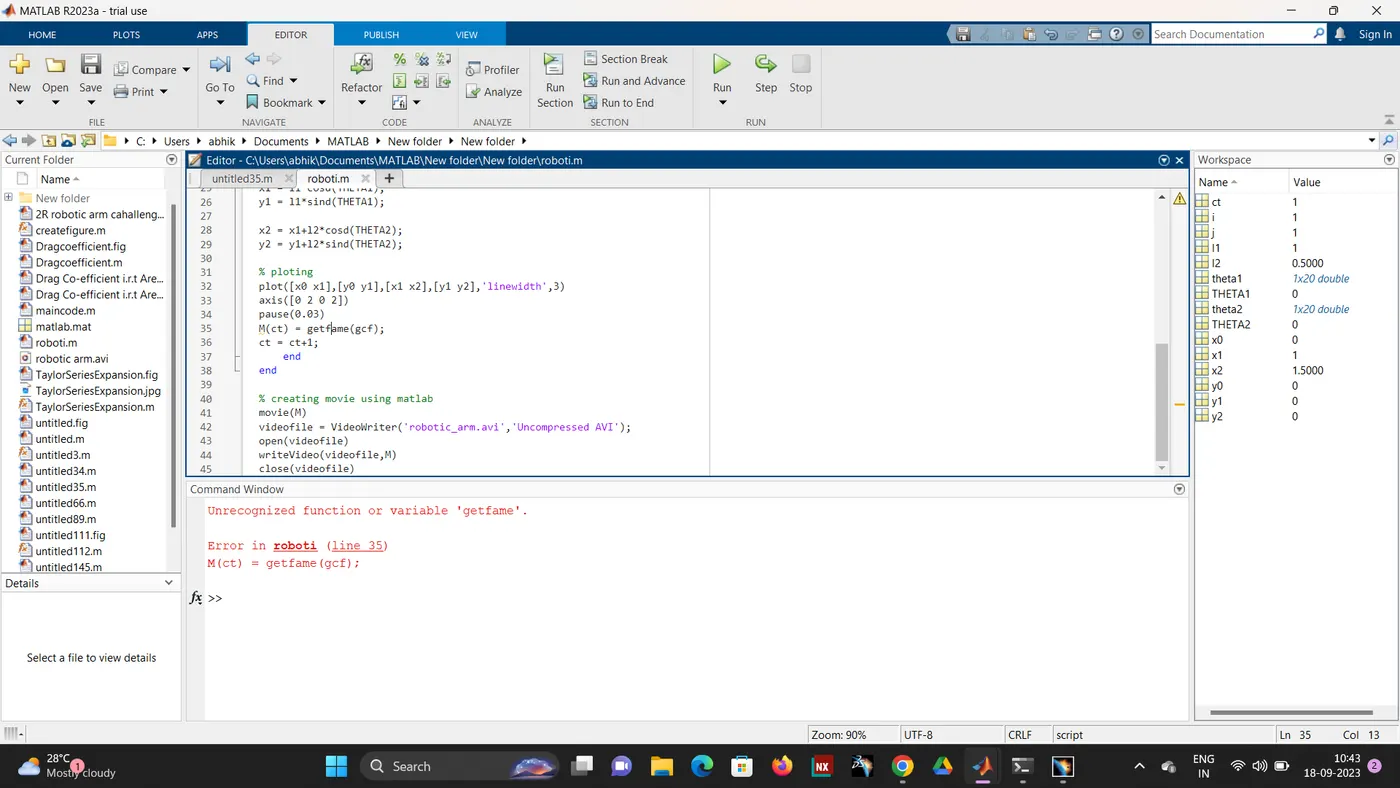
- Error Occurred only due to spelling mistakes or missing semicolons after completing the line
- Below Error Occurred due to small caps mistake in file naming