Week 3.2 - 2R Robotic Arm Challenge
Week 3.2 - 2R Robotic Arm Challenge
PROBLEM STATEMENT
Write a program in Matlab to simulate the forward kinematics of a 2R Robotic Arm, as shown in the video.
- Create an animation file of the plot.
- Upload an animation on You tube and provide the You tube link for an animation in your report.
- You can also provide the google drive link.Note: Make sure that you provide the access to the video, while pasting the google drive link.
- The presentation of your code will be taken into consideration while grading.
- paste the code using the "INSERT SAMPLE CODE" option and attach screenshots of the output.
Content expected in the report:
- Step-wise explanation of your code.
- Mention the errors faced while programming.
- Steps taken to overcome those errors.
- Screenshots showing errors thrown in command window.
SOLUTION WITH REPORTS:-
Before beginning with the actual problem statement we will look at some of the basics of the Robotics.
- Robotics is an emerging field , as a Mechanical Engineer , learning how to simulate a Robotic Arm is a good skill set to have. Lets start with the kinematics of the Linkages.
- If we are able to understand the kinematics and write simple programs that how robot is going to move.This has a lots of applications.
- If we are able to figure out how the robot is going to move then we can figure out its workspce.
- The Workspace refers to the possible locations that the robot can reach.
- This is very important when people are designing robots for really complex applications such as welding a complex frame.
Lets look at the basic MATLAB code by which we can generate the simple lineplots of both the linkages combined at a certain angle.
#basic_code
%forward kinematics of a 2R robotic arm manipulator

clear all
close all
clc

%Inputs
l1 = 1;
l2 = 0.5;

theta1 = 45;
theta2 = 90;

%cordinates
x0 = 0;
y0 = 0;

x1 = l1*cosd(theta1);
y1 = l1*sind(theta1);

x2 = x1 + l2*cosd(theta2);
y2 = y1 + l2*sind(theta2);

%plotting
line([x0,x1], [y0 y1],'linewidth',3,'color','b')
line([x1,x2], [y1 y2],'linewidth',3,'color','r')
The output generated from the above code are:-
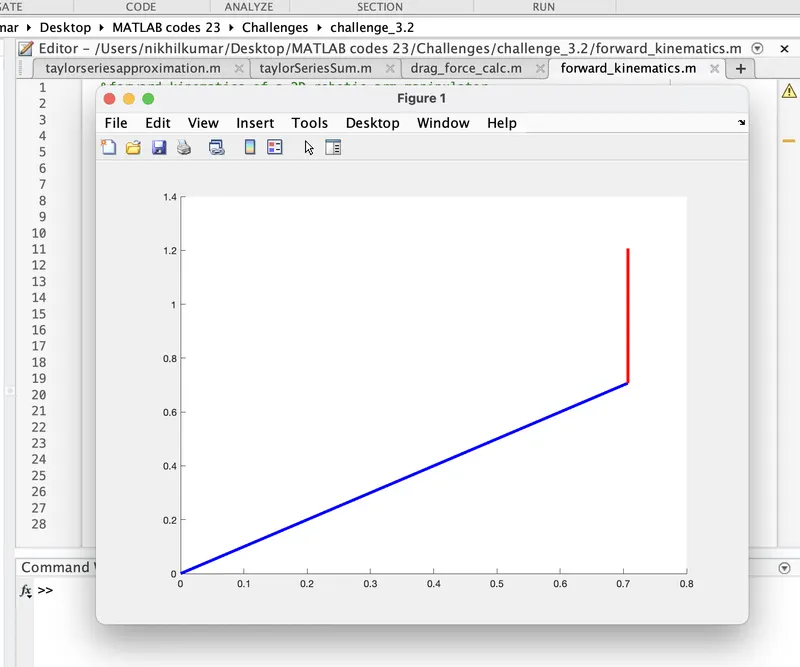
Now we will look at the codes which is used to generate the animation file for the above case.Here we will use for loop for automate the changes in the angles of the linkages.
#code
clear all
close all
clc

%inputs
l1 = 1;
l2 = 0.5;
theta1 = linspace(0,90,10);
theta2 = linspace(0,90,10);

ct = 1;
for i = 1:length(theta1)
    THETA1 = theta1(i);

    for j = 1:length(theta2)
        THETA2 = theta2(j);

        %coordinates inputs
        x0 = 0;
        y0 = 0;

        x1 = l1*cosd(THETA1);
        y1 = l1*sind(THETA1);

        x2 = x1 + l2*cosd(THETA2);
        y2 = y1 + l2*sind(THETA2);

        %Plotting
        plot([x0,x1],[y0,y1],[x1,x2],[y1,y2],'linewidth',3);
        axis([-0.1 1.5  0  1.5])
        pause(0.03)
        M(ct) = getframe(gcf);
        ct = ct+1;

    end
end

movie(M)
videofile = VideoWriter('forward_kinematics.avi','Uncompressed AVI');
open(videofile)
writeVideo(videofile,M)
close(videofile)
On Running this code a video file will be generated which i will post of youtube and will share the link in the Answer box.
1. Step by step explanation of the code
-
clear all,close all,clc: These are used to clear any existing variables, close all open figures, and clear the command window to start with a clean slate. -
Set the input parameters:
l1: Length of the first arm link (shoulder to elbow).l2: Length of the second arm link (elbow to end effector).theta1: An array of joint angles (in degrees) for the first joint, ranging from 0 to 90 degrees.theta2: An array of joint angles (in degrees) for the second joint, ranging from 0 to 90 degrees.
-
Initialize variables
ctandM:ct: Counter variable to keep track of the frames in the animation.M: An array to store the frames for creating the animation.
-
Outer loop: Iterate over each value of
theta1usingforloop. -
Inner loop: For each value of
theta1, iterate over each value oftheta2using anotherforloop. -
Calculate the coordinates of the arm links:
x0,y0: Base coordinates of the robotic arm (shoulder joint).x1,y1: Coordinates of the elbow joint based onl1andtheta1.x2,y2: Coordinates of the end effector based onl2andtheta2.
-
Plotting:
- The code uses the
plotfunction to draw the robotic arm by connecting the points (x0, y0), (x1, y1), and (x1, y1), (x2, y2) with lines. axisfunction sets the x and y-axis limits to have a proper view of the animation.pause(0.03): A short pause is added between each frame to control the animation speed.getframe(gcf): Captures the current figure (frame) as an image and stores it in theMarray.
- The code uses the
-
Outer loop continues, and the process is repeated for different combinations of
theta1andtheta2. -
movie(M): Plays the animation using the frames stored in theMarray. -
Video file creation:
- A video file named "forward_kinematics.avi" is created to store the animation.
VideoWriterobject is created with the desired settings for the video file.open(videofile): The video file is opened for writing.writeVideo(videofile, M): The frames stored in theMarray are written to the video file.close(videofile): The video file is closed after writing.
This code will display an animation of the 2R robotic arm moving through different joint angles, showing how the end effector's position changes accordingly.
2. Mention the errors faced while programming, &
4 . snapshot of the errors throwing in the command window.
I faced this error while i was programming for the creation of animation file.
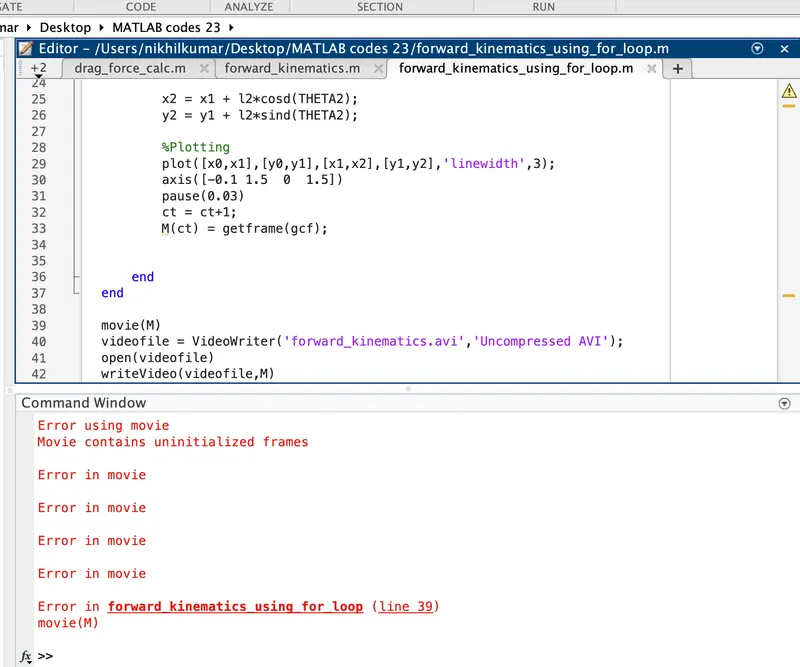
This was because I was writing the counter (ct) before saving the frames.This resulted in the value of (ct) was initially set to 2. Because I incremented it before I saved the first frame. This needs to be resolved.
3. Steps taken to overcome those errors,
This was causing due to the error in the algorithm of the coding logic. We have to save the frames first and then we have to write the counter variable(ct) . This will result in the overcoming of the above error.
For instance I have written the code in the correct algorithm above and that is giving the accurate results along with the required animation.
Apart from that there were some other typos also and some index errors was encountered during the challenge when running the code step by step.
Now I am providing the link of the animation which i have posted on youtube.(its a big file so i can't upload it directly in the answer box).
LINK OF THE GENERATED ANIMATION:-