Week 3.2 - 2R Robotic Arm Challenge
Aim:
Simulate the forward kinematics of a 2R Robotic Arm, as shown in the video.
Explination:
- Lengths of both the links are taken as input. Length of link-1 (L1) is taken as 1m and length of link-2 (L2) is taken as 0.5m.
- Angles traced by both the links, for link-1 and for link-2 is taken as input. The angles traced are varied over a range to simulate the movement of the robotic arm.
- Base position of link-1 (x0,y0)is considered as origin (0,0).
- Then two for loops are used to iterate over the range of angles traced by both the links. For each particular angle of link-1 , link-2 is moved over its entire range , to obtain different positions of end effector at that angle of link-1.
- For a particular value of θ1 and θ2, the end position of link-1 is calculated by these equations.
x1=x0+L1⋅cos(θ1)
y1=y0+L1⋅sin(θ1)
- The end position of link-1 is also the start position of link two. The end position for link-2 is calculated by these equations.
x2=x1+L2⋅cos(θ2)
y2=y1+L2⋅sin(θ2)
- Then for each particular position of lin-1 and link-2 , a plot is made which is then captured frame by frame to make a movie.
- A video file of '.avi' format is made to save the movie.
- The movie is then written into the videofile and the final animation is thus created.
Objectives:
- Write a program in Matlab to simulate the forward kinematics of a 2R Robotic Arm.
- Creating an animation from the plots obtained in the program.
- Understand the movement of an 2R Robotic in 2D workspace.
Program:
% A program to simulate the forward kinematics of a 2R Robotic Arm
clear all
close all
clc
% Taking inputs
% Length of link-1 (L1) and link-2 (L2) in meter
L1=1;
L2=0.5;
% Angle traced by link-1 in degrees (theta_1)
theta_1=linspace(0,90,11);
% Angle traced by link-2 in degrees (theta_2)
theta_2=linspace(0,90,21);
% Initialising base coordinates of link-1
x_0=0;
y_0=0;
ct=1;
for i=1:length(theta_1)
THETA_1 = theta_1(i); %taking particular values of angle traced by link-1 in order.
for j = 1:length(theta_2) % Iterating all values of theta_2 for particular value of theta_1
THETA_2=theta_2(j); %taking particular values of angle traced by link-2 in order.
% Calculating the coordinates of end point of link-1
x_1=x_0+L1*cosd(THETA_1);
y_1=y_0+L1*sind(THETA_1);
% Calculating the coordinates of the end of link-2
% End coordinates for link-1 are the start coordinates for link-2
x_2=x_1+L2*cosd(THETA_2);
y_2=y_1+L2*sind(THETA_2);
% Plotting the robotic arm for simulation
plot([x_0 x_1],[y_0 y_1],[x_1 x_2],[y_1 y_2], "linewidth",2);
axis([-0.1 1.5 0 1.5]);
% Pausing the current plot for a while before movoing to the next
% plot
pause(0.03);
% Capturing the current plot to combine later
M(ct) = getframe(gcf);
% Incrementing ct so that each frame is captured in M
ct=ct+1;
end
end
% Making a movie from collected frames
movie(M);
% Creating a video file of '.avi' format to save the animation
videofile=VideoWriter('forward_kinematics_of_2R_robotic_arm.avi','Uncompressed AVI');
open(videofile);
% Writing the movie in the videofile created
writeVideo(videofile, M);
close(videofile);
Snap Shot:
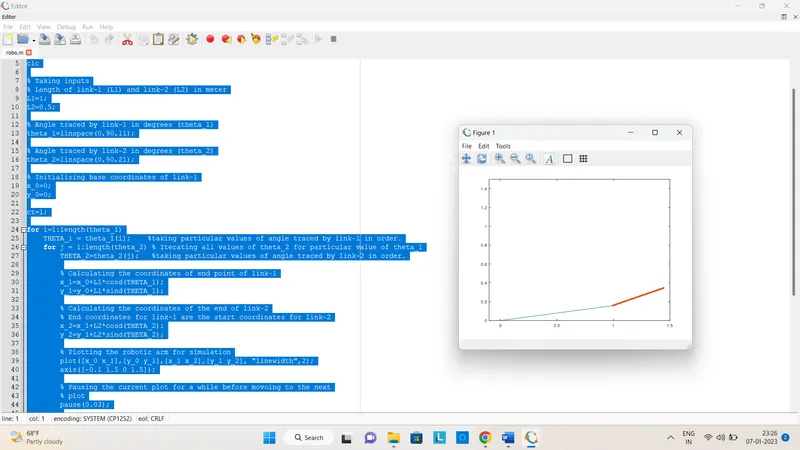
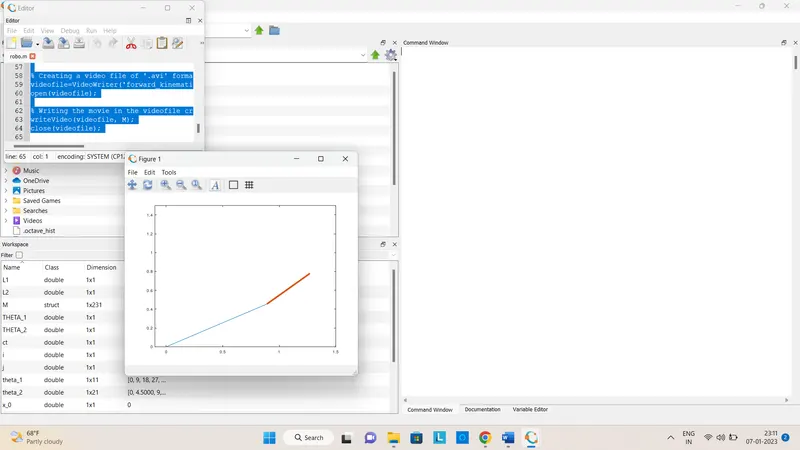
Video link:
CONCLUSION:
A simulation of the forward kinematics of a 2R Robotic Arm in 2D workspace was created using Octave Lab program or Matlab.