Week - 2 - Explicit and Implicit Analysis
Explicit methods calculate the state of a system at a later time from the state of the system at the current time, while implicit methods find a solution by solving an equation involving both the current state of the system and the later one. Mathematically, if {\displaystyle Y(t)} is the current system state and {\displaystyle Y(t+\Delta t)} is the state at the later time ({\displaystyle \Delta t} is a small time step), then, for an explicit method
{\displaystyle Y(t+\Delta t)=F(Y(t))\,}
while for an implicit method one solves an equation
{\displaystyle G{\Big (}Y(t),Y(t+\Delta t){\Big )}=0\qquad (1)\,}
to find {\displaystyle Y(t+\Delta t).}
Implicit methods require an extra computation (solving the above equation), and they can be much harder to implement. Implicit methods are used because many problems arising in practice are stiff, for which the use of an explicit method requires impractically small time steps {\displaystyle \Delta t} to keep the error in the result bounded. For such problems, to achieve given accuracy, it takes much less computational time to use an implicit method with larger time steps, even taking into account that one needs to solve an equation of the form (1) at each time step. That said, whether one should use an explicit or implicit method depends upon the problem to be solved.
Since the implicit method cannot be carried out for each kind of differential operator, it is sometimes advisable to make use of the so called operator splitting method, which means that the differential operator is rewritten as the sum of two complementary operators
{\displaystyle Y(t+\Delta t)=F(Y(t+\Delta t))+G(Y(t)),\,}
f(u)=u3+9u2+4u
EXPLICIT ANALYSIS
k(u)=3u2+18u+4
1) u0=0
k(u0)=4
`/_\F`=1
`/_\u1`=`/_\F`/k`
`/_\u1`= 0.25
u1= u0+`/_\u1`=0.25
2) k(u1)=8.6875
`/_\F`=1
`/_\u2`=`/_\F`/k`
`/_\u2`= 0.1151`
`u2= u1+`/_\u2`=0.3651`
3) k(u2)= 10.9718
`/_\F`=1
`/_\u3`=`/_\F`/k`
`/_\u3`= 0.0911`
u3= 0.45625
RESULTS
Fext =1+1+1=3
fint= u3^3+9u3^2+4u3
=3.7934
f is not equal to F hence not in equilibrium.
| Step | ΔF | Δu | u | F | f | R=F-f |
| 1 | 1 | 0.25 | 0.25 | 1 | 1.578125 | 0.578125 |
| 2 | 1 | 0.1151 | 0.3651 | 2 | 2.708749 | 0.708749 |
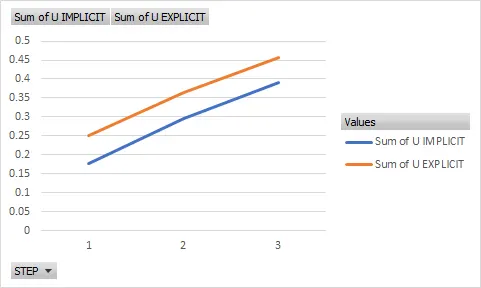
| 3 | 1 | 0.0911 | 0.4562 | 3 | 3.79281 | 0.79281 |
IMPLICIT ANALYSIS
k(u)=3u2+18u+4
1) u0=0
k(u0)=4
`/_\F`=1
`/_\u1`=`/_\F`/k`
`/_\u1`= 0.25
u1= u0+`/_\u1`=0.25
f= u3+9u2+4u= 1.578125
So R= f-F=0.578125 IS NOT LESS THAN 0.01 SO ITERATE
`delta`u(1)= -R(0)/k(u1)= -0.5781/8.6875`= -0.066
Correction u1= 0.25+(-0.066) = 0.184
checking R(u1)=f-F= 0.04693 STILL NOT LESS THAN 0.01
`delta`u(2)`=`delta`u(1)- R(1)/k(U1) =-0.066-0.0469/7.413= -0.0723
Correction u2= -0.0723+0.25=0.1776
Check R(2)= f-F= 0.999878-1= 0.000122
TOLERANCE REACHED FINAL VALUE OF DISPLACEMENT IS 0.1776
Step 2
u1= 0.1776
k(u0)= 3u2+9u+4=7.72
`Delta`F= 1
`Delta`F= k`Delta`u2
`Delta`u2=`Delta`F/k= 1/7.72=0.1295
new displacement u2= u1+Δu2 = 0.1776+0.1295 =0.3071
f=u3+9u2+4u=2.106156
R(0)=f-F=2.106156-2= 0.106156
`delta`u(1)`=-R(0)/k(u2)=-0.10/9.810731=-0.011
Correction u2=0.3071-0.011=0.2961
Checking R(1)=f -F=0.005 TOLERANCE REACHED
SO DISPLACEMENT IS 0.2961
Step 3
u2= 0.2961
k(u0)= 3u2+9u+4=9.592
`Delta`F= 1
`Delta`F= k`Delta`u3
`Delta u3`=`Delta`F/k=1/9.59 = 0.104
new displacement u3= u2+Δu3= 0.2961+0.104=0.4001
R(0)= f-F= 3.104-3
`delta`u(1)`=-R(0)/k(u3)=-0.104/11.68=-0.0089
Correction u3= 0.4-0.0089 =0.39109
Checking R=f-F=0.00074 TOLERANCE REACHED HENCE FINAL DISPLACEMENT IS 0.39109
| STEP | ΔF | u | f | R=f-F |
| 1 | 1 | 0.1776 | 0.999878 | 0.000122 |
| 2 | 1 | 0.2961 | 1.999438 | 0.005 |
| 3 | 1 | 0.39109 | 3.00074 | 0.00074 |