Week -2
AIM
Make a simulink model of doorbell using solenoid block, and to create a situation where the switch is closed for 2 seconds and then released.Observe the physical movement.(note: remaining parameters are assumed)
BLOCK REQUIRED FOR SIMULATION
- Pulse generator
- Battery
- solenoid
- switch
- Resistor
- Ideal transational sensor
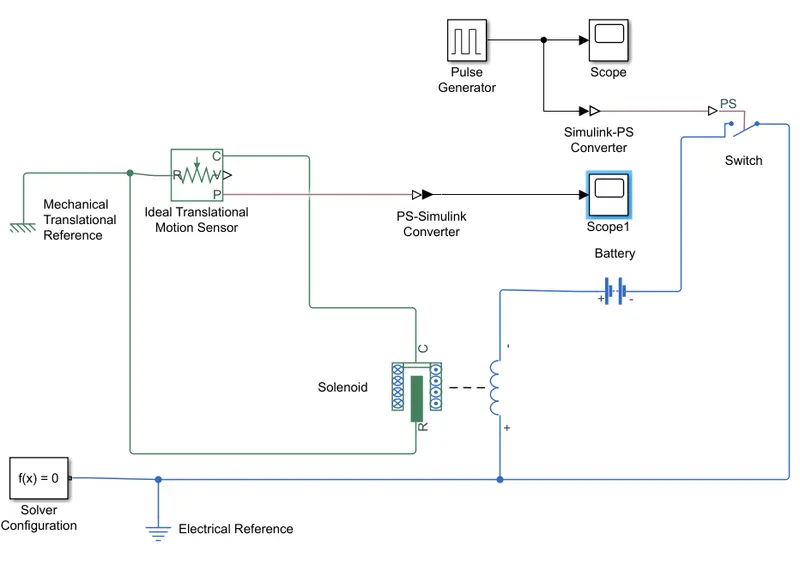
SIMULATED MODEL
SIMULATION PROCEDURES
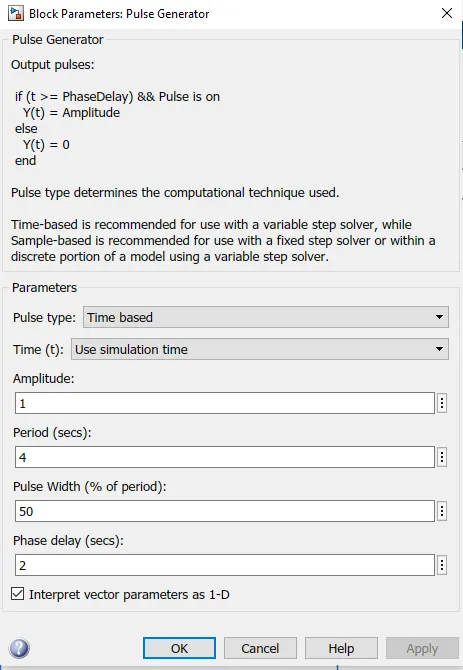
As per given conditions switch is closed for 2 seconds & then released,The pulse generator is used to create square wave pulses at regular intervals .The block wave form parameters,amplitude,pulse width,period and phase delay ,determine shape pf the wave form.switch block is controlled by external physical signal is greater than the switch is closed or else switch is open.Positive terminal is collected to block while as the negative terminal is connected electrical reference,when we connect solenoid block with the switch and battery we form a complete electrical circuit.
The part C is connected with mechanical reference.The ideal translational sensor is connected with solenoid block R to observe the movement of the plunger. Scope is connected with the ideal translational sensor to get the output.The signal from pulse generator was converted using (simulink to PS converter) and it is given to the input switch.A solenoid given and battery connected with it,The voltage of battery connected was made as same as that of the rated voltage of the solenoid. The switch is also connected to the same circuit.
The position of solenoid plunger is measured using an ideal translational motion sensor connected to the circuit. The initial position of this is set to 5mm in translational motion sensor,The scope is connected to visualize its behaviour.The spring constant and damping parameters of the solenoid block was altered to obtain the desired graph,the simulation was run for 30 seconds and result obtained is shown below,it can be observed that each 2 seconds bell was ringing.
RESULTS
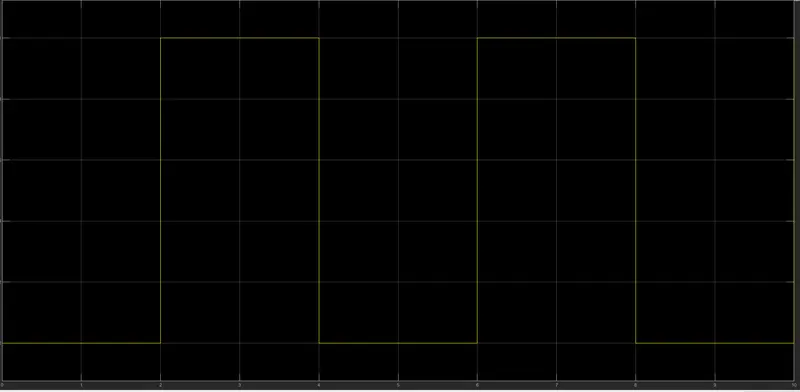
SCOPE
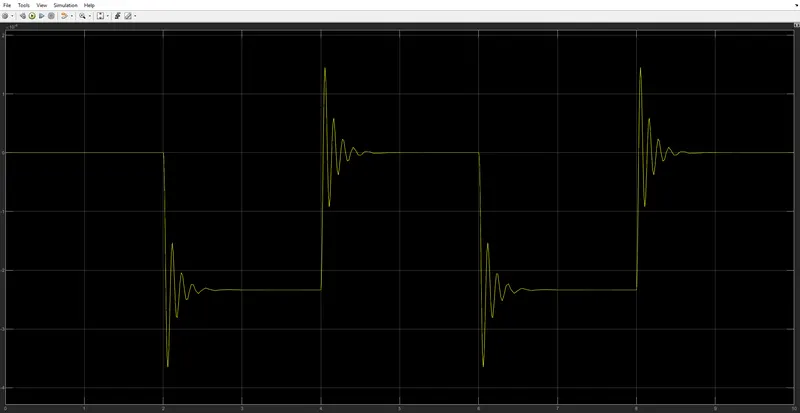
SCOPE 1
CONCLUSION
Giving input as time period for 2 seconds in the pulse generator to open & close the switch .when the switch is closed the solenoid block receives electrical power from the battery and plunger moves from port R to C to hit the bell procedure sound.Physical movement of the plunger is observed by using translational motion sensor & physical output is converted into simulink output model is displayed in the scope ,by reducing the spring constant value and increasing the damping value vibrations will be reduced.
AIM
- To Make a Simulink model To "Turn On or Turn Off the Fan" By Using Thermistor
Conditions- Temperature source: 20 °C from 0 to 10 seconds, 27 °C from 10 to 30 seconds, 23 °C from 30 to 50 seconds
Fan conditions: ON if the temperature above 25 °C, OFF otherwise.
- As per the given condition for temperature and time (20 °C from 0 to 10 seconds, 27 °C from 10 to 30 seconds, 23 °C from 30 to 50 seconds), These values are provided as input to the Signal Builder and configure it as per our condition.
- Passing the signals of Signal Builder(input) through Simulink-PS Converter to Thermister, we need to add Controlled Temperature source in between, as Thermister won't understand the input as it is.
- The output of Controlled Temperature Source is used as input to Thermister and to maintain potential difference Thermal Reference is added to it.
INPUT
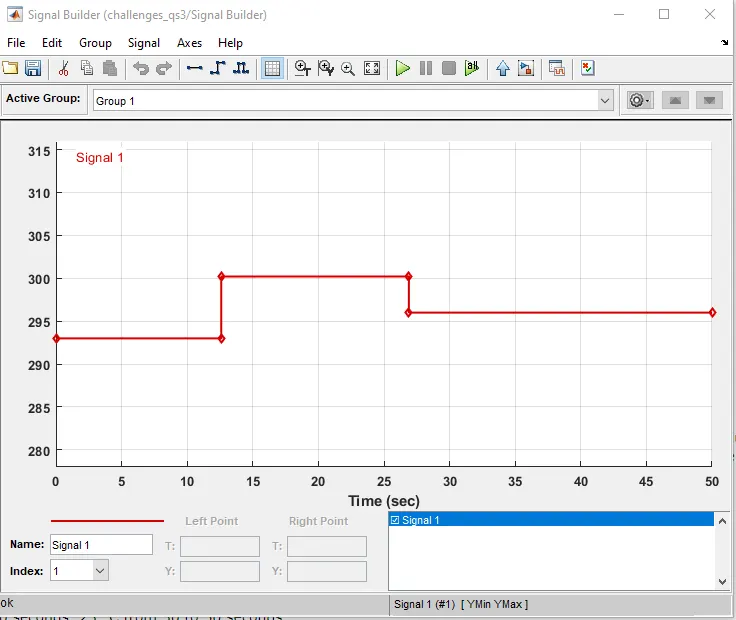
- Controlled Temperature Source block represents an ideal source of thermal energy that is powerful enough to maintain a specified temperature difference across the source regardless of the heat flow consumed by the system.
- Battery is connected to run the circuit, a solver is also used to understand the type of system.
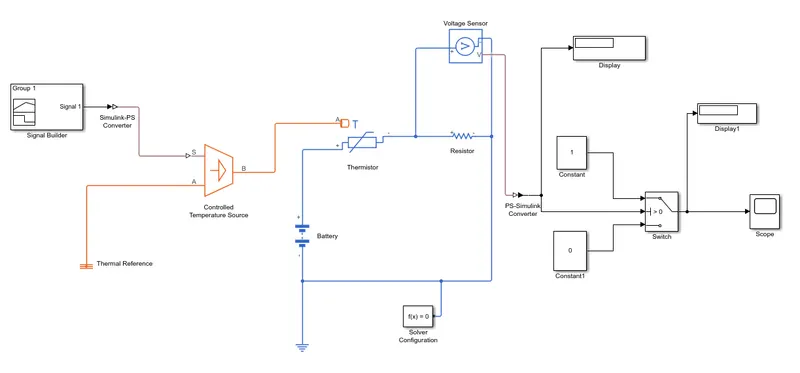
- A Voltage Sensor is used across the connected Resistor, to measure the voltage as a threshold value for the condition of our circuit.
- To fulfill our Fan conditions(ON if the temperature above 25 °C, OFF otherwise) we add a Switch and provide the threshold value, this will work as if-else loop, to give the condition as right or wrong we add constant blocks,
- If our condition is greater than the threshold value it will turn off the fan else turn off the fan.
- Scope and Display blocks are used to get the result as output.
CONCLUSION
- In the first part, we use a solenoid to convert the electric energy into mechanical energy and made a Simulink model to simulate the Doorbell, here we can conclude that the plunger is moving from its initial position of 5mm with a time delay of 2sec, this time delay happens while the plunger is suddenly disconnecting from the bell and moving away.
- In the second model, we use Thermister to sense the temperature and according to our condition, we put the threshold value to the switch block to turn on and turn off the fan at a particular temperature.