Week 2- 2R Robotic Arm Challenge
https://drive.google.com/file/d/1bwxpzmQWdl4Wzjpfy4yGcB9qKP0qiprS/view?usp=sharing
%creating kinematic link animation
close all
theta1=linspace(0,90,10);
theta2=linspace(0,90,10);
l1=1;
l2=0.5;
ct=1;
for i=1:length(theta1);
    x=theta1(i);
    for j=1:length(theta2);
        y=theta2(j);
x0=0;
y0=0;
x1=l1*cosd(x);
y1=l1*sind(x);
x2=x1+l2*cosd(y);
y2=y1+l2*sind(y);

plot([x0,x1],[y0,y1],'b',[x1,x2],[y1,y2],'r','linewidth',3);
axis([0 1.5 0 1.6]);
M(ct)=getframe(gcf)% getframe returns a movie frame. The frame is a snapshot
    %of the current axes
        ct=ct+1;
    end
end
movie(M)
videofile=VideoWriter('animation.avi');
open(videofile)
writeVideo(videofile,M)
close(videofile)
explaination:-
Aim:-
*Write a program in Matlab to simulate the forward kinematics of a 2R Robotic Arm
*create animation of the simulation
--inputs required
l1
l2
theta1(start,end,no of devision)
theta2(start,end,no of devision)
x0
y0
--Governing eqn
x1=l1*cosd(x)
y1=l1*sind(x)
x2=x1+l2*cosd(y)
y2=y1+l2*sind(y)
--Objective of challenge
write a matlab program to create a robotic arm of 2R and create animation of it using matlab
--Body of the content
about program
this is a simple matlab program to generate robotic arm animation
first theta1 is divide into 10 equal part using linspace command the use of is to generate Linearly spaced vector
similarly for theta 2 is done
define all the constraint l1,l2,x0,y0
once these values are defined
use for loop to generate the vector which contain all the theta 1 value
similarly for theta 2 is done to create y vector
here for every x point there is 10 y angles will be ploted so there is x vector of 90 element so does y
--define govening eqn
x1=l1*cosd(x)
y1=l1*sind(x)
this link start from [0,0] to [x1,y1]
for link to which starts from [x1,y1] to [x2,y2]
whre x2=x1+l2*cosd(y)
y2=y1+sind(y)
once the calculations are done
ploting has to do to produce the animation ploting of every point is imp
to
plot([x0,x1],[y0,y1],'b',[x1,x2],[y1,y2],'r','linewidth',3)
here from x0 to x1 and y0 to y1 is ploted in blue color where as x1 to x2 and y1 to y2 is ploted in red color of line width 3
then plot axis is fixed to get clean animation
-- now to genarate animation
M(ct)=getframe(gcf)
this command will get frame of every graph to produce animation video
getframe returns a movie frame. The frame is a snapshot of the current axes
ct is no asigined to do the ploting for every point
movie(M)
movie Play recorded movie frames
VideoWriter Create a video writer object
--errors while programing
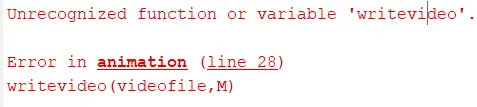
error 1:- this error is created because of not using writeVideo function properly this error is over came using help writeVideo command
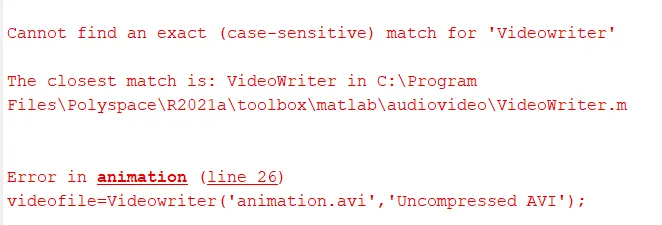
error 2:-this error is also similar to the above and solved by using help videowriter command
--conclusion
animation of robotic arm is created