Week 2- 2R Robotic Arm Challenge
AIM:- To simulate the forward kinematics of a 2R robotic arm using matlab
OBJECTIVE:-
-Write a program to simulate the foreard kinematics of a 2R Robotic Arm
-Animating and creating a movie from the plots obtained from the written program on matlab
THEORY:- A manipulator movement detrmines the workspace where the robotic arm can be applicable . our motive is to animate the movement robotic arm with the relative motion between the two comprising link
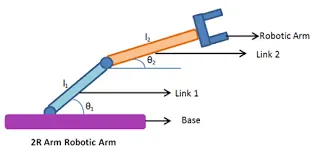
INPUTS:-Here the required inputs are written below
(x0,y0)=starting point of link-1
(x1,y1)=starting point of link-2
(x2,y2)=end point of link-2
L1=Length of the link between the first link and end link
Theta1=Angle made by link-1 with x-axis
Theta2=Angle made by link-2 with x-axis
MATLAB CODE:-
clear all
close all
clc

%inputs
l1=1;
l2=0.5;
theta1=linspace(0,90,10);
theta2=linspace(0,90,10);

ct=1;
for i = 1:length(theta1)
    THETA1=theta1(i);
    for j = 1:length(theta2)
    THETA2 = theta2(j);
    x0=0;
    y0=0;

    x1 = l1*cosd(THETA1);
    y1 = l1*sind(THETA1);

    x2 = x1 + l2*cosd(THETA2);
    y2 = y1 + l2*sind(THETA2);

    %ploting

    plot([x0 x1],[y0 y1],[x1 x2],[y1 y2],'linewidth',3)
    axis([-0.1 1.5 0 1.5])
    pause(0.03)
    m(ct) = getframe(gcf);
    ct=ct+1;


    end
end

movie(m)
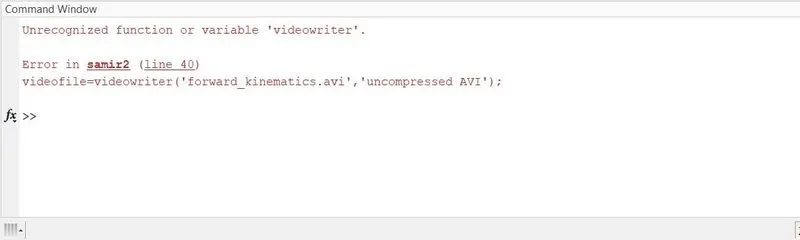
videofile = videowriter('forward_kinematics.avi','uncompressed AVI');
open(videofile)
writevideo(videofile,m)
close(videofile)
EXPLANATION OF PROGRAM:-
-We define the length of robotic arm that is l1.
-Set up the value as theta1 and theta2.
-Again using the command providing movement of the 2nd robotic arm.
-Define all coordinates of both the robotic arm .
-Ploting all the coordinate values.
-All figures assigned a variable m. one at a time using ct folloowed by termination of for loop
-Finally, movie command is used to combine all the figures saved in the M file make an animation/movie.avi format
ANIMATION:- The link for the animation is mentioned below
ERRORS:-

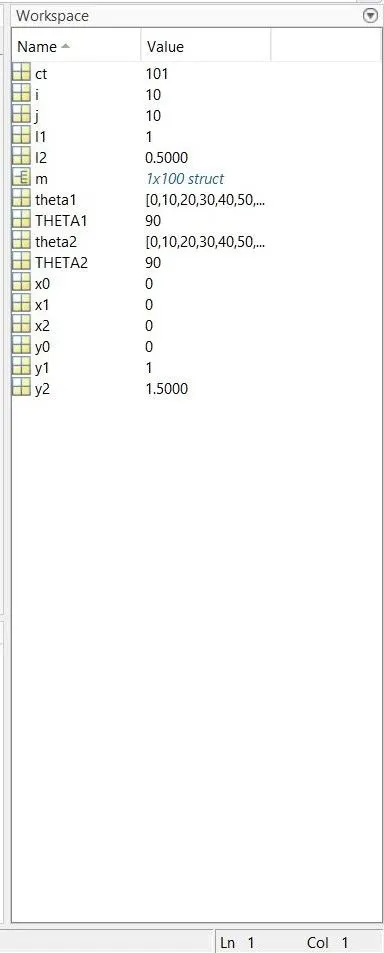
WORKSPACE:-
CONCLUSION:-A practical scenario regarding the functioning of the robotic arm and its workspace has been experienced by simulating the forward kinematics with a program in MATLAB.