2R Robotic Arm Challenge in matlab
AIM:
Write a program in Matlab to simulate the forward kinematics of a 2R Robotic Arm.
OBJECTIVE:
Create an animation file of the plot.
KINEMATICS:
Kinematics is the study of motion of the body without directly considering the force.
ROBOTIC ARM:
Robotic arm is the similar function to a human arm. Robotic arm is the machine that are programmed to execute a specific task , job quickly , efficiently and extremely accurately. Links are connected by joints allowing to rotational motion and translation displacement.
LINK OF THE ANIMATION:
https://drive.google.com/file/d/1L8rtSU45uO6dVBmMMBdZD9TQUTAaC5Dy/view?usp=sharing
CODE OF THE ROBOTIC ARM:
%Write a program in Matlab to simulate the forward kinematics of a 2R Robotic Arm?
clear all
close all
clc
%inputs
l1=1;
l2=0.5;
theta1=linspace(0,90,10);
theta2=linspace(0,90,10);
x=0;
y=0;
a=1;
%for loop(animation purpose)
for i=1:length(theta1)
    THETA1=theta1(i);
    for j=1:length(theta2)
        THETA2=theta2(j);
        x1=l1*cosd(THETA1);
        y1=l1*sind(THETA1);
        x2=x1+l2*cosd(THETA2);
        y2=y1+l2*sind(THETA2);
        plot([x,x1],[y,y1],[x1,x2],[y1,y2],'linewidth',4);
        axis([0 1.5 0 1.5]);
        pause(0.1);
        m(a)=getframe(gcf);
        a=a+1;
    end
end
%creating animation video
movie(m);
videoplayer=VideoWriter('robotic animation arm');
open(videoplayer);
writeVideo(videoplayer,m)
close(videoplayer)
EXPLANATION OF THE CODE:
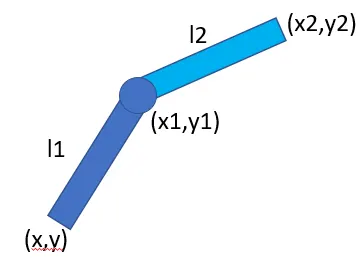
INPUT:
l1=length of the first link
l2=length of the second link
theta1=angle of the first link
theta2=angle of the second link
(x,y)=co-ordinate of l1 (start point)
(x1,y1)=co-ordinate of l1 (end point)
(x1,y1)=co-ordinate of l2 (start point)
(x2,y2)=co-ordinate of l2 (end point)
-clear all is used to delete the variable.
-close all is used to close the plots.
-clc is used to delete the command in the command window.
-we are giving the inputs of l1,l2,theta1,theta2. theta1 and theta 2 are given in linspace. Linspace is used to produce the linear equal interspace value.
-for loop is used in the code because varies of theta values to create the different plot. Within the loop x,x1,x2,y,y1,y2 values are given and plot the co-ordinate link.
-The axis are given for visual purpose. For continuous running of program we are using the increment.
-Each and every plot are saving in get frame and we can make the animation.
Mention the errors faced while programming & overcome those errors:
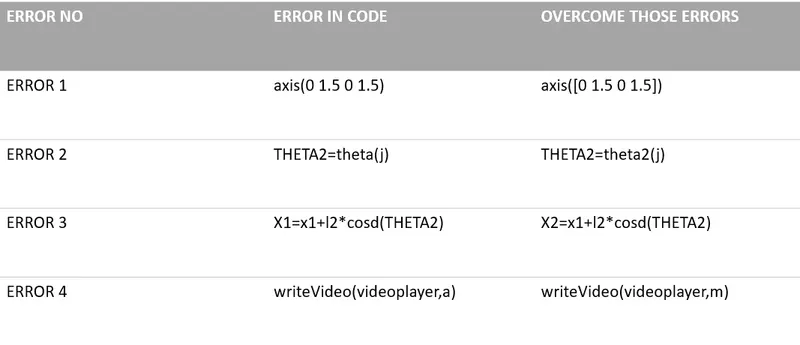
( ERROR SCREENSHOTS ARE UPLOAD FOR YOUR REFERENCE)
CONCLUSION:
Finally , we created the robotic animation arm for 2 link with help of for loop , getframe ,etc...