Week 2- 2R Robotic Arm Challenge
Aim: To write a program in Matlab to simulate the forward kinematics of a 2R Robotic Arm.
Theory and Introduction: Kinematics is the relationship between the positions, accelarations and velocities of the links of a manipulator. Forward kinematics refers to use of kinematic equations of a robot to compute the position of end effector from specified values for the joint parameters. If we know the geometry of the robot and all its joint points, we can do the math and figure out the position and orientation of any point on the robot.
Robotic arms are machines that are programmed to execute the a specific task quickly, efficiently and with extreem accuracy. They are generally motor driven and most often used for the rapid, consistence performmance of heavy or highly repetitive procedures over extended periods of time, and are especially valuedd in the industrial production, manufatcuring, machining and assembly sectors. A typical industrial robotic arm includes a series of joints, articulations and manipulators that work together to closely resemble the motion and functionality of a human arm.
Project Setup:
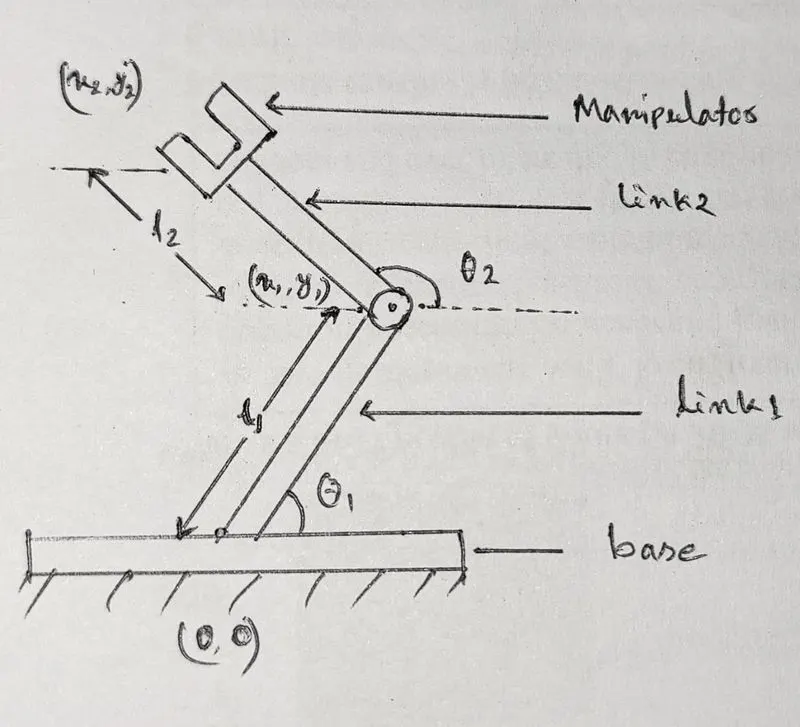
Computation of the position and orientation of an end effector (2R Robotic arm) in terms of the joint angles with the help of figure 1:
 :
:
Figure 1
Given data:
length of link1 = 4,
length of link2 = 3,
starting point of l1: X(0,0), Y(l1cos`theta1`, l1sin`theta1`) (`theta`= `theta1`)
starting point of l2: X(x1,y1) Y(x1+l2cos`theta2`,y1+l2sin`theta2`) (`theta`=`theta2`)
Code Sample:
% Forward Kinrematics of 2R Robotic Arm for project
% Program with animation

clear all
close all
clc
Explanation:
clear all stands for clear all the workspace data.
close all stands for close all the plots.
clc stands for clear all the command window data.
Code Sample:
% Forward Kinrematics of 2R Robotic Arm for project
% Program with animation

clear all
close all
clc

l1=4      % l1= length of link 1
l2=3      % l2= length of link 2

theta1=linspace(0,90,10)   % Angles of link1
theta2=linspace(0,135,10)  % Angles of link2
Explanation:
length of link1 = 4, length od link2 =3.
linspace command is used to generate equally spaced vsctors. Here using linspace command 10 positions of theta1 for link1 is generated between 0 degree to 90 degree. Similarly using linspace command 10 positions of theta2 for link2 is generated between 0 degree to 135 degree.
Code Sample:
% Forward Kinrematics of 2R Robotic Arm for project
% Program with animation

clear all
close all
clc

l1=4      % l1= length of link 1
l2=3      % l2= length of link 2

theta1=linspace(0,90,10)   % Angles of link1
theta2=linspace(0,135,10)  % Angles of link2

for i=1:length(thata1)
    THETA1=theta1(i)
Explanation:
For loop function executes a group of statements in a loop for a specified number of times. Length of theta1 is equal to 10 which is the number of elements in a row of theta1 matrix ( number of column ). THETA1 is that one specified value of theta1 at a time. i is a for loop index. 1:length(theta1) indicates all the values from 1st to 10th, which is length of theta1 matrix.
Possible error:
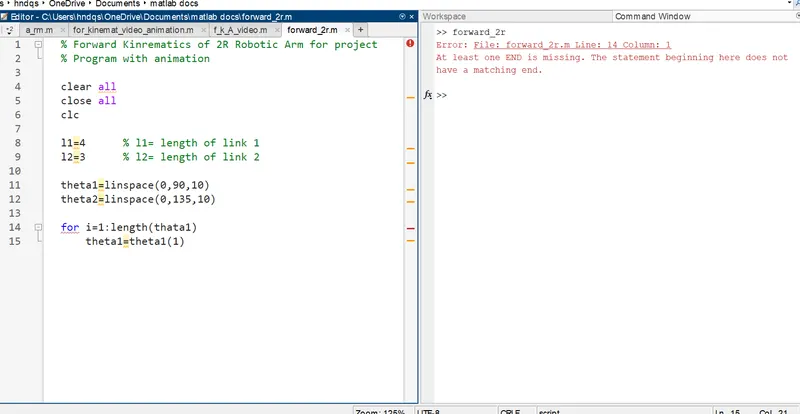
THETA1 is misplaced as theta1 where theta1 is an array but THETA1 is one vector in that array. Also i is misplaced for 1 with theta1(1).
Error Notice:
Steps to overcome errors:
Using THETA1 as in capital theta1 the error can be overcome. Also i is an index for for loop.
Code Sample:
% Forward Kinrematics of 2R Robotic Arm for project
% Program with animation

clear all
close all
clc

l1=4      % l1= length of link 1
l2=3      % l2= length of link 2

theta1=linspace(0,90,10)   % Angles of link1
theta2=linspace(0,135,10)  % Angles of link2

for i=1:length(thata1)
    THETA1=theta1(i)
    for j=1:length(theta1)
        THETA2=theta2(j)
    end
end
Explanation:
Since loop function of link1 for theta1 and its index is indicated by i and THETA1 is reffered as a vector in theta1 array, similarly loop function of link2 for theta2 and its index is indicated by j and THETA2 is reffered as a vector in theta2 array. End is to close the loopp function.
Possible Error:
Mistaking theta1 = theta2 in place of j=1:length(theta2)
Steps to overcome:
This error will not conflict the out put of the code but it is better to write everything in order and its rigth place.
Code Sample:
% Forward Kinrematics of 2R Robotic Arm for project
% Program with animation

clear all
close all
clc

l1=4      % l1= length of link 1
l2=3      % l2= length of link 2

theta1=linspace(0,90,10)   % Angles of link1
theta2=linspace(0,135,10)  % Angles of link2

for i=1:length(theta1)
    THETA1=theta1(i)
    for j=1:length(theta1)
        THETA2=theta2(j)

        % coordinates
        x0=0;
        y0=0;

        x1=l1*cosd(THETA1)
        y1=l1*sind(THETA1)

        x2=x1+l2*cosd(THETA2)
        y2=y1+l2*sind(THETA2)

    end
end
Explanation:
Since we fixed 10 positions each for theta1 and theta2, for every positions of theta1 there will be 10 positions of theta2. Thats why another for loop j=1:length(theta2) with all the coordinates of x and y is inserted within the loop for i = 1:length(theta1). By ending the loops, for every coordinates of x1 and y1 we will get 10 coordinates of x2 and y2.
Code Sample:
% Forward Kinrematics of 2R Robotic Arm for project
% Program with animation

clear all
close all
clc

l1=4      % l1= length of link 1
l2=3      % l2= length of link 2

theta1=linspace(0,90,10)   % Angles of link1
theta2=linspace(0,135,10)  % Angles of link2


for i=1:length(theta1)
    THETA1=theta1(i)
    for j=1:length(theta1)
        THETA2=theta2(j)

        % coordinates
        x0=0
        y0=0

        x1=l1*cosd(THETA1)
        y1=l1*sind(THETA1)

        x2=x1+l2*cosd(THETA2)
        y2=y1+l2*sind(THETA2)

        % plotting

        line([x0 x1],[y0 y1],'linewidth',3,'color','b')
        line([x1 x2],[y1 y2],'linewidth',3,'color','r')

    end
end
Explanation:
Now adding plot using line command with a line thickness of 3 and blue color for link1 and red color for link2 in the 2nd loop (2nd loop is in the 1st loop, plot in Cartesian plane) it will result a plot with all the possible positions of link1 and link2. i.e. Figure: 2
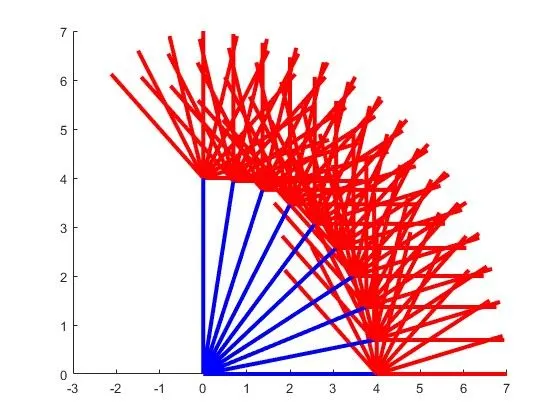
Figure: 2
Possible Error:
In plotting command it is very likely to be mistaken a full stop (.) in place of comma (,).
Steps to overcome:
Best ways to overcome these errors: To be be more patient and being attentive.
Code Sample:
% Forward Kinrematics of 2R Robotic Arm for project
% Program with animation

clear all
close all
clc

l1=4      % l1= length of link 1
l2=3      % l2= length of link 2

theta1=linspace(0,90,10)   % Angles of link1
theta2=linspace(0,135,10)  % Angles of link2

ct=1;
for i=1:length(theta1)
    THETA1=theta1(i)
    for j=1:length(theta1)
        THETA2=theta2(j)

        % coordinates
        x0=0;
        y0=0;

        x1=l1*cosd(THETA1)
        y1=l1*sind(THETA1)

        x2=x1+l2*cosd(THETA2)
        y2=y1+l2*sind(THETA2)

        % plotting

        figure(ct)
        line([x0 x1],[y0 y1],'linewidth',3,'color','b')
        line([x1 x2],[y1 y2],'linewidth',3,'color','r')
        ct=ct+1;
    end
end
Explanation:
Adding a counter before the loop and figure(ct) command will give us a result of total 100 figures of plots. To overcome this conflict folowing code samples and explanatios are provided.
Code Sample:
% Forward Kinrematics of 2R Robotic Arm for project
% Program with animation

clear all
close all
clc

l1=4      % l1= length of link 1
l2=3      % l2= length of link 2

theta1=linspace(0,90,10)   % Angles of link1
theta2=linspace(0,135,10)  % Angles of link2

ct=1;
for i=1:length(theta1)
    THETA1=theta1(i)
    for j=1:length(theta1)
        THETA2=theta2(j)

        % coordinates
        x0=0;
        y0=0;

        x1=l1*cosd(THETA1)
        y1=l1*sind(THETA1)

        x2=x1+l2*cosd(THETA2)
        y2=y1+l2*sind(THETA2)

        % plotting

        hold on
        plot([x0 x1],[y0 y1],[x1 x2],[y1 y2],'linewidth',3)
        axis([-3 7.5 0 8])
        pause(0.1)
        ct=ct+1

    end
end
Explanation:
Replacing both line command with plot command and giving an axis range of -3 to 7 and 0 to 8 and a pause of 0.1 second between link angles will result a plot with random colors for both links. The hold on command holds previous link after the plot draws the next link position. The plot command will simply shorten both the line commands into one, we just neeed to put (x1,x2), (y1,y2) coordinates in the same command line. Also figure(ct) command is removed.
Possible Error:
Determining axis range is importent. Otherwsie The link representation in the plot may not display properly.
Steps to overcome:
To overcome this problem we need to check clearly in the graph, in which axis range the link representation is properly visible.
Code Sample:
% Forward Kinrematics of 2R Robotic Arm for project
% Program with animation

clear all
close all
clc

l1=4      % l1= length of link 1
l2=3      % l2= length of link 2

theta1=linspace(0,90,10)   % Angles of link1
theta2=linspace(0,135,10)  % Angles of link2

ct=1
for i=1:length(theta1)
    THETA1=theta1(i)
    for j=1:length(theta1)
        THETA2=theta2(j)

        % coordinates
        x0=0
        y0=0

        x1=l1*cosd(THETA1)
        y1=l1*sind(THETA1)

        x2=x1+l2*cosd(THETA2)
        y2=y1+l2*sind(THETA2)

        % plotting


        plot([x0 x1],[y0 y1],[x1 x2],[y1 y2],'linewidth',3)
        axis([-3 7.5 0 8])
        pause(0.1)
        M(ct)=getframe(gcf)
        ct=ct+1
    end
end
Explanation:
To create an animation M(ct)=getframe(gcf) command is used. M is an array which holds all the frames, ct is the counted frame of every link positions of link1 and link2.
Code Sample:
% Forward Kinrematics of 2R Robotic Arm for project
% Program with animation

clear all
close all
clc

l1=4      % l1= length of link 1
l2=3      % l2= length of link 2

theta1=linspace(0,90,10)   % Angles of link1
theta2=linspace(0,135,10)  % Angles of link2

ct=1
for i=1:length(theta1)
    THETA1=theta1(i)
    for j=1:length(theta1)
        THETA2=theta2(j)

        % coordinates
        x0=0
        y0=0

        x1=l1*cosd(THETA1)
        y1=l1*sind(THETA1)

        x2=x1+l2*cosd(THETA2)
        y2=y1+l2*sind(THETA2)

        % plotting


        plot([x0 x1],[y0 y1],[x1 x2],[y1 y2],'linewidth',3)
        axis([-3 7.5 0 8])
        pause(0.1)
        M(ct)=getframe(gcf)
        ct=ct+1

    end
end

movie(M)
videofile=VideoWriter('forward_kinematics_of_2R_robotic_arm.avi','Uncompressed AVI')
open(videofile)
writeVideo(videofile,M)
close(videofile)
Explanation:
To create a movie file from the array M and to open, write and close the movie file with a filename of 'forward_kinematics_of_2R_robotic_arm.avi' :