Week 2- 2R Robotic Arm Challenge
https://drive.google.com/file/d/1PR_hQdrQUOqa_2EigCsw7lKTc1vLEDz0/view?usp=sharing
Aim:
2R robotic arm forward kinematics simulate program in Matlab and create an animation video.
A 2R robot arm has a two links and arm as shown in fig.
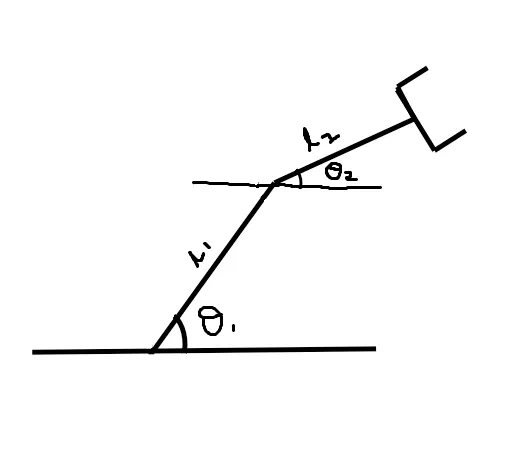
Assume length of link 1 as l1 and length of link 2 as l2 and link 1 making an angle θ(theta)1 with x axis and link 2 making an angle θ2 with x axis
To solve the program we have to solve the coordinate points off the links.
For link1 the starting points will be (x0 yo), as it is fixed to the base (origin) and ending point will be (x1 y1) which making an angle θ1 with the x axis as shown in figure
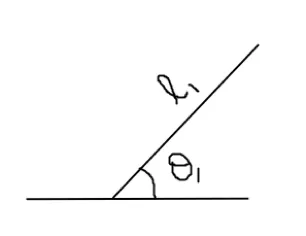
I,e., x0=0,y0=0
x1= l1*cosθ1
y1= l1*sinθ1
For link 2 the starting point will be the ending point of link 1 and ending point of link will be (x2 y2) which is making an θ2 with x axis as shown in figure
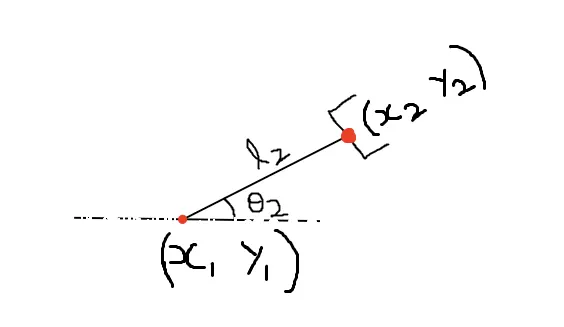
I,e., x2= x1+l2*cosθ2
y2= y1+l2*sinθ2
program for 2R robotic arm.
% basic idea of the program
Close all

Clear all

Clc


%inputs

l1=1;

l2=0.5;

theta1=45

theta2=60


% defining the coordinates.

x0=0

y0=0

x1=l1*cosd(theta1)

y1=l1*sind(theta1)

x2=x1+l2*cosd(theta2)

y2=y1+l2*sind(theta2)


%plotting into graph

line([x0 x1],[y0 y1],’linewidth’,3,’colour’,’b’)

line([x1 x2],[y1 y2],’linewidth’,3,’colour’,’r’)
Result:
On executing the following command the values of x1,y1,x2,y2 have been computed and graph will display as two links joining to each other by using the values of coordinates of x0,y0,x1,y1,x2,y2. Figure shown as one link with blue colour and other link with red colour as shown in basic idea of 2R robotic arm screenshot
Here we have taken the values of theta1 and theta 2 as fixed(predefined),so we get the graph as per the predefined angles of the links.
Creating an animation program for 2R robotic arm manipulator.
% forward kinematics of a 2R Robotic Arm manipulator
close all
clear all
clc


% inputs

l1 = 1;
l2 = 0.5;
theta1 = linspace(0,90,10);
theta2 = linspace(0,90,10);

ct = 1;
for i = 1:length(theta1)
    THETA1 = theta1(i);
    for j = 1:length(theta2)
        THETA2 = theta2(j);

x0 = 0
y0 = 0
x1 = l1*cosd(THETA1)
y1 = l1*sind(THETA1)
x2 = x1+l2*cosd(THETA2)
y2 = y1+l2*sind(THETA2)


plot([x0 x1],[y0 y1],[x1 x2],[y1 y2],'linewidth',3)
axis([-1 1.5 0 1.5])
pause(0.2)
ct = ct+1;
m(ct)=getframe(gcf)

    end
end

movie(m)
videofile = VideoWriter('forward_kinematics.avi','uncompressed AVI');
open(videofile)
writeVideo(videofile,m)
close(videofile)
Result: for creating an animation we have to take different theta values of the links so we are using linespace command for assigning different theta values to the links.
In the command we are taking 10 theta values in-between 0 to 90 degrees
Assuming l1 and l2 are fixed values.
Now for each value of theta 1 and theta 2 we have to repeat the calculations of x1,y1,x2,y2 so we are using for loop to calculate the values at different theta values.
The command length(theta1) denotes the number of values in theta 1(in program we have taken 10 values)
The line I=1:length(theta1) denotes the value of I changes from 1 to length(theta1) and each time it stores only one value and executes all the calculations by using the for loop command.
We are assigning different theta1(which is an array) values to another variable ca lled THETA1 (which contains only one value).
The line j=1:length(theta2) denotes the value of j changes from 1 to length(theta2) and each time it stores only one value and executes all the calculations by using the for loop command.
Here by using the for loop to j results us for each value I it performs all the calculations for j at different values of theta2
I,e., according to the program for one value of I (length(theta1)), j (length(theta2)) calculates 10 values
Ct denotes counter. initially ct was assigning with value 1 and by each and every time for loop executes the counter was increased by 1 value by giving the command ct=ct+1
Creating a movie or animation: get individual frames and then save them in an array Called m
I,e., m(ct)=getframe(gcf)
At the end of the for loop if we type movie Matlab is going to create a movie with all those frames
Videowriter is a command used to create video file by giving file name and profile to the video.
Once created the video file we are going open video file by giving the command open(videofile)and then going to write the frames on this video file by using write command
I,e., write(videofile,m) and finally close the video file by using close command I,e., close(videofile)
Errors faced while programming:
1) After assigning different theta values to the program and introduced the for loop and executed the program I got 100 plots
close all
clear all
clc
% inputs
l1 = 1;
l2 = 0.5;
theta1 = linspace(0,90,10);
theta2 = linspace(0,90,10);
ct = 1;
for i = 1:length(theta1)
THETA1 = theta1(i);
for j = 1:length(theta2)
THETA2 = theta2(j);
x0 = 0
y0 = 0
x1 = l1*cosd(THETA1)
y1 = l1*sind(THETA1)
x2 = x1+l2*cosd(THETA2)
y2 = y1+l2*sind(THETA2)
figure(ct)
Hold on
line([x0 x1],[y0 y1],’linewidth’,3,’color’,’b’)
line([x1 x2],[y1 y2],’linewidth',3,’color’,’r’)
ct = ct+1;
end
end
Steps taken to overcome the error
Changed the line command to plot command and merged all into single plot command, introduced pause command and removed the figure(ct) and hold on command.
The program changed at the end like this
close all
clear all
clc
% inputs
l1 = 1;
l2 = 0.5;
theta1 = linspace(0,90,10);
theta2 = linspace(0,90,10);
ct = 1;
for i = 1:length(theta1)
THETA1 = theta1(i);
for j = 1:length(theta2)
THETA2 = theta2(j);
x0 = 0
y0 = 0
x1 = l1*cosd(THETA1)
y1 = l1*sind(THETA1)
x2 = x1+l2*cosd(THETA2)
y2 = y1+l2*sind(THETA2)
plot([x0 x1],[y0 y1],[x1 x2],[y1 y2],'linewidth',3)
pause(0.2)
ct = ct+1;
end
end
on making the fallowing changes the final output was plotted in single plot window and for every angle of link 1 ,link 2 makes 10 different positions which was shown in challange 4 result file