Week 2- 2R Robotic Arm Challenge
simulation of the forward kinematics of a 2R Robotic Arm using matlab
CODE
%program for forward kinematics

%taking 2 angle of the link theta1 and theta2
theta1=linspace(0,90,10);
theta2=linspace(0,90,10);

ct=1;
%starting a for loop
for i=1:length(theta1)
    THETA1=theta1(i);
    for j=1:length(theta2)
        THETA2=theta2(j);
x0=0;
y0=0;

l1=1;
l2=0.5;

x1=l1*cosd(THETA1);
y1=l1*sind(THETA1);

x2=x1+l2*cosd(THETA2);
y2=y1+l2*sind(THETA2);

plot([x0 x1],[y0 y1],[x1 x2],[y1 y2],'linewidth',3)
    axis([-0.1 1.5 0 1.5])
    M(ct)=getframe(gcf);
    pause(0.03)
ct=1+ct;
    end
end
movie(M)
videofile=VideoWriter('forward_kinematics.avi','uncompressed AVI');
open(videofile)
writeVideo(videofile,M)
close(videofile)
explaination-
1- Taking two angles of the link using linspace command.
2- Taking a array ct and assaigning the value of 1.
3- Starting for loop to find the cordinates of [x1 y1] and [x2 y2] for differet value of theta1 and theta2.
4- The cordinates of [x1 y1] and [x2 y2] are calculated as shown in the above code.
5- A graph is plotted for a cordinates of [x0 y0],[x1 y1],[x2 y2] for different values of theta1 and theta 2
5- Axis of the graph is limited using axis command giving the range of x=-0.1:1.5,y=0:1.5.
6- The frame we get after each itteration is stored in m(ct).we get the frame by using the getframe(gcf) command and ct is incremented by 1.
7- A movie is created using Videowriter command and named as forward_kinematics.avi
8- writevideo command is used combine frame in videofile
error faced while writing the program-
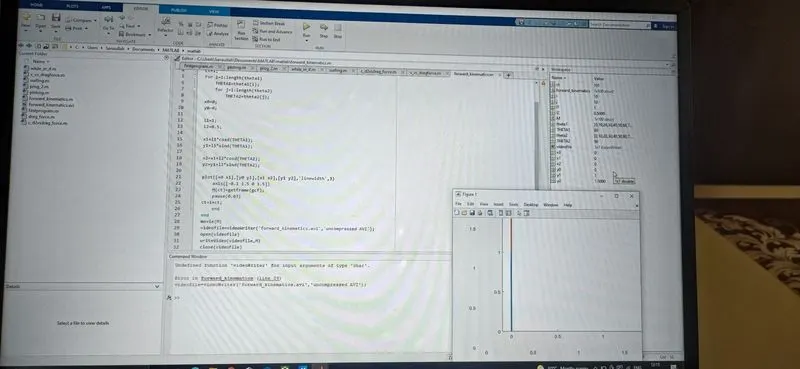
1-the videowrite command in line 29 was showin error cause the matlab are very case sensitive. the command was VideoWriter which was confirmed by cross-checcking in search document option in matlab
screenshot
the animation-
https://drive.google.com/file/d/1-5hLzIagFanWdgGFl46uy9aW7GlO01is/view?usp=sharing