Week 2- 2R Robotic Arm Challenge
AIM
To simulate the forward kinematics of a 2R Robotic Arm
OBJECTIVE
Write a program to simulate forward kinematics of a robotic arm
To Create an animation and movie of the robotic arm through the obtained plot.
THEORY
Robotic arm:A robotic arm is a type of mechanical arm, usually programmable, with similar functions to a human arm; the arm may be the sum total of the mechanism or may be part of a more complex robot. The links of such a manipulator are connected by joints allowing either rotational motion (such as in an articulated robot) or translational (linear) displacement. The links of the manipulator can be considered to form a kinematic chain. The terminus of the kinematic chain of the manipulator is called the end effector and it is analogous to the human hand. However, the term "robotic hand" as a synonym of the robotic arm is often proscribed.
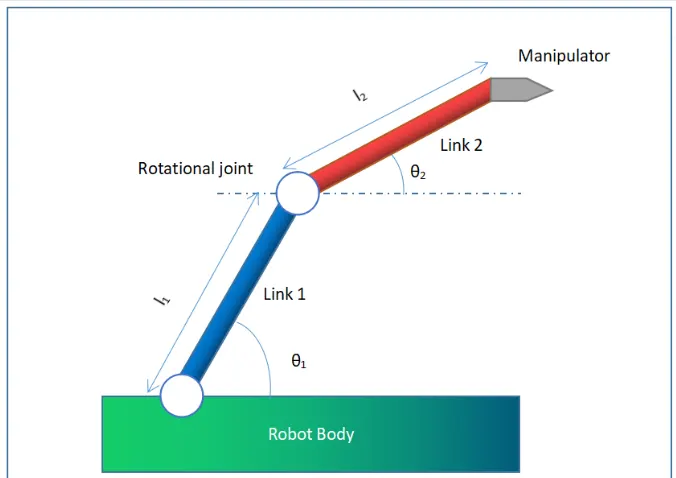
INPUTS
Length of link 1 (L1)=1
Length of link 2 (L1)=0.5
Co-ordinates of link 1 and 2
x0=0
y0=0
x1=l1*cosd(thetha1)
y1=l1*sind(thetha2)
x2=x1+l2*cosd(thetha2)
y2=y1+l2*sind(thetha2)
WHERE,
x0,y0=starting points of link1
x1,y1=ending points of link1/starting point of link2
x2,y2=ending points of link2
l1=length of link1
l2=length of link2
thetha1=angle made by link1 with respect to x-axis
thetha2=angle made by link2 with respect to x-axis
HERE d is taken after cos and sin beacuse to represent it in 'degrees'
PROGRAM/CODE
clear all
close all
clc

%inputs
L1=1;
L2=0.5

thetha1=linspace(0,90,10);
thetha2=linspace(0,90,10);
ct=1;
for i=1:length(thetha1)
    THETHA1= thetha1(i);
  for  j=1:length(thetha2)
    THETHA2=thetha2(j);
    x0=0;
    y0=0;
    x1=L1*cosd(THETHA1);
    y1=L1*sind(THETHA1);

   x2=x1+L2*cosd(THETHA2);
   y2=y1+L2*sind(THETHA2);
   % plotting

   plot([x0 x1],[y0 y1],[x1 x2],[y1 y2],'lineWidth',3)
   axis([-0.1 1.5 0 1.5])
   pause(0.03)
   m(ct)=getframe(gcf);
   ct=ct+1

  end
end
movie(m)
videofile=VideoWriter('forward_kinematics.avi','Uncompressed AVI')
open(videofile)
writeVideo(videofile,m)
close(videofile)
CODE EXPLANATION
Start with the CLEAR ALL,CLOSE ALL AND CLC COMMAND
Assign the inputs for LENGTH OF LINK1 and LINK2
Assign THETHA values
ct represnts count
for loop is used to run the code again and again where i and j is taken
then using the mathematical relation
we need to find x1,y1 and x2,y2
plotting to be done using plot command
co-ordinates for axis is given using axis command
pause command is used in animation to get tge graph much more smoother
m(ct) represents the movie and the frame count
get frame command is used
for every for Loop end need to be given
to create a movie asign movie(m)
then videofile that will be in video format
give the movie name using .avi which is standard form and Uncompressed AVI
type as open file ,writeVideo and close so that the movie will be saved in the folder and can access it .
RESULTS/OUTPUT
CONCLUSION
A practical scenario regarding the functioning of the 2R robotic arm and its workspace has been experienced by simulating forward kinematics with a program in MATLAB.