Week 2- 2R Robotic Arm Challenge
Here, we are writing a program to forward kinematics of 2r robotic arm and creating a animation file.
Now, we are taking two links with length l1 and l2,at angle of theta1 and theta2(at various angles).
Inputs l1 = 1, l2 = 0.5 taken,
For theta1 we are 10 values from 0 ° to 90 °, for this we are using linspace command, for theta2 respectively.
theta1 = linspace(0,90,10);
theta2 = linspace(0,90,10);
now we want to find x,y coordinates for two links having the three different co-ordinates, as shown below
(x0,x1) (x1,y1) (x2,y2)
X0 = 0
y0 = 0
x1 = l1*cos(theta1)
y1 = l1*sin(theta1)
x2 = x1+l2*cos(theta2)
y2 = y1+l2*cos(theta2)
now we are having all inputs and outputs, we are writing program
as usually writing
clear all
close all
clc
to clear and close all
then entering inputs as given above
now here we ae using the for loop command for creation of different plots at different angles as explain.
In for loop command we are assigning the i and j values as the
i = 1:length(theta1)
the above command gives us the 10 theta values or in other words it will gives us different theta value for ten times because we are using linspace(0,90,10) command
it gives 0 to 90deg 10 values, respectively for j also.
Now we are taking the each angel in THETA1&THETA2 values
And now adding these THETA1&THETA2 values in the your formulas
And we are getting results like for every THETA1 angle with 10 THETA2 angles ike that we are 100 results
Now we want add all them in the plot
For that e are using plot([x0 x1],[y0 y1],[x1 x2],[y1 y2],'LineWidth',3) command with linewidth 3
And assigning the axis and pausing the plot with 0.1sec.
Now if we run it we will get all the results un one plot for overcoming that we are using counter command
We it will add plot for every value
Ct =1
In for loop adding ct = ct+1
Now creating the animation movie for this results
Here we are creating the array M
M(ct) = getframe(gcf)
Getframe is getting the current frames or plots
Adding the movie command for generating the movie
Adding below command
videofile = VideoWriter('forward_kinematics.avi','Uncompressed AVI');
is says forward_kinematics.avi is the file name and Uncompressed AVI is the Profile of video
use open command open(videofile)
add writevideo command which will write in .m and close the close(videofile)
the excute the program we will see the all plots and video in playing.
program at various angles of robotic and creation of animation video

clear all
close all
clc

%inputs
l1 = 1;
l2 = 0.5;
theta1 = linspace(0,90,10);
theta2 = linspace(0,90,10);

ct=1

for i = 1:length(theta1)
    THETA1 = theta1(i);
    for j = 1:length(theta2)
        THETA2 = theta2(j);
        x0 = 0;
        y0 = 0;
        x1 = l1*cosd(THETA1);
        y1 = l1*sind(THETA1);

        x2 = x1 + l2*cosd(THETA2);
        y2 = y1 + l2*sind(THETA2);

        %plotting


        plot([x0 x1],[y0 y1],[x1 x2],[y1 y2],'LineWidth',3)
        axis([-0.1 1.5 0 1.5])
        pause(0.1)
        M(ct) = getframe(gcf);
        ct = ct+1;

    end

end

movie(M)
videofile = VideoWriter('forward_kinematics.avi','Uncompressed AVI');
open(videofile)
writeVideo(videofile,M)
close(videofile)
link for video: https://drive.google.com/file/d/1xBD_GvOImxCkxGNvQdlyGG-d3cJIIGMs/view?usp=sharingprogram for single plot or single value
% foward kinematics of 2r robtic arm
clear all
close all
clc
%inputs
l1=1;
l2=0.5;
theta1 = 45;
theta2 = 30;
%coordinates
x0 = 0;
y0 = 0;
x1 = l1*cosd(theta1);
y1 = l1*sind(theta1);
x2 = x1 + l2*cosd(theta2);
y2 = y1 + l2*sind(theta2);
%plotting
line([x0 x1],[y0 y1],'linewidth',3,'color','b')
line([x1 x2],[y1 y2],'linewidth',3,'color','r')
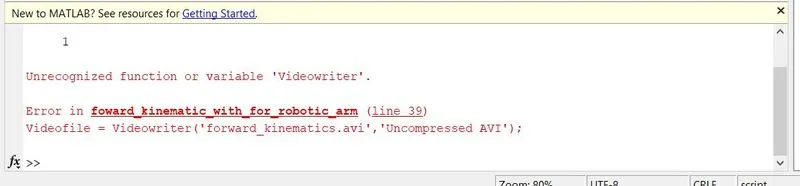
i have this issue will creating the video, after this i have checked the program and i find typo error and excuted
i have few more errors in creating the main program, which i didn't recoreded, from next time i will recorded more no of errors thanks