Week 2- 2R Robotic Arm Challenge
Title: Matlab program to create forward kinematics of 2-R Robotic arm.
Inputs :
- length l1= length of the first rotating arm.
- length l2= lenght of the second rotating arm.
- alpha1 & alpha2= angle made by the rotating arms.
Explanation :
- The angles are coded in linspace command which determines the start and end limit of the arm followed by the number of steps included in it.
- The following code is given in for loopwhich allows to use block of codes many times corresponding to thier given names.
- Here 'i' and 'j' are taken to be length of angles created by first and second rotating arm and its taken in ratio of 1 and new angle is created as Alpha1 and Alpha2. It shows that with every angluar movement of link 1 and 2 the the value changes as per given feed of linspace command.
- X-Y co-ordinates are provided to the links.
- X0,Y0 are the fixed link of first arm to the base.
- X1,Y1 are the end link or first arm and starting link for arm 2 which is take to be length of the first arm and cosAlpha1 and sinAlpha1 angle made by them.
- X2,Y2are the free end link of the second arm which is given by the corresponding X1,Y2 cordinates addition to the length of second arm(l2) and the cosAlpha2 and sinAlpha2 angle made by the arm.
Plotting for aniamtion:
- The plot command is feed with all the available cordinates and the line width is se to be 3.
- The axis is given to the plot so that the animation could be visible completely.
- Pause command denotes the pause to be taken in second right after the display of frames which leads to animation.
- The entire animation is given as name 'P' counter. getfreame command is used for frames in video form.
- The captured frames need to be displayed in progression so the frames captured is added by 1 to itself and the for loop is closed the end command
Movie Animation:
- As per given mane movie P is recalled.
- videofile with videowriter name forward_kinematics.m in AVI uncompressed form is used.
- The open command si given for the movie.
- videowriter command gives the instructions to write the viddeofile P.
- After the movie a close command is provided to shut the movie.
Codes :
%Forward kinematics for 2-R Robotic arm
clear all
close all
clc
%Inputs

%Lengths of the robotic arm (l1,l2)
l1 = 3;
l2 = 2;

% angle created by the robotic arm (alpha1,alpha2)
alpha1 = linspace(0,180,20);
alpha2 = linspace(0,90,20);

ct = 1
for i = 1 : length(alpha1)
    Alpha1 = alpha1(i);
    for j = 1 : length(alpha2)
        Alpha2 = alpha2(j);
        %cordinates for x-y axis for arm
        x0 = 0;
        y0 = 0;
        x1 = l1*cosd(Alpha1);
        y1 = l1*sind(Alpha1);
        x2 = x1+l2*cosd(Alpha2);
        y2 = y1+l2*sind(Alpha2);
        %plotting
        plot([x0,x1],[y0,y1],[x1,x2],[y1,y2],'linewidth',3)
        axis([-5 5 -5 6])
        pause(0.01)
        P(ct) = getframe(gcf);
        ct= ct+1;
    end
end
movie(P)
videofile=VideoWriter('forward_kinematics.m.avi', 'uncompressed AVI')
open(videofile)
writeVideo(videofile,P)
close(videofile)
Errors Faced While Writing The command:
- While writing the program the length l1 was added to the X2,Y2 cordinates command which leads to increase in lenght of the arm2 during animation which for further resolved by replacing it X1 and Y1.
- Videofile name was missing which lead to an error as shown which was over come by mentioning the videofile name P.
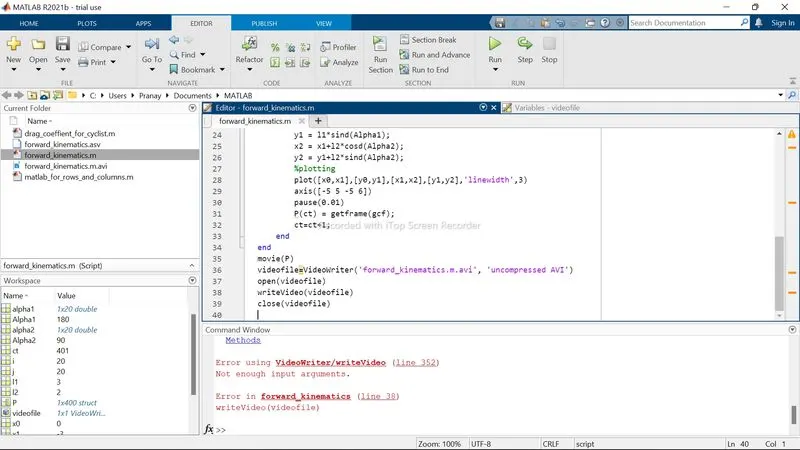
- A getframe command was missed which created an error and did not display the movie. it was later overcome by adding the appropriate feeds in the section.
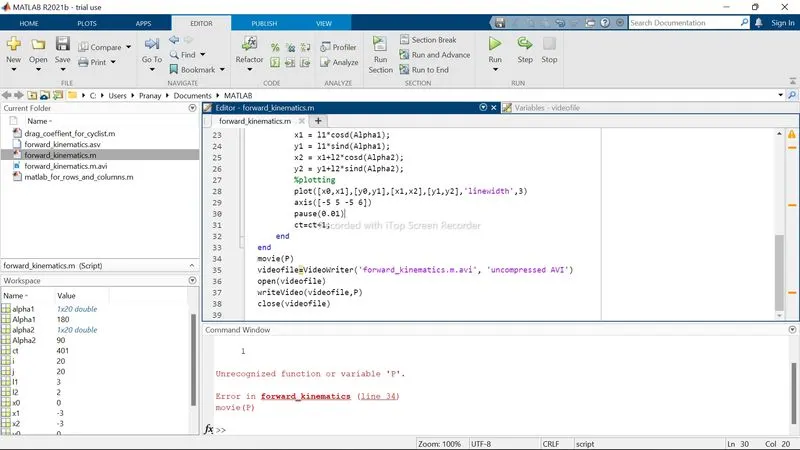
- Further more minor errors like missing special characters and miswriting names in block letters were resolved as writing.
The Finished coded output is Shown below:
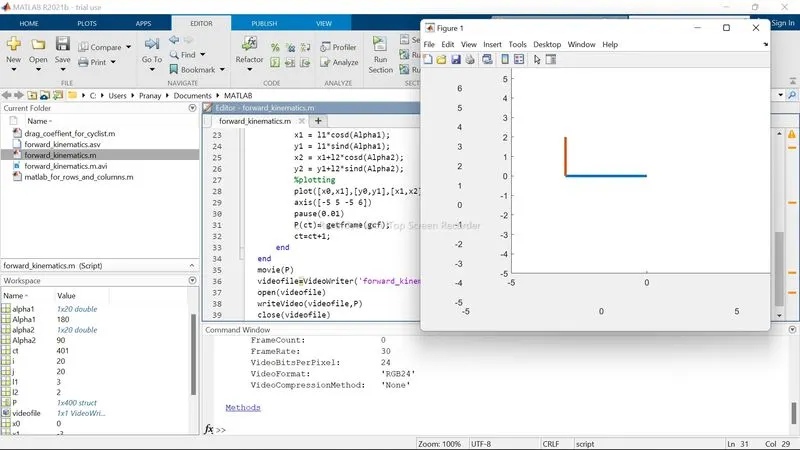
Results: With the above coded program the first arn be rotated to 180 and second arm to 90 degrees respectively.
Google Drive Link For Animation:
https://drive.google.com/file/d/16HmDubepxxiCxhbDHXUGqrOCB5XfHzT5/view?usp=sharing