Week 2- 2R Robotic Arm Challenge
1. Aim of this Challenge:
To write a matlab program to simulate the forward kinematics of 2R Robotic arm.
Factors Involved:
Length of Link 1 (L1) = 10 m
Length of Link 2 (L2) = 6 m
Angle of Link 1 (theta1) = 35 degree
Angle of Link 2 (theta2) = 50 degree
Objective :
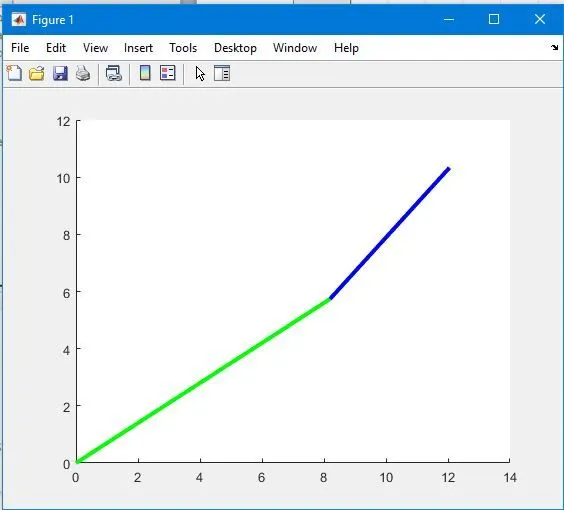
To simulate the 2R Robotic arm and plot it for the above given values
Programming :
Below the details of the programs and results captured.
%Program to simulate the forward kinematics of 2R robotic arm.
%Factors involved - Length and angle of two links.
clear all
close all
clc

%Inputs
L1 = 10;
L2 = 6;

theta1 = 35;
theta2 = 50;

%Coordinates
x0 = 0;
y0 = 0;

x1 = L1*cosd(theta1);
y1 = L1*sind(theta1);

x2 = x1 + L2*cosd(theta2);
y2 = y1 + L2*sind(theta2);

%Plotting
line ([x0 x1], [y0 y1], 'linewidth', 3, 'color', 'g')
line ([x1 x2], [y1 y2], 'linewidth', 3, 'color', 'b')
Results:
2. Aim of this Challenge:
To write a matlab program to simulate forward kinematics of 2R Robotic arm and save the result as animated video.
Factors Involved:
Length of Link 1 (L1) = 15 m
Length of Link 2 (L2) = 9 m
Theta values not defined specifically, because we are going to do animation
Objective :
To simulate the 2R Robotic arm and animate the results.
Programming :
Below the details of the programs and results captured.
%Program to simulate the forward kinematics of 2R robotic arm and create an animation

clear all
close all
clc

%Inputs
L1 = 15;
L2 = 9;

theta1 = linspace(0,90,10);
theta2 = linspace(0,90,10);

ct=1
for i=1:length(theta1)
    THETA1 = theta1(i);
    for j = 1:length(theta2)
        THETA2 = theta2(j);

        x0 = 0;
        y0 = 0;

        x1 = L1*cosd(THETA1);
        y1 = L1*sind(THETA1);

        x2 = x1 + L2*cosd(THETA2);
        y2 = y1 + L2*sind(THETA2);

        %Plotting

        plot([x0 x1],[y0 y1],[x1 x2],[y1 y2], 'linewidth', 3)
        axis([-1 24 0 24])
        pause(0.03)
        M(ct) = getframe(gcf);
        ct=ct+1;

    end
end

movie(M)
videofile = VideoWriter('forward_kinematics.avi','uncompressed AVI');
open(videofile)
writeVideo(videofile,M)
close(videofile)
Results:
Result of the forward kinematics of 2R Robotic arm has be completed using matlab and the animation saved as video file. Below is the link for animation file. Also I attache the video file
https://drive.google.com/file/d/1X88mbkToHtR5EHYEw-YOdlxT_suBe9gN/view?usp=sharing
Explanation:
Here I am using linspace command to define the different angle values instead of providing it manually. In this program I am going to control the theta 1 and theta 2 values with programming. For that For loop is used to execute this robotic arm.
In for loop the i defines the length of theta 1 which is defined in the linspace command (10) .This stores in to a Variable called THETA1. This means the THETA1 have 10 values. Similarly the j defines the lenght of theta 2 which stores into a variable called THETA2. This means THETA2 have 10 values. SO that possible combination is 10X10.
Then i defined the coordinates of the link position (x0,y0),(x1,y1),(x2y2).
Plotting - In previous program i used the line command. Line command plots all the values of THETA1 and THETA2 in the single screen ,which is hard to see the plot. To animate the link movements , i used the plot command . Defined the axis to fit the links in the plot , so that the visualization look good.
Pause interval used to control the speed of animation.
Counter - Initialized the counter before the loop (ct=1) . Inside for loop, added ct+1 which means the for loop initialize and changes it automatically. (up value).
In order to create a movie file, I am saving it in array M using the getframe command. After that at the end of for loop , i am writing the video file using the commands.
Errors and Issues:
During the execution of program, I faced some errors and rectified.
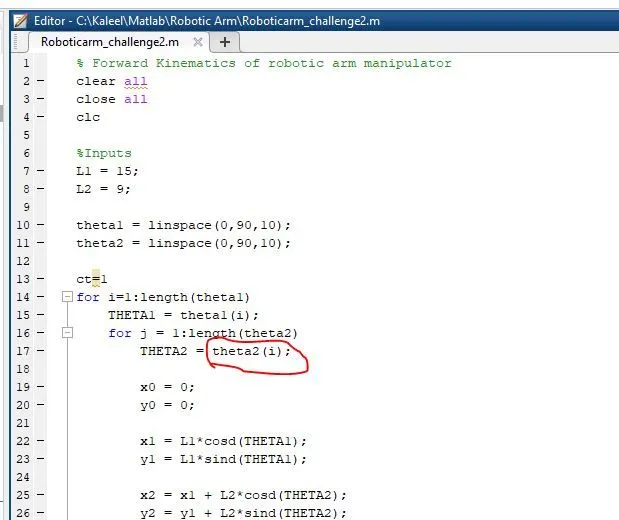
1. Movie file executed and found the angle of the THETA only varies whereas the THETA2 doesnt change. Later i found the THETA2 defined wrongly. See attached image.
it should be theta2(j).
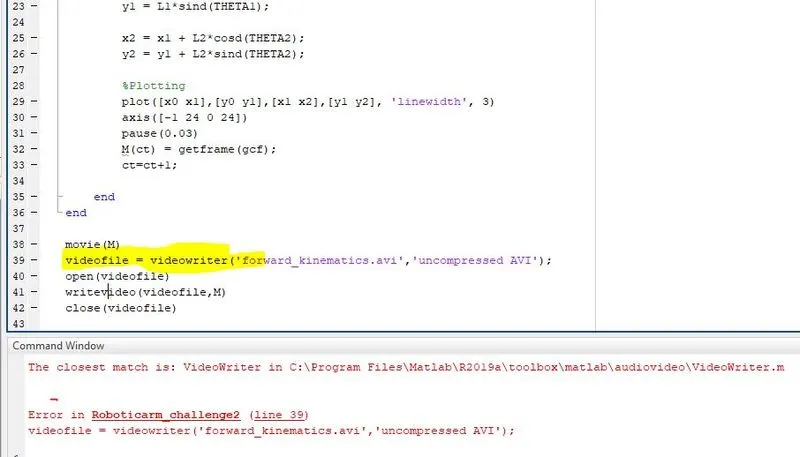
2. While writing the video file, i could not get the vide file. Error in the commands. Later i found VideoWriter is the case-sensitive command and changed it.
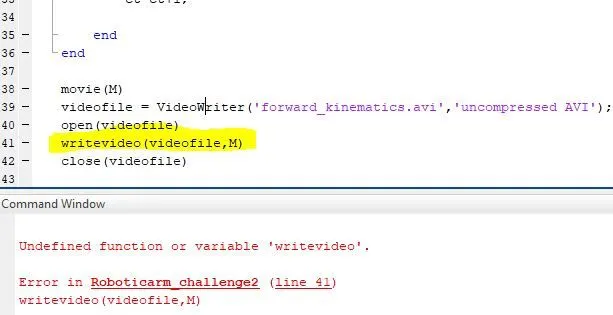
3. Again it throws another error where the line 41 is also case-sensitive. Later i found and change writeVideo.
Conclusion:
Successfully completed the programming for forward kinematics of 2R Robotic arm.