Week 2- 2R Robotic Arm Challenge
Aims:
To write a program in Matlap to stimulate the forward kinematics of 2R Robotic Arm
Objective:
To Stimulate the forward kinematics of 2R Robotic arm by using matlap.
Introduction:
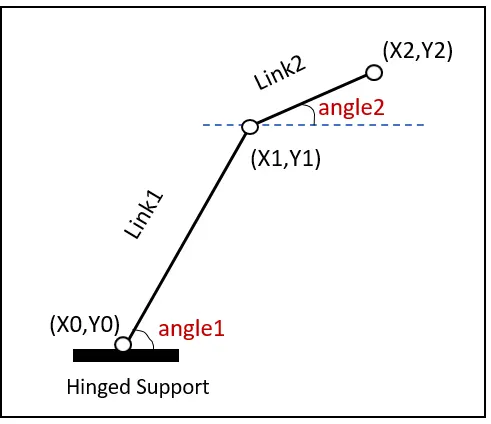
In this task we have to findout the forward kinematics of 2R Robotic arm by using the basic arms of the robot to do that we are dealing with the linkage known as Forward kinematics of a 2R Robotic arm .we are taking two links as a representative of the Robotic arm in which Link-1 is Hinged at (X0, Y0) and making an angle1, while Link-2 is hinged at the end of the Link-1 and making angle2 with respect to Datum.In this Robot arm can use many Industrial applications.
Programs:
The programs are the manipulate the forward kinematics of 2R Robotic arm.
clear all
close all
clc

%Inputs
l1=6;                     % Length of arm Link 1
l2=3;                     % Length of arm link 2

% Angle values theta1&2 from 0 to 90 degree
theta1=linspace(0,90,10);
theta2=linspace(0,90,10);
c=1

for i=1:length(theta1);
    THETA1=theta1(i);
    for j=1:length(theta2);
    THETA2=theta2(j);
%Calculating x and y coordinates
    x0=0;
    y0=0;
    x1=l1*cosd(THETA1);
    y1=l1*sind(THETA1);

    x2=x1+l2*cosd(THETA2);
    y2=y1+l2*sind(THETA2);

    %Plotting x and y values
    plot([x0 x1],[y0 y1],[x1 x2],[y1 y2],'linewidth',2);
    grid on
    axis([-1 12 -1 12]);  % max and min axis values
    pause(0.1);
    m(c)=getframe(gcf);
    c=c+1;
    end
end
% Creating Animation of 2R Robotic Arm
movie(m)
videofile=VideoWriter('Kinematics of 2R Robotic arm .avi','Uncompressed AVI');
open(videofile);
writeVideo(videofile,m);
close(videofile);
Conclusion:
The link that uploded in youtube in the title of Forward KInematics of 2R Robotic arm