Week 2- 2R Robotic Arm Challenge
AIM: Simulating the forward kinematics of a 2R Robotic Arm using MATLAB program.
OBJECTIVES:
1. Write a program in Matlab to simulate the forward kinematics of 2R robotic arm.
2. Creating an animation from the plots obtained in the program.
3. Understand the movement of an 2R robotic in 2D workspace.
4. Upload an animation on You tube of 2R robotic arm in 2D workspace.
THEORY:
A robotic arm is a type of mechanical arm, usually programmable, with similar functions to a human aem; the arm may be the sum total of the mechanism or may be part of a more complex robot. The links of such a manipulator are connected by joints allowing either rotational motion or translational displacement. The links of the manipulator can be considered to form a kinematic chain. The terminus of the kinematic chain of the manipulator is called end effector and it is analogous to the human hand.
Forward kinematics refers to the use of the kinematic equations of a robot to compute the position of the end-effector from specified values for the point parameters.
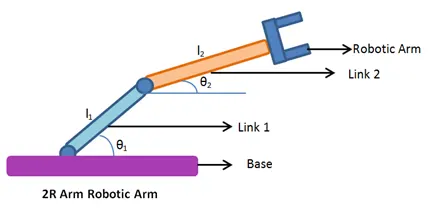
2R Robotic Arm
The link-1 is attached to the base and end of the link one is connected to link-2 and end of link-2 is connected to the end effector which performs the desired operation. In this project we restrict the movement of the links in a 2D plane.
PROGRAM
% Forward kinematics of a 2R Robotic arm

clear all
close all
clc

% Inputs
% Length of link-1 (L1) and link-2 (L2) in meter
L1 = 2;
L2 = 1.5;

% Angle traced by link-1 (theta1) and link-2 (theta2) in degrees
theta1 = linspace(0,90,10)
theta2 = linspace(0,90,10)

 ct=1
 for i = 1:length(theta1)
     THETA1 = theta1(i);
     for j = 1:length(theta2)
         THETA2 = theta2(j)
         x0 = 0;
         y0 = 0;

         % Calculating the coordinates of the end point of link-1
         x1 = L1*cosd(THETA1);
         y1 = L1*sind(THETA1);

         % Calculating the coordinates of the end of link-2
         % End coordinates for link-1 are the start coordinates for link-2
         x2 = x1+L2*cosd(THETA2);
         y2 = y1+L2*sind(THETA2);

         % Plotting
         plot ([x0 x1], [y0 y1], [x1 x2], [y1 y2], 'linewidth', 3)
         axis([-0.1 4 -0.1 4])
         pause(0.1)

         % Capturing the current plot to combine later
         M(ct) = getframe(gcf);

         % Incrementing ct so that each frame is capturedin M
         ct = ct+1;
     end
 end

 % Making a movie from collected frames
 movie(M)

 % Creating a video file '.avi' format to save the animation
 videofile = VideoWriter ('Forward kinematics of a 2R Robotic arm.avi', 'uncompressed AVI');
 open(videofile)

 % Writing the movie in the videofile created
 writeVideo(videofile,M)
 close(videofile)
PROCEDURE:
- To start with clear all, close all and clc command is used to clear the windows.
- Lengths of both the links are taken as input.
- Length of link-1 (L1) is taken as 2m and length of link-2 (L2) is taken as 1.5m.
- Angles traced by both the lilnks, for link-1 and for link-2 taken as input. The angles traced are varied over a range to simulate the movement of the robotic arm.
- Base position of link-1 `(x_0,y_0)` is considered as origin (O,O).
- Then two for loops are used to iterate over the range of angles traced by both the links.
- For each particular angle of link-1,link-2 is moved over its entire range, to obtain different positions of end effector at that angle of link-1.
- For a particular value of and the end position of link-1 is calculated by these equations.
`x_1=x_0+L1*costheta_1`
`y_1=y_0+L1*sintheta_1`
The end position of link-1 is also the start position of link two. The end position for link-2 is calculated by these equataions.
`x_2=x_1+L2*costheta_2`
`y_2=y_1+L2*sintheta_2`
9.Then for each particular position of link-1 and link-2, a plot is made which is then captured frame by frame tomake a movie.
10.A.video file of "avi" format is made to save the movie.
11. The movie is then written into the videofile and the final animation is thus created.
ERRORS IN THE PROGRAM
1. Problem faced while Writing the movie in video file.
The function or variable "Write" was unrecognized.
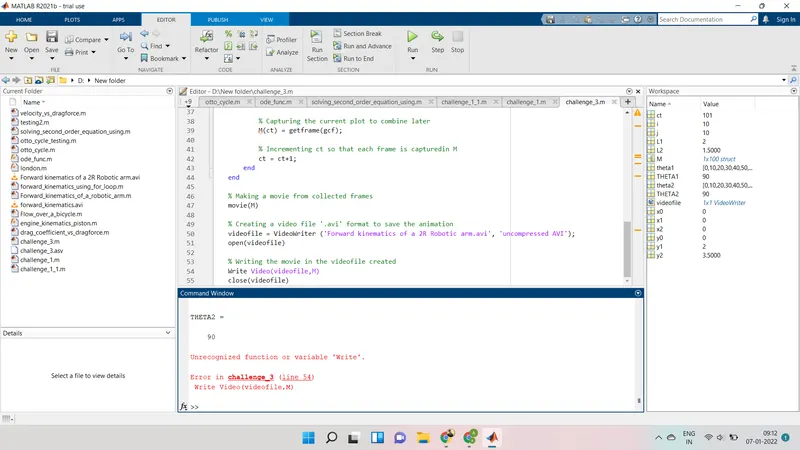
ERROR SOLVED
The function or variable was replaced by "writevideo" then program.
OUTPUT
The output is obtained in form of an animated video clip. This animation can be viewed by visiting the link mentioned below.
CONCLUSION
A simulation of the forward kinematics of a 2R Robotic Arm in 2D workspace was created using MATLAB program.