Week -2
AIM: To make a Simulink model of a doorbell using a solenoid block.
To sense the temperature of a heater & turn on or turn off the fan using Thermistor.
OBJECTIVE:
- Make a Simulink model of a doorbell using a solenoid block.
- To sense the temperature of a heater & turn on or turn off the fan using Thermistor.
THEORY:
#PART 1
DOORBELL:
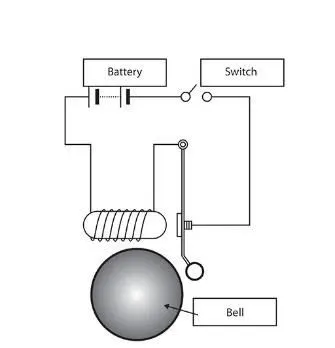
- The doorbell is a device having a mechanical and electrical component that produces sound by pressing the button.
- When the switch is pressed, the circuit loop is complete which causes the current to flow through the circuit, while passing the solenoid it generates the electromagnet at desired space, which allows the plunger to move, due to which it hots the bell and produce sound.
SOLENOID:
A solenoid is a device comprised of a coil of wire, housing, and movable plunger (armature). when an electrical current is introduced, a magnetic field forms around the coil which draws the plunger in. More simply, a solenoid converts electrical energy into mechanical work.
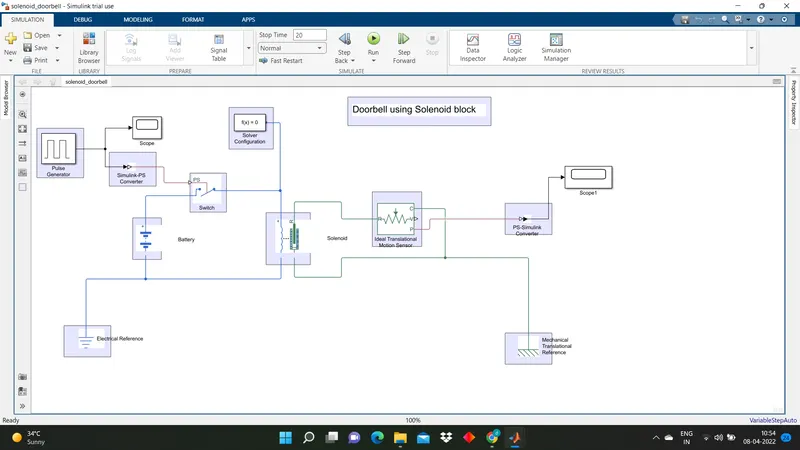
Simulink model for Doorbell:
EXPLANATION:
In Simulink, we use blocks to represent any system to get the desired output. In this project, we use some blocks to get our desired output.
1. Pulse Generator: The pulse Generator block generates a square wave pulse at regular intervals. The block waveform parameters, Amplitude, Pulse Width, Period, and phase delay, determine the shape of the output waveform.
2. Simulink-PS Converter: It converts the Simulink input signal into a physical signal.
3. Switch: Switch is controlled by an external physical signal.
4. Electrical Reference: It shows the Connection to the electrical ground.
5. Solenoid: Electrical characteristics and generated force of solenoid.
6. Battery: It gives the power to the close loop.
7. Ideal Translational Motion Sensor: It is a motion sensor in mechanical translational systems.
8. PS-Simulink Converter: It Converts physical signal into Simulink output signal.
9. Mechanical Translational Reference: Reference connection for mechanical translational ports.
10. Scope: It displays signals generated during simulation.
OUTPUT:
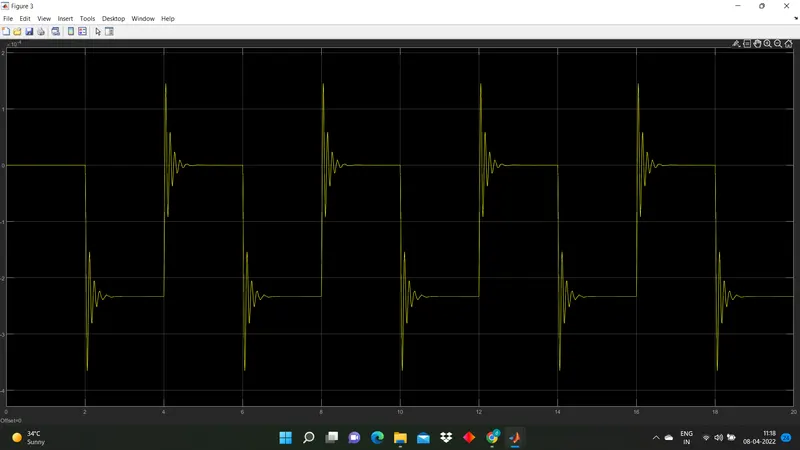
#The spring constant is 200N/m:
# The Spring constant is 20N/m:
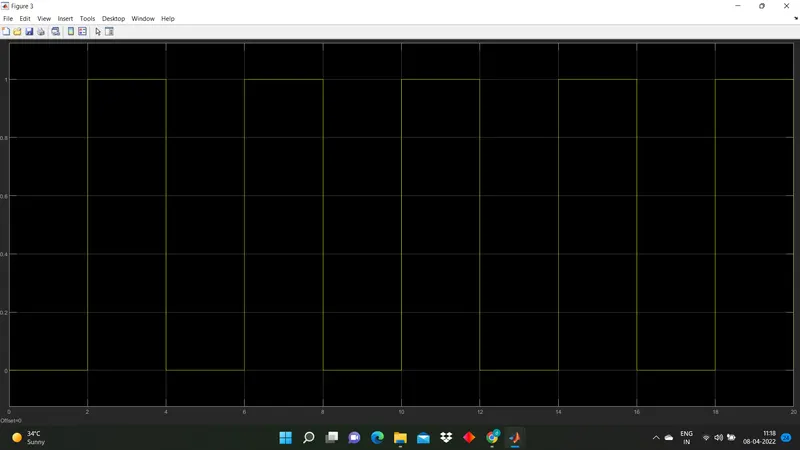
- From the above two graphs, we can observe that plunger is moved from its original position to some amplitude with a time delay of 2 sec.
- Then it hit the bell and pause there for 2 sec and come to its initial position.
#PART 2
THERMISTOR: A thermistor is a resistance thermistor or a resistance whose resistance is dependent on temperature.
CONDITION:
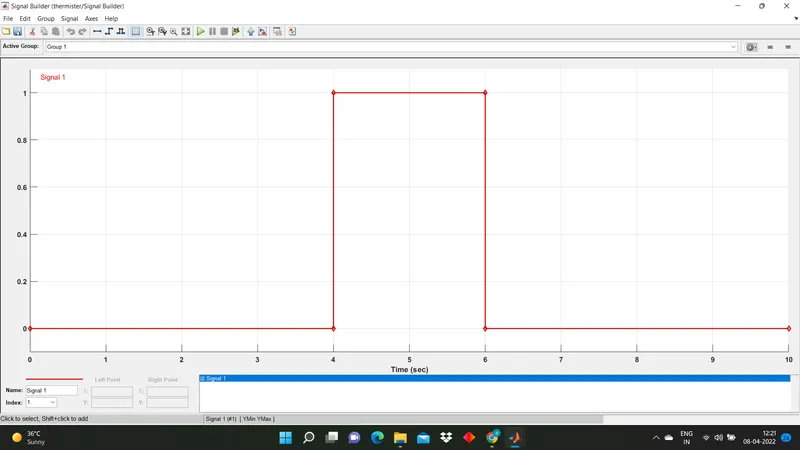
- Temperature source: 20 Degree celsius from 0-10 seconds, 27 Degree celsius from 10-30 seconds, 23 degrees celsius from 30-50 seconds.
- Fan conditions: ON if the temperature is above 25 degrees celsius, OFF otherwise.
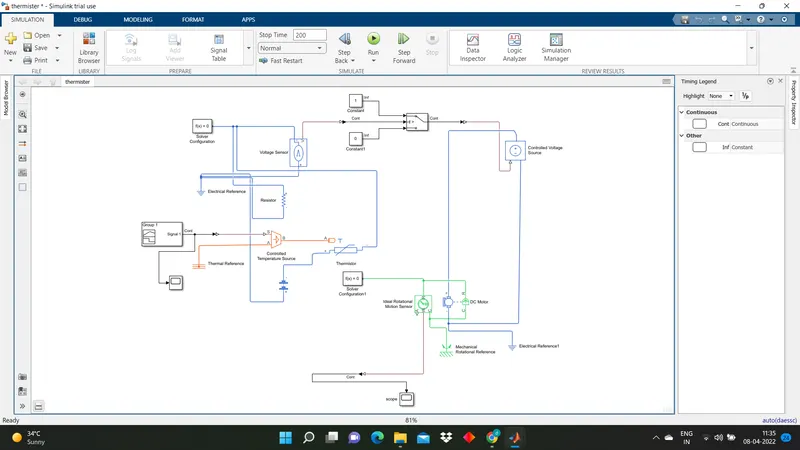
SIMULINK MODEL:
EXPLANATION:
- As per the given condition for time and temperature give the values to the signal builder and configure them as per our condition
- There is a Simulink-PS converter that converts Simulink signal to Physical signal.
- Give this signal to the Controlled Temperature Source block which represents an ideal source of thermal energy that is powerful enough to maintain specified temperature differences across the source regardless of the heat flow consumed by the system.
- This signal then passes to the thermistor which is connected to the battery.
- The voltage sensor is connected to a resistor which is used to measure the voltage as a threshold value for the condition of our circuit.
- As per Fan condition that ON if the temperature is above 25 degrees celsius, OFF otherwise. We use the switch and provide a threshold value.
- If the signal value is greater than the threshold value then turn it ON otherwise it will be turned OFF.
CONCLUSION:
- In this way, In the first part, we use a solenoid to convert electrical energy into mechanical energy and made a Simulink model into a doorbell.
- In the second part, we use the thermister to sense the temperature, and according to the given condition, we put the threshold value to the switch for turning ON and turning OFF the fan.