Week -2
A. Simulink Model Of Doorbell using solenoid block.
Ans: To impliment the simulation of model of doorbell we are using various blocks and parameters
Blocks: Pulse generator, Simulink PS Converter, Switch, Battery,
Electrical reference, solenoid, Ideal Translational Motion Sensor, PS Simulink Converter, Mechanical Translational Reference, Scope
we using above blocks to represent any system to getting desired output.in this project we get various blocks to get our main output and waveform.
Pulse generator: it generates square wave pulse. block contain amplitude, pulse width, period and phase delay.
Simulink PS Converter: It converts simulink input signal into a physical signal.
Switch: Switch controlled by an externel physical signal.
Battery: Battery gives power to loop.
electrical refrence: it shows electrical connection to earth or ground.
solenoid: solenoid is one of electrical char. and it generates the force.
Ideal Translational Motion sensor: it is a sensor which sense the the mechanical translational system.
PS simulink converter: it converts physical signal into simulink output signal.
Mechanical translational Reference: it connects are connects the mechanical translational ports.
Scope: it display output signals after simulation.
Working:-
1.Here we are using solenoid. it is a main part of model which is used to convert electrical energy to mechanical energy. it is a one type of electromagnet ,the main purpose of solenoid is to generate magnetic field through coil . the coil can be arranged to producemagnetic field. when electric current paases through it.
2. As per shown below model of doorbell one terminal of battery is connected to to solenoid and other terminal of battery is connected to switch. pulse generator is provided input to switch for on/off.
3. when switch is pressed circuit is complete and current is pass through solenoid.the moving part of solenoid is connected to ideal translational motion sensor which sense the motion and gives the desired output.
4. After that when circuit is comlplete the pulse generator is gives command to 'switch off' the switch.due to all this process the plunger is move to hits the bell and sound is produced.
the block diagram of simulink model of doorbell
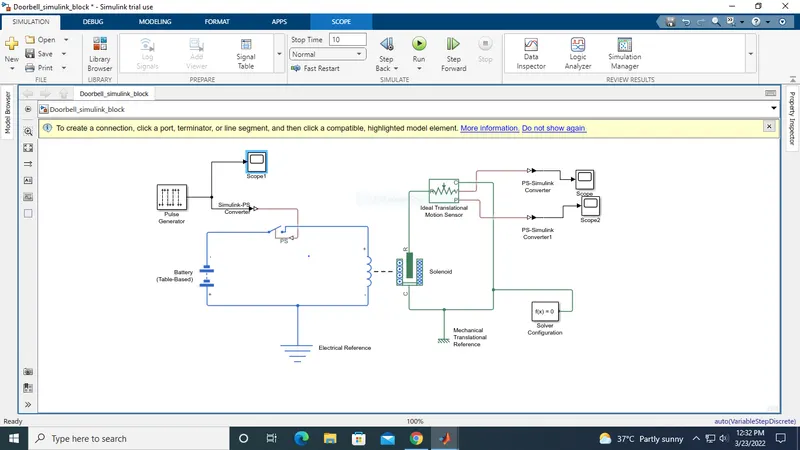
the graphical representation as shown below attachment. time delay is 2sec
B. Use The Thermister To Sense The Temperature of Heater
Ans: 1.To make simulink model of temperature sensor we use main parameter that is thermister.
2.It is resistance thermometer or we can say resistor who is depend on temperature.
3.Here we are using various blocks
Battery,signal builder, simulink ps converter, ps simulink converter, controlled temperature source, solver configuration, thermal reference, thermistor, resistance, voltage sensor, display, electrical reference.
block diagram of simulink model of thermister
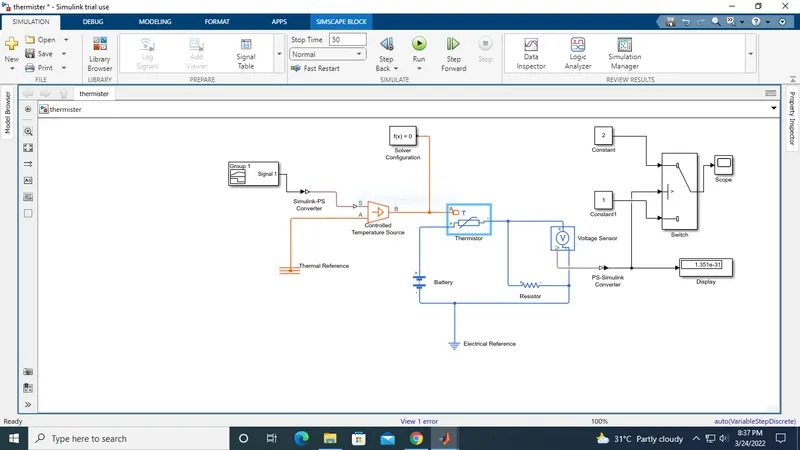
working: 1. as per the given condition for time and temperature gives the value to signal builder. the signal builder configure our condition and gives the signal to next, that is simulink ps converter.
2.The ps converter converts the simulink signal to physical signal and passes to temperature source. here the thermal energy is maintain the specfic temperature difference across the source.
3. After that signal is passes to thermister who is connected to battery. the voltage sensor is connected to resistor. it is used to measure voltage as threshold value for condition.
as per our fan condition t0=20degC, for 0 to 10 sec, t1=27degC, for 10 to 30 sec the fan is ON.
4. When the temperature is rises above 25degC it turns OFF.
we use the switch to provide threshold value. If the signal value is greater than threshold value it turn ON otherwise it will be OFF.