Week -2
Google Dive Link: https://drive.google.com/drive/folders/1qw4aZlEMObTuMabbfPLd2E7YdYbyDCHc?usp=sharing
Problem-1> Make a Simulink model of Doorbell using solenoid block with the following details: (Note: In the arrangement, when the switch is closed the electromagnet receives electrical power from the battery and pulls the metal arm to hit the bell producing sound.)
Create a situation where the switch is closed for 2 seconds and then released. Observe the physical movement of the plunger.
Ans: Let us see the block diagram that I have created in Simulink then we will understand it and its results step by step.
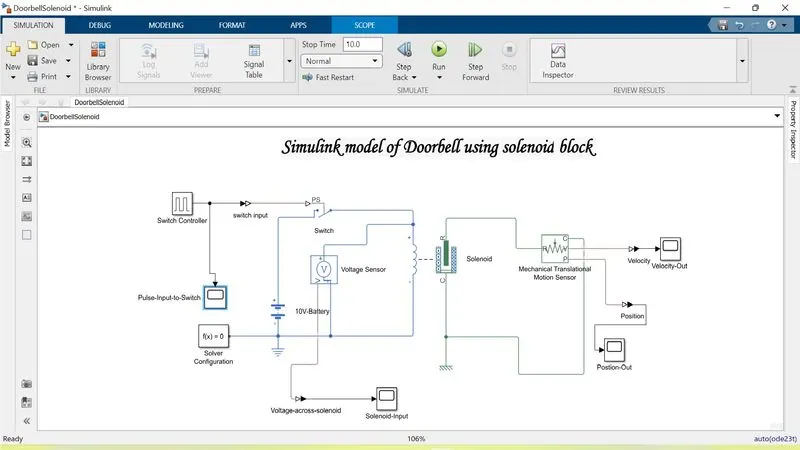
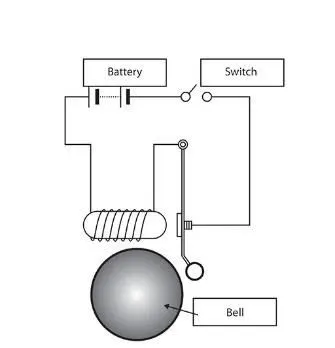
- Here in this block diagram to maintain Switch On for 2 secs and Off for 2 secs, I used a Pulse generator whose time periode is 4 secs, Amplitude is 1V and it is 1 for 2 secs and in remaining time it will be Off or 0.
- Then I connected a battery of 10V, 2 ohm followed by a solver configuration and ground and connected it to a Solenoid whose operating voltage is 10V. (Note: Here solver Configure initializes the solver parameters for our functional block to work.)
- After that I Connected an Ideal Translational Motion sensor in behalf of the plunger and the bell.
- Note: Wherever there is Physical model and simulink input I take a Simulink-PS converter and when the case is opposite I take a PS-Simulink Converter.Now Lets Check the Outputs
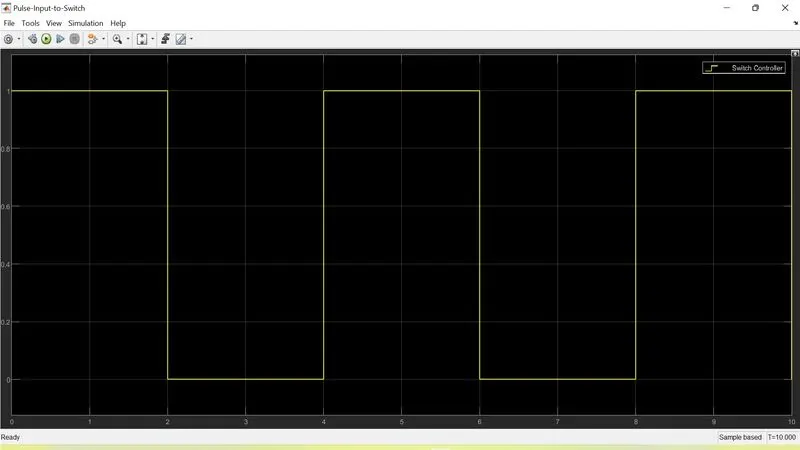
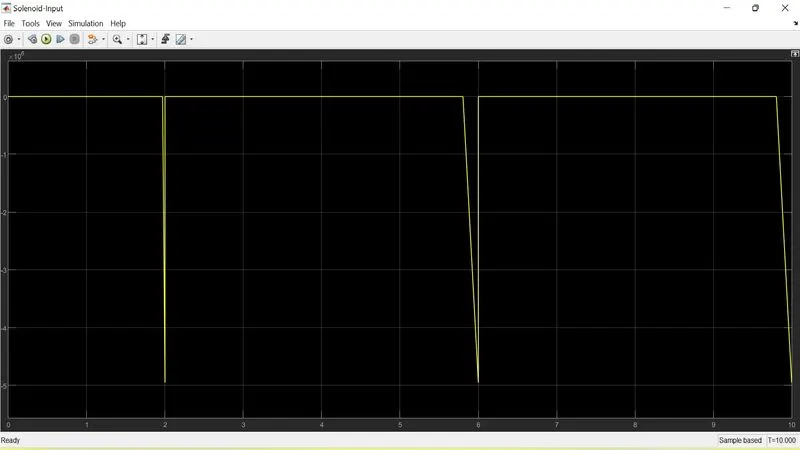
The left one represents the output of Pulse Generator which is used to control the switch. | The right one is the output of Solenoid after having exicitation from battery.
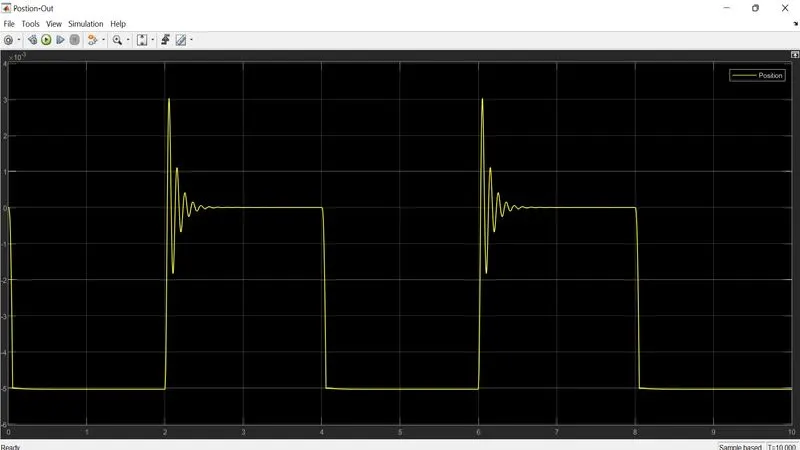
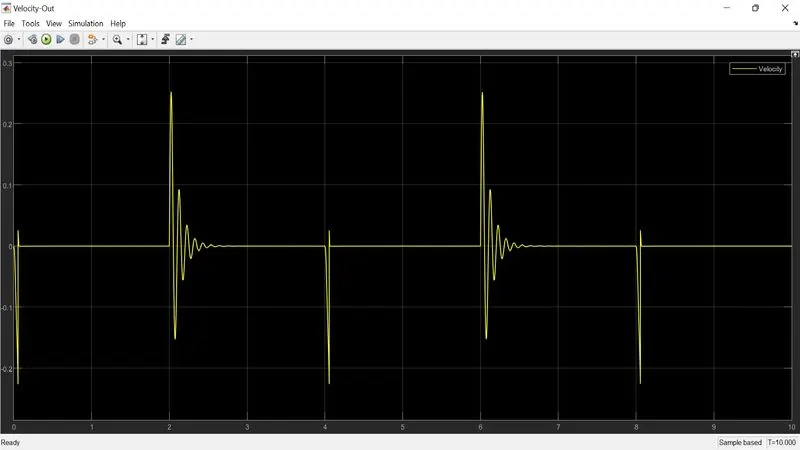
Here the left one represents the position graph from Ideal Translational Sensor. | The right one represents the velocity of Ideal Translational Motion sensor.
- Note: We can see there is Oscillation in the velocity graph before it goes to stable state. This is due to damping effect. To reduce it we can decrese the damping coefficient of the Ideal Translational Motion Sensor.
Problem-2> Use a thermistor to sense the temperature of a heater & turn on or turn off the fan as per the below conditions:
(Note: Temperature source: 20 °C from 0 to 10 seconds, 27 °C from 10 to 30 seconds, 23 °C from 30 to 50 seconds
Fan conditions: ON if the temperature above 25 °C, OFF otherwise)
Ans: For this case also Let us see the block diagram that I have created in Simulink then we will understand it and its results step by step for better understanding.
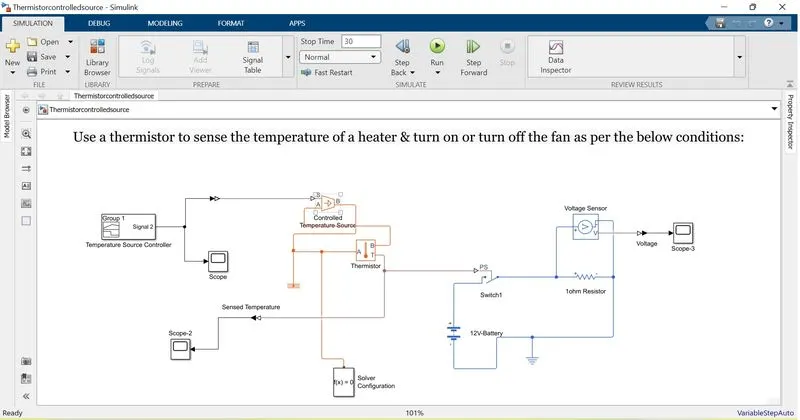
- Here as we can see to control the Heat source as a above mentioned criteria in Problem-2, I made a signla builder which generate output 20 from 0 to 10secs, 27 from 10 to 30 secs and 23 from 30 to 50 secs.
- After having the input from Signal builder I take the temperature difference from Heat Source and feed it to Thermistor. Both of them are connected with the same solver configuration and Thermal reference.
- Now it's time to take the input from temperature sensor and put it into a switch which will be responsible for switching ON the fan when the temperature is above 25degree celsius. That's why I selected the threshold of switch as 25.
- Now to represent the Fan we take resistance of 1 ohm followed by a voltage source of 12V DC with internal resistance of 2 ohm.
- And to check whether the Fan is ON/Off we put a Voltage sensor across the resistance and feed it's O/P to a scope.
Now, Let us check the Outputs.
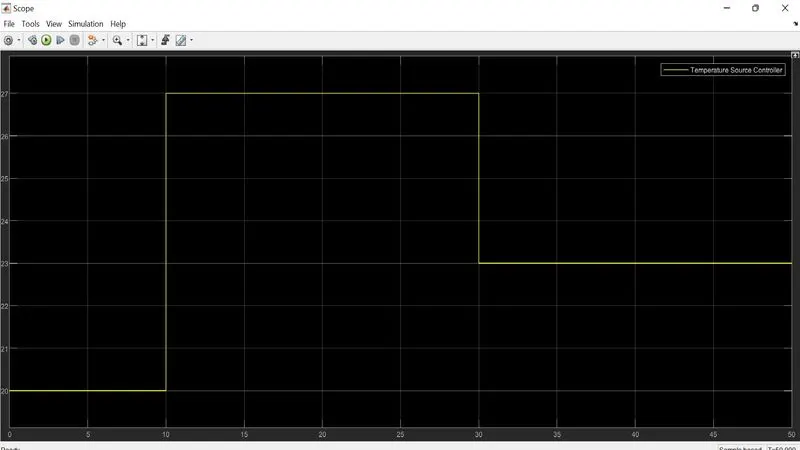
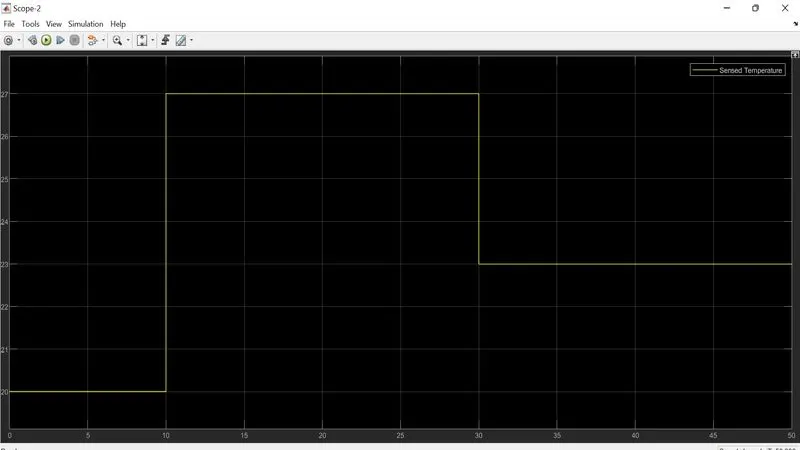
At the left graph it is O/P from signal builder | At the right portion it is the O/P of Thermistor.
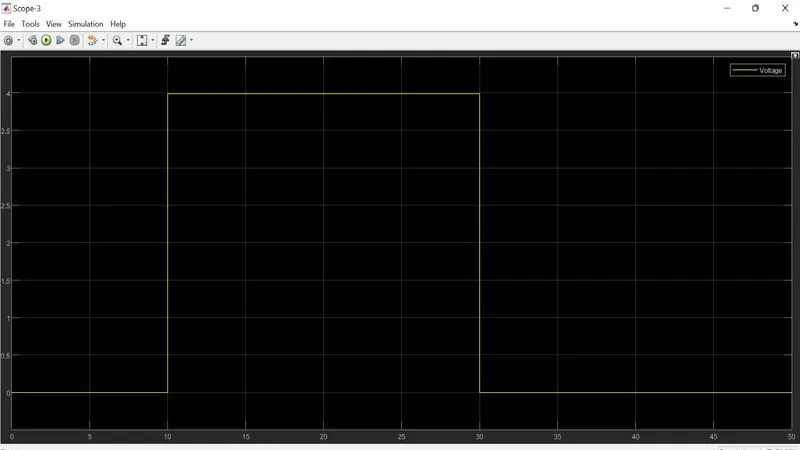
This graph represents the Output of Voltage sensor. It is given 4V at ON state because the source voltage is is 12V and the resistance of the ciruit is 3ohm (internal resistance is 2ohm + Load resistance is 1ohm). That's why by voltage division law voltage across 1ohm resistance is 12V*(1/3) = 4V.
(Note: As from 10 to 30 secs the temperature is greater then 25degree celsius that's why we are getting full O/P in that region.
(Note: All the simulink file has been uploaded in the Google drive)
(Note: For better understanding of my answer Please see in Full Screen Mode)
Google Dive Link: https://drive.google.com/drive/folders/1qw4aZlEMObTuMabbfPLd2E7YdYbyDCHc?usp=sharing