Week -2
1. Simulation of Door Bell
Aim: Observation of Physical movement of the Plunger
The arrangement of the doorbell is such that, when the switch is closed the electromagnet receives electrical power from the battery and pulls the metal arm to hit the bell producing sound.
Here, the Simulink model of the doorbell is given below;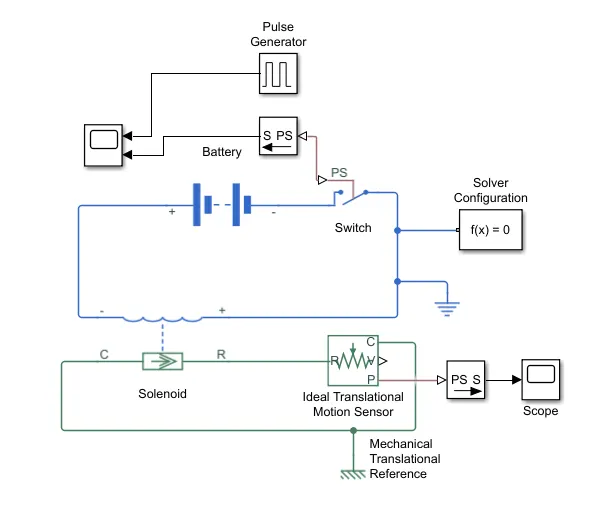
As per the given circuit diagram;
The negative terminal of the battery is connected with a switch and the Positive terminal of the battery is connected to the solenoid. The 'R' terminal of the solenoid is connected with an Ideal Translational Motion sensor. As the motion of the plunger is linear hence we have connected the Translational motion sensor. For connecting the mechanical system to the Simulink scope the PS to Simulink converter is used. Also, the motion is linear hence, translational reference is connected.
Now, we have to create a situation where the switch is closed for 2 seconds and then released. Hence, a pulse generator block is used to create a pulse. A phase delay of 2 seconds is considered. The below scope results shows the output of the pulse generator.
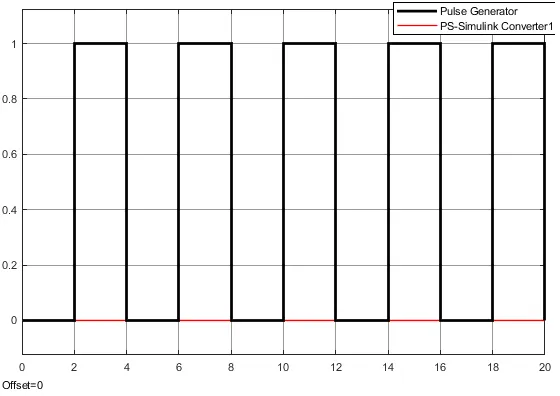
From the plot diagram, we can see that the pulse is ON for every two seconds and hence at that specified period of time it will hit the plunger and the sound will produce.
The all the parametric values considered for getting the simulation output are the default values.
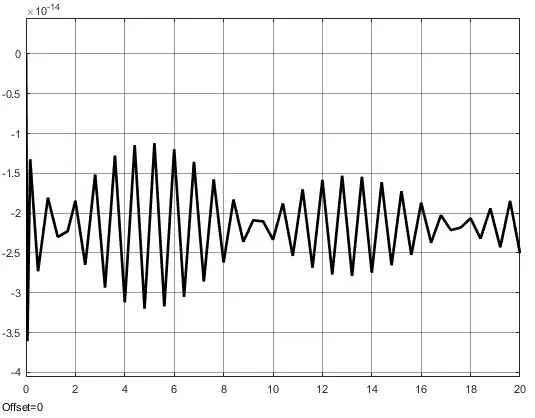
The Simulink output which shows the physical movement of the plunger is given below.
Que.2) Use a thermistor to sense the temperature of a heater and turn it on or off the fan as per the given conditions:
The Temperature Conditions are given such as :
1. Temperature = 20 degree celsius from 0 to 10 sec
27 degree celsius from 10 to 30 sec
25 degree celsius from 30 to 50 sec
The fan conditions are given such as:
ON if the temperature above 25 degree celsius, OFF otherwise.
The MATLAB Simulink diagram for the system is given below: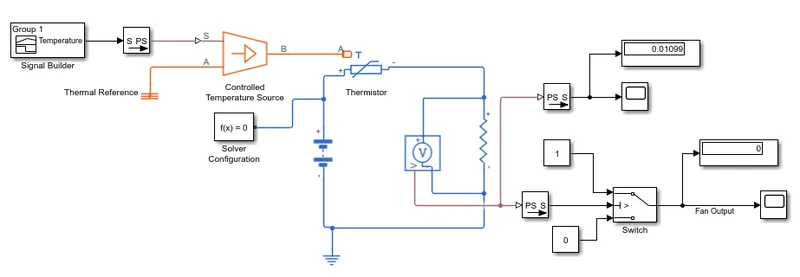
The simulink description is given as below:
1. The source of temperature is built using a signal builder block as per conditions given in the question. The figure given below shows the signal builder plot given as a source to the system.
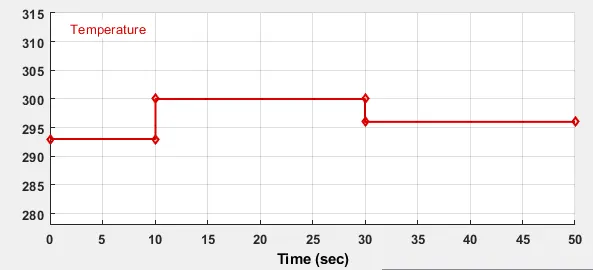
The temperature considered on Y-axis is in Kelvin scale and time on x-axis is in seconds.
For 0 to 10 sec, temperature = 293 K
For 10 to 30 sec, temperature = 300 K
and for 30 to 5 sec, temperature = 296 K
We have to operate the fan condition such that if the temperature is above 298 K then the fan should be ON, otherwise OFF.
The temperature source (signal builder) is then connected with Controlled temperature source so as to control the given temperature. Now, we have to use a thermistor to sense the temperature of a heater. Hence a thermisor block is used. For heater, we have connected a resistance with voltage divider so that the thermistor will operate. The battery supply is used as an external source to the thermistor. And this electrical circuit is grounded with an electrical reference.
The output block of Voltage sense is then given to a switch for operating a given condition such that the fan should be ON when temperature is above 298 K.
The input threshold value is given such that the output of voltage sense when input of 298K is given to the controlled temperature source. Thus the Theshold given to the switch is 0.01189.
Hence the switch will be ON when the applied conditions will be true.
After applying all these conditions, the final output is shown below in the figure:
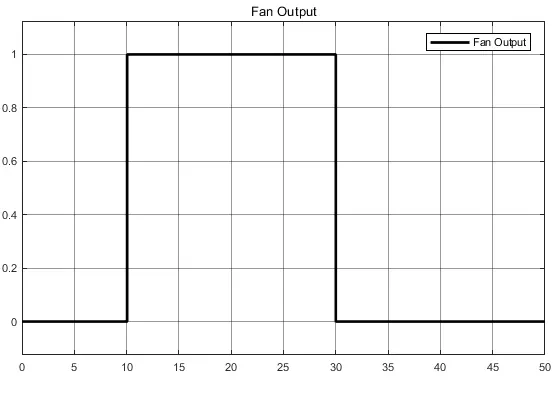
From the simulation output it can be seen that the Fan is ON between 10 to 30 seconds as the temperature in that time is greater than 298 K. and for other time period the fan is OFF.
The ON condition implemented in the switch is ON when input is 1 and OFF when its zero.