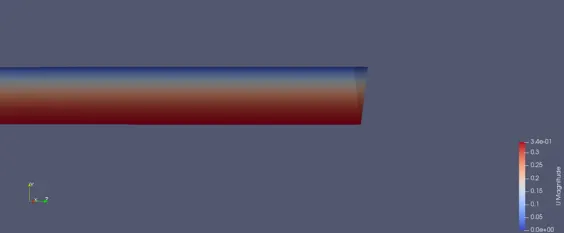
Week 12 - Validation studies of Symmetry BC vs Wedge BC in OpenFOAM vs Analytical H.P equation
Objective:
To execute the flow through a pipe using a wedge boundary condition.
To execute the flow through a pipe using a symmetry boundary condition.
Calculate the velocity for the flow using Hagen Poisuelle's equation.
Write a Matlab code to create a blockMeshDict file for the following wedge angle (10,25,45).
Entry length
The hydrodynamic entry length is taken to be the distance from the entrance region to the point where the shear stress is about
2 percent of the fully developed flow.
L/D = 0.005Re.
Velocity profile can be calculated as
where u is velocity profile in m/s.
is the average velocity in m/s.
r is the radial distance in m.
R is the radius of the pipe in m.
The maximum velocity is at the center of the pipe which can be obtained by substituting r=0 in the above formula
Hagen Poiseuille Equation:
Hagen Poiseuille equation evaluates the pressure drop in an incompressible and Newtonian fluid in a laminar flow that has a
constant cross-sectional area and also the length of the pipe should be larger than its diameter.
Assumptions in this equation are that the fluid is an incompressible and Newtonian fluid whose length is larger than its
diameter.
This equation calculates pressure drop due to viscosity in the fluid.
The equation to calculate the pressure drop is given by:
where Q is the volumetric flow rate in
A is the area of the pipe in m.
D is the diameter of the pipe in m.
L is the length of the pipe in m.
is the dynamic viscosity in
Pressure Drop
Pressure drop is calculated as it is related to the power requirement of the pump to maintain the flow inside the pipe.
Pressure drop can also be calculated using the below formula.
is a dynamic viscosity in
u = 2 ⋅ Vavg ⋅ (1 −((r)^2/(R)^2))
Vavg
V max = 2 ⋅ Vavg
△ P =(128 ⋅ μ ⋅ L ⋅ Q)/(π ⋅ D^4)
Q = Vavg ⋅ A
L is the length of the pressure drop region.
is the average velocity in m/s.
R is the radius of the pipe in m.
From the above formula, the pressure loss is proportional to viscosity which when its value is zero then there is no pressure
drop. Therefore the pressure drop from P1 to P2 is entirely due to viscous for constant diameter and fixed length of the pipe.
Matlab Code to automate the computational mesh for any wedge angle.
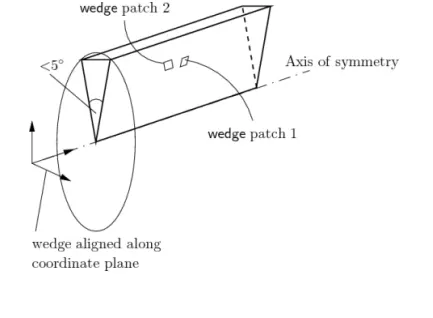
% Code to automate the computational mesh for any wedge angle
close all
clear all
clc
%Defining the wedge angle from which the vertices are calculated using
%trignometry fucntions.
theta = input('angle:');%<--User input for the anlge
theta = theta/2;
x = cosd(theta)*0.005;
y = sind(theta)*0.005;
%length of the pipe.
l = 2;
%type of boundary condition to be applied to the wedge face.
str = "symmetry";
%Creating a blockMeshDict file
f = fopen('blockMeshDict.txt','w');
%Below are the codes for blockMeshDict file.
fprintf (f ,'%s n' ,'/*--------------------------------*- C++ -*----------------------------------*');
fprintf (f,'%s n',' ========= |');
fprintf (f,'%sn',' \ / F ield | OpenFOAM: The Open Source CFD Toolbox');
fprintf (f,'%sn',' \ / O peration | Website: https://openfoam.org');
fprintf (f,'%sn',' \ / A nd | Version: 8');
fprintf (f,'%sn',' \/ M anipulation |');
fprintf (f,'%sn','*---------------------------------------------------------------------------*/');
fprintf (f,'%sn','FoamFile');
fprintf (f,'%sn','{');
fprintf (f,'%sn','');
fprintf (f,'%sn',' version 2.0;');
fprintf (f,'%sn',' format ascii;');
fprintf (f,'%sn',' class dictionary;');
fprintf (f,'%sn',' object blockMeshDict;');
fprintf (f,'%sn','}');
fprintf (f,'%sn','// * * * * * * * * * * * * * * * * * * * * * * * * * * * * * * * * * * * * * //');
fprintf (f,'%sn','');
fprintf (f,'%sn','convertToMeters 1;');
fprintf (f,'%sn','');
fprintf (f,'%sn','vertices');
fprintf (f,'%sn','(');
fprintf (f,'%sn',' (0 0 0)');
fprintf (f,'%sn',' (0 0 0)');
fprintf (f,'%s %f %f %f %s n',' (',y,x,0,')'); %<-- giving the calculated values as vertices for defining
the wedge
fprintf (f,'%s %f %f %f %s n',' (',-y,x,0,')');
fprintf (f,'%s %f %f %f %s n',' (',0,0,l,')');
fprintf (f,'%s %f %f %f %s n',' (',0,0,l,')');
fprintf (f,'%s %f %f %f %s n',' (',y,x,l,')');
fprintf (f,'%s %f %f %f %s n',' (',-y,x,l,')');
fprintf (f,'%sn',');');
fprintf (f,'%sn','');
fprintf (f,'%sn','blocks');
fprintf (f,'%sn','(');
fprintf (f,'%sn',' hex (0 1 2 3 4 5 6 7) (1 50 200) simpleGrading (1 0.1 1)');
fprintf (f,'%sn',');');
fprintf (f,'%sn','');
fprintf (f,'%sn','edges');
fprintf (f,'%sn','(');
fprintf (f,'%sn',');');
fprintf (f,'%sn','');
fprintf (f,'%sn','boundary');
fprintf (f,'%sn','(');
fprintf (f, %sn , inlet );
fprintf (f,'%sn',' {');
fprintf (f,'%sn',' type patch;');
fprintf (f,'%sn',' faces');
fprintf (f,'%sn',' (');
fprintf (f,'%sn',' (0 3 2 1)');
fprintf (f,'%sn',' );');
fprintf (f,'%sn',' }');
fprintf (f,'%sn','');
fprintf (f,'%sn',' outlet');
fprintf (f,'%sn',' {');
fprintf (f,'%sn',' type patch;');
fprintf (f,'%sn',' faces');
fprintf (f,'%sn',' (');
fprintf (f,'%sn',' (4 7 6 5)');
fprintf (f,'%sn',' );');
fprintf (f,'%sn',' }');
fprintf (f,'%sn','');
fprintf (f,'%sn',' fixedWalls');
fprintf (f,'%sn',' {');
fprintf (f,'%sn',' type wall;');
fprintf (f,'%sn',' faces');
fprintf (f,'%sn',' (');
fprintf (f,'%sn',' (3 2 6 7)');
fprintf (f,'%sn',' );');
fprintf (f,'%sn',' }');
fprintf (f,'%sn',' wedge1');
fprintf (f,'%sn',' {');
fprintf (f,'%s %sn',' type',str); %<-- str variable stores the type of Boundary conditions to applied
on the wedge patch
fprintf (f,'%sn',' faces');
fprintf (f,'%sn',' (');
fprintf (f,'%sn',' (0 3 7 4)');
fprintf (f,'%sn',' );');
fprintf (f,'%sn',' }');
fprintf (f,'%sn',' wedge2');
fprintf (f,'%sn',' {');
fprintf (f,'%s %sn',' type',str);
fprintf (f,'%sn',' faces');
fprintf (f,'%sn',' (');
fprintf (f,'%sn',' (1 5 6 2)');
fprintf (f,'%sn',' );');
fprintf (f,'%sn',' }');
fprintf (f,'%sn',' line1');
fprintf (f,'%sn',' {');
fprintf (f,'%sn',' type empty;');
fprintf (f,'%sn',' faces');
fprintf (f,'%sn',' (');
fprintf (f,'%sn',' (0 1 5 4)');
fprintf (f,'%sn',' );');
fprintf (f,'%sn',' }');
fprintf (f,'%sn','');
fprintf (f,'%sn',');');
fprintf (f,'%sn','');
fprintf (f,'%sn','mergePatchPairs');
fprintf (f,'%sn','(');
fprintf (f,'%sn',');');
fprintf (f,'%sn','');
fprintf (f,'%sn','// ************************************************************************* //');
fprintf (f,'%sn','');
Explanation of the Matlab code:
In the above code, the desired wedge angle is defined for the theta variable which is used to calculate the vertices for the wedge
angle using trigonometric functions, and also the length of the pipe is defined in the variable l.
BlockMeshDict.txt file is created to which codes are written which are similar to the original blockMeshDict which includes the
vertices for the model, defining of the model satisfying right-hand thumb rule and also defining the type of boundary
conditions along with the faces of the wedge.
blockMeshDict for wedge angle 10 degrees for symmetry Boundary Conditions.
/*--------------------------------*- C++ -*----------------------------------*
========= |
\ / F ield | OpenFOAM: The Open Source CFD Toolbox
\ / O peration | Website: https://openfoam.org
\ / A nd | Version: 8
\/ M anipulation |
*---------------------------------------------------------------------------*/
FoamFile
{
version 2.0;
format ascii;
class dictionary;
object blockMeshDict;
}
// * * * * * * * * * * * * * * * * * * * * * * * * * * * * * * * * * * * * * //
convertToMeters 1;
vertices
(
(0 0 0)
(0 0 0)
( 0.000436 0.004981 0.000000 )
( -0.000436 0.004981 0.000000 )
( 0.000000 0.000000 2.000000 )
( 0.000000 0.000000 2.000000 )
( 0.000436 0.004981 2.000000 )
( -0.000436 0.004981 2.000000 )
);
blocks
(
hex (0 1 2 3 4 5 6 7) (1 50 200) simpleGrading (1 0.1 1)
);
edges
(
);
boundary
(
inlet
{
type patch;
faces
(
(0 3 2 1)
);
}
outlet
{
type patch;
faces
(
(4 7 6 5)
);
}
fixedWalls
{
type wall;
faces
(
(3 2 6 7)
);
}
wedge1
{
type symmetry
faces
(
(0 3 7 4)
);
}
wedge2
{
type symmetry
faces
(
(1 5 6 2)
);
}
line1
{
type empty;
faces
(
(0 1 5 4)
);
}
);
mergePatchPairs
(
);
// ************************************************************************* //
Wedge vertices for wedge angle 25 degrees:
vertices
(
(0 0 0)
(0 0 0)
( 0.001082 0.004881 0.000000 )
( -0.001082 0.004881 0.000000 )
( 0.000000 0.000000 2.000000 )
( 0.000000 0.000000 2.000000 )
( 0.001082 0.004881 2.000000 )
( -0.001082 0.004881 2.000000 )
);
Wedge vertices for wedge angle 45 degrees:
vertices
(
(0 0 0)
(0 0 0)
( 0.001913 0.004619 0.000000 )
( -0.001913 0.004619 0.000000 )
( 0.000000 0.000000 2.000000 )
( 0.000000 0.000000 2.000000 )
( 0.001913 0.004619 2.000000 )
( -0.001913 0.004619 2.000000 )
);
Initial Conditions for Pressure with Symmetry boundary conditions:
/*--------------------------------*- C++ -*----------------------------------*
========= |
\ / F ield | OpenFOAM: The Open Source CFD Toolbox
\ / O peration | Website: https://openfoam.org
\ / A nd | Version: 8
\/ M anipulation |
*---------------------------------------------------------------------------*/
FoamFile
{
version 2.0;
format ascii;
class volScalarField;
object p;
}
// * * * * * * * * * * * * * * * * * * * * * * * * * * * * * * * * * * * * * //
dimensions [0 2 -2 0 0 0 0];
internalField uniform 0;
boundaryField
{
inlet
{
type zeroGradient;
}
outlet
{
type fixedValue;
value uniform 0;
}
fixedWalls
{
type zeroGradient;
}
wedge1
{
type symmetry;
}
wedge2
{
type symmetry;
}
line1
{
type empty;
}
}
// ************************************************************************* //
ControlDict:
/*--------------------------------*- C++ -*----------------------------------*
========= |
\ / F ield | OpenFOAM: The Open Source CFD Toolbox
\ / O peration | Website: https://openfoam.org
\ / A nd | Version: 8
\/ M anipulation |
*---------------------------------------------------------------------------*/
FoamFile
{
version 2.0;
format ascii;
class dictionary;
location "system";
object controlDict;
}
// * * * * * * * * * * * * * * * * * * * * * * * * * * * * * * * * * * * * * //
application icoFoam;
startFrom startTime;
startTime 0;
stopAt endTime;
endTime 20;
deltaT 0.0085;
writeControl timeStep;
writeInterval 6;
purgeWrite 0;
writeFormat ascii;
writePrecision 6;
writeCompression off;
timeFormat general;
timePrecision 6;
runTimeModifiable true;
functions
{
#includeFunc residuals
}
// ************************************************************************* //
Transport Properties.
/*--------------------------------*- C++ -*----------------------------------*
========= |
/ F ield | OpenFOAM: The Open Source CFD Toolbox
/ O peration | Website: https://openfoam.org
/ A nd | Version: 8
/ M anipulation |
*---------------------------------------------------------------------------*/
FoamFile
{
version 2.0;
format ascii;
class dictionary;
location "constant";
object transportProperties;
}
// * * * * * * * * * * * * * * * * * * * * * * * * * * * * * * * * * * * * * //
nu [0 2 -1 0 0 0 0] 8.55e-7;
// ************************************************************************* //
Steps in the execution of the problem:
1. Choosing the required solver from the tutorial directory. In this case, the given problem is incompressible transient laminar
flow hence icoFoam solver is used.
2. Cavity model is used as it is simple and easy to modify.
3. Copy the cavity directory to the Foam run directory because no changes have to be made in the tutorial directories.
4. Inside the run folder the navigate to the cavity directory and to the system directory to modify the BlockmeshDict with the
changes mentioned above and similarly navigate to controlDict to make the necessary changes.
5. Apply initial conditions by navigating to the 0 directory and then use the gedit command to edit the Pressure and velocity
initial conditions.
6. Once the grading is applied the mesh has to be updated using blockMesh. This command is repeated each time the grading is
changed.
7. After execution of blockMesh command if there is no error then the solver is executed with icoFoam command.
8. After successful execution the post-processing is done using the paraFoam command which opens the ParaView window
9. In the ParaView window the flow is analyzed for each flow variable.
Matlab script for comparing the velocity and shear stress for different wedge angles for wedge and symmetry boundary conditions.
close all
clear all
clc
%wedge BC
v10 = readmatrix ('v10.CSV');
u10 = v10(:,1);
r10 = v10(:,2);
v25 = readmatrix ('v25.CSV');
u25 = v25(:,1);
r25 = v25(:,2);
v45 = readmatrix ('v45.CSV');
u45 = v45(:,1);
r45 = v45(:,2);
v45n = readmatrix('v45n.CSV');
u45n = v45n(:,1);
r45n = v45n(:,2);
%Analytical Solution
Vavg=0.17; %<-- Average velocity in m/s
R= 0.005; %<-- Radius of the pipe in m.
u = 2*Vavg*(1-(r10).^2./(R)^2); %<-- Formula to calculate the velocity profile.
figure(1)
plot (u10,r10)
hold on
plot (u25,r25)
plot (u45,r45)
plot (u45n,r45n)
plot (u,r10,'linewidth',2,'color','k')
xlabel ('Velocity in m/s')
ylabel ('Radial distance in m')
title ('Velocity Vs Radial Distance for Wedge BC')
legend ('Wedge angle 10 degree','Wedge angle 25 degree','Wedge angle 45 degree','Improved Velocity wedge
angle 45 degree','Analytical solution')
%symmetry BC
v10s = readmatrix ('v10s.CSV');
u10s = v10s(:,1);
r10s = v10s(:,2);
v25s = readmatrix ('v25s.CSV');
u25s = v25s(:,1);
r25s = v25s(:,2);
v45s = readmatrix ('v45s.CSV');
u45s = v45s(:,1);
r45s = v45s(:,2);
v45sn = readmatrix ('v45sn.CSV');
u45sn = v45sn (:,1);
r45sn = v45sn(:,2);
figure(2)
plot (u10s,r10s)
hold on
plot (u25s,r25s)
plot (u45s,r45s)
plot (u45sn,r45sn)
plot (u,r10,'linewidth',2,'color','k')
xlabel ( Velocity in m/s )
ylabel ('Radial distance in m')
title ('Velocity Vs Radial Distance for Symmetry BC')
legend ('Wedge angle 10 degree','Wedge angle 25 degree','Wedge angle 45 degree','Improved Velocity
profile','Analytical Solution')
%Shear stress for wedge BC
ss10 = readmatrix('ss10.CSV');
s10 = ss10(:,2);
ss25 = readmatrix ('s25.CSV');
s25 = ss25(:,2);
ss45 = readmatrix('s45.CSV');
s45 = ss45 (:,2);
ss45n = readmatrix('s45n.CSV');
r45n = ss45n(:,1);
s45n = ss45n(:,2);
%Calculation of the shear stress analytically.
dv = 0.000852; %<-- dynamic viscoity in kg/ms.
rd = linspace (0,0.005,1001); %<-- defining the radial distance
r = rd(2)-rd(1); %<-- length between the adjacent points.
s = dv*(diff(u)/r); %<-- Formula to calculate the shear stress analytically
s = flipud(s); %<-- the shear stress obtained is flipped
radial = linspace (0,0.005,1000); %<-- defining radial distance for the plot
figure(3)
plot (s10,rd)
hold on
plot (s25,rd)
plot (s45,rd)
plot (s45n,rd)
plot (s,radial)
xlabel('Shear Stress in N/m^2')
ylabel ('radial distance in m')
title ('Shear Stress Vs radial distance for Wedge BC')
legend ('Wedge angle 10 degree','Wedge angle 25 degree','Wedge angle 45 degree','Improved velocity wedge
angle 45 degree','Analytical Solution')
%Shear stress for symmetry BC
ss10s = readmatrix('ss10s.CSV');
s10s = ss10s(:,2);
ss25s = readmatrix ('s25s.CSV');
s25s = ss25s(:,2);
ss45s = readmatrix('s45s.CSV');
s45s = ss45s (:,2);
s45sn = readmatrix ('s45sn.CSV');
ss45sn = s45sn (:,2);
%Calculation of the shear stress analytically.
dv = 0.000852; %<-- dynamic viscoity in kg/ms.
rd = linspace (0,0.005,1001); %<-- defining the radial distance
r = rd(2)-rd(1); %<-- length between the adjacent points.
ss = dv*(diff(u)/r); %<-- Formula to calculate the shear stress analytically
ss = flipud(ss); %<-- the shear stress obtained is flipped
radial = linspace(0,0.005,1000); %<-- defining radial distance for the plot
radial = (radial)';
figure(4)
plot (s10s,rd)
hold on
plot (s25s,rd)
plot (s45s,rd)
plot (ss45sn,rd)
plot (ss,radial)
xlabel('Shear Stress in N/m^2')
ylabel ('radial distance in m')
title ('Shear Stress Vs radial distance for Symmetry BC')
legend ('Wedge angle 10 degree','Wedge angle 25 degree','Wedge angle 45 degree','improved Shear Stress','Analytical Solution')
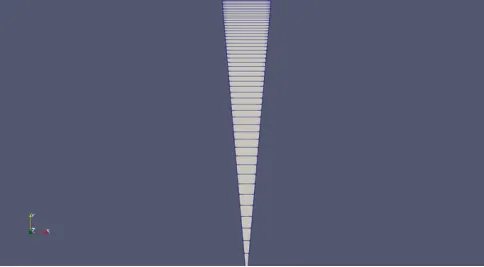
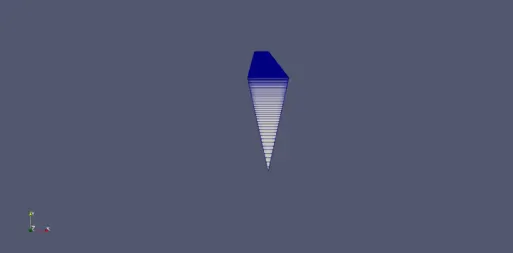
Mesh at the inlet of the pipe:
For 10 degrees wedge angle
For 25 degrees wedge angle:
For 45 degrees wedge angle:
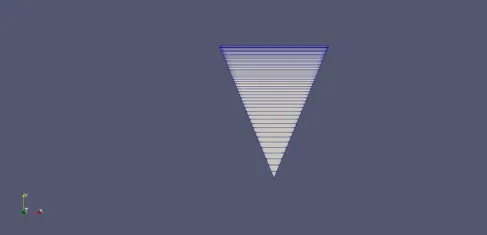
For 45 wedge angle with an increase in the number of cells:
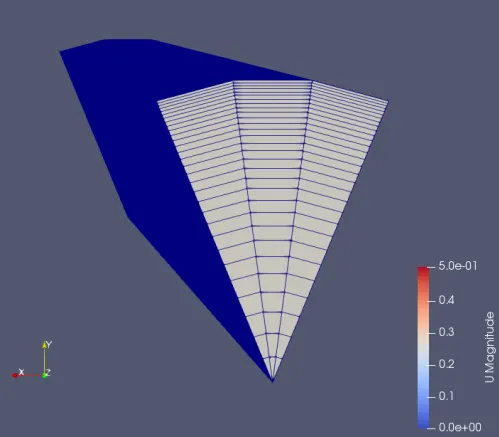
At inlet
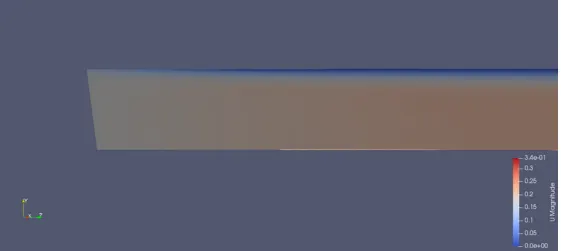
At outlet: