Simulation of Flow through a pipe in OpenFoam
Objective:
- To develop a MatLab program that can generate the computational mesh automatically in openFoam for given angles using a symmetry boundary condition.
- To simulate the flow through the pipe in OpenFOAM using icoFoam solver and post-process the result in paraFoam.
- Compare the results obtained from the Hagen Poisuelle’s equation, using wedge boundary condition, using a symmetry boundary condition.
Hagen Poisuelle Flow:
HP flow applies to the laminar flow of an imcompressible fluid of viscosity through a tube of length and given radius.
According to this,
Flow rate:`Q=V_(avg)A_e=(DeltaPpiD^4)/(128muL)`
Average velocity:`V_(avg)=(DeltaPD^2)/(32muL`
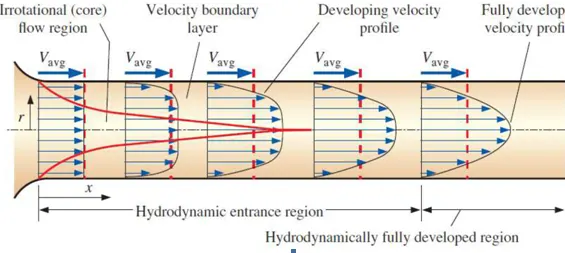
Length of the Entrance:
The distance the fluid travels after entering a pipe before the complete devolpment formation of the flow.
Hydrodynamic entrance region:
Area of the pipe where the fluid entering a pipe develops a velocity profile due to the viscous forces that are spreading from the interior walls of pipes.
Here the fluid enters a pipe at a constant speed, hence fluid particles in the layer get contact with the pipe's surface come to a complete rest because of the non slip rule.
The layer that is in contact with the pipe surface is resistant to the acceleration of the neighbouring layers due to the viscous forces produced within the fluid and gradually slows down the adjacent layers of the fluid, by forming a velocity profile.
To make the conservation of mass true, the velocity of the layers of the fluid at the center of the pipe increases in order to compensate the reduced velocities of the layer of fluid near the pipe surface.
Hence this generates a velocity gradient across the cross section of the pipe.
Fully developed region:
Here the velocity profile does not change in the fluid flow direction.
Flow properties:
1) Geometry: Axi-symmetric
2) Reynolds number Re: 2100 (Laminar Flow)
3) Working fluid: water (Density p=997 kg /m^3
4) Fluid temperature: 25 degree Celsius
5) Diameter of pipe = 0.02 m (R=0.01 m)
5) Dynamic viscosity(u) = 0.890*10^-3 pa.s
6) Kinematic viscosity (v) = 08927106 m^2s-1
7) theta = 4
and calculate the length of the pipe using entry length formula
L = 0.06*Re*d
= 0.06*2100*0.02
=2.52 meters.
Boundary Conditions:
- Inlet:
- Pressure: zeroGradient
- Velocity: fixedValue - 0.10542 m/s
- Outlet
- Pressure: fixedValue - 0.025396861 m^2s^-2
- Velocity: zeroGradient
- Axis:
- Pressure: empty
- Velocity: empty
- Wall:
- Pressure: zeroGradient
- Velocity: no Slip
- Wedge:
- Pressure: wedge
- Velocity: wedge
Steps for solving the problem:
- Firstly in Linux OS open " Terminal ".
- Type'tut’, on typing this will direct to the inbuilt tutorial files in openFOAM software. Now to view the list of tutorials type 'ls'.
- Once the list opens, we can see multiple directories displayed. To select type' cd incompressible/'. As above to go into its list type 'ls'. Then it directs to the particular directory.
- As per the given data we need to solve the flow using the icoFOAM solver. So type ‘cd icoFOAM/'. Go to the list and select cavity i.e.’ cd cavity/'.
- Once we direct to the cavity folder it shows multiple files, here there is a file called ‘cavity’, this should be copied and paste the file to the 'run folder' by using the command ' cp -r cavity FOAM_RUN /(folder name where u saved the cavity in run folder without'/')’.
Creating .txt file for blockMeshDict
- Initially, understanding the concept of Hagen poiseuille's equation is important as several assumptions are made and necessary formulas are used.
- Proper assumptions are made as mentioned, so that we can have a better execution of program without any errors.
- From Hagen poiseuille's equation calculate the equations so that we can check the solutions and list down all the formulas that are required for the calculation, so that program runs smoothly.
- When we start the program, define all the assumptions that are made. Also include all the necessary equations that are to be calculated as shown in the program.
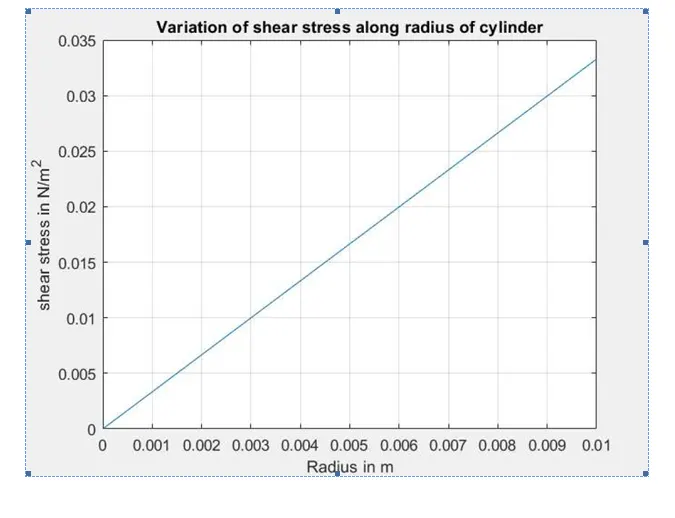
- Write a small code to calculate the shear stress vs radius of the pipe.
- Now to create a blockMeshDict file we using file parsing technique, reading and writing the files. These files are further used in our calculations or simulations as an input data.
- Firstly to create a header file follow the above steps manually or we can import the header part from the file existing and specify the line numbers so that it displays in correct sequence.
- In order to create a text file, use-"f1 = fopen('blockMeshDict.txt', w') ". This command is used to write the data in the particular folder as mentioned.
- Follow the same sequence that is used in tutorial files and mention the necessary spacing as followed above. All the steps are covered in the programme.
- On completing the entry of all the neccessary data that is to be calculated for a blockMeshDict file, just type " fclose(f1) ". This helps to close the text file.
- Hence this generates a' .txt file' as shown below. This file should be replaced with the existing file by removing .txt at the end of file name i.e. file name should only contain ‘ blockMeshDict’.
Creating controlDict, transportProperties, u and p files
- Directly open the existing file of controlDict and change the values of start time, end time deltaT etc and save the file.
- Similarly, in transport Properties change the value of kinematic viscosity of the fluid as shown below and save the file.
- In the same way, make the necessary changes asper the inputs and considerations for u and p files and also save them.
- Go to the terminal and direct to the location where the files are saved and go to the cavity directory in run, by typing ‘ blockMesh'. By giving this command it structures the mesh and internal calculations are done for a perfect meshing. After the end of running theblockMesh, now check for the errors in the mesh by using ‘ checkMesh' command.
- Hence if there are no errors after checking the mesh we can say that it is stable.
- Now use ' icoFoam' command to run the simulation completely, this is because we used icoFoam as the solver for this problem. Wait untill it reaches the last time step. Check if it has excited for all the time steps so that simulation goes smoothly. Also check if the courant number is less than 1.
- After the end of the simulation type ' paraFoam '. The command paraFoam directs to the paraview software directly by displaying the geometry.
- By using paraview software, geometry along with mesh is visualised and graphs are plotted as shown below.
Program in Matlab for creating a blockMeshDict file and showing varaiation of shear stress along radius of the cylinder:
(Wedge angle = 3 degrees)
clear all
close all
clc

%Inputs
Re = 2100                   %Reynolds number
D = 0.02;                   %Diameter of pipe in metres
rho = 997                   %Density of water in kg/m^3
nu = 8.917e-7               %Kinematic viscosity of water in m^2/sec


%Calculations
mu = rho*nu;                %Dynamic viscosity of water
%Re = rho*V_avg*D/mu;
V_avg = mu*Re/(rho*D);
V_max = 2*V_avg

r = D/2                     %Radius of pipe in meters

L_entrance = 0.06*D*Re      %Hydrodynamic length at the entrance
L = L_entrance+0.3;         %Total Length of the pipe

%Hagen Poiseulle equation
delta_p = 8*mu*V_avg*L/r^2  %Pressure in Pa
Kinematic_P = delta_p/rho;  %Kinematic pressure in m^2/s^2

%Wedge Angle
theta = input("Enter the value of the wedge angle:");   %wedge angle should be less than 5 deg.

%calculating shear stress
R = linspace(0,D/2,1000);

for i = 1:length(R)
    tau(i) = 2*mu*V_max*(abs(R(i)))/r^2;
end
%Plot
plot(R,tau);
xlabel('Radius in meters');
ylabel('shear stress in N/m^2');
title('Variation of shear stress along radius of cylinder')
grid on
hold on

%creating blockMeshDict file:

%calculating vertices
v0 = [0 0 0];
v1 = [0 r*cosd(theta/2) -r*sind(theta/2)];
v2 = [0 r*cosd(theta/2) r*sind(theta/2)];
v3 = [L 0 0];
v4 = [L r*cosd(theta/2) -r*sind(theta/2)];
v5 = [L r*cosd(theta/2) -r*sind(theta/2)];

%Header file in openFoam
h1 = '/*--------------------------------*- C++ -*----------------------------------*';
h2 = '| =========                 |                                                 |';
h3 = '| \      /  F ield         | OpenFOAM: The Open Source CFD Toolbox           |';
h4 = '|  \    /   O peration     | Version:  v2006                                 |';
h5 = '|   \  /    A nd           | Website:  www.openfoam.com                      |';
h6 = '|    \/     M anipulation  |                                                 |';
h7 = '*---------------------------------------------------------------------------*/';
h8 = 'FoamFile'
h9 = '{';
h10 =   'version    2.0';
h11 =   'format     ascii;';
h12 =   'class      dictionary;';
h13 =   'object     blockMeshDict;';
h14 = '}';
h15 = '// * * * * * * * * * * * * * * * * * * * * * * * * * * * * * * * * * * * * * //';

f1 = fopen('blockMeshDict.txt','w');        %creating a text file
fprinttf(f1, '%s n',h1);
fprinttf(f1, '%s n',h2);
fprinttf(f1, '%s n',h3);
fprinttf(f1, '%s n',h4);
fprinttf(f1, '%s n',h5);
fprinttf(f1, '%s n',h6);
fprinttf(f1, '%s n',h7);
fprinttf(f1, 'n');
fprinttf(f1, '%s n',h8);
fprinttf(f1, 'n');
fprinttf(f1, '%s n',h9);
fprinttf(f1, '%s n',h10);
fprinttf(f1, '%s n',h11);
fprinttf(f1, '%s n',h12);
fprinttf(f1, '%s n',h13);
fprinttf(f1, '%s n',h14);
fprinttf(f1, '%s n',h15);
fprinttf(f1, 'n');

fprinttf(f1, '%s n','convertToMeters 1;')
fprinttf(f1, 'n');


%Vertices
fprintf(f1, '%s n','vertices');
fprintf(f1, '%s n','(')
fprintf(f1, 't(%d %d %d)n',v0(1),v0(2),v0(3))
fprintf(f1, 't(%d %d %d)n',v1(1),v1(2),v1(3))
fprintf(f1, 't(%d %d %d)n',v2(1),v2(2),v2(3))
fprintf(f1, 't(%d %d %d)n',v3(1),v3(2),v3(3))
fprintf(f1, 't(%d %d %d)n',v4(1),v4(2),v4(3))
fprintf(f1, 't(%d %d %d)n',v5(1),v5(2),v5(3))
fprintf(f1, '%s n',');')


%blocks
fprintf(f1,'n')
fprintf(f1,'%s n','blocks')
fprintf(f1,'%s n','(')
fprintf(f1,'t hex (0 3 4 1 0 3 5 2) (%d %d %d) simpleGrading (1 0.1 1)n',300,30,1)
fprintf(f1,'%s n',');')


%Edges
fprintf(f1,'n')
fprintf(f1,'%s n','edges')
fprintf(f1,'%s n','(')
fprintf(f1,'t arc 1 2 (%d %d %d)n',0,r,0)
fprintf(f1,'t arc 4 5 (%d %d %d)n',L,r,0)
fprintf(f1,'%s n',');')

%boundary
fprintf(f1,'n')
fprintf(f1,'%s n','boundary')
fprintf(f1,'%s n','(')

%Axis
fprintf(f1,'t axis n t{n')
fprintf(f1,'t type empty;n')
fprintf(f1,'t faces nt (n')
fprintf(f1,'t (%d %d %d)n',0,3,3,0)
fprintf (f1,'tt);n t}n')

%wall
fprintf(f1,'n')
fprintf(f1,'t wall n t {n')
fprintf(f1,'t type wall'n')
fprintf(f1,'faces n t(n')
fprintf(f1,' (%d %d %d %d)n',1,4,5,2)
fprintf(f1,'tt);n t}n')

%Inlet
fprintf(f1,'n')
fprintf(f1,'t inlet n t {n')
fprintf(f1,'t type patch;n')
fprintf(f1,'t faces nt (n')
fprintf(f1,'tt);n t}n')


%outlet
fprintf(f1,'n')
fprintf(f1,'t outlet n t {n')
fprintf(f1,'t type patch;n')
fprintf(f1,'t faces nt (n')
fprintf(f1 't (%d %d %d %d)n',3,5,4,3)
fprintf(f1,'tt);n t}n')


%front
fprintf(f1,'n')
fprintf(f1,'t front n t {n')
fprintf(f1,'t type wedge;n')
fprintf(f1,'t faces nt (n')
fprintf(f1,'t (%d %d %d %d)n',0,3,4,1)
fprintf(f1,'tt);n t}n')


%back
fprintf(f1,'n')
fprintf(f1,'t back n t {n')
fprintf(f1,'t type wedge;n')
fprintf(f1,'t faces nt (n')
fprintf(f1,'tt);n t}n tt );n')

fprintf(f1,'n')

fprintf(f1, '%s n','mergePatchPairs')
fprintf(f1,'t(n tt ); n')

fprintf(f1,'// **************************************************************//')
fclose(f1)
blockMeshDict file:
/*--------------------------------*- C++ -*----------------------------------*
| =========                 |                                                 |
| \      /  F ield         | OpenFOAM: The Open Source CFD Toolbox           |
|  \    /   O peration     | Version:  v2006                                 |
|   \  /    A nd           | Website:  www.openfoam.com                      |
|    \/     M anipulation  |                                                 |
*---------------------------------------------------------------------------*/
FoamFile
{
    version     2.0;
    format      ascii;
    class       dictionary;
    object      blockMeshDict;
}
// * * * * * * * * * * * * * * * * * * * * * * * * * * * * * * * * * * * * * //

convertToMeters 1;

vertices
(
        (0 0 0)
        (0 9.996573e-03 -2.617695e-04)
        (0 9.996573e-03 2.617695e-04)
        (2.820000e+00 0 0)
        (2.820000e+00 9.996573e-03 -2.617695e-04)
        (2.820000e+00 9.996573e-03 2.617695e-04)
);
blocks
(
        hex (0 3 4 1 0 3 5 2) (300 30 1) simpleGrading (1 0.1 1)
);
edges
(
        arc 1 2 (0 1.000000e-02 0)
        arc 4 5 (2.820000+00 1.000000-02 0)
);
boundary
(
   axis
    {
       type empty
       faces
       (
           (0 3 3 0)
        );
    }
   wall
    {


     type wall;
     faces
     (
        (1 4 5 2)
      );
    }
   inlet
    {
      type patch;
      faces
      (
         (0 1 2 0)
       );
    }
   outlet
    {
      type patch;
      faces
      (
         (3 5 4 3)
      );
    }
   front
    {
      type wedge
      faces
      (
         (0 3 4 1)
      );
    }
   back
   {
      type wedge;
      faces
      (
         (0 2 5 3)
      );
    }
);
mergePatchPairs
(

);
//******************************************************************//
controlDict file:
/*--------------------------------*- C++ -*----------------------------------*
| =========                 |                                                 |
| \      /  F ield         | OpenFOAM: The Open Source CFD Toolbox           |
|  \    /   O peration     | Version:  v2006                                 |
|   \  /    A nd           | Website:  www.openfoam.com                      |
|    \/     M anipulation  |                                                 |
*---------------------------------------------------------------------------*/
FoamFile
{
    version     2.0;
    format      ascii;
    class       dictionary;
    location    "system";
    object      controlDict;
}
// * * * * * * * * * * * * * * * * * * * * * * * * * * * * * * * * * * * * * //

application       icoFoam;

startFrom         startTime;

startTime         0;

stopAt            endTime;

endTime           10;

deltaT            1e-3;

writeControl      timestep;

writeInterval     100;

purgeWrite        0;

writeFormat       ascii;

writePrecision    6;

writeCompression  off;

timeFormat        general;

timePrecision     6;

runTimeModifiable true;


//***********************************************************************//
transport Properties file:
/*--------------------------------*- C++ -*----------------------------------*
| =========                 |                                                 |
| \      /  F ield         | OpenFOAM: The Open Source CFD Toolbox           |
|  \    /   O peration     | Version:  v2006                                 |
|   \  /    A nd           | Website:  www.openfoam.com                      |
|    \/     M anipulation  |                                                 |
*---------------------------------------------------------------------------*/
FoamFile
{
    version     2.0;
    format      ascii;
    class       dictionary;
    location    "constant"
    object      transportProperties;
}
// * * * * * * * * * * * * * * * * * * * * * * * * * * * * * * * * * * * * * //

nu              [0 2 -1 0 0 0 0] 8.917e-7;


//**************************************************************************//
velocity (u) file:
/*--------------------------------*- C++ -*----------------------------------*
| =========                 |                                                 |
| \      /  F ield         | OpenFOAM: The Open Source CFD Toolbox           |
|  \    /   O peration     | Version:  v2006                                 |
|   \  /    A nd           | Website:  www.openfoam.com                      |
|    \/     M anipulation  |                                                 |
*---------------------------------------------------------------------------*/
FoamFile
{
    version     2.0;
    format      ascii;
    class       volVectorField;
    object      U;
}
// * * * * * * * * * * * * * * * * * * * * * * * * * * * * * * * * * * * * * //

dimensions     [0 1 -1 0 0 0 0];

internalField  uniform (0.09363 0 0);

boundaryField
{
    axis
    {
       type             empty;
    }

    wall
    {
       type             noslip;
    }

    inlet
    {
       type             fixedValue;
       value            uniform (0.09363 0 0);
    }

    outlet
    {
       type             zeroGradient;
    }

    front
    {
       type             wedge;
    }

    back
    {
       type             wedge;
    }
}


// ************************************************************************** //
pressure (p) file:
/*--------------------------------*- C++ -*----------------------------------*
| =========                 |                                                 |
| \      /  F ield         | OpenFOAM: The Open Source CFD Toolbox           |
|  \    /   O peration     | Version:  v2006                                 |
|   \  /    A nd           | Website:  www.openfoam.com                      |
|    \/     M anipulation  |                                                 |
*---------------------------------------------------------------------------*/
FoamFile
{
    version     2.0;
    format      ascii;
    class       volScalarField;
    object      p;
}
// * * * * * * * * * * * * * * * * * * * * * * * * * * * * * * * * * * * * * //

dimensions     [0 2 -2 0 0 0 0];

internalField  uniform 0;

boundaryField
{
    axis
    {
       type             empty;
    }

    wall
    {
       type             zeroGradient;
    }

    inlet
    {
       type             zeroGradient;
    }

    outlet
    {
       type             zeroGradient;
       value            uniform 0.018;
    }

    front
    {
       type             wedge;
    }

    back
    {
       type             wedge;
    }
}


// ************************************************************************** //
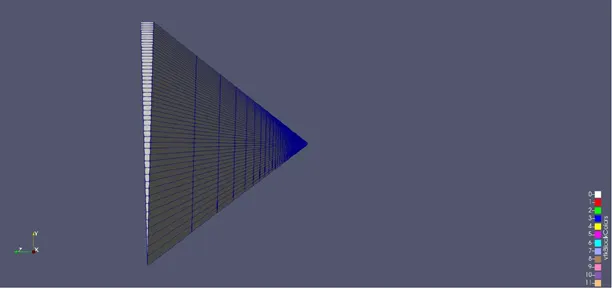
Geometry of the wedge
Generated velocity profile:
Inlet:
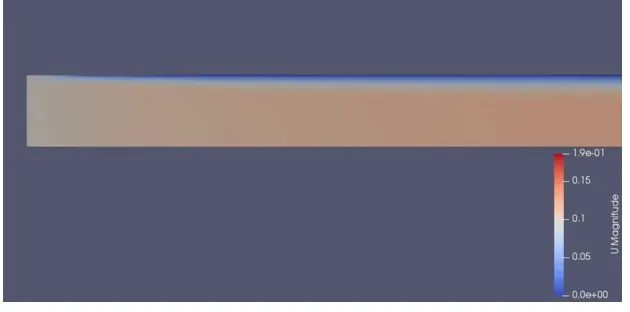
Outlet :
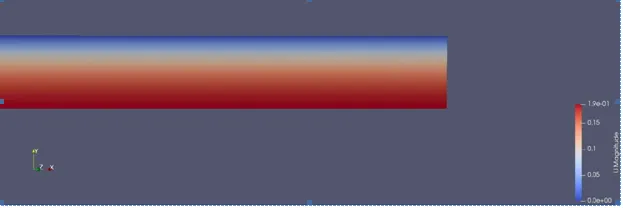
Velocity profiles at inlet:
Program to calculate the shear stress:
clear all
close all
clc

%inputs
Re = 2100
D = 0.02;
rho = 997;
nu = 8.917e-7


%calculations
mu = rho*nu;
V_avg = mu*Re/(rho*D)
V_max = 2*V_avg

r = D/2

theta = input("Enter the value of the wedge angle:");

%calculating shear stress
R = linspace(0,D/2,1000);

for i = 1:length(R)
    tau = 2*mu*V_max*(abs(R(i)))/r^2;
end

%plot
plot(R,tau)
hold on
xlabel('Radius');
ylabel('shear stree');
title('Shear stress variation')
grid on
Plot:
Conclusions:
- Length of the pipe determined by entry length formula (with the use of Reynolds no).
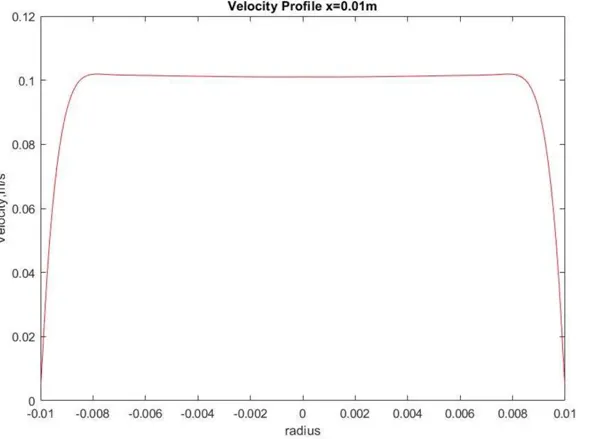
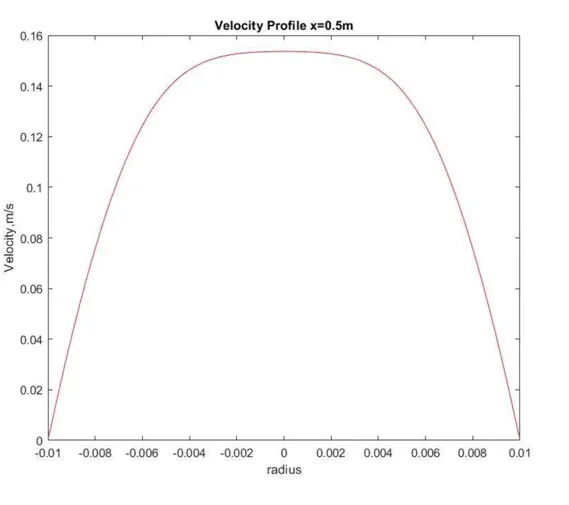
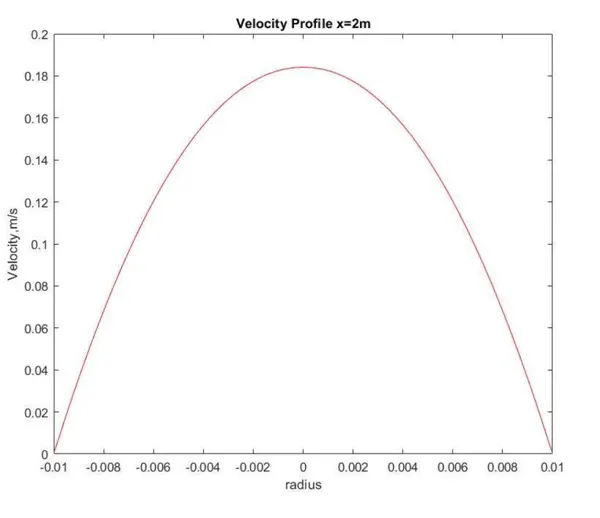
- We run the icoFoam solver and get the velocity profile on the postprocessing (paraFoam). The velocity profile gradually developed from inlet to outlet at different lengths of the pipe and flow reaches maximum velocity near the outlet. This region called the fully developed region as the velocity profile completely develops towards the outlet
- At the wall, velocity remains zero due to the fixedValue(0 0 0) or Noslip boundary condition, but as the flow progress, the boundary layers develop and adjacent layers also begin to slow down. Due to this phenomenon velocity at the center keep increasing so that we get the velocity profile the same as defined in Hagen poiseuille's equations since the pressure difference obtained from the equations.
- Shear stress is high near the wall because near the wall, since the change in velocity(du) is larger (ie due to no-slip boundary condition, velocity near the wall is zero and a small distance from the wall it has finite value) and drops quickly as we move towards the center of the pipe.