Week-11 Challenge: Braking
1) For a defined driving cycle, calculate the energy required for braking.
Formula used for calculating the Energy required for braking:
Energy=1/2*m*(Vi-Vf)^2
where,
m=Mass of the vehicle
Vi= Initial speed in m/s
Vf=Final speed in m/s
We use an excle calculator for calculating the energy required for braking.
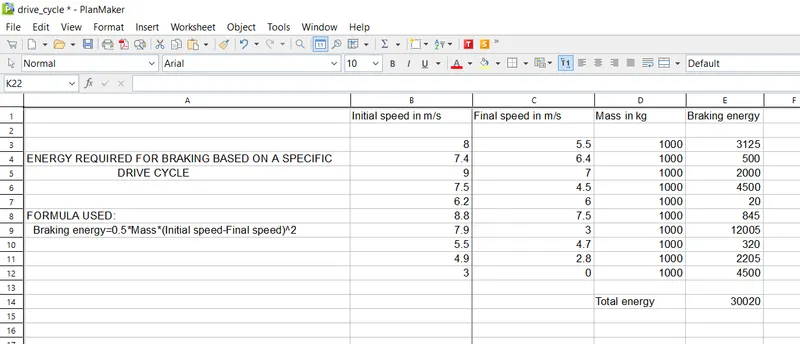
Therefore, the energy required for braking for an defined driving cycle has been found using an excel calculator.
2) Why electric motor can’t develop braking torque at high speed similar to starting? How electric and mechanical brakes are coordinated?
** Why electric motor can't develop braking torque at high speed similar to starting?:
We already know that the torque of the induction motor is inverse proportional to the square of the rotor speed, so at high speed the torque will be lower and that's why at high speed electric motor cannot produce braking torque similar to starting.
** How electric and mechanical brakes are coordinated?:
The electric motor is controlled to produce proper amount of braking force to recover as much braking energy as possible and at the same time, the total braking force must be sufficient to meet vehicle decelaration wanted by the person driving the vehicle.
In Electric Vehicle we use two types of brake controls, they are
Series brake control: Here mechanical brake and electrical brake is done one after other.
Parallel brake control: Here both brakes are applied simultaneously.
Mechanical braking:
It is nothing but a friction brakes used in vehicle to slow down the vehicle.
Electric braking:
It is used to reduce the speed of the motor depending upon the flux and torque.
** Therefore, we need both the mechanical and electric braking in a system.
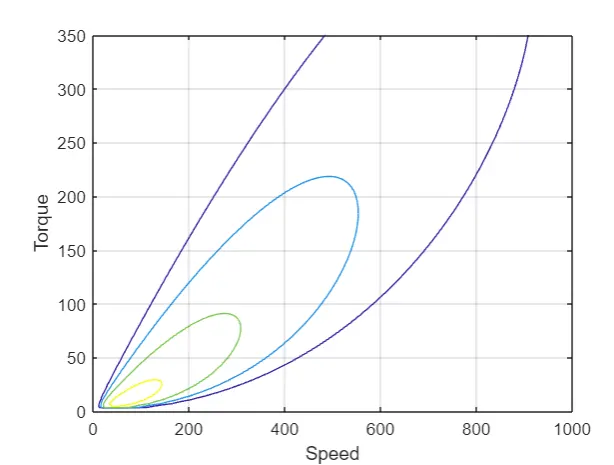
3) Make a MATLAB program which plots contour of given motor speed, torque and efficiency values. Attach the code as a .m file attach a screenshot of all the plots.
MATLAB program:
% Start of MATLAB program

clc
clear all
close all

s=linspace(0,1000);
t=linspace(0,350);

kc=0.5;
ki=0.09;
kw=0.0001;
c=10;

[x,y]=meshgrid(s,t);
output_power=(x.*y);
cu=kc.*(y.^2);
I=ki.*x;
w=kw.*(x.^3);

input_power=output_power+cu+I+w+c;
z=output_power./input_power;

v=[0.70,0.75,0.80,0.85,0.90,0.95];
contour(x,y,z,v);
grid on
xlabel('Speed')
ylabel('Torque')

% end of MATLAB program