Week 11 Challenge
CREATING WIDGET FOR QUALITY CHECK
OBJECTIVE:
To create macro for display failing 2D and 3D elements and to create temp nodes to visualize elements.
PROCEDURE:
To check elements quality criteria hypermesh provides various commands. Using this command failing elements can be easily identified.
STEPS TO IDENTIFY AND CREATE TEMP NODES:
- Create mark for displayed elements.
- Use element test command for respected quality criteria and save failed elements on separate mark ID.
- Marked elements masked and reversed to get only failed elements on display.
- Create temp nodes for displayed nodes.
- Using command “llength” no of failed elements has been get.
TK SCRIPT:
PROCEDURES:
Check_3_cat:
This procedure takes input for name and quality criteria. Tet collapse is set as name and criteria value inputted as criteria. Procedure will execute and provide temp nodes for elements which fails tet collapse.
Check_4_cat:
This procedure check quality criteria which has 4 inputs like warpage, aspect, skew. Inputs are name of quality check, criteria value, dimension. It will create temp nodes for 2D or 3D elements as respect to inputted value.
Check_5_cat:
This procedure check quality criteria which has 5 input like length. To find min and max length for elements, criteria, selection of min or max, command name. Procedure will return no of failed elements.
2D:
This procedure will select panel to 2D mode. Every selection criteria button in this selection will evaluate 2D elements.
3D:
This procedure will change panel to 3D elements. Each check button will provide failed 3D elements.
Check command buttons:
This button will execute various quality check. Each button has created TCL command to select element check, quality criteria, min or max mode, dimension. Final no of elements store in a text variable to represent on entry box.
TCL COMMAND:
*elementtest(Quality) entitytype mark_ID Quality_criteria markI_D Dimention Min/Max Quad_Tria Contour
*elementtestwarpage -Check warpage for elements.
*elementtestaspect -Check aspect ratio of elements.
*elementtestskew -Check skew anlge of elements.
*elementtestlength -Check Min/Max length with respect to selection.
*elementtestinterangle -Check Min/Max angle for Quad/Tria with respect to selection.
*elementtesttetcollapse -Check tet collapse for 3D elements.
SAMPLE IMAGES:
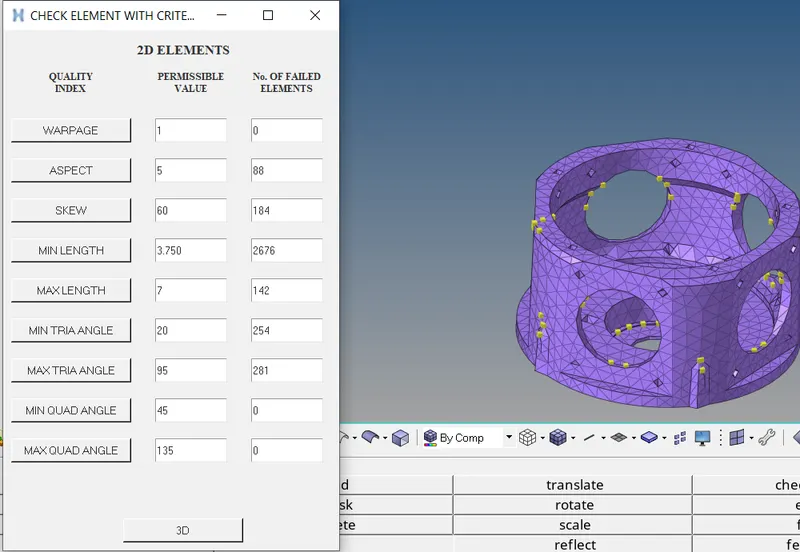
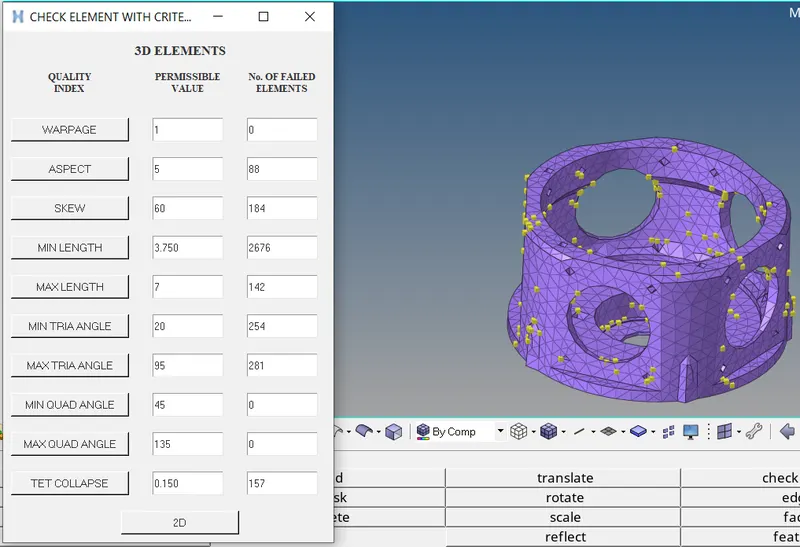
RESULT:
This TCL command creates widget with entry boxes and buttons which will creates temp nodes on failing elements. Button named 2D/3D will change button settings from one to another.