Week 1- Mixing Tee
Aim :- To setup steady simulations in Ansys using a mixing Tee joint , one shorter and the other longer to compare the mixing effectiveness when hot inlet temperature is 36°C and cold inlet is at 19°C.
Introduction :- Computational Fluid dynamics is a branch of Fluid mechanics which uses mathematics, physics and computational software to visualize how fluid flows. A mixing Tee joint is used to provide proper mixing of quantities to provide the desired result at the outlet.By varying the velocity of the chilled air at the inlet we can get the desired temperature at the outlet.Mostly we can see Mixing Tee in air conditioners.
Theory :- Mixing is a unit operation that involves the manipulation of a heterogeneous physical system with an intent to make it more homogeneous.Mixing is performed to allow heat and/or mass transfer to occur in between one or more streams, components or phases. Modern industrial processing almost involves some form of mixing. Mixing Tees utilizes a specifically engineered internal geometry to efficiently mix two fluid streams into one combined stream. Mixing Tees are widely used in the petrochemical,HVAC industries etc.Hot air flowing in the pipe is mixed with cold air flowing in Tee. The standard deviation of temperature is computed to quantify the degree of mixing. The velocity and temperature fields are also computed. The effects of the mesh size, turbulence model on the results were examined.
Momentum ratio :- Momentum ratio is defined as the velocity at the cold inlet to the velocity at the hot inlet.
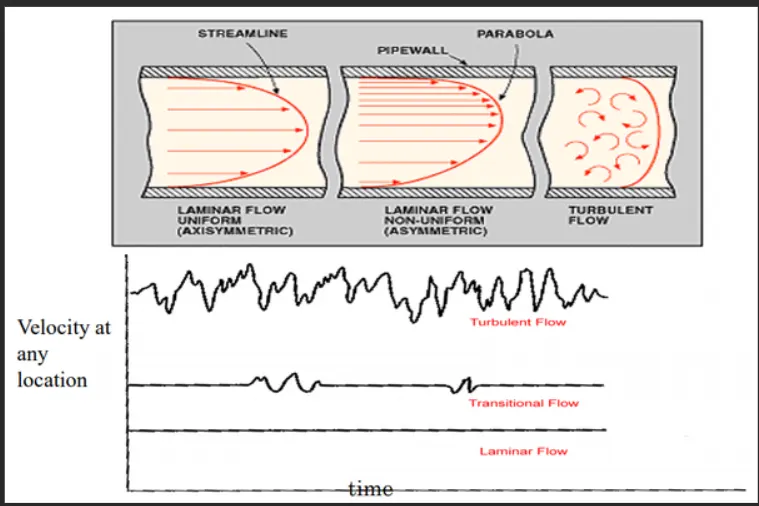
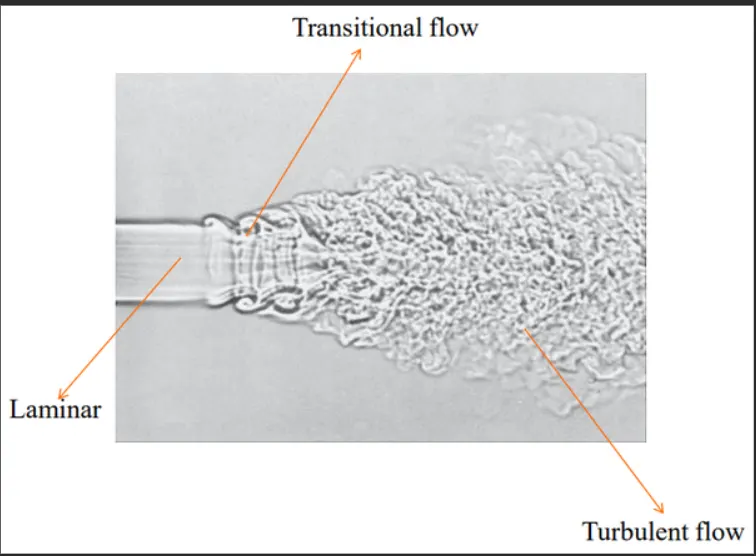
Turbulence :- Turbulence is an irregular fluid motion in which the various quantities show a random variation with time and space coordinates, so that statistically distinct average values can be discerned. Turbulence is there dimensional and characterized by high level of fluctuating vorticity. It often originates as an instability of a laminar flow.
Convergence :- When our simulation has no change after certain iterations or timesteps, then we can consider that the solution has reached a steady state i.e converged (Even if we run further, we will not be able to see any change in the case).
Solving and Modelling approach :- Ansys fluent is an important tool in CAE domain, which allows us to perform all three major steps of any simulation.Pre-processing, Solving and Post processing.Ansys Fluent facilitates for modelling flow, turbulence, heat transfer and chemical reactions.
Case1)
- Short mixing Tee with a hot inlet velocity of 3m/s.
- Momentum ratio of 2,4.
Case 2)
- Long mixing Tee with a hot inlet velocity of 3m/s.
- Momentum ratio of 2,4.
Use the k-epsilon and k-omega SST model for the first case and based on your judgement use the more suitable model for further cases.
In a table we compare the following values from two cases.1) Cell count 2) Average outlet temperature 3) Number of iterations for convergence.
Expected results :-
1) Velocity and temperature contour plots on the cut planes along and across the pipe.
2) Velocity and temperature line plots along and across the length of the pipe.
3) Perform Mesh independent study for any one case.
4) Discuss the effect of length and momentum ratio on results.
5) For each simulation we shall show the convergence plots.
Pre-Processing and Solver setting :-
Case1:- Short mixing Tee
hot inlet velocity = 3m/s, cold inlet velocity = 6m/s (since Momentum ratio = 2)
- First we have to open Ansys workbench and click and drag Ansys Fluent and click on Geometry to clean the body that means we need to convert mechanical body to desirable CAD model.
- For this we use spaceclaim to make CAD model.
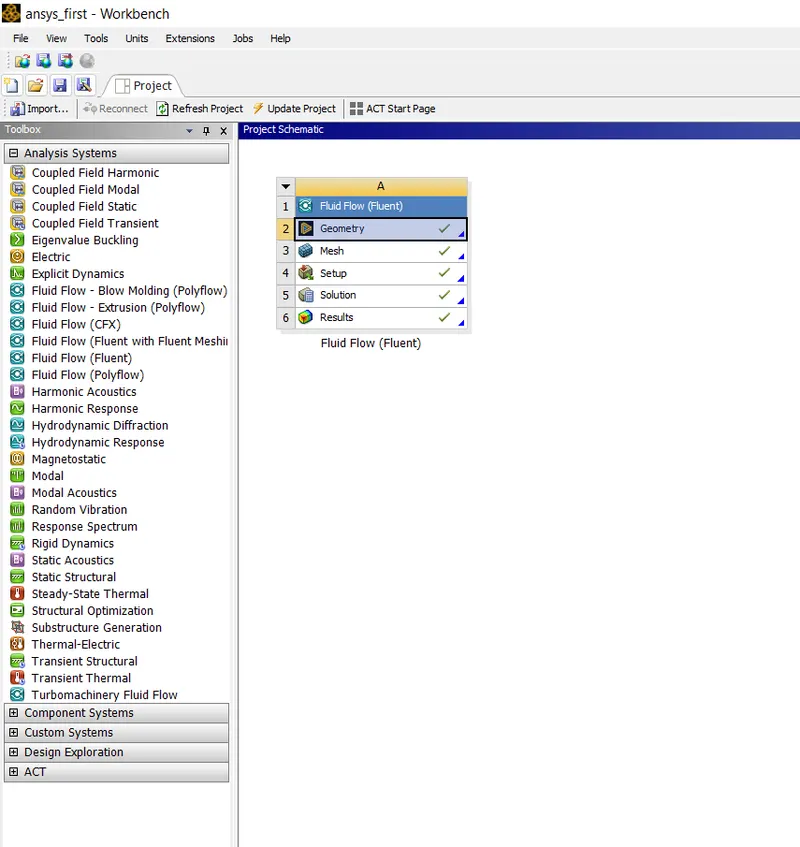
- Double click on the geometry and open the required mechanical model of Mixing Tee and then remove the edges and surfaces which we don't consider for the study i.e suppress the physics on the mechanical model to make it a CAD model so that we require only the surfaces and the CAD body to study specificly.
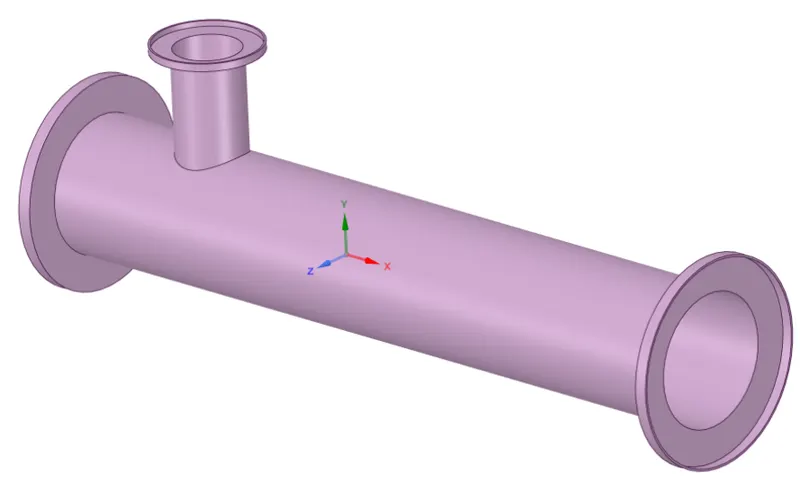
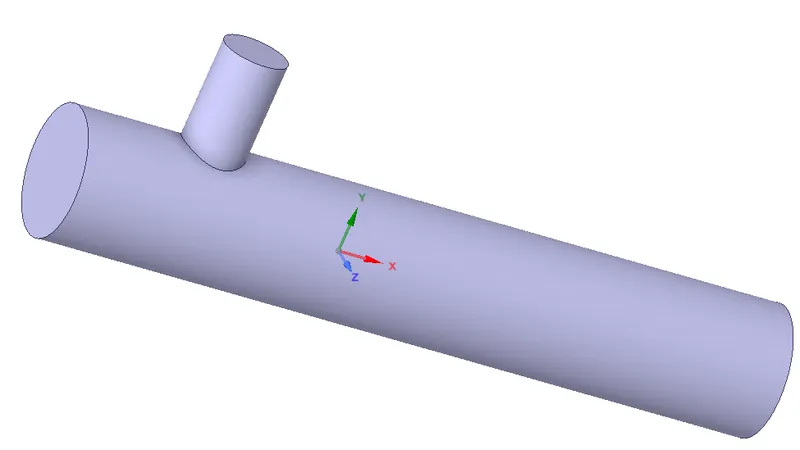
Meshing :-
- Double Click on meshing model and select outer faces of the model to name them.
- Now select the faces and right click and name them as inlet-x,inlet-y,outlet,walls etc.
- Now click on mesh and generate mesh according to some predefined criteria.
- Section plane can be created to see inner portion of geometry.
- Select the option element quality to see,how many elements are defying the quality and make sure that the quality is not less than 5%.
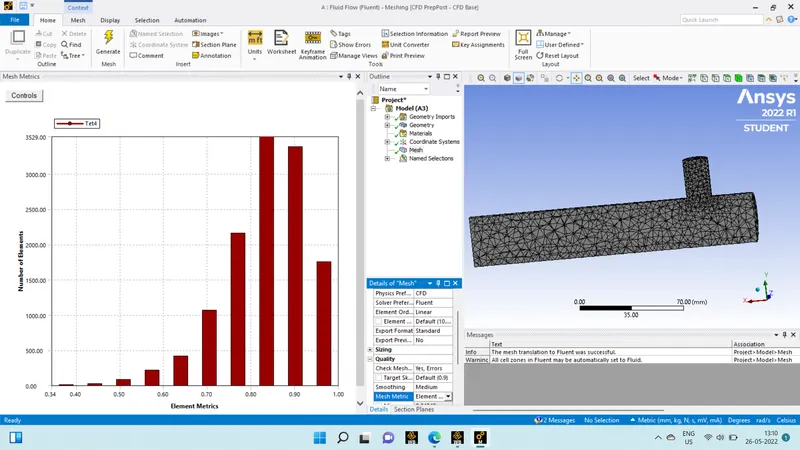
Now exit the mesh and open Setup.
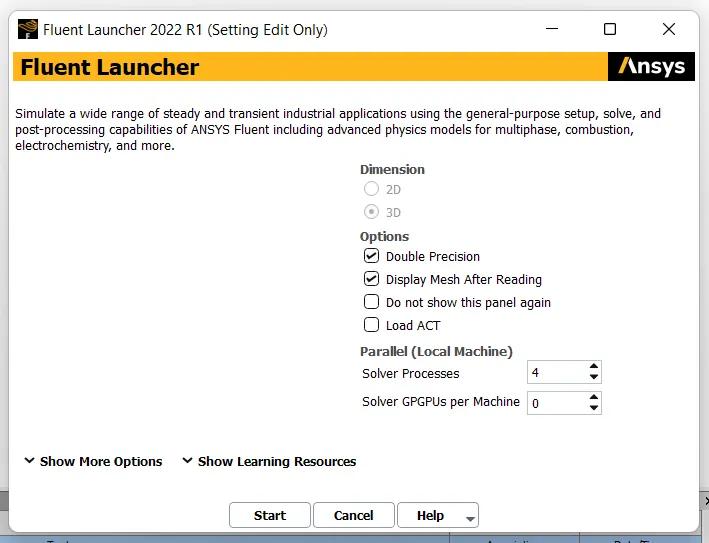
- After opening fluent launcher check the options for double precision and display mesh after reading.Solver processes can be set from 1-4 and then click on start.
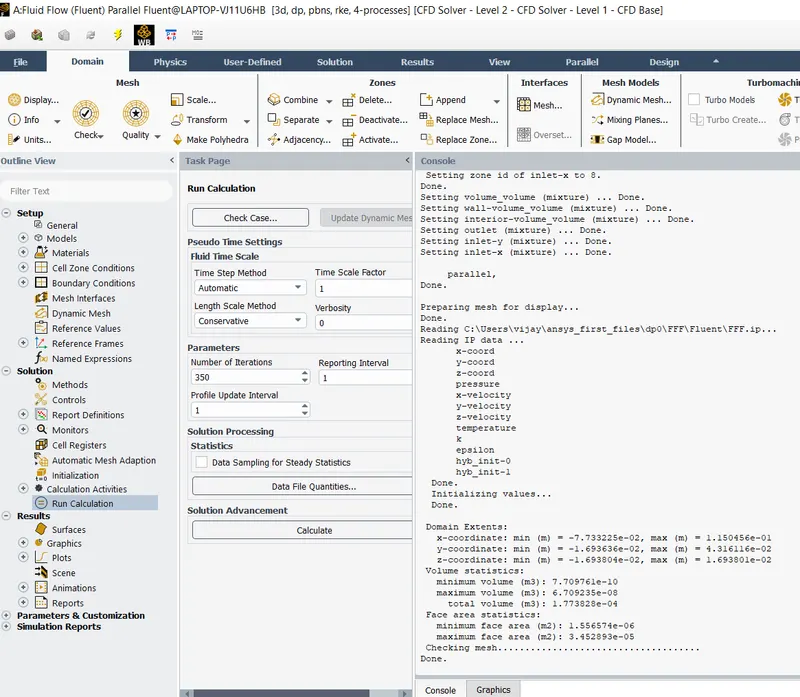
- Check the mesh for any errors and if no error we can proceed further.We are going to do steady state simulation(time),pressure based and Absolute velocity formulation.(Solver settings)
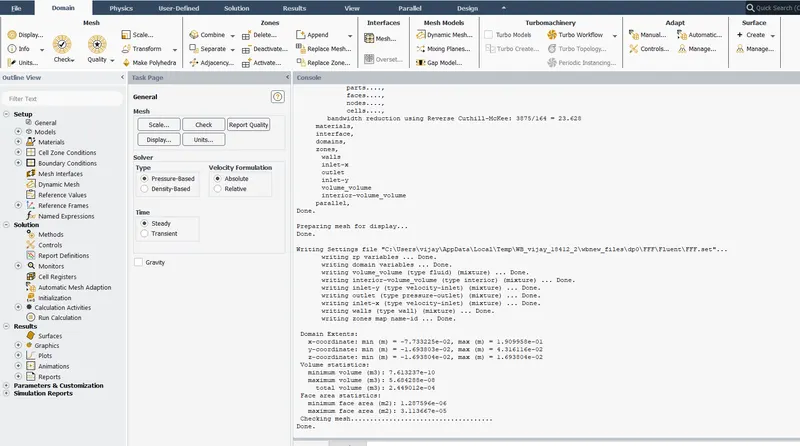
- Now go to Physics Menu and click on energy as we are using energy equation and select viscous model and select realizable k-epsilon model and close it.
- Click on material and choose air as working fluid.(by default air is the working fluid)
- Now go to zones and and click on cell zones and check whether the fluid is air.
- Now go to boundaries and select inlet-x(hot fluid) and click on edit and set velocity magnitude = 3m/s and go to thermal parameter and set temperature as 36C,similarly for inlet-y(cold-fluid) velocity = 6m/s and temperature as 19C.
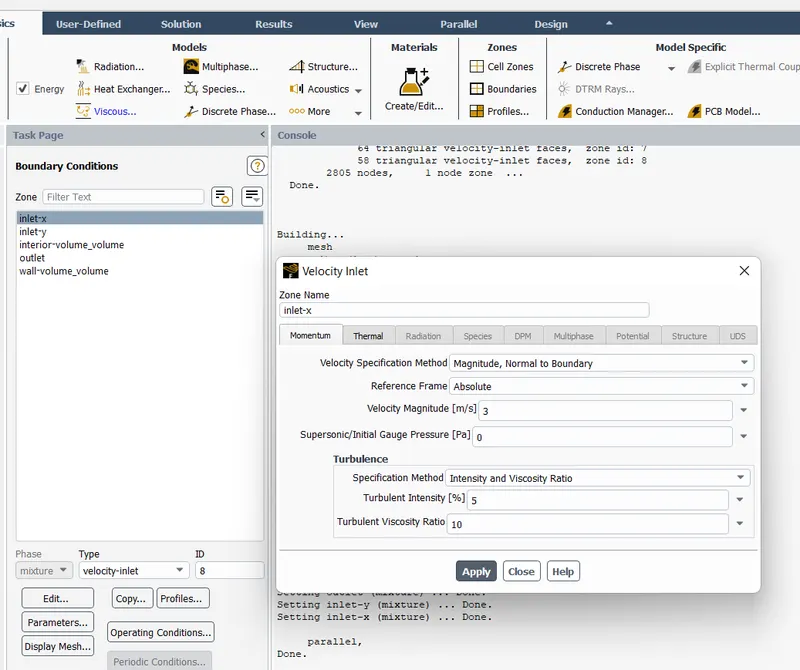
- Now for the momentum ratio of 4 change the cold inlet velocity to 12m/s.(another sub-case)
- We have to generate temperature report of outlet and we want standard deviation of temperature.Go to solutions tab and select definition and select area weighted average,now set temperature as field variable and repeat the same procedure for standard deviation of temperature.
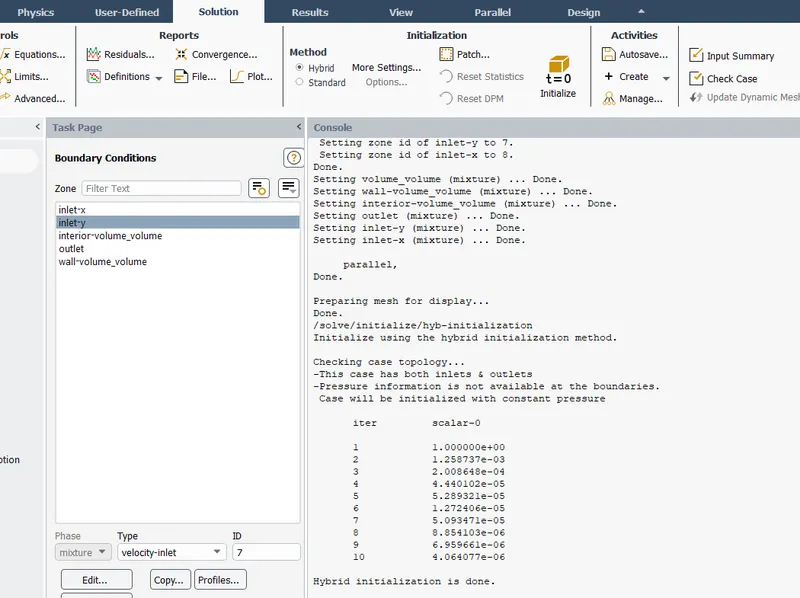
- Now click on initialization to calculate approximate values of velocity and pressure
Give the number of iterations and click on calculate.Change the number of iterations until convergence occurs.Note down the number of iterations where the convergence occurs.NO.of cells = 12613 tetrahedral cells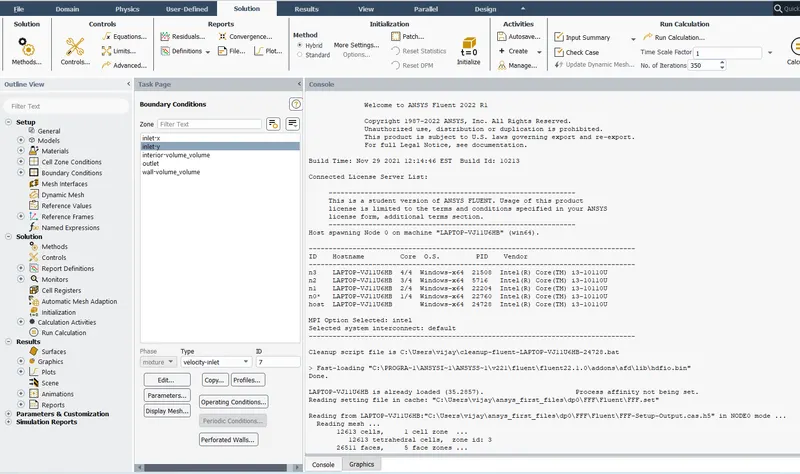
- Checking the mesh
- Hybrid initialization done before calculation.
After 319 iterations our solution is converged.
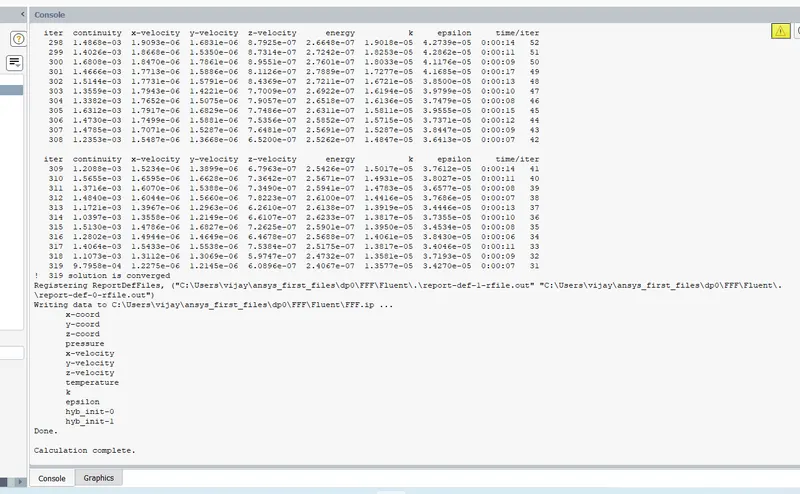
- Residuals
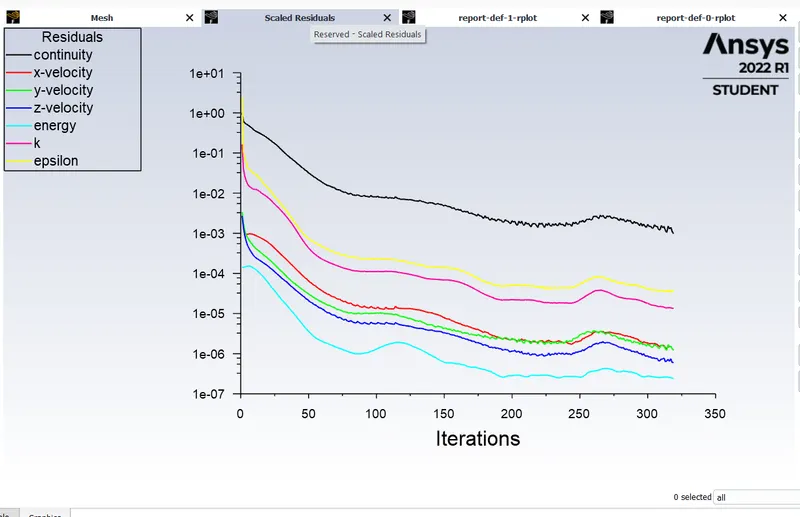
- Average temperature vs iterations
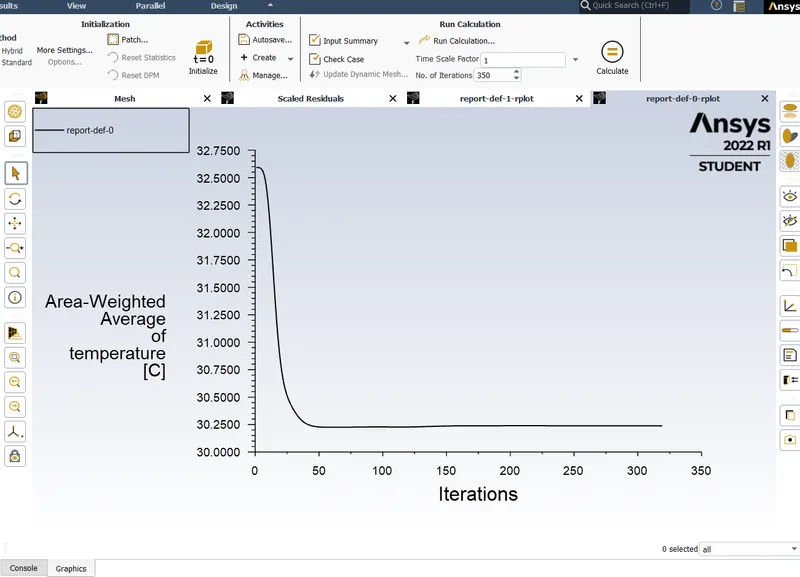
- Standard deviation of temperature vs Iteration
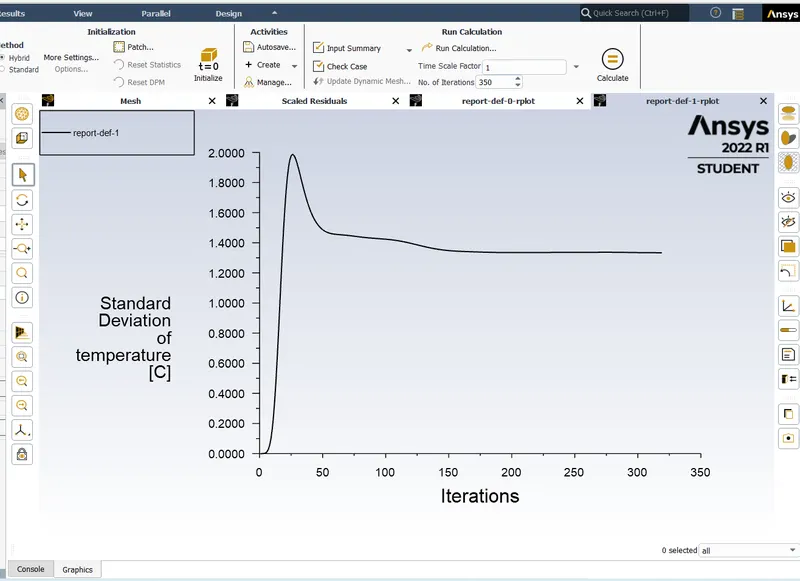
- Exit the Setup and double click on Result to open CFD post.Check boxes to see walls and other parts.Click on walls and go to Render and set higher transparency (> 0.8 ) and change the colour to white to observe clearly.
- Now insert an XY plane in wall by clicking on plane in location option of insert.
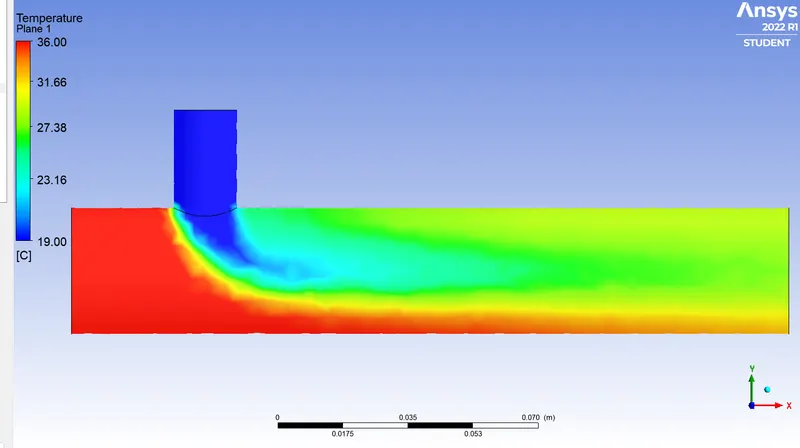
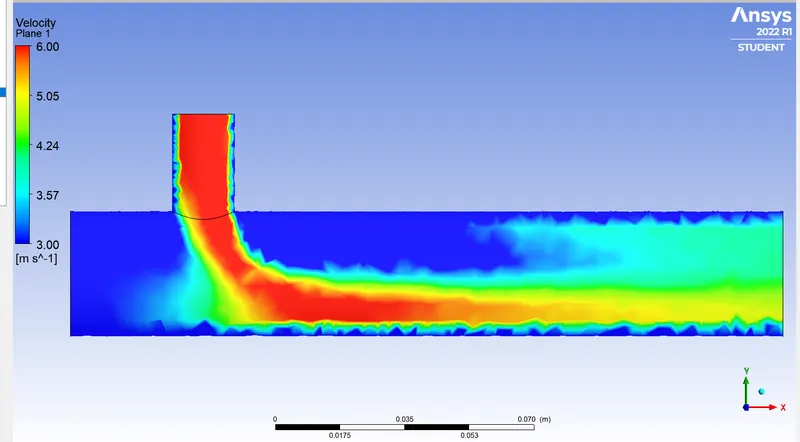
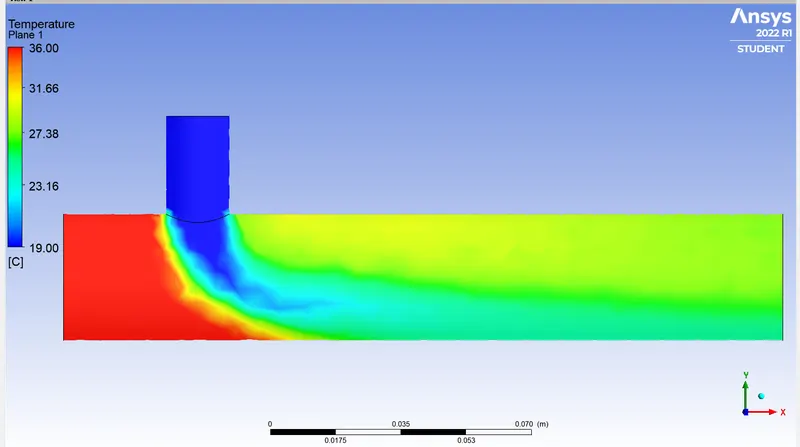
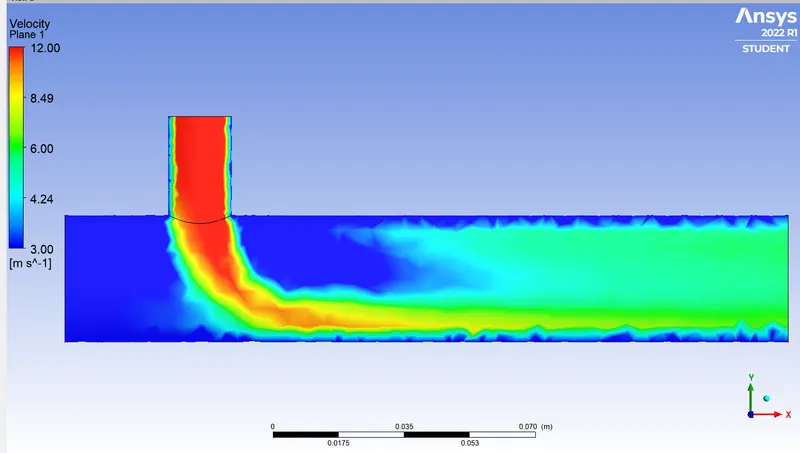
- Go to colour of plane and change it by variable (choose option temperature).Similarly velocity contours can be created by just changing variable as velocity.
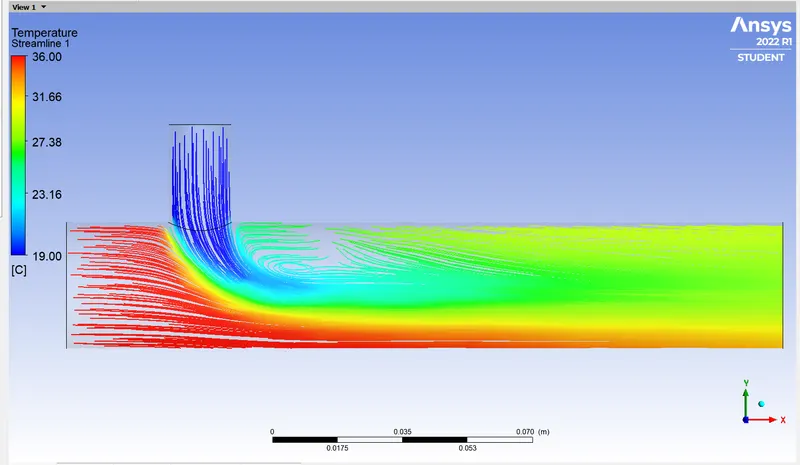
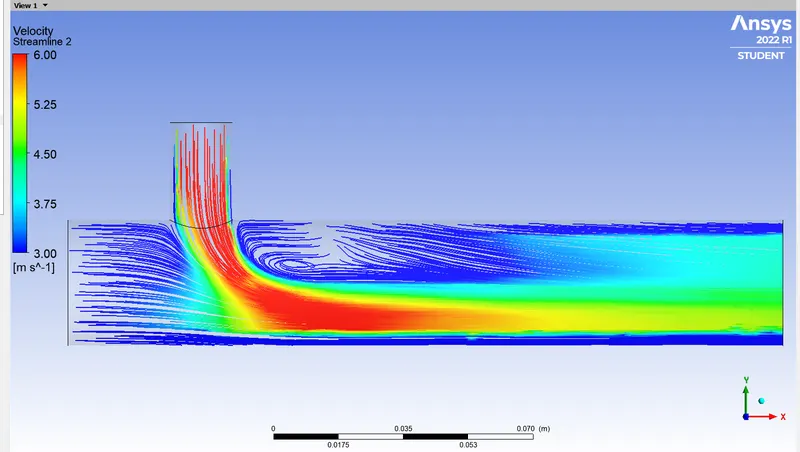
- Right click on plane which we created and select streamline.Go to appearance and select temperature to see plot line on plane.Repeat the same procedure for velocity plot line.
Temperature Contour:-
Velocity Contour:-
Temperature Streamline:-
Velocity Streamline:-
Results for Momentum ratio = 4 (i.e cold inlet velocity = 12m/s):-
- Area weighted average temperature:- Standard deviation of Temperature:-
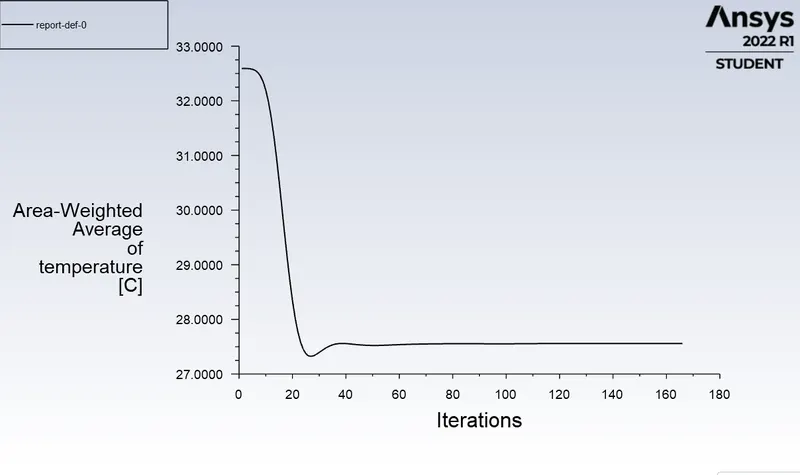
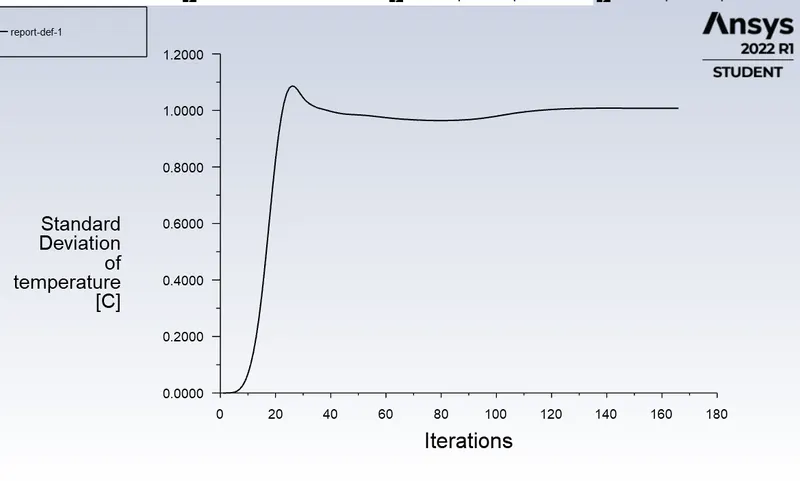
- Temperature Contour plot:- Velocity Contour plot:-
Temperature streamline :- Velocity streamline :-
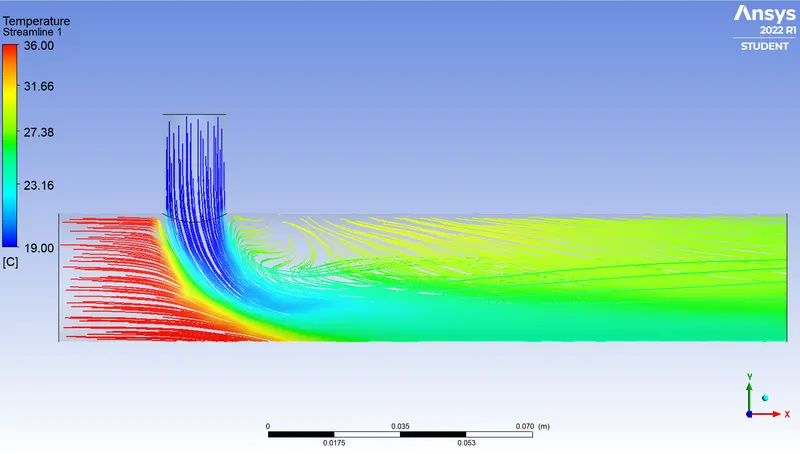
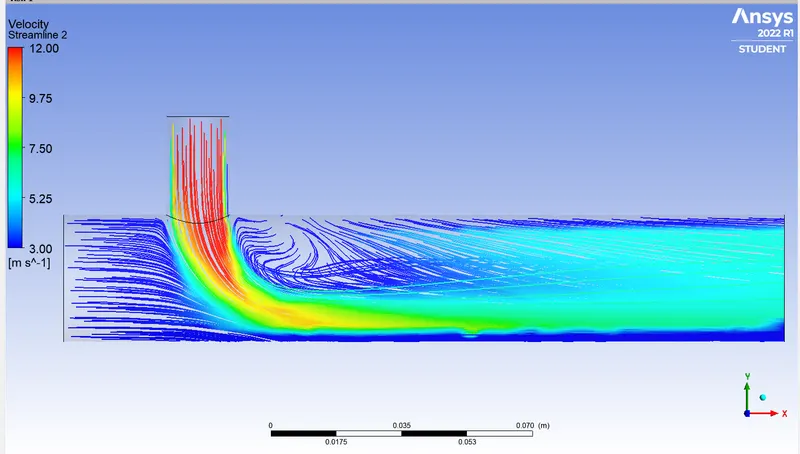
Case2 ) Results for Long Mixing Tee :- (when the momentum ratio =2)
- Quality of mesh :-
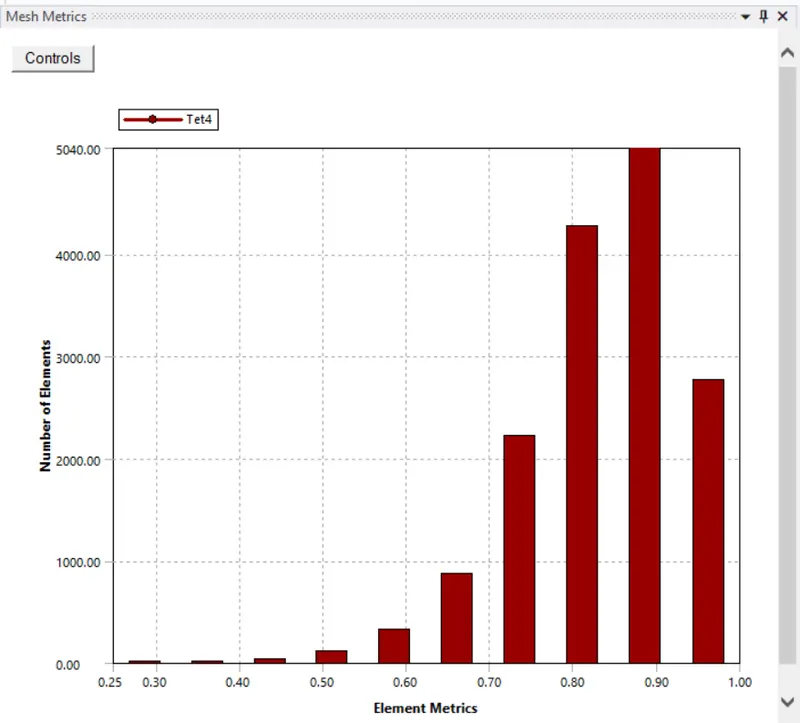
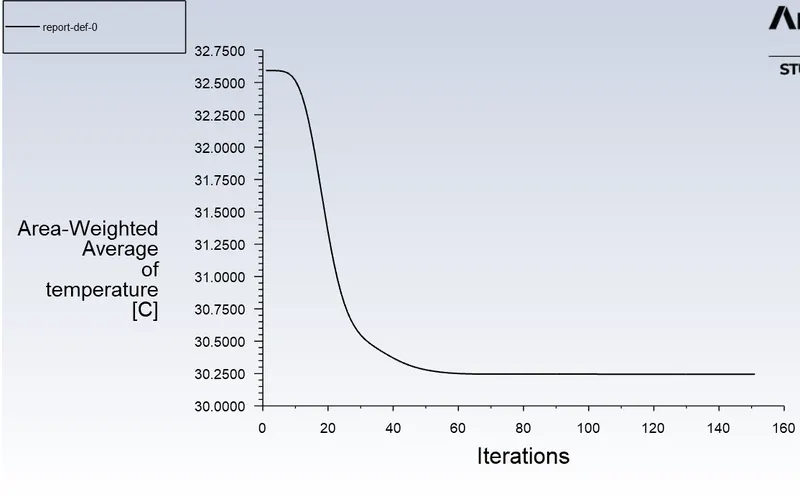
Area weighted average temperature:- Standard deviation of temperature
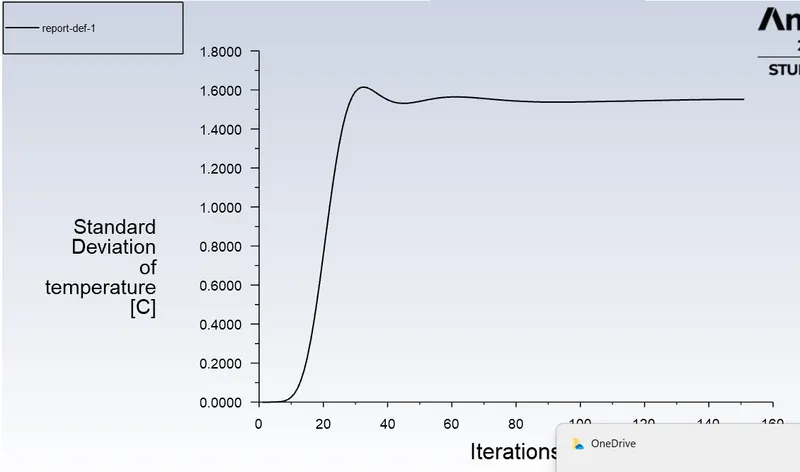
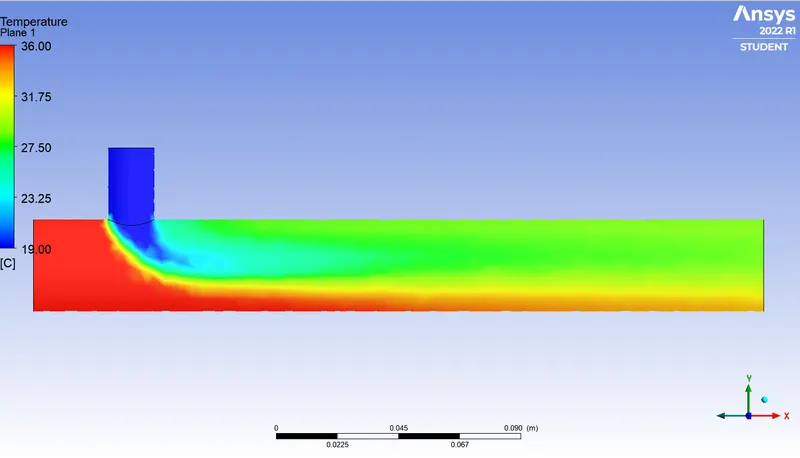
Temperature contour plot:- Velocity contour plot
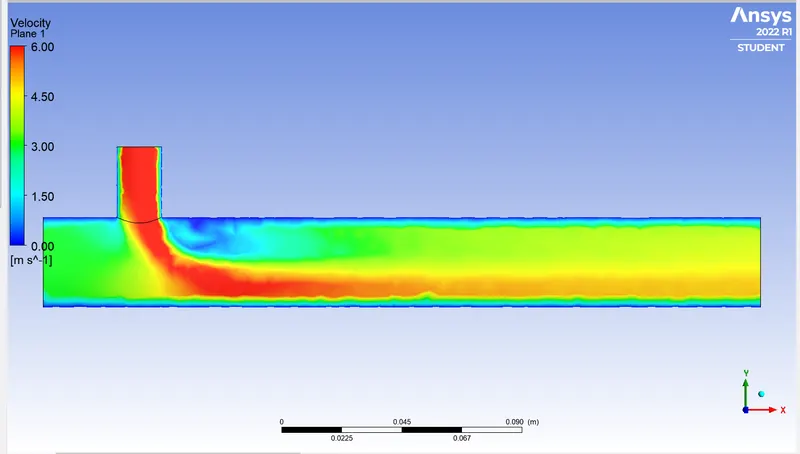
Temperature streamline :-
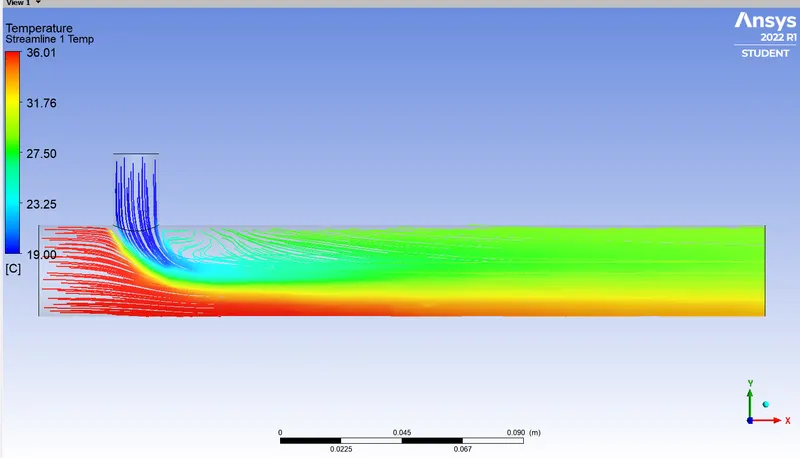
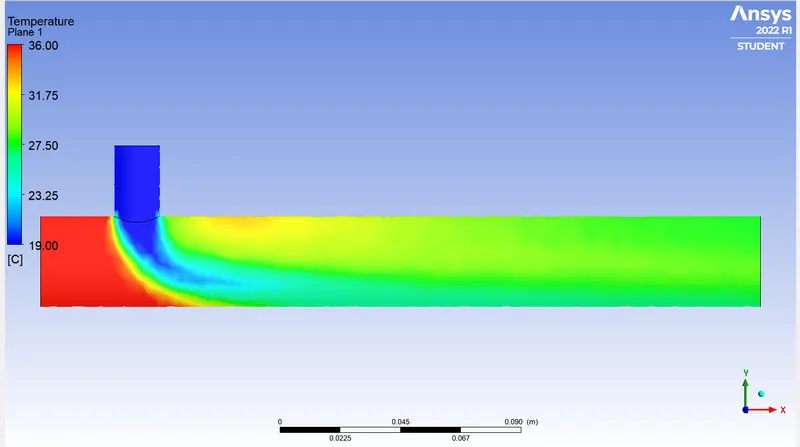
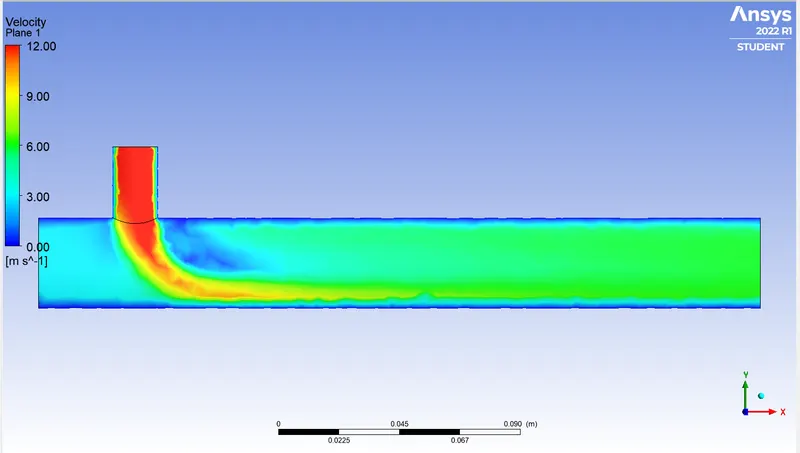
When the momentum ratio=4
Area weighted average of temperature Standard deviation of temperature
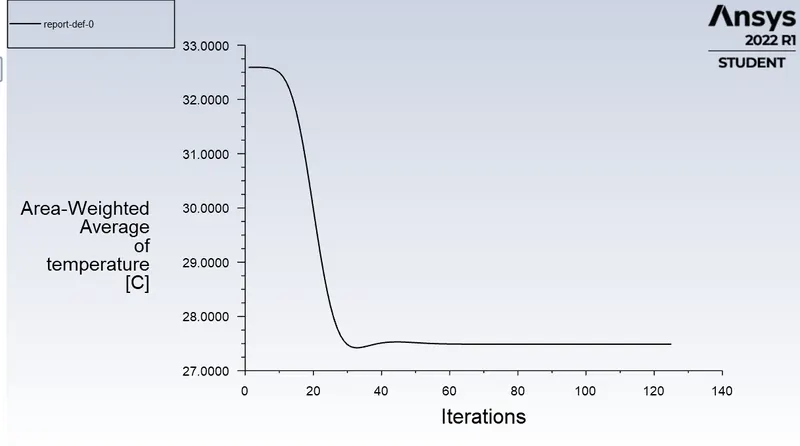
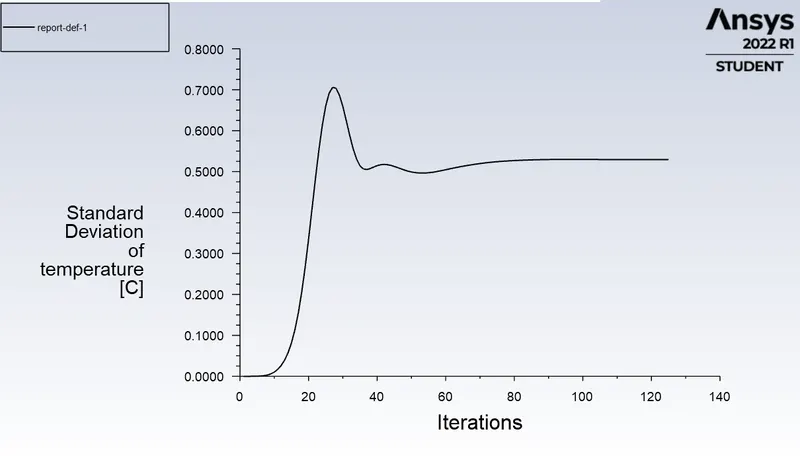
Temperature contour Velocity contour
Temperature Streamline Velocity Streamline
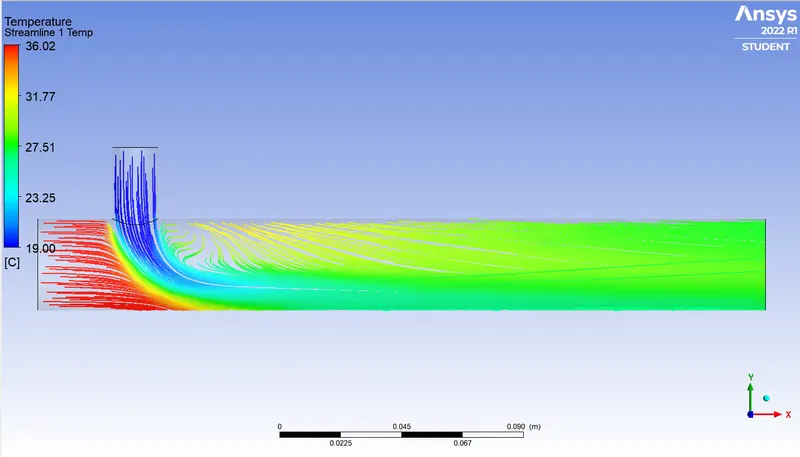
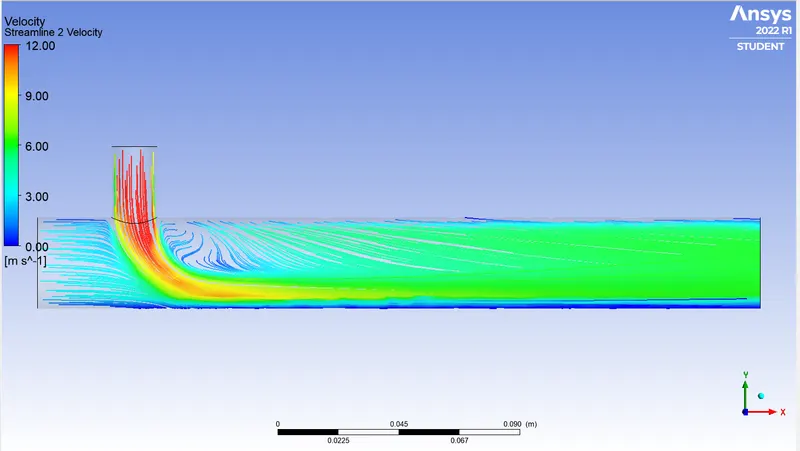
Short Mixing Tee joint Long Mixing Tee joint
| Cold Inlet velocity | 6m/s | 12m/s | 6m/s | 12m/s |
| Cell count | 12613 | 12613 | 15635 | 15635 |
| Average outlet temperature | 30.2°C | 27.5°C | 30.2°C | 27.5°C |
| No. of Iterations for Convergence | 319 | 166 | 151 | 125 |
There is no convergence in the k-omega turbulence model ,that's why k-epsilon is prefferable for all cases.
Conclusions:-
- The average outlet temperatures on both the long mixing Tee and short mixing Tees are same.
- As the momentum ratio increases the cold inlet fluid velocity increases and due to high relative velocity between the fluid it experiences higher turbulence and so the outlet fluid temperature decreases.Higher the momentum ratio lower will be the outlet temperature.
- Inorder to obtain better mixing the inlet velocity of cold fluid is important.By increasing the cold fluid velocity the outlet temperature decreases.
- The Longer Tee's mesh quality is less compared to the short Tee, hence short Tee is preferable.(also more size higher will be the cost)
- Under mesh independent study we come to conclude that the lower mesh size gives more accurate results but it doesn't affect the results in a great extent.Mesh refinement won't affect the result.
- Ansys Fluent is high performance CFD software recognised for accuracy, robustness etc.It has various applications like simulation of calculation of air flow on a air craft wing, combustion in furnace, bubble columns in oil refineries etc.