Week 1 : Exploring the GUI of GT-POWER
JORGE LOZANO
IC Engine Calibration using GT-POWER and GT-SUITE
Exploring the GUI of GT-POWER
Objective:
- Explore the GUI of GT SUITE and list down modules available with brief description.
- Locate following settings:
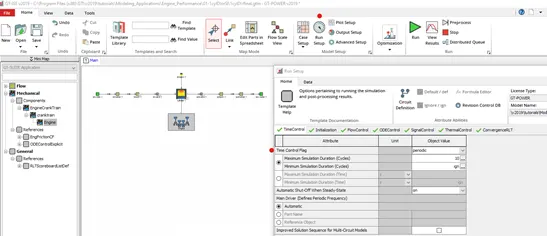
- Time control flag
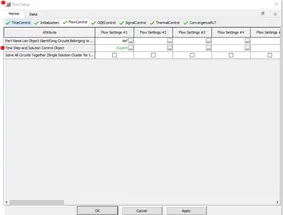
- Time step and solution control
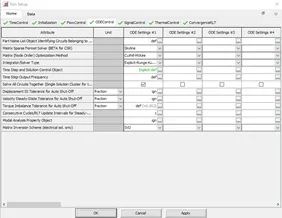
- Integrator/Solver type
- Explore intercooler tutorial and note down all settings of:
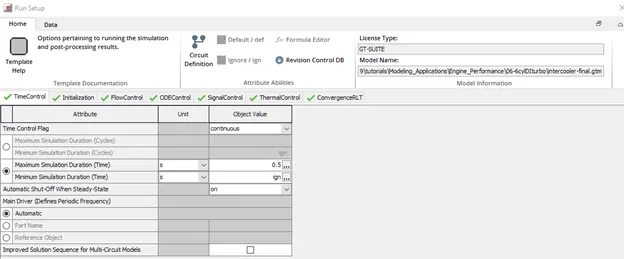
- Run setup
- Advanced setup
- Plot setup
- Output setup
- Problem:
Given
- Diameter of cooler inlet and outlet pipe= 50 mm
- Length of the CAC= 1000 mm
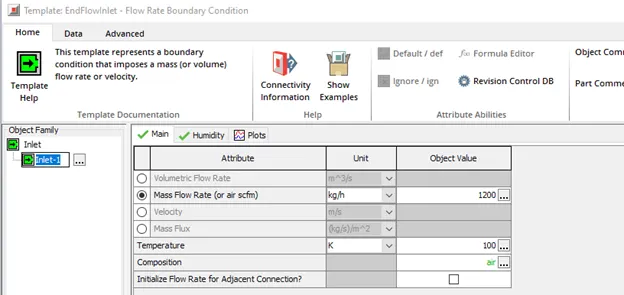
- Inlet mass flow rate = 1200 kg/ h at 100 degC
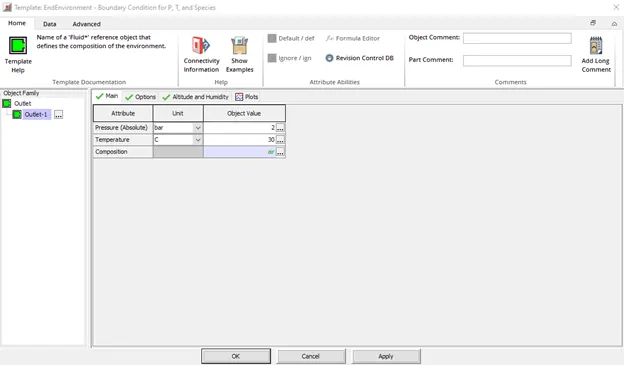
- Outlet pressure 2 bar at 30 deg C
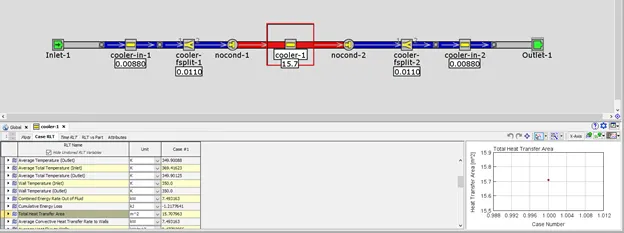
- Calculate the total heat transfer at Charge air cooler (CAC)
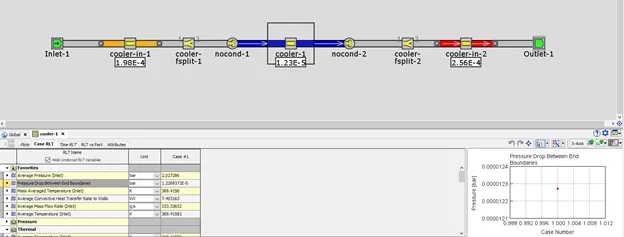
- Calculate pressure drop across CAC
From Concept Design to Detailed System Analysis
GT-SUITE is the industry-leading simulation tool with capabilities and libraries aimed at a wide variety of applications and industries.
It offers engineers functionalities ranging from fast concept design to detailed system or sub-system/component analyses, design optimization, and root cause investigation.
Why You Should Choose GT-SUITE
Industry’s Tool of Choice
- It is recognized worldwide as the Industry Standard for system simulations
- Used by most leading OEMs and suppliers
- Highly acclaimed
Multi-Physics Platform
Modern Software with Unique Capabilities
Enterprise-Level Capabilities
High Productivity and Cost Advantage
- Explore the GUI of GT SUITE and list down modules available with brief description.
GT-SUITE is packaged in the form of three licensing options:
Gt-Suite: Contains all GT libraries and capabilities. The ideal choice for full vehicle design and analysis, GT-SUITE offers an all-inclusive package that provides an important cost advantage to users.
Gt-Power: The industry-leading software for engine simulation with a detailed cylinder model and combustion analysis.
Gt-Suitemp: Serves as a multi-physics platform to construct models in a wide range of applications including Cooling Systems and Thermal Management, Vehicle and HEV Fuel Economy, Hydraulics and Pneumatics, and many more.
Tools:
GT-AutoLion– Integrate AutoLion battery models directly into GT-SUITE’s electrical and thermal domains
GT-POWER-xRT – Tool dedicated to running detailed GT-POWER engine models on MiL/SiL/HiL platforms
GT-SUITE-RT – Run GT-SUITE models on HiL platforms
GT-Automation – A time-saving enterprise package that allows simulation engineers to write Python code to manipulate GT models programmatically
GT-AutoLion-3D – A 3D battery modeling capability that allows battery cell designers and buyers to study important factors that determine a battery’s performance, capacity, and longevity.
GT-TAITherm – Perform fast 3D cabin comfort analysis with a special version of TAITherm packaged directly inside GT-SUITE
Advanced Combustion Toolset: A collection of productivity tools for combustion analysis that enable both increased model fidelity and faster runtimes
GT-RealDrive: Simulate vehicle models on real-world routes including traffic density, traffic signals, and speed limits
GT-CONVERGE – Built-in 3D CFD supporting co-simulation or stand-alone analysis, both transient and steady-state
GT-SPACECLAIM – CAD model building and preparation
GT-Linearization – Linearization of models for controls development
Models:
Lithium-Ion Battery – dynamic battery model
Electric Motor – dynamic motor model sub-licensed from JMAG
FRM Engine Database – set of 23 fast-running engine models representative of modern engines
2.Locate following settings:
- Time control flag
- Time step and solution control
- Integrator/Solver type
- Explore intercooler tutorial and note down all settings of:
- Run setup
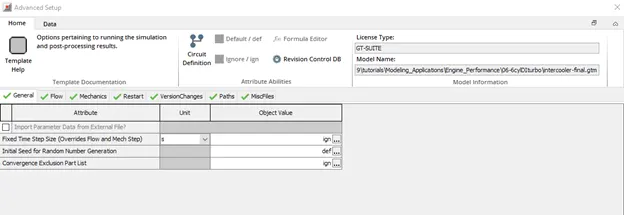
- Advanced setup
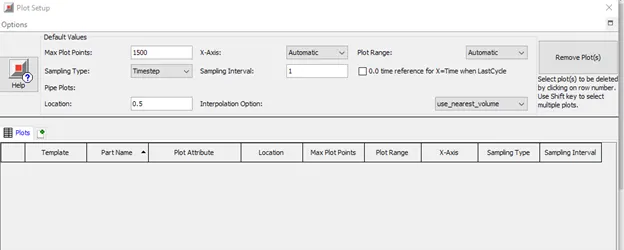
- Plot setup
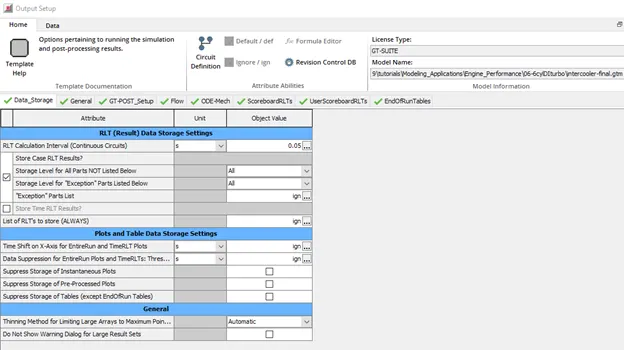
- Output setup
- Problem:
Given
Diameter of cooler inlet and outlet pipe= 50 mm
- Length of the CAC= 1000 mm
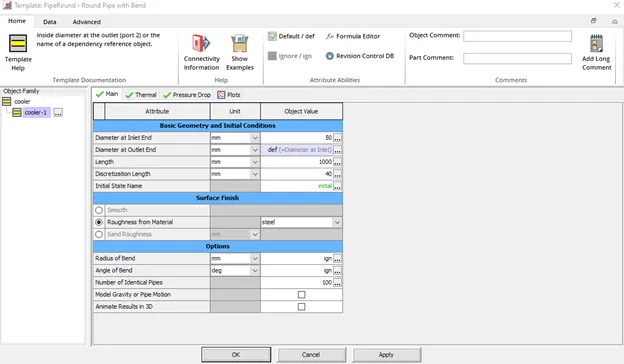
- Inlet mass flow rate = 1200 kg/ h at 100 degC
- Outlet pressure 2 bar at 30 deg C
Calculate the total heat transfer at Charge air cooler (CAC)
Calculate pressure drop across CAC
Conclusion:
- Knowledge of the GT-Suite GUI software was introduced, getting to explain the modules, tutorials and models contained.
- Able to run a 1D simulation obtaining a Overall HT and pressure drop value results.
- Intercooler engine modification and simulation performed.
Reference: