Week 1 Challenge - Introduction to MATLAB and Basics of Structural Engineering
CHALLENGE 1
HOWE TRUSS:
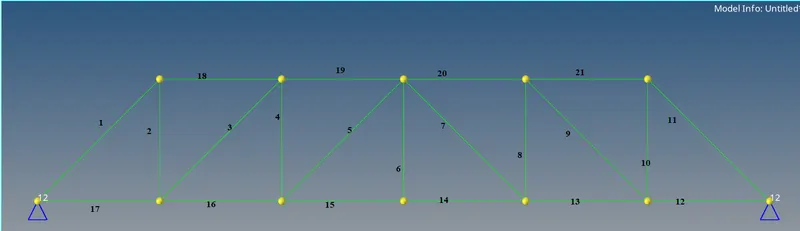
a)Howe truss is created with 2 hinge supports and links is shown below.
Assumptions:
All line members have to uniform cross sections.
Joints are rigid.
Hinges can lock horizontal and vertical movements.
b) Model definitions:
No. of links (m)=21
No. of joints (j)=12
Hinge links*2=> r=4
Here, m+r=25 and 2j=24
m+r>2j.
c) Structure is Internally indeterminate. By force method equation, the truss is Indeterminate.
Indeterminate:
One in which the number of unknown forces and reactions exceeds the number of equilibrium equations.
d)Externally stable:
Yes, the Truss member shown above is externally stable. It has 2 hinge supports that prevent external motions.
e)Internally stable:
No, by force equations (m+r>2j).
f)Structure is indeterminate.
Kinematic degree of indeterminacy :3j-r-m => 3(12)-4-21 => 11
Static degree of indeterminacy :m+r-2j=>21+4-2(12)=>1
g) Does your answers to the above questions remain the same for the below given coplanar truss:
No, this structure is unstable.
No. of links (m)=6
No. of joints (j)=5
Hinge links+roller support=> r=3
Therefore,
m+r=9
2j=10
m+r<2j
The structure is unstable.
MATLAB PROGRAM:
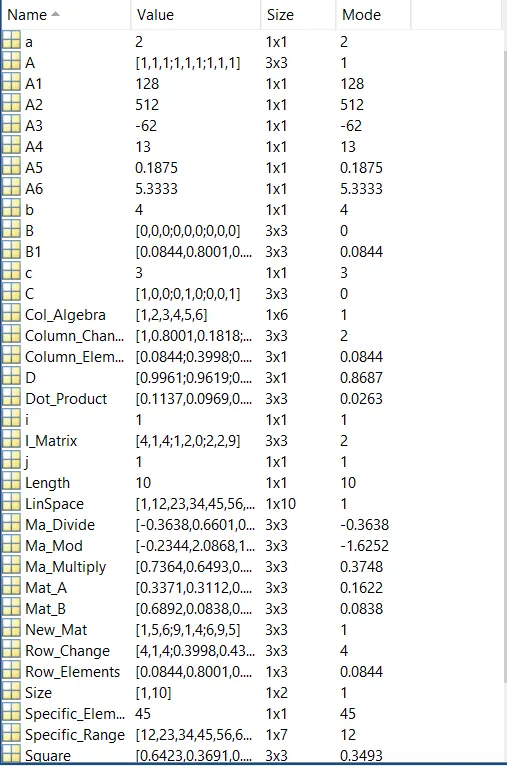
2.Create a Matlab script and assume variables a,b,c. Assign random numbers for variables a,b,c. Perform mathematical operations as listed below and list the answers.
a=2;
b=4;
c=3;
%Mathematical operations
A1=a*b^c;
A2=(a*b)^c;
A3=a-b^c;
A4=a^b-c;
A5=a^b\c;
A6=a^b/c;
3.Perform Matlab script operations to create a row vector and perform the following:
%Understanding vector algebra
Col_Algebra=(1:2:3:4:5:6); %list
LinSpace=linspace(1,100,10); %Linspace
Length=length(LinSpace); %Length to find no. of elements
Size=size(LinSpace); %list row and column value
Specific_Element=LinSpace(5); %Specific element in list
Specific_Range=LinSpace(2:8); %Get elements for specified range
Transpose=LinSpace' %Transpose matrix
4.Create a matrix with m rows and n columns A and B and perform the following commands
%Matrix Operations
Mat_A=rand(3)
Mat_B=rand(3)

Ma_Multiply=Mat_A*Mat_B %Cross multiplication for matrix
Ma_Divide=Mat_A/Mat_B  %Matrix divide
Ma_Mod=Mat_A\Mat_B %Matrix inverse and divide
Square=Mat_A^2  %Perform Mat_A cross multiplication
Val=Mat_A^2-Mat_A*Mat_A %Justifies '^' operator perform cross multiplication
Dot_Product=Mat_A.^2
Val2=Mat_A.^2-Mat_A^2 %Proof that dot product and cross product are different
5.Create a Matlab script to understand the standard commands to create standard matrices
%Creating Matrices
A=ones(3)       %Creating matix with 1 for given range
B=zeros(3)      %Creating matrix with 0 for given range
C=eye(3)        %Creating diagonal matrix
D=diag(rand(3)) %Creating diagonal values as matrix.
6.create a Matlab script to perform selecting and changing parts of matrices:
%Accessing elements in matrix
B1=rand(3)
i=input('Enter row for access and replace (1~3)') %Input from user to select row
j=input('Enter column for access and replace less than (1~3)') %Input from user to select column.
%If user inputted value greater or lesser than permissible value.
if i<1|i>3
    i=3
end
if j<1|j>3
    j=3
end
Row_Elements=B1(i,:) %User selected row will be assigned to Row_Elements
Column_Elements=B1(:,j) %User selected Column will be assigned to Column_Elements

%Changing elements
I_Matrix=round(rand(3)*10) %Temp matrix
Row_Change=B1 %B1 matrix assigned to Row_Change
Row_Change(i,:)=I_Matrix(1,:) %Row values are changed.
Column_Change=B1 %B1 Matrix assigned to Column_Change
Column_Change(:,j)=I_Matrix(:,2) %Column value changed.
CONCLUSION:
Matlab codes are created for a given tasks and outputs are verified.