Week 1 Challenge
Q1.
1. Write the steps involved to upload a .std file through web mail?
ANSWER:-
Steps involved to upload a .std file through web mails are as follows;
- Open the STAAD pro software and locate the share option available on the introduction screen.
- After clicking on the share button, select send mail option.
- Then, browse for the. Std file on your machine & send it.
2. Name the different materials that can be designed using STAAD Pro.
ANSWER:-
Different materials that can be designed using STAAD Pro. are as below;
- Concrete.
- Steel.
- Aluminium.
- Timber.
- Composite sections.
3. Is it possible to capture images in STAAD Pro? If yes how?
ANSWER:-
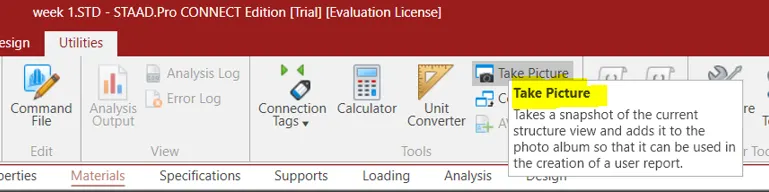
- YES, it is possible to capture images in STAAD Pro.
- We can take pictures of models and structural results in staad pro using the take picture command, the command is available in the utility panel with a camera logo.
4. Name the three ways by which you can create a model.
ANSWER:-
Three ways by which you can create a model in as STAAD pro are as below;
- Analytical model.
- Physical model.
- Building planner model.
5. Write the steps followed to assign properties in a model.
ANSWER:-
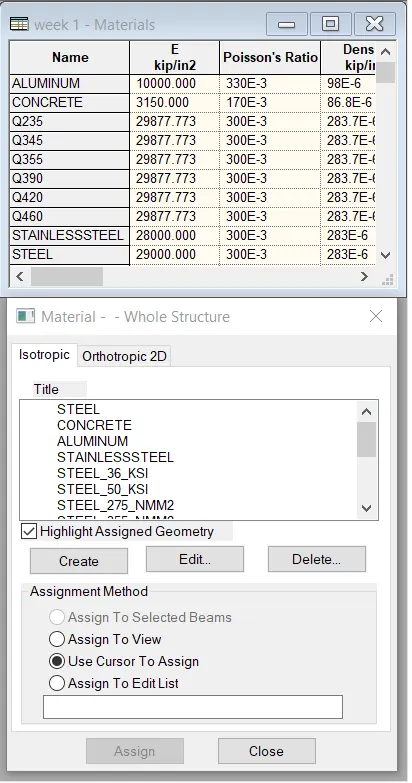
- Go to the properties panel.
- Click on materials.
- Select a desired material from the list
- Concrete / steel / aluminum / stainless steel etc.
- Then check the assignment method based on your preference like use cursor / assign to view etc.,
- After checking the radio button, go ahead and assign the material property to your model.
Q2.
1. Name any six design parameter involved in RCC design.
ANSWER:-
The six Design parameter involved in RCC design are as below;
- Clear cover
- FC compressie strength of concrete
- FY Tensile Strength of steel
- Max main Dia of bar
- Code of practice
- End conrete design
2. What are the different cursor types available in STAAD Pro?
ANSWER:-
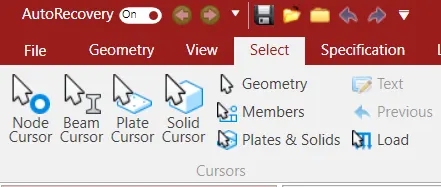
Answer. The different cursor types that are available in STAAD Pro are listed below:
- Nodes cursor.
- Plates cursor.
- Beams cursor.
- Plates and Solid cursor.
- Loads cursor.
- Solids cursor.
- Physical Member cursor.
- Geometry cursor.
3. How will you generate different views for a model? State the steps involved.
ANSWER:-
First go to view option in the ribbon there we can get option like as below;
- Top view
- Isometric view
- Front view
- Left view
- Right View
- Botttom view
- Back view
4. Explain the procedure to define a “Simply Supported” condition in STAAD Pro
PROCEDURE:-
Go to the support command in the tool palet command
- Click on create support command
- There we can get option like fixed support , pin support , Fixed but
- Enforced but support
- Cable support
- Inclined support
5. Name any five topics that you will include while creating DBR.
ANSWER:-
First of all lets understand what is DBR? So the DBR is the Design Brief Report.So basically DBR is a short brief of what you are going to make,why you are going to make,where you are going to make. In short it is a core detail of our project. So the five topics that will include creating DBR is listed below:
- Name of the project and the location of the project.
- Structural Layout.
- Introduction to the construction methodology.
- Quality Assurance and Quality Control.
- Budget of the Project.
6. Describe the term “Multi material design” of STAAD Pro.
ANSWER:-
- It is used for 3D model generation, analysis and multi -material design .
- The STAAD .Pro supports several steel , concrete and timber material in a seprate member
- This seprate member will cordinate and the formed in to a structure
Q3.
1. Name the structure systems in STAAD Pro? Explain each system?
ANSWER:-
The structure systems in STAAD Pro software are:
- Space Frames.
- Plane Frames.
- Trusses.
EXPLANATION:-
1. SPACE FRAMES:-
So basically the space frames are the three-dimensional truss like structures that is designed to carry loads for the longer spans without any intermediate supports. The space frame structures are rigid and ligh-weight in nature and it is structurally effective. It has low transportation cost.
2. PLANE FRAMES:-
Plane frames are RCC or steel frame structures. It is a two-dimensional structure which is constructed with straight elements which are conected by the rigid or the hinged connections.
3. TRUSSES:-
Trusses are created by arranging the structural elements in the triangle forms which can take loads in both compression and tension.
2. Explain the coordinate system adopted in STAAD Pro software.
ANSWER:-
The co-ordunates system that are adopted in STAAD Pro software are X,Y and Z co-ordinates.
So basically the co-ordinate system adopted in STAAD Pro software are:
- Global Axis:- Mainly global axis are fixed in the co-ordinate system.
- Local Axis :- Local axis is variable in nature. We can change the local axis but not the global axis.
As the STAAD Pro software. Basically it uses a conventional cartesian co-ordinate system,and in this system Y is a global axis which is in upward direction. We can say that the height of the building is always parallel to the global Y-axis just as shown in the below given image:
3. Elaborate DBR and its uses.
ANSWER:-
So basically the DBR ( Design Brief Report ) is a project management document whic consist of various informations regarding the construction of the structure. This DBR is a detailed report which tells the minute details of the ongoing construction work.It defines the final stage in the process of defining the Client's requirement for the construction work. This report basically consist of all the major and important structural details that is relevant or we can say that is related to the project like description of the client,site information,special requirements if any,the technical requirements,components required,the project requirements and the other issue related to the construction.
4. Explain the different types of analysis options in STAAD pro.
ANSWER:-
The different types of analysis options in STAAD Pro software are listed below:
- Linear Elastic analysis.
- P-Delta analysis.
- Buckling analysis.
- Pushover analysis.
5. Explain the difference between Fixed and Fixed But condition.
ANSWER:-
Fixed condition:-
Fixed condition in the STAAD Pro software is the condition where all the degrees of freedom that is horizontal or vertical or moment are fixed or we can say these coditions are restrained we cannot change accordingly. Those condition we can say are the fixed conditions.
Fixed-But condition:-
And as for the fixed-end condition we can say that this condition can be customized its end conditions accordingly. In this condition we can change the end condition it is not restrained.We can release some of the required degree of freedom.