To simulate the forward kinematics of 2R Robotic arm using Matlab.
Aim: To simulate the kinematics of the robotic arm.
Objective : 1) Write a program to obtain the position of a manipulator.
2) Create an animation of the link.
Theory: Forward Kinematics refers to the use of kinematic equations of a robot to compute the position of the end-effector from specified values for the joint parameters.
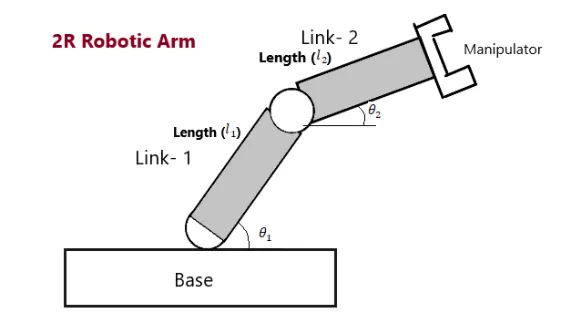
Above figure is the description of 2R robotic arm. It consists of 2 links viz link 1 and link2. Link1 is larger than link2. The co-ordinates of base 1 are (0,0) while the co-ordinates of link1 are (x1,y1). The co-ordinates of manipulator are (x2,y2).
Matlab Code:
% Forward kinematics of 2R Robotic arm manipulator
clear all
close all
clc
% Inputs
l1 = 1;
l2 = 0.5;
theta1 = linspace(0,90,10);
theta2 = linspace(0,90,10);
ct = 1;
for i = 1:length(theta1)
Theta1 = theta1(i);
for j = 1:length(theta2)
Theta2 = theta2(j);
x0 = 0;
y0 = 0;
x1 = l1*cosd(Theta1);
y1 = l1*sind(Theta1);
x2 = x1 + l2*cosd(Theta2);
y2 = y1 + l2*sind(Theta2);
% Plotting
plot([x0 x1],[y0 y1],[x1 x2],[y1 y2],'linewidth',3)
axis([-0.1 1.5 0 1.5])
pause(0.03)
M(ct) = getframe(gcf);
ct = ct+1;
end
end
movie(M)
videofile = VideoWriter('forwardkinematics.avi', 'Uncompressed AVI');
open(videofile)
writeVideo(videofile,M)
close(videofile)
Explanation of the code:
- The clear all, close all, clc are the commands to clear the workspace as you run the program.
- The dimensions of link1 and link 2 are defined.
- Actually we need to create an animation of link2 for different values of theta which ranges between 0 to 90 degree.
- So linspace command is used to generate the values of theta between 0 and 90 degrees.
- The co-ordinates of base, link1 and link2 are defined using kinematic equations.
- The kinematic equations are used in the for loop so that they can be repeated for different values of theta.
- To generate the link 1 and link2 , the co-ordinates are plotted using the plot command.
- To create an animation, a counter variable(ct) is introduced and it is incremented to 1.ct represents each and every frame.
- Getframe(gcf) is a command used to get current figure window. It is stored in an array M(ct).
- Movie(m) command generate the animation movie with all the frames.
- Videowriter command is used to create the avi file of the movie.
Results: An animation of 2R robotic arm is generated using matlab and the youtube link is given below.
Conclusion: The kinematic equations for creating 2R robotic arm are studied and the commands to create an animation in Matlab are studied.