Robotic Arm Programing in Matlab
Aim: To create a program in Matlab to simulate the forward kinematics of a 2R Robotic Arm
About Robotic Arm: It can be defined as a mechanical arm that can be functionalized to perform movements just as the human arm by programming it to do so for industrial and other applications.
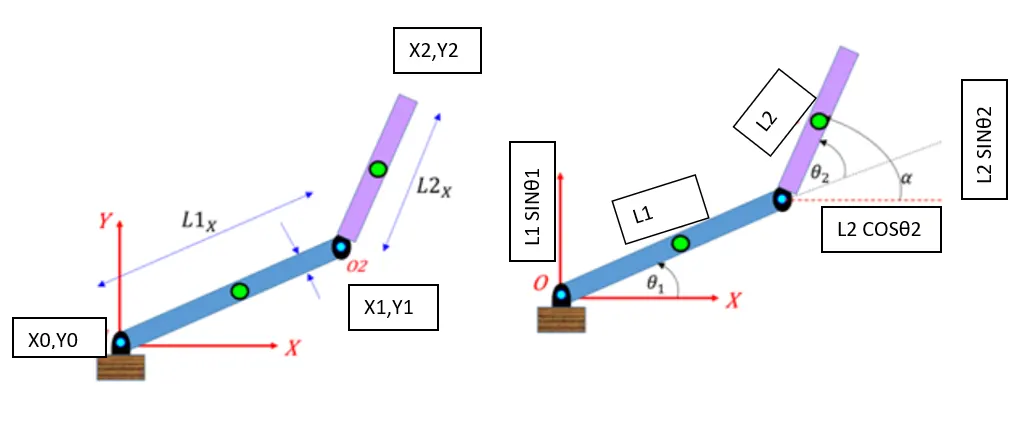
The logic used in the Programm: As shown in Fig1 and Fig2 the linkage L1 is free to move at the given angle θ1, and similarly Linkage L2 at the given angle θ2. The L1 is considered to be at the origin at the axis point (X0, Y0) and the origin of L2 is from (X1, Y1) which is the end of the total length of the L1. and the given L1 and L2 is termed as shown in fig1 and fig 2.
Steps involved in Programming
Step1: Define Geometric Parameters
Step2: Define the link lengths, joint angles, and end-effector locations of the robots as symbolic variables.
Step3: Specify values for the link lengths of the robot.
Step4: Define X and Y Coordinates of End Effector.
Step5: Define the X and Y coordinates of the end-effector as a function of the joint angles (θ1 ,θ2).
Step6: Create for loop for different values of angles, so that the linkage coverage is at each and every angle.
Step7: Create a frame array to co-arrange every frame into the video by using the write video command.
PROGRAMM
% Forward Kinematics of 2R forward robotic arm manipulator
clear all
close all
clc
% Inputs
l1=1;
l2=0.5;

theta1=linspace(0,90,10)
theta2=linspace(0,90,10)

ct=1
for i= 1:length(theta1)
THETA1=theta1(i)
for j=1:length(theta2)
THETA2=theta2(j)
x0=0;
y0=0;

x1=l1*cosd(THETA1);
y1=l1*sind(THETA1);

x2=x1+l2*cosd(THETA2);
y2=y1+l2*sind(THETA2);

%Plotting


plot([x0 x1],[y0 y1],[x1 x2],[y1 y2],'linewidth',3)
axis([0 1.5 0 1.5])

M(ct)=getframe(gcf)
ct=ct+1;

end
end
movie(M)
videofile=VideoWriter('Robotic_arm_video','Uncompressed AVI')
open(videofile)
writeVideo(videofile,M)
close(videofile)
ERRORS WHILE PROGRAMMING
Mainly the error was related to command writing (Spelling) for Video commands.
Conclusion:
Thus we wrote a program and made a collective frame video of the linkage movement in the graph plot .
Link of the video
https://drive.google.com/file/d/17bN4G1SRtgm0nfrHwEYOsyN2mR5vUYRf/view?usp=sharing