Projefct 1_Comparative study of different storey buildings for Seismic forces
QUESTION: -
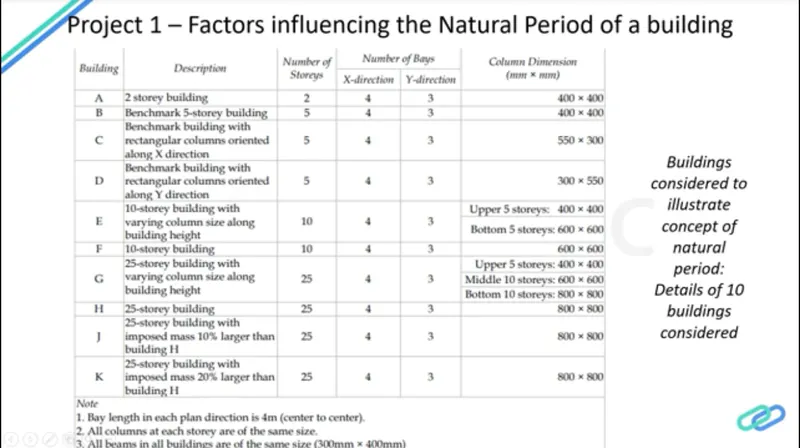
\1) Effect of stiffness on T: Compare fundamental natural periods of buildings E & F as well as G & H. Why is there a marginal or significant difference in the fundamental natural periods?
2) Effect of mass on T: Compare fundamental natural periods of buildings H, J and K. Have the buildings become more flexible or stiff due to change in mass?
3) Effect of Building Height on T: How does the fundamental natural periods of Buildings A, B, F and H change with change in building height?
4) Effect of Column Orientation on T: How does the fundamental natural periods of Buildings B, C and D change with change in column orientation
ANSWER: -
Aim: - To compare
1) Fundamental natural periods of buildings E & F as well as G & H. And the significant difference in the fundamental natural periods.
2) Fundamental natural periods of buildings H, J and K. Have the buildings become more flexible or stiff due to change in mass.
3) Fundamental natural periods of Buildings A, B, F and H with change in building height.
4) Fundamental natural periods of Buildings B, C and D with change in column orientation.
Introduction: -
Buildings oscillate during earthquake shaking. The oscillation causes inertia force to be induced in the building.
The intensity and duration of oscillation, and the amount of inertia force induced in a building depend on features of buildings, called their dynamic characteristics, in addition to the characteristics of the earthquake shaking (beyond the control of an engineer) itself.
The important dynamic characteristics of buildings are modes of oscillation and damping (assumed constant in most practical cases).
A mode of oscillation of a building is defined by associated Natural Period and Deformed Shape in which it oscillates.
Every building has a number of natural frequencies, at which it offers minimum resistance to shaking induced by external effects (like earthquakes and wind) and internal effects (like motors fixed on it).
Each of these natural frequencies and the associated deformation shape of a building constitute a Natural Mode of Oscillation.
The mode of oscillation with the smallest natural frequency (and largest natural period) is called the Fundamental Mode, the associated natural period is called the Fundamental Natural Period.
Procedure: -
1)Fundamental natural periods of buildings E & F as well as G & H. And the significant difference in the fundamental natural periods.
Step: -1
Building E
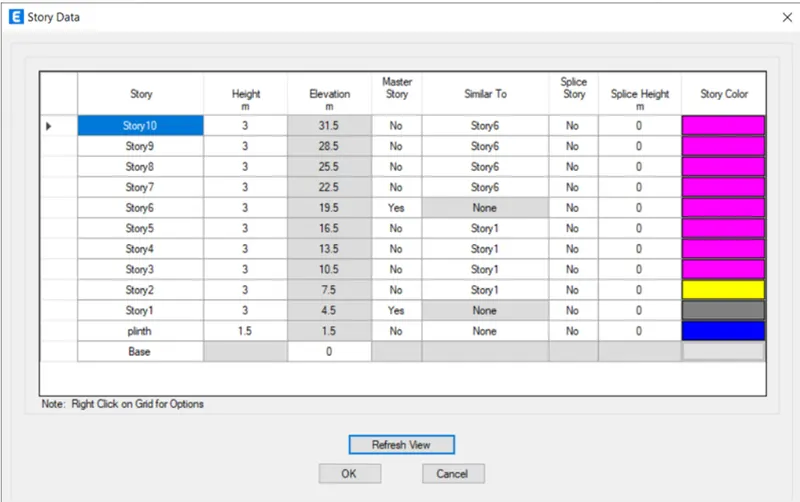
First we have to open the etabs software and create the new model and add the 10 storey in the story data as shown below.
Next we put the story1 and Story6 as Master Story, as shown below.
Next we have to set the material properties and section properties.
We assign the columns to bottom 5 storeys with the size of (600X600)mm, and add columns to top 5 storeys with the size of (400X400)mm.
Next we assign the beams to all the storeys with the size of (300X400)mm.
Next we assign the slabs with the thickness of 150mm from 1st storey to 10th storey
Next we have to assign all the loads such as live load, dead load, brickwall load and seismic loads etc,.
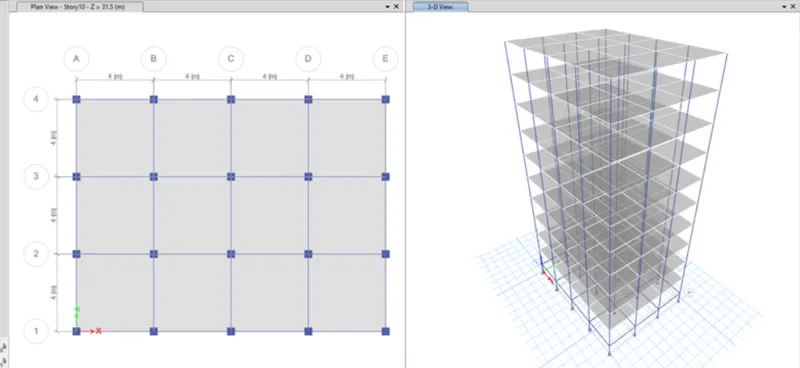
After assigning all the loads, we have to check the model and the model shows no error.
After checking the model, then click on the run analysis.
Finally the run analysis has been finished, then the deformed shape of the model will appears
Next we have to click on the Display option and then select the show table option.
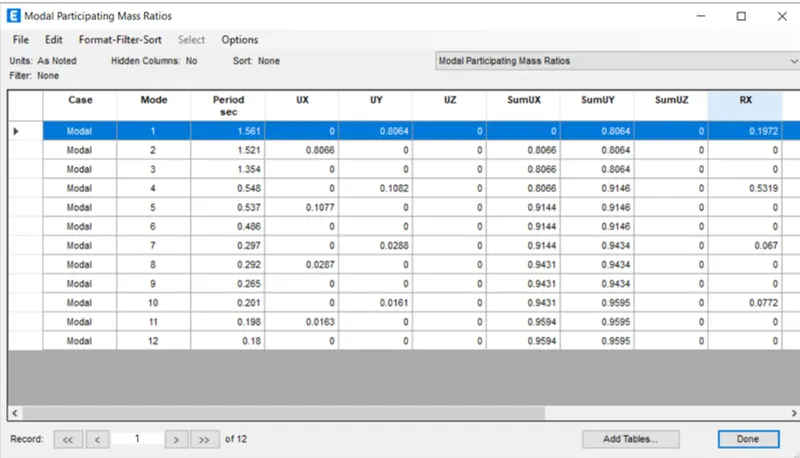
After selecting the show table option, then we need to select the Modal Participating Mass Ratios from the Structure output.
Then after the Modal Participating Mass Ratios table will appear, as shown below.
Step:-2
Building F
First we have to open the etabs software and create the new model and add the 10 storey in the story data as shown below.
Next we put the story1 as Master Story, as shown below.
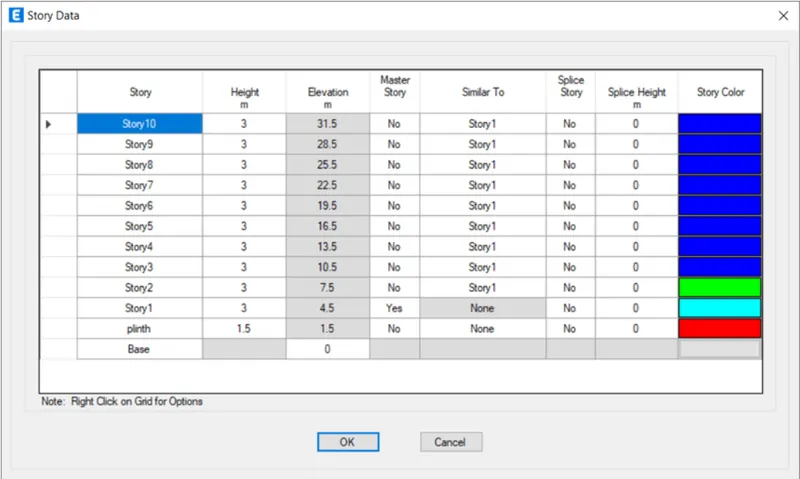
Next we have to set the material properties and section properties.
We assign the columns to all the storeys with the size of (600X600)mm.
Next we assign the beams to all the storeys with the size of (300X400)mm.
Next we assign the slabs with the thickness of 150mm from 1st storey to 10th storey
Next we have to assign all the loads such as live load, dead load, brickwall load and seismic loads etc,.
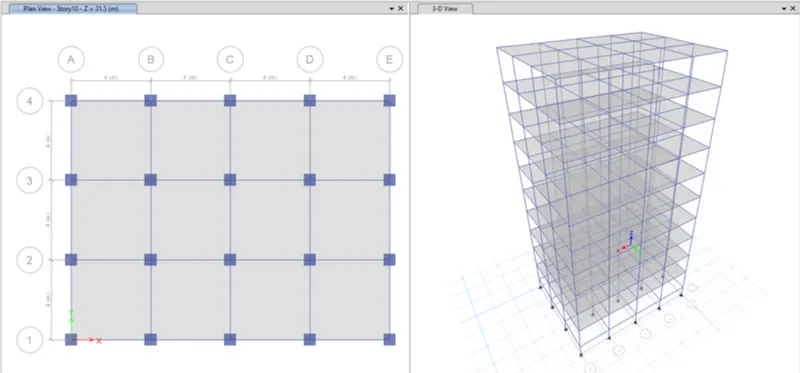
After assigning all the loads, we have to check the model and the model shows no error.
After checking the model, then click on the run analysis.
Finally the run analysis has been finished, then the deformed shape of the model will appears
Next we have to click on the Display option and then select the show table option.
After selecting the show table option, then we need to select the Modal Participating Mass Ratios from the Structure output.
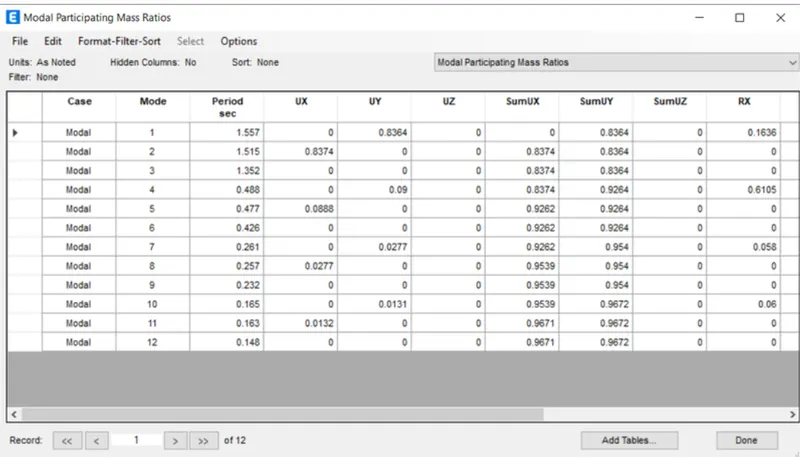
Then after the Modal Participating Mass Ratios table will appear, as shown below.
Step:-3
Building G
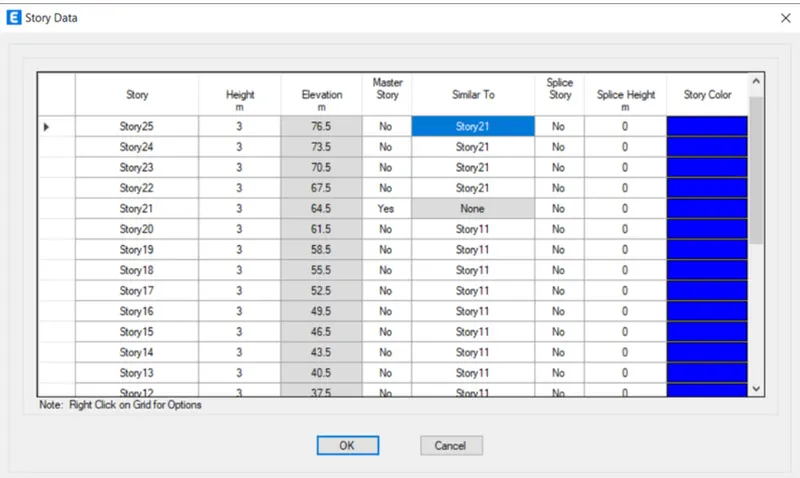
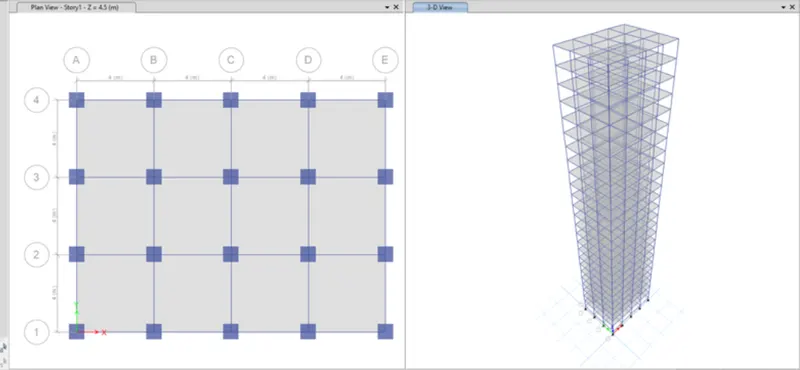
First we have to open the etabs software and create the new model and add the 25 storey in the story data as shown below.
Next we put the story1, Story11, and Storey21 as Master Storeys, as shown below.
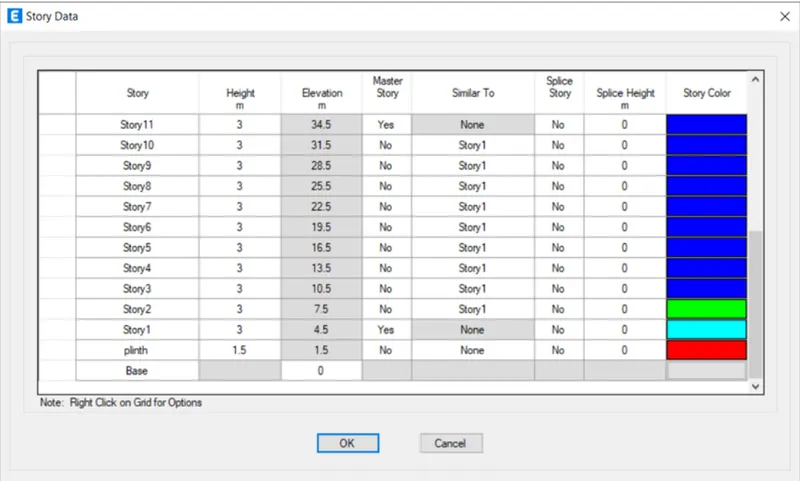
Next we have to set the material properties and section properties.
We assign the columns to bottom 10 storeys with the size of (800X800)mm,
Next assign the columns to middle 10 storeys with the size of (600X600)mm
Next we assign the columns to top 5 storeys with the size of (400X400)mm.
Next we assign the beams to all the storeys with the size of (300X400)mm.
Next we assign the slabs with the thickness of 150mm from 1st storey to 25th storey
Next we have to assign all the loads such as live load, dead load, brickwall load and seismic loads etc,.
After assigning all the loads, we have to check the model and the model shows no error.
After checking the model, then click on the run analysis.
Finally the run analysis has been finished, then the deformed shape of the model will appears
Next we have to click on the Display option and then select the show table option.
After selecting the show table option, then we need to select the Modal Participating Mass Ratios from the Structure output.
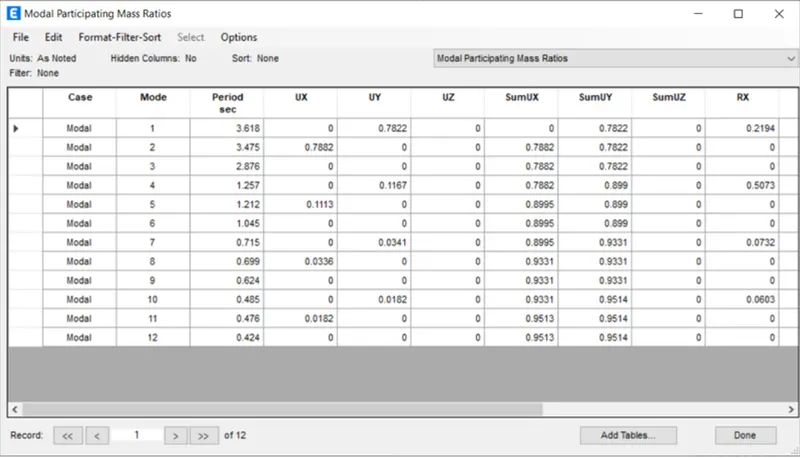
Then after the Modal Participating Mass Ratios table will appear, as shown below.
Step:-4
Building H
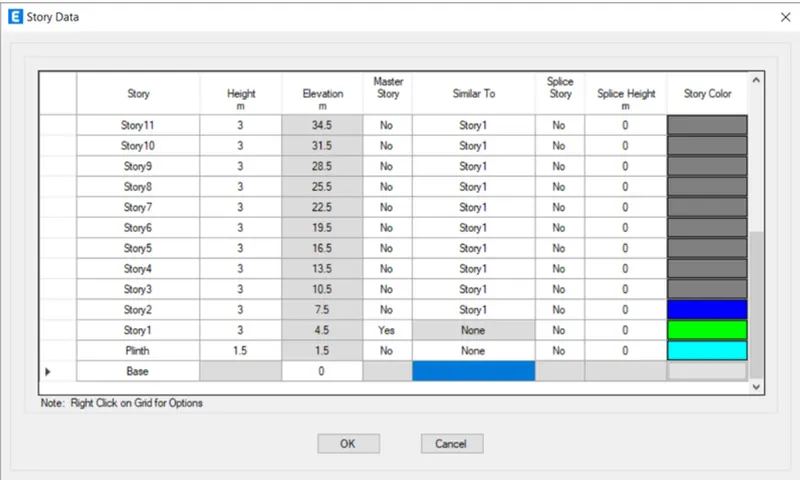
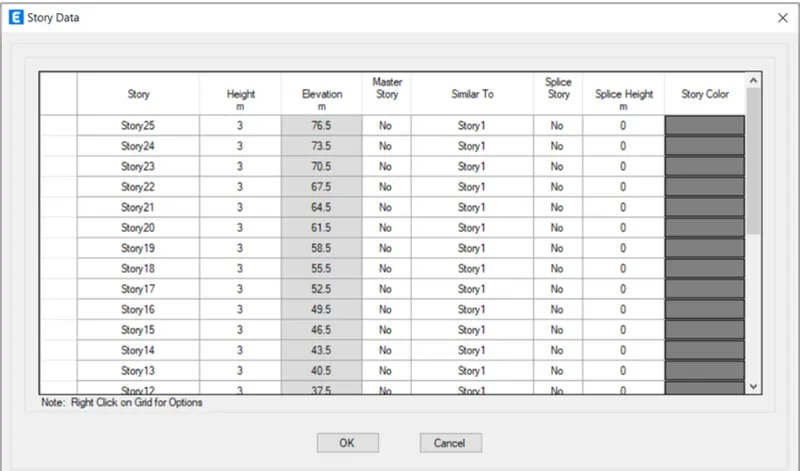
First we have to open the etabs software and create the new model and add the 25 storey in the story data as shown below.
Next we put the story1 as Master Story, as shown below.
Next we have to set the material properties and section properties.
We assign the columns to all the storeys with the size of (800X800)mm.
Next we assign the beams to all the storeys with the size of (300X400)mm.
Next we assign the slabs with the thickness of 150mm from 1st storey to 25th storeY
Next we have to assign all the loads such as live load, dead load, brickwall load and seismic loads etc,.
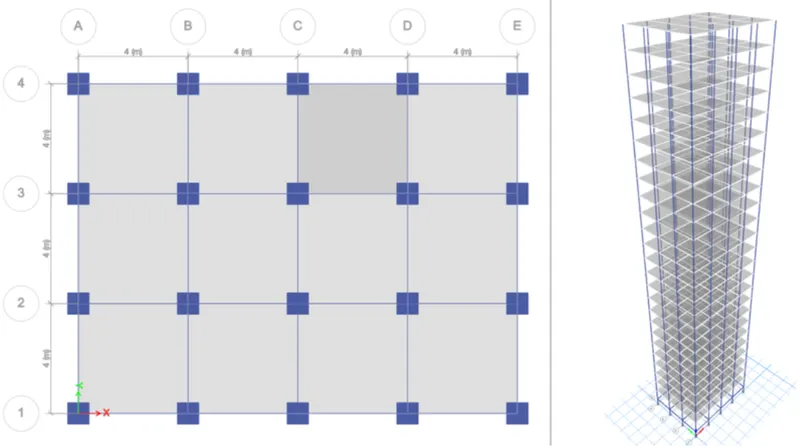
After assigning all the loads, we have to check the model and the model shows no error.
After checking the model, then click on the run analysis.
Finally the run analysis has been finished, then the deformed shape of the model will appears
Next we have to click on the Display option and then select the show table option.
After selecting the show table option, then we need to select the Modal Participating Mass Ratios from the Structure output.
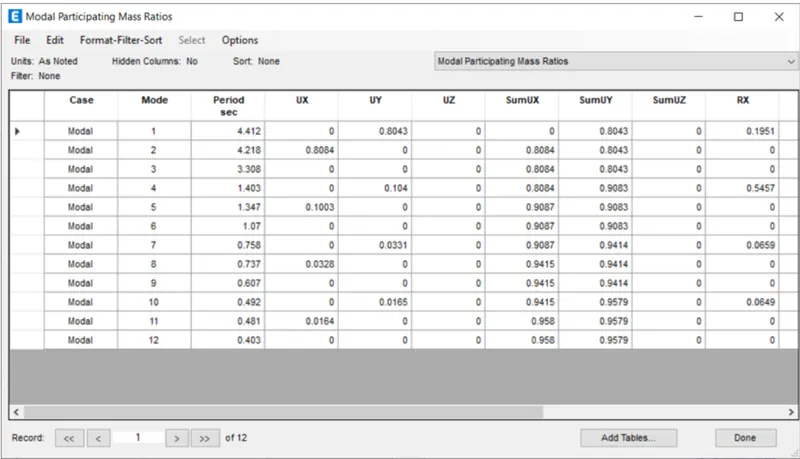
Then after the Modal Participating Mass Ratios table will appear, as shown below.
Result:-
The fundamental natural period of Building E is T=1.561 sec.
The fundamental natural period of Building F is T=1.557 sec.
The fundamental natural period of Building G is T=3.618 sec.
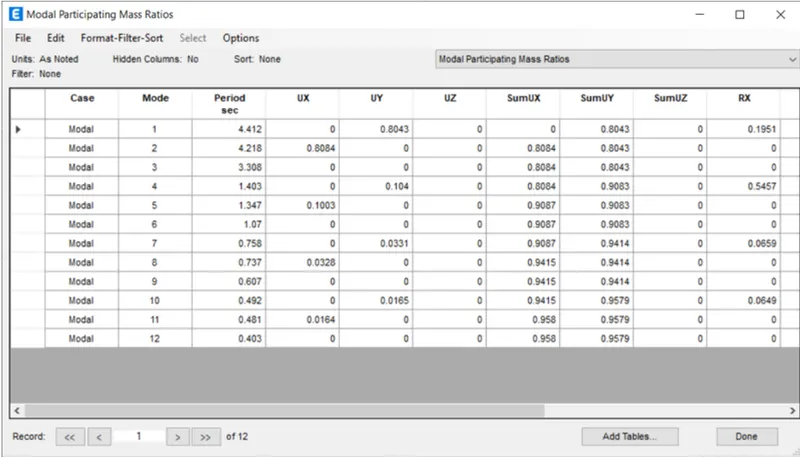
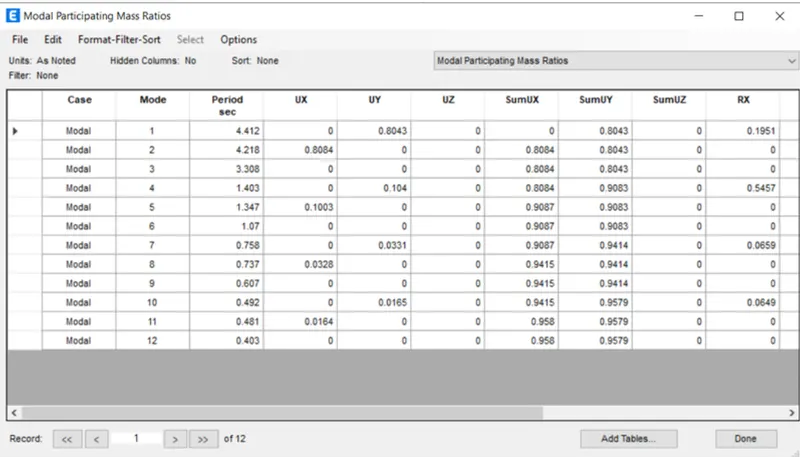
The fundamental natural period of Building H is T=4.412 sec.
In the Building E we use two different column sizes, one has been assigned to top 5 storeys and another one to the bottom 5 storey. But in building F there is only one column size we use for the entire building, thats why there is a significant difference in the fundamental natural periods.
Similarly we use three different column sizes for building G, and one column size for building H.
Hence there is a significant difference in the fundamental natural periods.
2)Fundamental natural periods of buildings H, J and K. Have the buildings become more flexible or stiff due to change in mass.
Step:-1
Building H
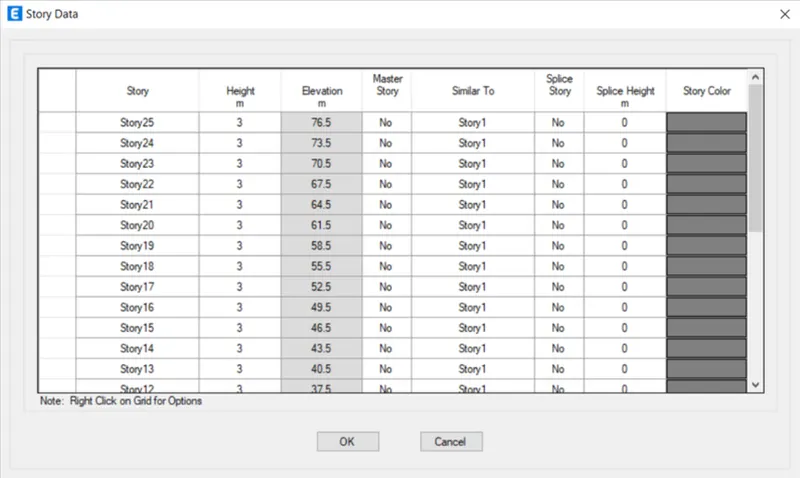
First we have to open the etabs software and create the new model and add the 25 storey in the story data as shown below.
Next we put the story1 as Master Story, as shown below.
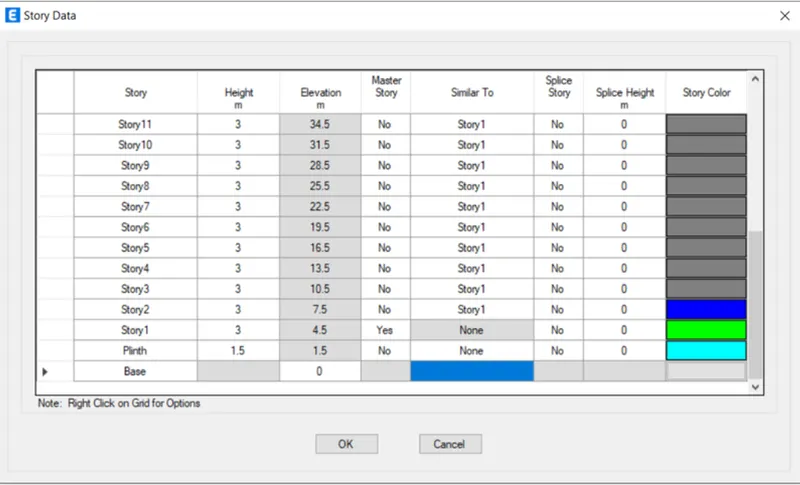
Next we have to set the material properties and section properties.
We assign the columns to all the storeys with the size of (800X800)mm.
Next we assign the beams to all the storeys with the size of (300X400)mm.
Next we assign the slabs with the thickness of 150mm from 1st storey to 25th storey
Next we have to assign all the loads such as live load, dead load, brickwall load and seismic loads etc,.
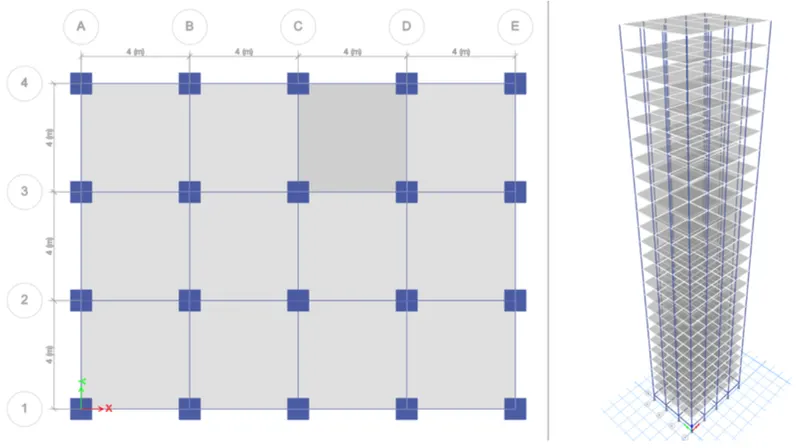
After assigning all the loads, we have to check the model and the model shows no error.
After checking the model, then click on the run analysis.
Finally the run analysis has been finished, then the deformed shape of the model will appears
Next we have to click on the Display option and then select the show table option.
After selecting the show table option, then we need to select the Modal Participating Mass Ratios from the Structure output.
Then after the Modal Participating Mass Ratios table will appear, as shown below.
Step:-2
Building J
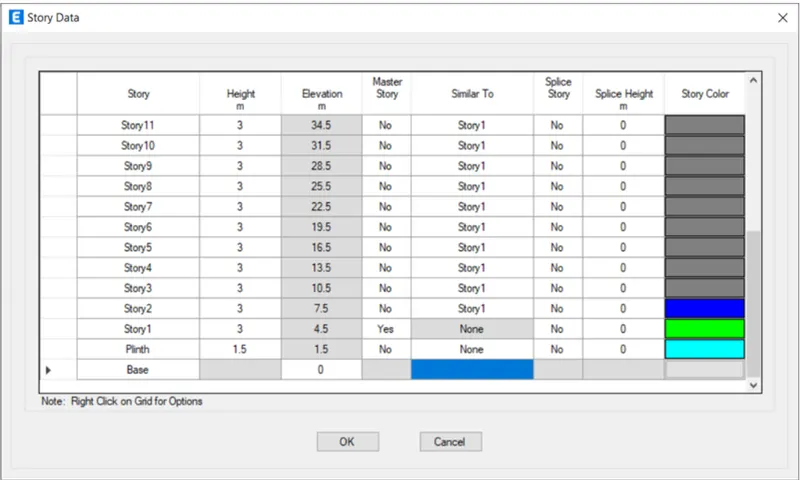
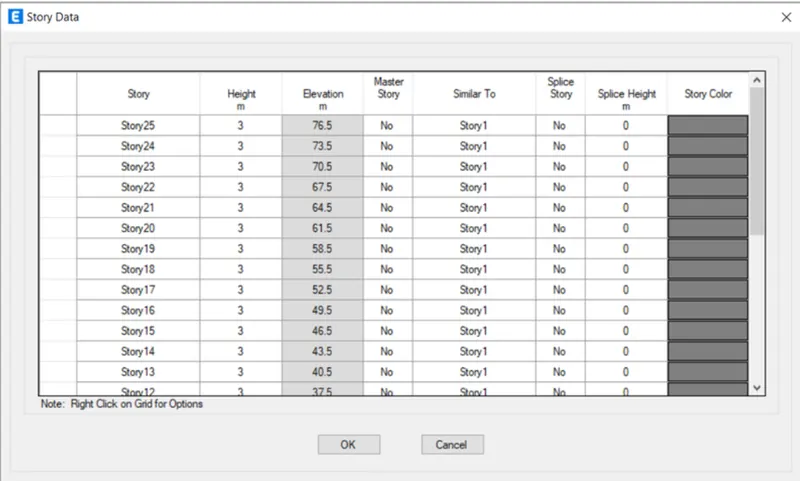
First we have to open the etabs software and create the new model and add the 25 storey in the story data as shown below.
Next we put the story1 as Master Story, as shown below.
Next we put all the storeys similar to storey1, as shown below.
Next we have to set the material properties and section properties.
We assign the columns to all the storeys with the size of (800X800)mm.
Next we assign the beams to all the storeys with the size of (300X400)mm.
Next we assign the slabs with the thickness of 150mm from 1st storey to 25th storey
Next we have to assign all the loads such as live load, dead load, brickwall load and seismic loads etc,.
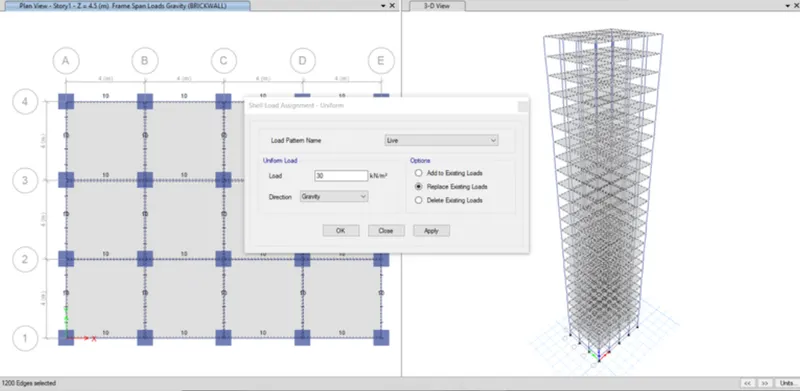
Here we have to increase the mass by 10% compared to building H.
To increase the mass by 10% we need to add live load of 30kN/m2 for every storey, as shown below.
After assigning all the loads, we have to check the model and the model shows no error.
After checking the model, then click on the run analysis.
Finally the run analysis has been finished, then the deformed shape of the model will appears
Next we have to click on the Display option and then select the show table option.
After selecting the show table option, then we need to select the Modal Participating Mass Ratios from the Structure output.
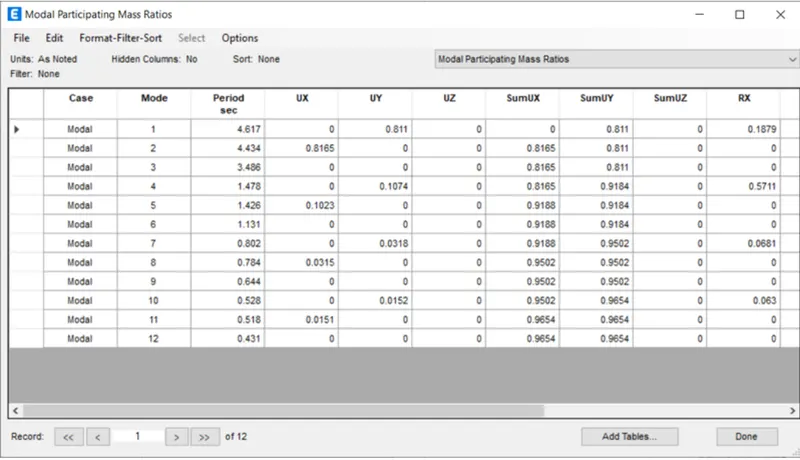
Then after the Modal Participating Mass Ratios table will appear, as shown below.
Step:-3
Building K
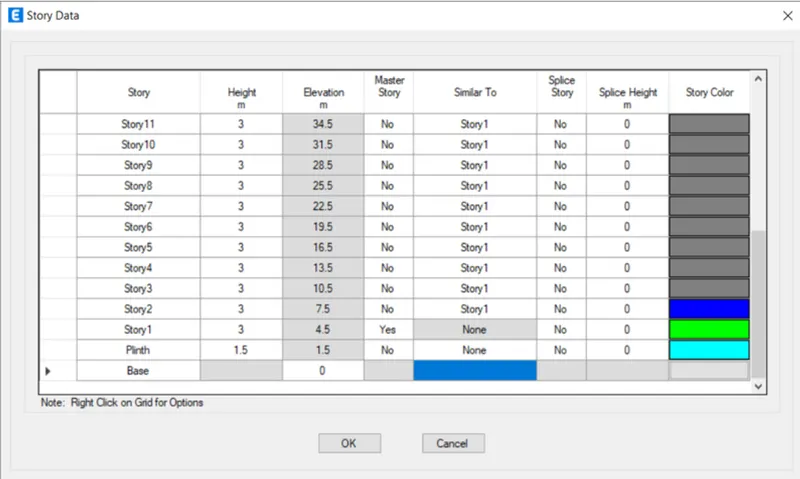
First we have to open the etabs software and create the new model and add the 25 storey in the story data as shown below.
Next we put the story1 as Master Story, as shown below.
Next we put all the storeys similar to storey1, as shown below.
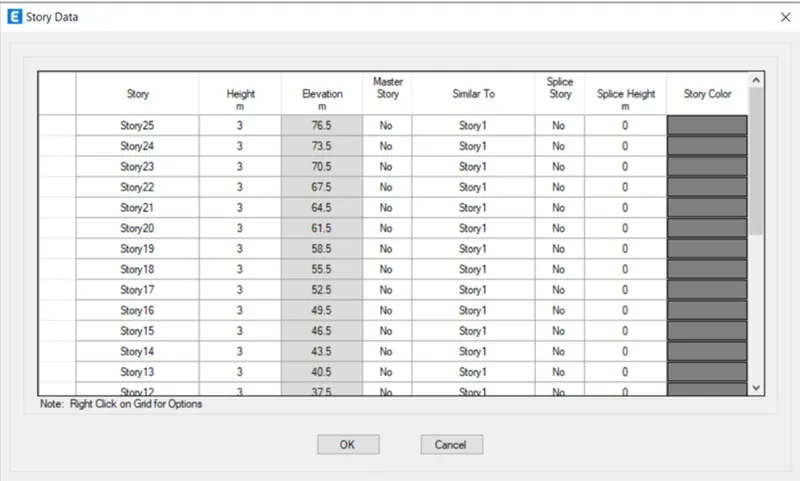
Next we have to set the material properties and section properties.
We assign the columns to all the storeys with the size of (800X800)mm.
Next we assign the beams to all the storeys with the size of (300X400)mm.
Next we assign the slab
Next we assign the slabs with the thickness of 150mm from 1st storey to 25th storey
Next we have to assign all the loads such as live load, dead load, brickwall load and seismic loads etc,.
Here we have to increase the mass by 20% compared to building H.
To increase the mass by 20% we need to add live load of 60kN/m2 for every storey, as shown below.
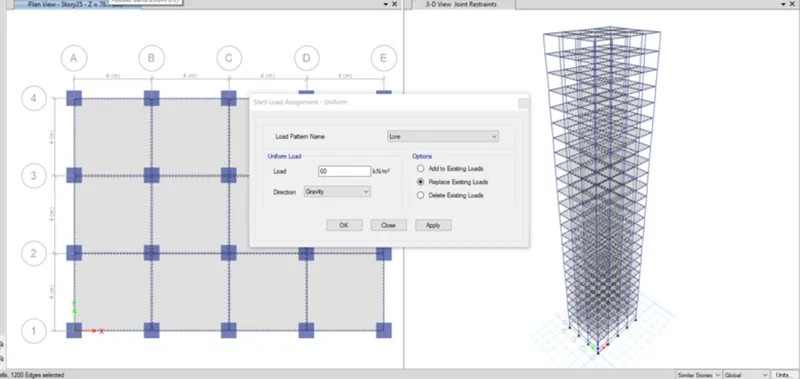
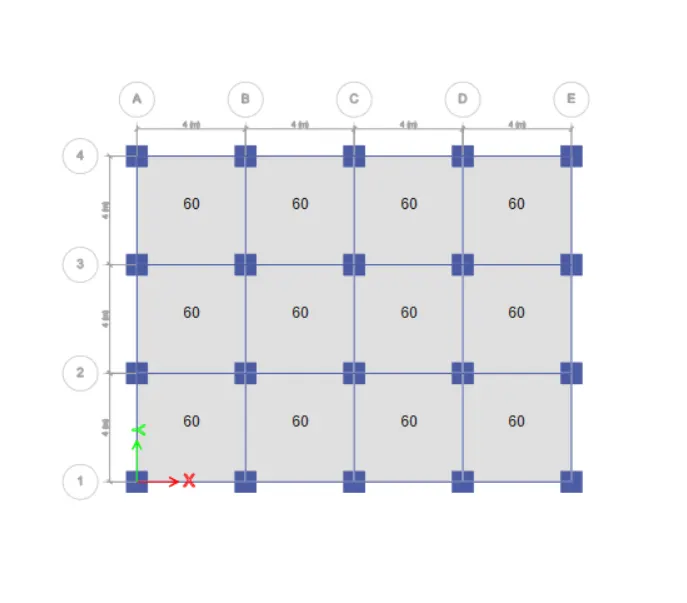
After assigning all the loads, we have to check the model and the model shows no error.
After checking the model, then click on the run analysis.
Finally the run analysis has been finished, then the deformed shape of the model will appears
Next we have to click on the Display option and then select the show table option.
After selecting the show table option, then we need to select the Modal Participating Mass Ratios from the Structure output.
Then after the Modal Participating Mass Ratios table will appear, as shown below.
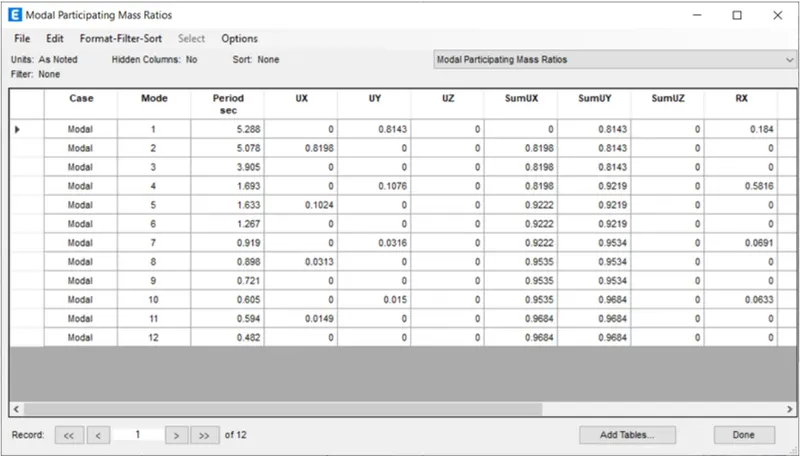
Result:-
The fundamental natural period of Building H is T=4.412 sec.
The fundamental natural period of Building J is T=4.617 sec.
The fundamental natural period of Building K is T=5.288 sec.
When the mass of the building is increases, then the natural period of the building also increases.
When the mass of the building J increased by 10% compared to Building H, the Building J is more flexible than the building H.
When the mass of the building K increased by 20% compared to Building H, the Building K is more flexible than the building J and building H.
Finally when the weight of the building increases, the buildings become more flexible.
3)Fundamental natural periods of Buildings A, B, F and H with change in building height.
Step:-1
Building A
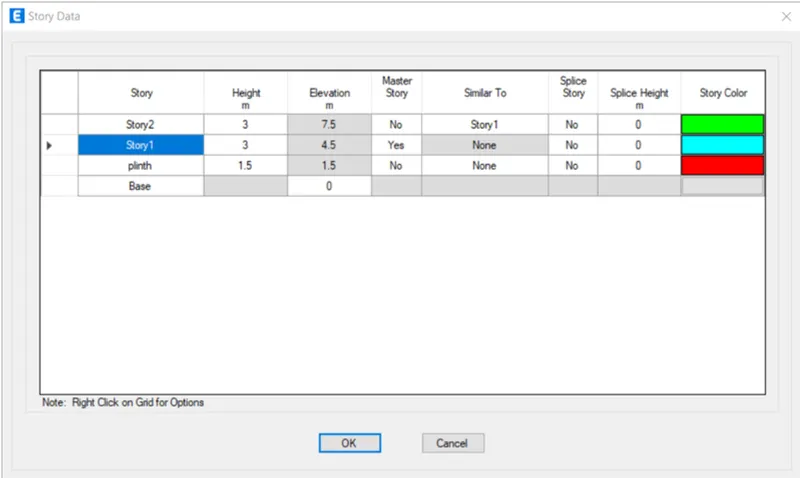
First we have to open the etabs software and create the new model and add the 2 storey in the story data as shown below.
Next we put the story1 as Master Story, as shown below.
The height of the building is 7.5m, as shown below.
Next we have to set the material properties and section properties.
We assign the columns to all the storeys with the size of (400X400)mm.
Next we assign the beams to all the storeys with the size of (300X400)mm.
Next we assign the slabs to the 1st storey and 2nd storey with the thickness of 150mm
Next we have to assign all the loads such as live load, dead load, brickwall load and seismic loads etc,.
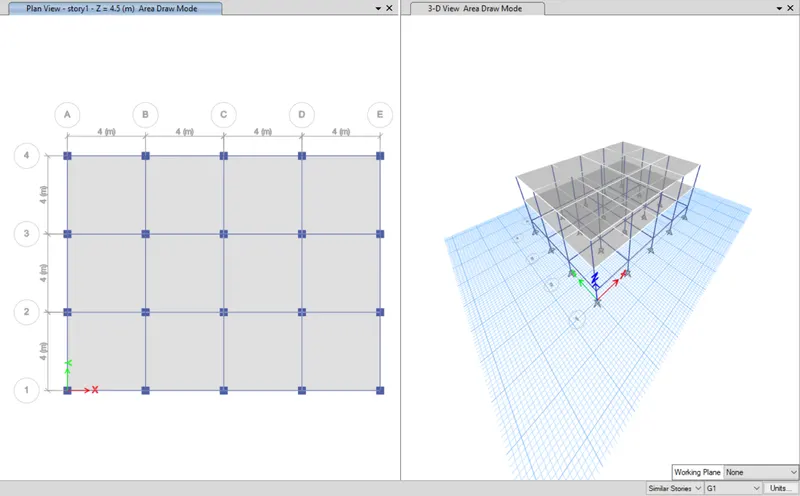
After assigning all the loads, we have to check the model and the model shows no error.
After checking the model, then click on the run analysis.
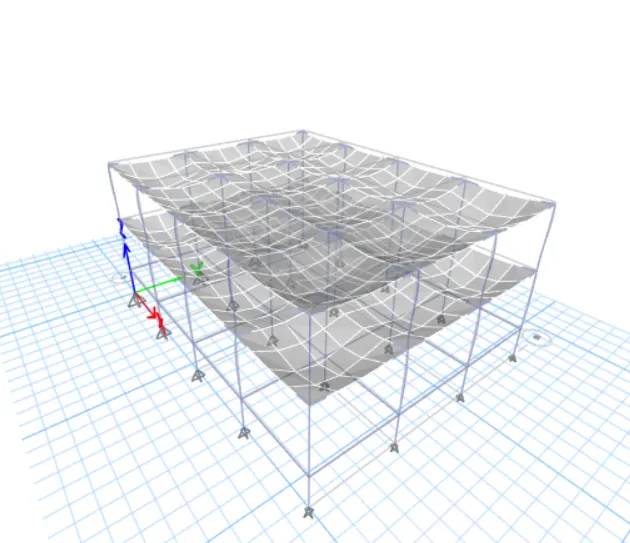
Finally the run analysis has been finished, then the deformed shape of the model will appears
Next we have to click on the Display option and then select the show table option.
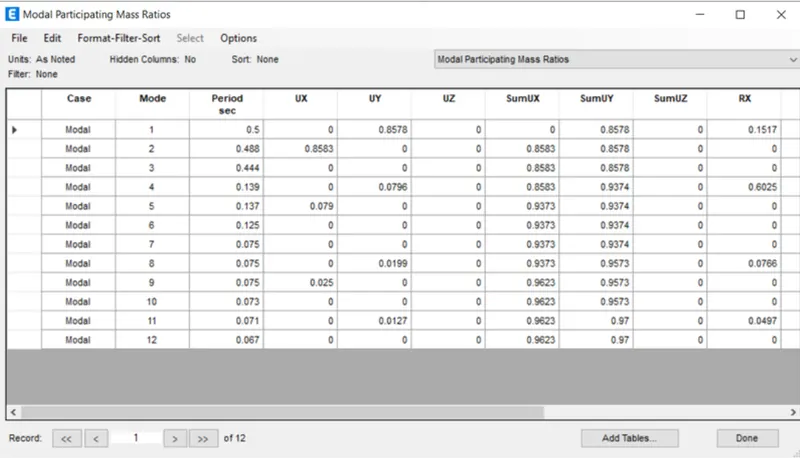
After selecting the show table option, then we need to select the Modal Participating Mass Ratios from the Structure output.
Then after the Modal Participating Mass Ratios table will appear, as shown below.
Step:-2
Building B
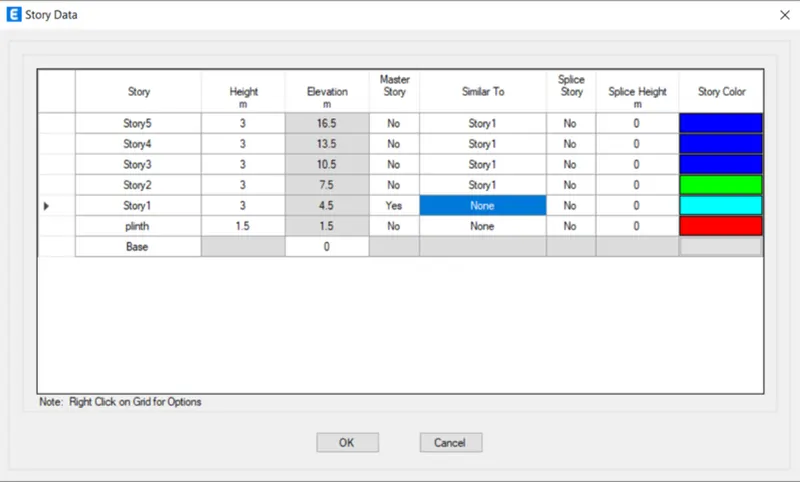
First we have to open the etabs software and create the new model and add the 5 storey in the story data as shown below.
Next we put the story1 as Master Story, as shown below
The height of the building is 16.5m, as shown below.
Next we have to set the material properties and section properties.
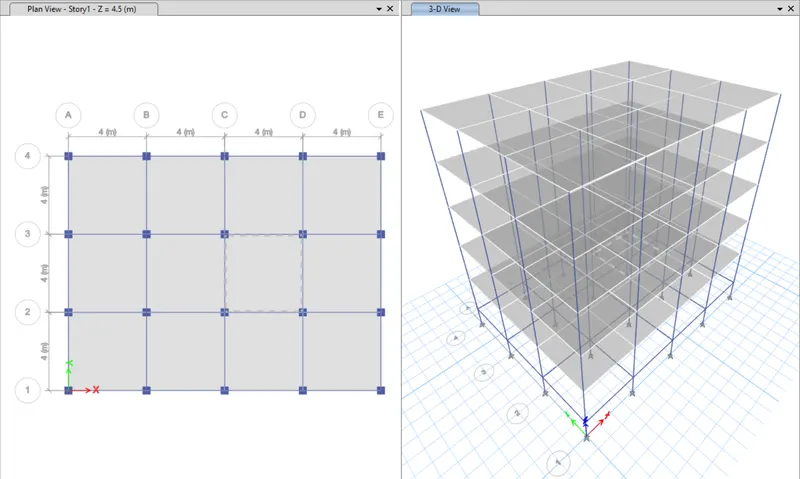
We assign the columns to all the storeys with the size of (400X400)mm.
Next we assign the beams to all the storeys with the size of (300X400)mm.
Next we assign the slabs from 1st storey to 5th storey with the thickness of 150mm
Next we have to assign all the loads such as live load, dead load, brickwall load and seismic loads etc,.After assigning all the loads, we have to check the model and the model shows no error.
After checking the model, then click on the run analysis.
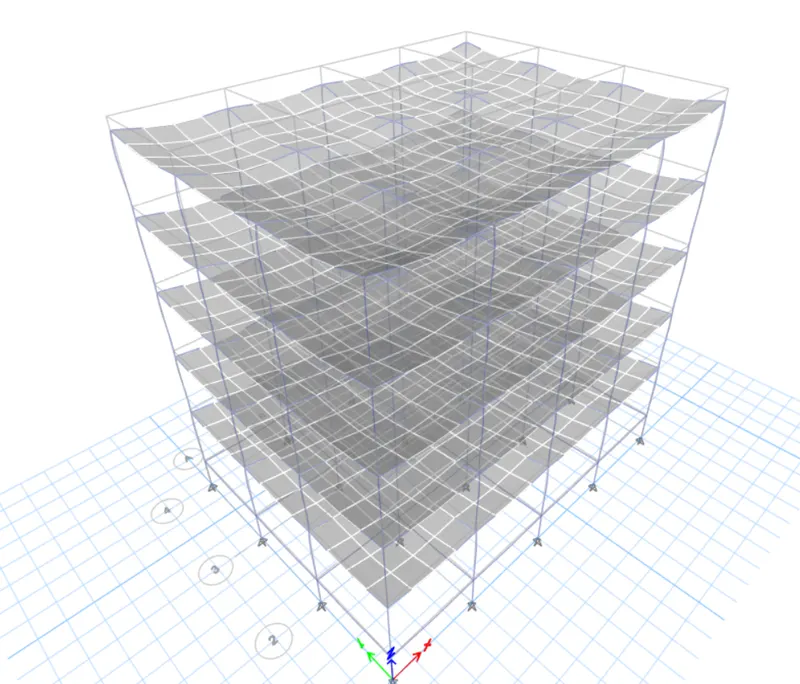
Finally the run analysis has been finished, then the deformed shape of the model will appears, as shown below.
Next we have to click on the Display option and then select the show table option.
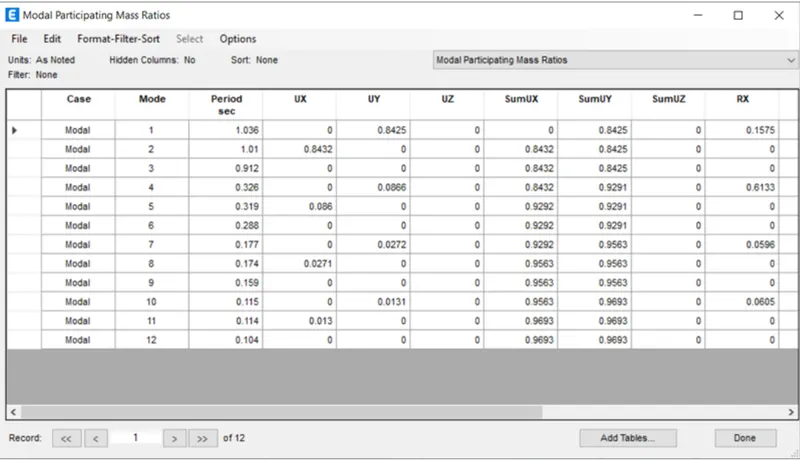
After selecting the show table option, then we need to select the Modal Participating Mass Ratios from the Structure output.
Then after the Modal Participating Mass Ratios table will appear, as shown below.
Step:-3
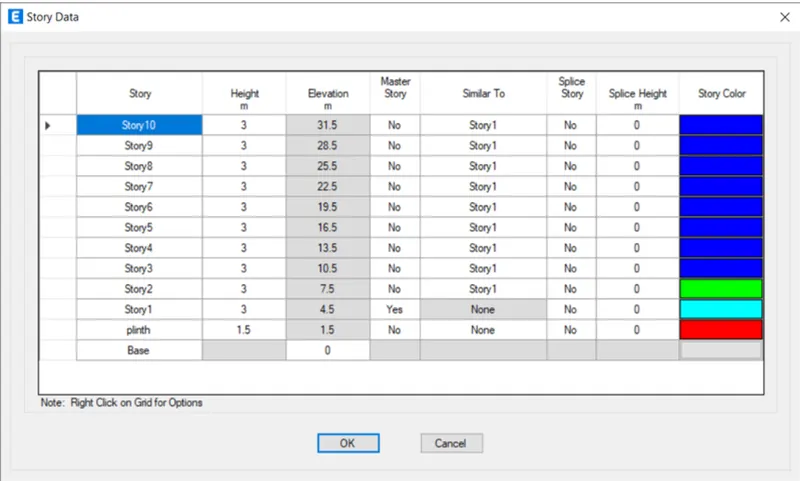
Building F
First we have to open the etabs software and create the new model and add the 10 storey in the story data as shown below.
Next we put the story1 as Master Story, as shown below
The height of the building is 31.5m, as shown
Next we have to set the material properties and section properties.
We assign the columns to all the storeys with the size of (600X600)mm.
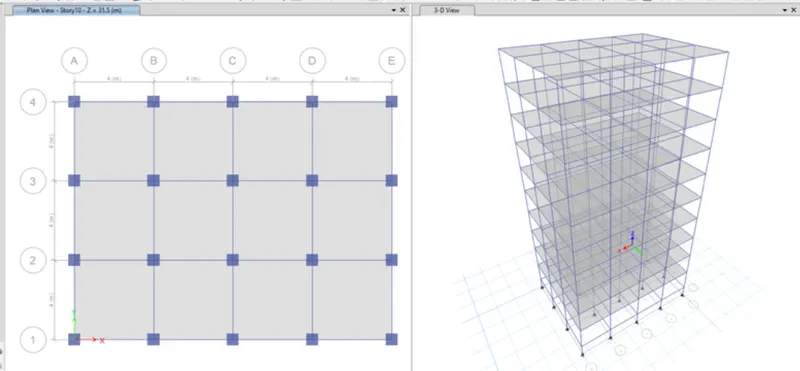
Next we assign the beams to all the storeys with the size of (300X400)mm.
Next we assign the slabs with the thickness of 150mm from 1st storey to 10th storey, as shown below.
Next we have to assign all the loads such as live load, dead load, brickwall load and seismic loads etc,.
After assigning all the loads, we have to check the model and the model shows no error.
After checking the model, then click on the run analysis.
Finally the run analysis has been finished, then the deformed shape of the model will appears
Next we have to click on the Display option and then select the show table option.
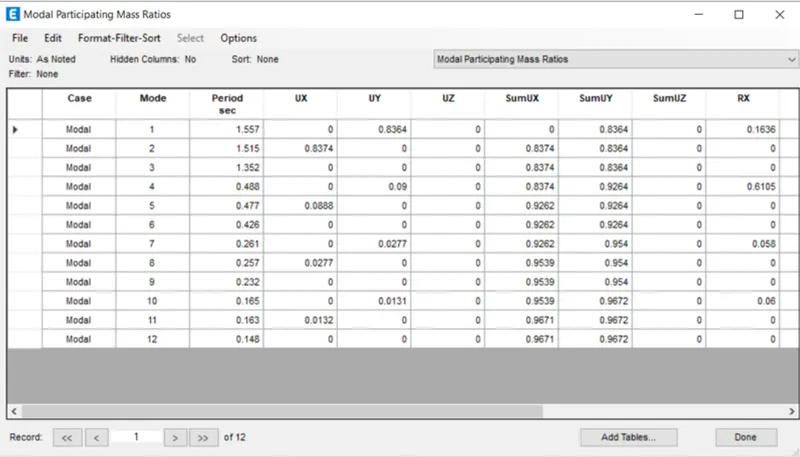
After selecting the show table option, then we need to select the Modal Participating Mass Ratios from the Structure output.
Then after the Modal Participating Mass Ratios table will appear, as shown below.
Step:-4
Building H
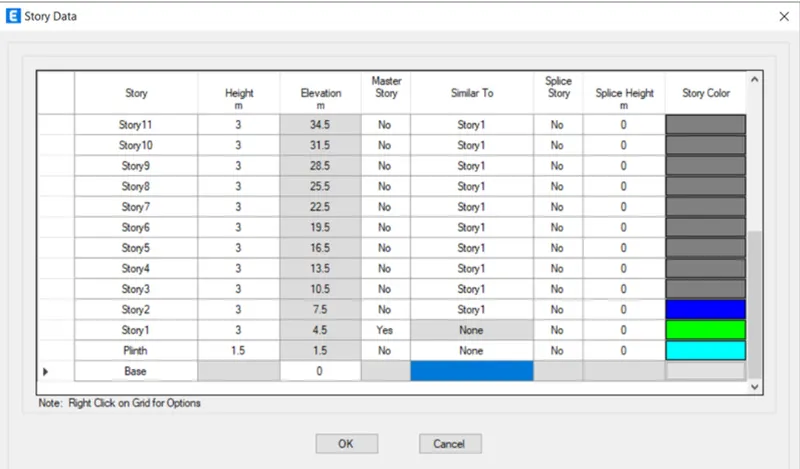
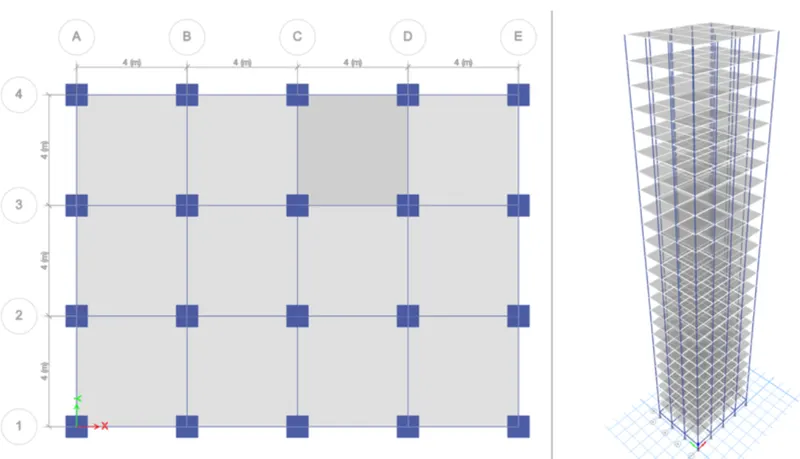
First we have to open the etabs software and create the new model and add the 25 storey in the story data as shown below.
Next we put the story1 as Master Story, and the height of the building is 76.5m, as shown below.
Next we have to set the material properties and section properties.
We assign the columns to all the storeys with the size of (800X800)mm.
Next we assign the beams to all the storeys with the size of (300X400)mm.
Next we assign the slabs with the thickness of 150mm from 1st storey to 25th storey
Next we have to assign all the loads such as live load, dead load, brickwall load and seismic loads etc,.
After assigning all the loads, we have to check the model and the model shows no error.
After checking the model, then click on the run analysis.
Finally the run analysis has been finished, then the deformed shape of the model will appears
Next we have to click on the Display option and then select the show table option.
After selecting the show table option, then we need to select the Modal Participating Mass Ratios from the Structure output.
Then after the Modal Participating Mass Ratios table will appear, as shown below.
Result:-
The fundamental natural period of Building A is T=0.5 sec.
The fundamental natural period of Building B is T=1.036 sec.
The fundamental natural period of Building F is T=1.557 sec.
The fundamental natural period of Building H is T=4.412 sec.
When the height of the buildings increases, the natural periods of buildings also increases.
4)Fundamental natural periods of Buildings B, C and D with change in column orientation.
Step:-1
Building B
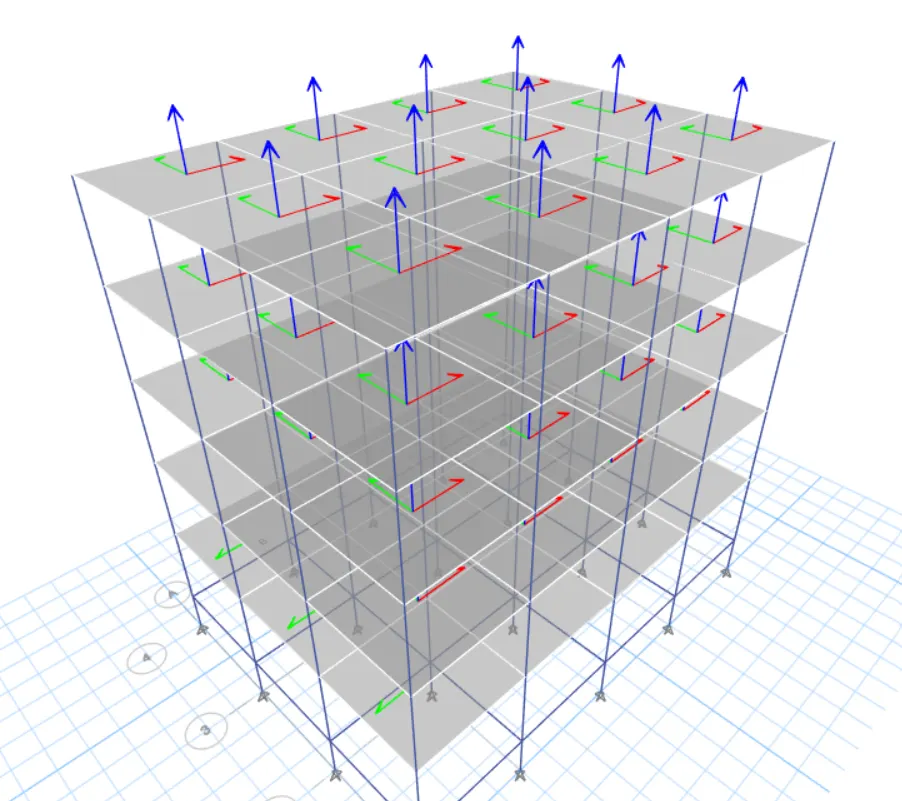
First we have to open the etabs software and create the new model and add the 5 storey in the story data as shown below.
Next we put the story1 as Master Story, as shown below
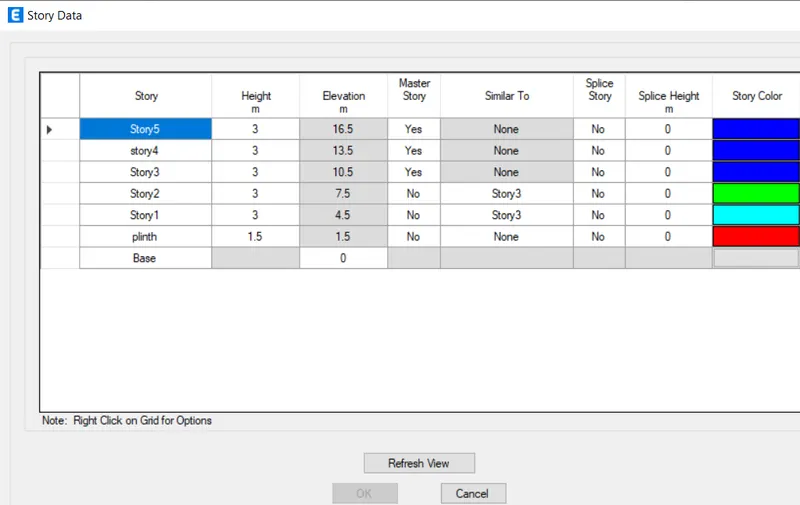
Next we have to set the material properties and section properties.
We assign the columns to all the storeys with the size of (400X400)mm.
Next we assign the beams to all the storeys with the size of (300X400)mm.
Next we assign the slabs from 1st storey to 5th storey with the thickness of 150mm
Next we have to assign all the loads such as live load, dead load, brickwall load and seismic loads etc,.
Now we need to change the column orientation to the X direction.
We go to the Assign and select frame option, and in that we select the Local axes option, as shown below.
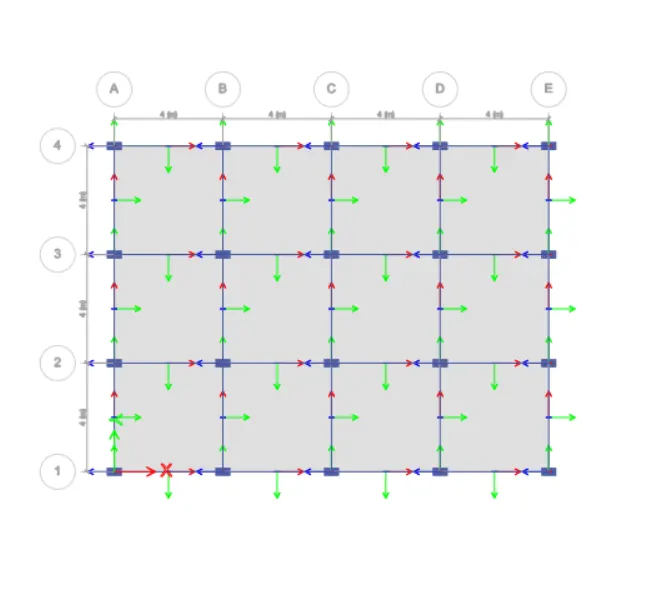
After selecting the local axes option the new tab appears, in that we put Rotate by Angle as 90 degrees
The column orientation has been changed to X direction with the angle of 90 degrees
After assigning all the loads, we have to check the model and the model shows no error.
After checking the model, then click on the run analysis.
Finally the run analysis has been finished, then the deformed shape of the model will appears
Next we have to click on the Display option and then select the show table option.
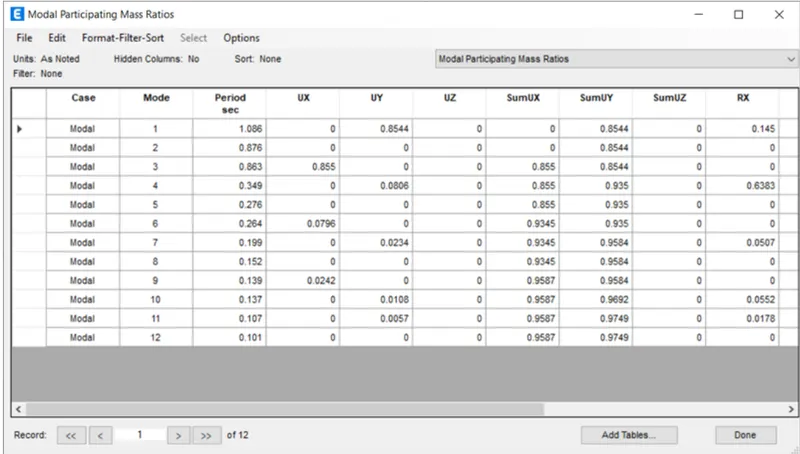
After selecting the show table option, then we need to select the Modal Participating Mass Ratios from the Structure output.
Then after the Modal Participating Mass Ratios table will appear
Step:-2
Building C
First we have to open the etabs software and create the new model and add the 5 storey in the story data as shown below.
Next we put the story1 as Master Story, and the height of the building is 16.5m, as shown below
Next we have to set the material properties and section properties.
We assign the columns to all the storeys with the size of (550X300) mm.
Next we assign the beams to all the storeys with the size of (300X400) mm.
Next we assign the slabs from 1st storey to 5th storey with the thickness of 150mm
Next we have to assign all the loads such as live load, dead load, brick wall load and seismic loads etc,.
Now we need to change the column orientation to the X direction.
We go to the Assign and select frame option, and in that we select the Local axes option
After selecting the local axes option the new tab appears, In that we put the Rotate by Angle as 90 degrees
The column orientation has been changed to X direction with the angle of 90 degrees, as shown below.
After assigning all the loads, we have to check the model and the model shows no error.
After checking the model, then click on the run analysis.
Finally the run analysis has been finished, then the deformed shape of the model will appears, as shown below.
Next we have to click on the Display option and then select the show table option.
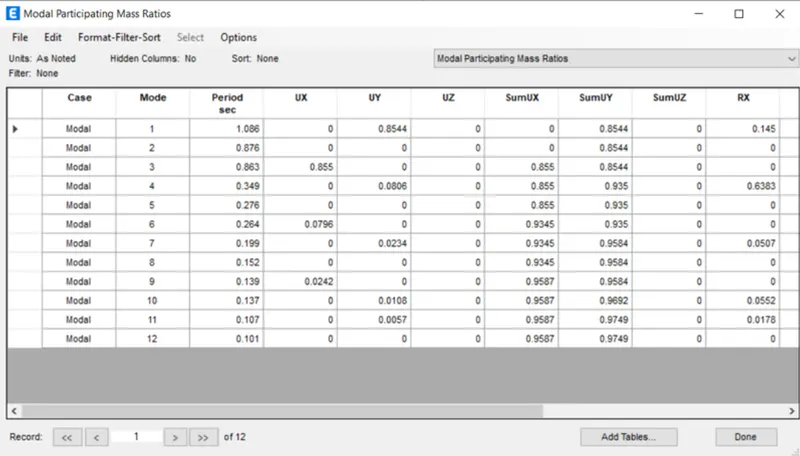
After selecting the show table option, then we need to select the Modal Participating Mass Ratios from the Structure output.
Then after the Modal Participating Mass Ratios table will appear, as shown below.
Step:-3
Building D
First we have to open the etabs software and create the new model and add the 5 storey in the story data as shown below.
Next we put the story1 as Master Story, and the height of the building is 16.5m, as shown
Next we have to set the material properties and section properties.
We assign the columns to all the storeys with the size of (300X550)mm.
Next we assign the beams to all the storeys with the size of (300X400)mm.
Next we assign the slabs from 1st storey to 5th storey with the thickness of 150mm
Next we have to assign all the loads such as live load, dead load, brickwall load and seismic loads etc,.
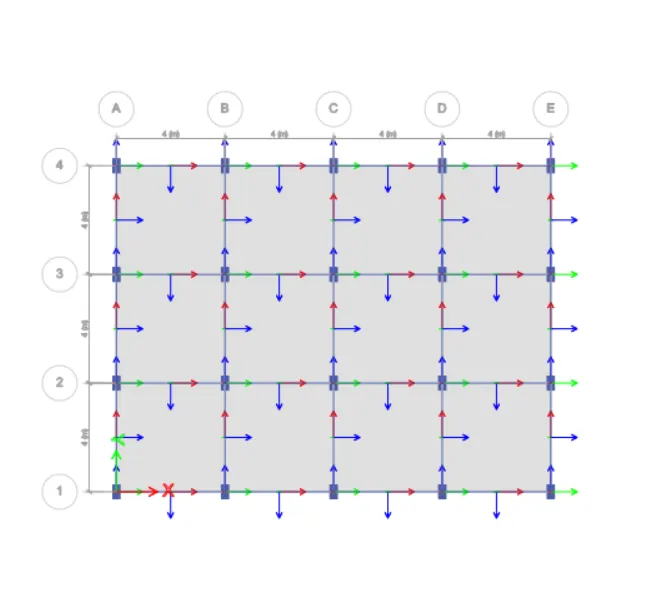
Now we need to change the column orientation to the Y direction.
We go to the Assign and select frame option, and in that we select the Local axes option
After selecting the local axes option the new tab appears, In that we put the Rotate by Angle as 90 degrees
The column orientation has been changed to Y direction with the angle of 90 degrees, as shown below.
After assigning all the loads, we have to check the model and the model shows no error.
After checking the model, then click on the run analysis.
Finally the run analysis has been finished, then the deformed shape of the model will appear
Next we have to click on the Display option and then select the show table option.
After selecting the show table option, then we need to select the Modal Participating Mass Ratios from the Structure output.
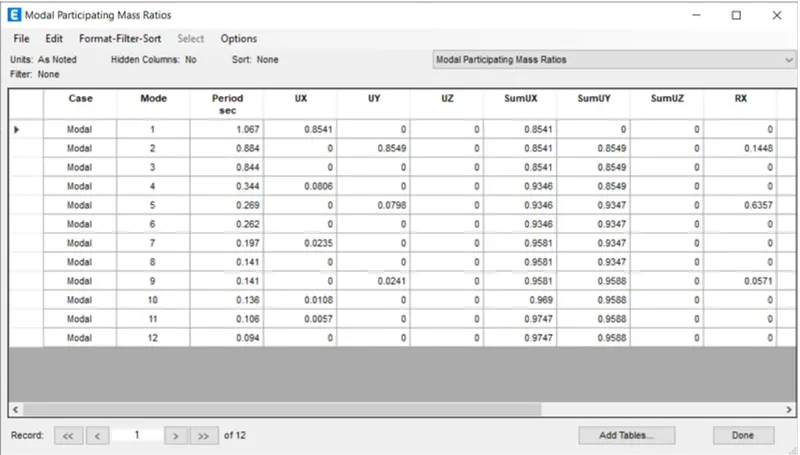
Then after the Modal Participating Mass Ratios table will appear, as shown below.
Result:-
The fundamental natural period of Building B is T=0.972 sec.
The fundamental natural period of Building C is T=1.086 sec.
The fundamental natural period of Building D is T=1.067 sec.
Here the natural periods of buildings shall be increased due to the change in column orientation.
Final Result:-
1) Fundamental natural periods of buildings E & F as well as G & H. And the significant difference in the fundamental natural periods.
The fundamental natural period of Building E is T=1.561 sec.
The fundamental natural period of Building F is T=1.557 sec.
The fundamental natural period of Building G is T=3.618 sec.
The fundamental natural period of Building H is T=4.412 sec.
In the Building E we use two different column sizes, one has been assigned to top 5 storeys and another one to the bottom 5 storey. But in building F there is only one column size we use for the entire building, thats why there is a significant difference in the fundamental natural periods.
Similarly we use three different column sizes for building G, and one column size for building H.
Hence there is a significant difference in the fundamental natural periods.
2) Fundamental natural periods of buildings H, J and K. Have the buildings become more flexible or stiff due to change in mass.
The fundamental natural period of Building H is T=4.412 sec.
The fundamental natural period of Building J is T=4.617 sec.
The fundamental natural period of Building K is T=5.288 sec.
When the mass of the building is increases, then the natural period of the building also increases.
When the mass of the building J increased by 10% compared to Building H, the Building J is more flexible than the building H.
When the mass of the building K increased by 20% compared to Building H, the Building K is more flexible than the building J and building H.
Finally when the weight of the building increases, the buildings become more flexible.
3) Fundamental natural periods of Buildings A, B, F and H with change in building height.
The fundamental natural period of Building A is T=0.5 sec.
The fundamental natural period of Building B is T=1.036 sec.
The fundamental natural period of Building F is T=1.557 sec.
The fundamental natural period of Building H is T=4.412 sec.
When the height of the buildings increases, the natural periods of buildings also increases.
4) Fundamental natural periods of Buildings B, C and D with change in column orientation.
The fundamental natural period of Building B is T=0.972 sec.
The fundamental natural period of Building C is T=1.086 sec.
The fundamental natural period of Building D is T=1.067 sec.
Here the natural periods of buildings shall be increased due to the change in column orientation.