Project - Data Handling and Interpolation
% Project - Data Handling and Interpolation
val = xlsread('H:\Simulink\VI.xlsx'); % Import data from Excel sheet.
v = val(:,1); % Extract the voltage value from Excel.
i = val(:,2); % Extract the Current value from Excel.
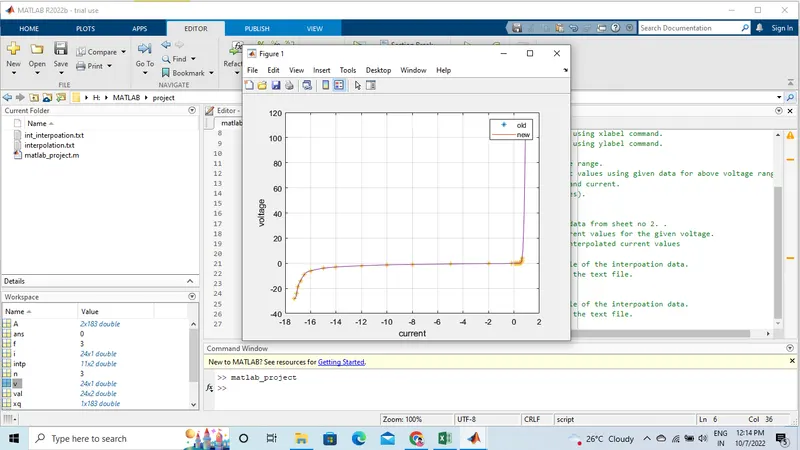
plot(v,i,'*'); hold on; % plot graph voltage& current.
grid on; % show grid line.
xlabel('current'); % TO give X-axis name using xlabel command.
ylabel('voltage'); % TO give Y-axis name using ylabel command.
%
xq = -17.3:0.1:0.9; % Interpolation voltage range.
yq = spline(v,i,xq); % Calculate the current values using given data for above voltage range.
A =[xq;yq]; % New data of voltage and current.
plot(xq,yq) % plot graph (new values).
legend ('old','new'); % TO Name the graph .
%
xr = xlsread('H:\Simulink\VI.xlsx',2); % Extract the voltage data from sheet no 2. .
yr = spline(v,i,xr); % Interpolation of current values for the given voltage.
intp = [xr yr]; % TO given voltage & interpolated current values
%
f = fopen('interpolation.txt','w'); % TO write the text file of the interpoation data.
fprintf(f,'%.3f %.3f\n',[xr; yr]); % TO print the data to the text file.
fclose(f); % close the file.
%
n = fopen('int_interpoation.txt','w'); % TO write the text file of the interpoation data.
fprintf(n,'%2f %2f\n',[xq;yq]); % TO print the data to the text file.
fclose(n); % close the file.