Project 8
Aim: To detect corners of objects in a frame using the Shi-Tomasi corner detector and their displacement from frame to frame using Lucas Kanade Optical Flow method.
Procedure:
Optical Flow: Optical Flow task implies the calculation of the shift vector for pixel as an object displacement difference between two neighbouring images.
The main idea of Optical Flow is to estimate the object’s displacement vector caused by its motion or camera movements.
To perform optical flow using Lucas Kanade's optical flow method, corners are being detected by the Shi-Tomasi corner detector algorithm.
Shi-Tomasi Corner Detector Algorithm:
Shi-Tomasi is almost similar to Harris Corner detector, apart from the way the score (R) is calculated. This gives a better result. Moreover, in this method, we can find the top N corners, which might be useful in case we don’t want to detect each and every corner.
A large value of R indicates a corner, a negative value indicates an edge. Also, to pick up the optimal corners, we can use non-maximum suppression.
In Shi-Tomasi, R is calculated in the following way:

If R is greater than a threshold, it is classified as a corner.
Lucas-Kanade Optical Flow Method:
In calculating the displacement, two constraints, Brightness constancy and constant displacement, are considered.
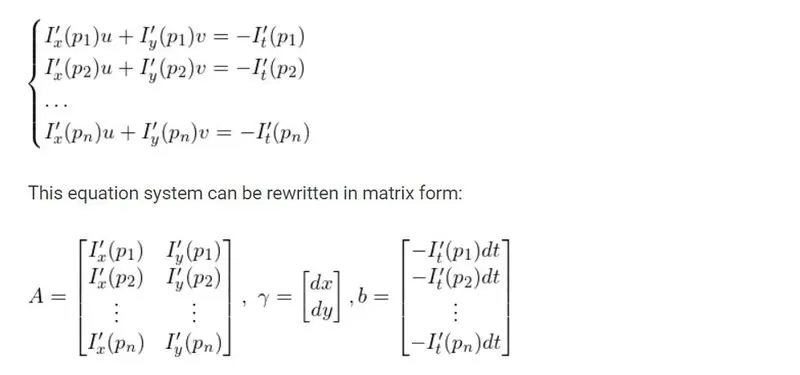
The following equation describes a tracked pixel with unknown velocities u and v as spacial motion induced by the camera, developed using brightness constancy assumption

Then, a window of size pXp is considered and their displacement equations are taken and calculated using least squares method to compute gamma.

CODE:
1. import modules
import numpy as np
import cv2
import matplotlib.pyplot as plt
%matplotlib inline
2. define a function to predict corners of objects in the frames of video. Here we used Shi Tomasi corner detector algorithm for the improvement of Lucas Kanade Optical flow method
def shitomasi(gray_image):
    points = cv2.goodFeaturesToTrack(gray_image, maxCorners=200,
                      qualityLevel=0.1,
                      minDistance=10,
                      blockSize=5)
    return points
3. Define a function to calculate the displacement of corners computed from above function using Lucas Kanade Optical Flow method
def LKmodel(gray_t1, gray_t2, prev_points):
    # Use the Lucas-Kanade method `cv.calcOpticalFlowPyrLK` for Optical Flow
    # Indices of the `status` array which equal 1 signify a corresponding new feature has been found
    points, status, error = cv2.calcOpticalFlowPyrLK(gray_t1, gray_t2, prev_points, None,winSize=(15, 15),maxLevel=2,
                                                    criteria=(cv2.TERM_CRITERIA_EPS | cv2.TERM_CRITERIA_COUNT, 10, 0.03))
    return (points, status, error)
4. Open and read the video file and calling the function to generate required values to detect displacement of the objects in the frames and finally saving them to create a new video with masks created in the below section of code
#read video as frame and convert it to gray
ret, prev_frame = capture.read()
prev_gray = cv2.cvtColor(prev_frame, cv2.COLOR_BGR2GRAY)

#finding points using shitomasi function
prev_points = shitomasi(prev_gray)

#creating a mask image mat like prev_frame
mask_image = np.zeros_like(prev_frame)
#to get width and height of video frames to make a frame size
frame_width = int(capture.get(3))
frame_height = int(capture.get(4))
frame_size = (frame_width, frame_height)

#to write computed frames as video
output = cv2.VideoWriter('traffic_LKST.avi',cv2.VideoWriter.fourcc('M','J','P','G'),fps=30, frameSize=frame_size)

#while video is open reading frame by frame to go through LKmodel function to detect displacement of corners of each object
#and also creating mask image of corners and add it to frame
while(1):
    ret, frame = capture.read()
    curr_gray = cv2.cvtColor(frame, cv2.COLOR_BGR2GRAY)
    curr_points, status, error = LKmodel(prev_gray, curr_gray, prev_points)
    if curr_points is not None:
        curr_points = curr_points[status == 1]
        old_points = prev_points[status == 1]
    for i, (curr, prev) in enumerate(zip(curr_points, old_points)):
        a,b = curr.ravel()
        c,d = prev.ravel()
        mask_image = cv2.line(mask_image,(int(a), int(b)), (int(c), int(d)), color[i].tolist(), 2)
        frame = cv2.circle(frame,(int(a), int(b)),5, color[i].tolist(), -1)
    #adding mask to the frame
    img = cv2.add(frame, mask_image)
    #writing image to the output file to save as video
    output.write(img)
    #rearranging current frame to previous frame
    prev_gray = curr_gray.copy()
prev_points = curr_points.reshape(-1, 1, 2)Result: The above link has the video generated using the code explained.