Project 4
import numpy as np
import cv2 as cv
import matplotlib.pyplot as plt
import urllib.request

# Defining a function named "Regions". thereby specifying a region of interest (ROI) where lane lines are expected.

def Regions(img):
    Height = img.shape[0]
    Width = img.shape[1]
    Triangle = np.array([
        [(0,Height), ((Width/2),(Height/2)), (Width,Height)]
    ], np.int32)

    mask = np.zeros_like(img)
    masked_img = cv.fillPoly(mask, Triangle, 255)
    ROI = cv.bitwise_and(img, masked_img)

    return ROI


# Read the image diretly from online
url = 'https://ayanzadeh93.github.io/Udacity-Advance-Lane-detection-of-the-road/readme_images/undistorted_vp.jpg'
req = urllib.request.urlopen(url)
arr = np.asarray(bytearray(req.read()), dtype=np.uint8)
image = cv.imdecode(arr, cv.IMREAD_COLOR)
height = image.shape[0]
width = image.shape[1]

Gray = cv.cvtColor(image, cv.COLOR_BGR2GRAY)
Gaussian = cv.GaussianBlur(Gray, (5, 5), 1)
Canny = cv.Canny(Gaussian, 150, 250)
Region = Regions(Canny)

Lines = cv.HoughLinesP(Region, 1, np.pi/180, 150, minLineLength=5, maxLineGap=3) #, np.array([])

# Separate left and right lane lines
left_lines = []
right_lines = []
for line in Lines:
    x1, y1, x2, y2 = line[0]
    slope = (y2 - y1) / (x2 - x1)
    if slope < 0:
        left_lines.append(line)
    else:
        right_lines.append(line)

# Calculate average slope and intercept for each lane line
left_slope, left_intercept, left_count = 0, 0, 0
for line in left_lines:
    x1, y1, x2, y2 = line[0]
    slope = (y2 - y1) / (x2 - x1)
    intercept = y1 - slope * x1
    left_slope += slope
    left_intercept += intercept
    left_count += 1
left_slope /= left_count
left_intercept /= left_count

right_slope, right_intercept, right_count = 0, 0, 0
for line in right_lines:
    x1, y1, x2, y2 = line[0]
    slope = (y2 - y1) / (x2 - x1)
    intercept = y1 - slope * x1
    right_slope += slope
    right_intercept += intercept
    right_count += 1
right_slope /= right_count
right_intercept /= right_count

# Calculate x-coordinates of lane lines at top and bottom of region of interest
y1 = int(height / 2) + 50
y2 = height
left_x1 = int((y1 - left_intercept) / left_slope)
left_x2 = int((y2 - left_intercept) / left_slope)
right_x1 = int((y1 - right_intercept) / right_slope)
right_x2 = int((y2 - right_intercept) / right_slope)

# Draw averaged lane lines on image
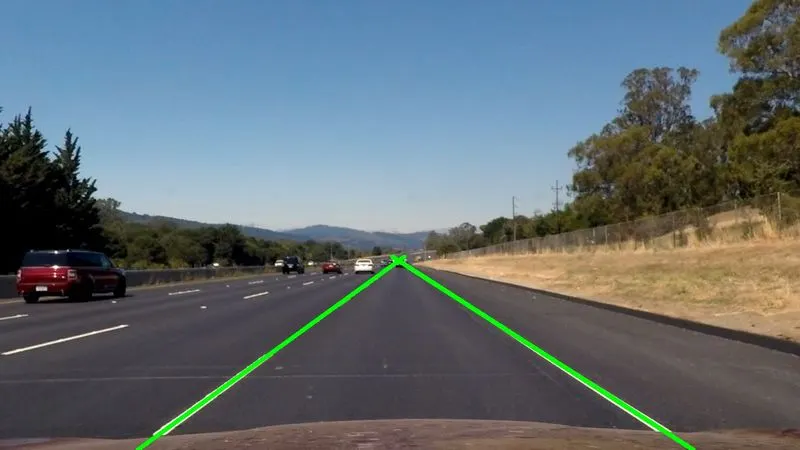
cv.line(image, (left_x1, y1), (left_x2, y2), (0, 255, 0), 5)
cv.line(image, (right_x1, y1), (right_x2, y2), (0, 255, 0), 5)

# Display image with lane lines
cv.imshow('Lane Lines', image)
cv.waitKey(0)
cv.destroyAllWindows()


# Read video file
cap = cv.VideoCapture("D:\Codings\My Codes\Autonomous Vehicle\Week 4\Test_File-1.mp4")

# Get the frames per second (fps) and frame size of the video
fps = int(cap.get(cv.CAP_PROP_FPS))
width = int(cap.get(cv.CAP_PROP_FRAME_WIDTH))
height = int(cap.get(cv.CAP_PROP_FRAME_HEIGHT))

# Define the codec and create VideoWriter object for output
fourcc = cv.VideoWriter_fourcc(*'mp4v')
out = cv.VideoWriter('Test File_Output-1.mp4', fourcc, fps, (width, height))

# Loop through each frame of the video
while cap.isOpened():
    # Read frame from video
    ret, frame = cap.read()
    if not ret:
        break

    else:
        height = frame.shape[0]
        Gray = cv.cvtColor(frame, cv.COLOR_BGR2GRAY)
        Gaussian = cv.GaussianBlur(Gray, (5, 5), 1)
        Canny = cv.Canny(Gaussian, 150, 250)
        Region = Regions(Canny)

        Lines = cv.HoughLinesP(Region, 1, np.pi/180, 150, minLineLength=5, maxLineGap=3)

        # Separate left and right lane lines
        if Lines is not None:
            left_lines = []
            right_lines = []
            for line in Lines:
                x1, y1, x2, y2 = line[0]
                slope = (y2 - y1) / (x2 - x1)
                if slope < 0:
                    left_lines.append(line)
                else:
                    right_lines.append(line)

            # Calculate average slope and intercept for each lane line
            left_slope, left_intercept, left_count = 0, 0, 0
            for line in left_lines:
                x1, y1, x2, y2 = line[0]
                slope = (y2 - y1) / (x2 - x1)
                intercept = y1 - slope * x1
                left_slope += slope
                left_intercept += intercept
                left_count += 1
            if left_count != 0:
                left_slope /= left_count
                left_intercept /= left_count

            right_slope, right_intercept, right_count = 0, 0, 0
            for line in right_lines:
                x1, y1, x2, y2 = line[0]
                slope = (y2 - y1) / (x2 - x1)
                intercept = y1 - slope * x1
                right_slope += slope
                right_intercept += intercept
                right_count += 1
            if right_count != 0:
                right_slope /= right_count
                right_intercept /= right_count

            # Calculate x-coordinates of lane lines at top and bottom of region of interest
            y1 = int(height / 2) + 50
            y2 = height
            if left_slope != 0:
                left_x1 = int((y1 - left_intercept) / left_slope)
                left_x2 = int((y2 - left_intercept) / left_slope)

            if right_slope != 0:
                right_x1 = int((y1 - right_intercept) / right_slope)
                right_x2 = int((y2 - right_intercept) / right_slope)

            # Draw averaged lane lines on frame
            cv.line(frame, (left_x1, y1), (left_x2, y2), (0, 255, 0), 5)
            cv.line(frame, (right_x1, y1), (right_x2, y2), (0, 255, 0), 5)

    # Display the resulting frame
    cv.imshow('Lane Detection', frame)

    # Write the resulting frame to output video file
    out.write(frame)

    # Exit loop if 'q' is pressed
    if cv.waitKey(1) & 0xFF == ord('q'):
        break

# Release video capture and writer objects
cap.release()
out.release()

# Destroy all windows
cv.destroyAllWindows()- The code appears to be implementing lane detection using OpenCV library in Python.
- The code first imports the necessary libraries such as numpy, opencv(cv2), matplotlib.pyplot, and urllib.request.
- The code then defines a function named 'Regions' which accepts an image as an argument and returns a region of interest (ROI) which in this case is a triangle.
- The code then reads an image from a URL using urllib and decodes it using OpenCV. The image read by urlib will be an rgb image.
- It then applies various operations such as Gaussian Blur, Canny edge detection, and the 'Regions' function to obtain the region of interest.
- The code then applies Hough Transform to obtain the lane lines in the region of interest.
- The lane lines are then separated into left and right lines by checking their slope. The left lines have a negative slope while the right lines have a positive slope.
- The average slope and intercept of the left and right lines are calculated respectively.
- The x-coordinates of the left and right lane lines are then calculated based on the slope and intercept obtained earlier.
- The code then draws the left and right lane lines on the original image.
- Finally, the code reads a video file and applies the same steps to each frame of the video to detect the lane lines and write the output to another video file named 'Test File_Output1.mp4'.
OutPut Image File:
Output Video:
The output video file is uploaded in the below section.