Project
PROJECT REPORT : Project Creating Scientific Calculator.(OBJECT ORIENTED CODING)
- INTRODUCTION: Calculator is a tool by which we can solve our both daily life and academic mathematical problem. Java is a class-based object-oriented CODEming (OOP) language that is built around the concept of objects. OOP concepts (OOP) intend to improve code readability and reusability by defining how to structure a Java CODE efficiently.
- Application Used: Eclipse IDE , JDK16
- FEATURES OF PROJECT:
|
1]Arithmetic Functions : |
2]Geometric Functions: |
3]Conversion: |
4]SIP Calculation: |
|
|
|
|
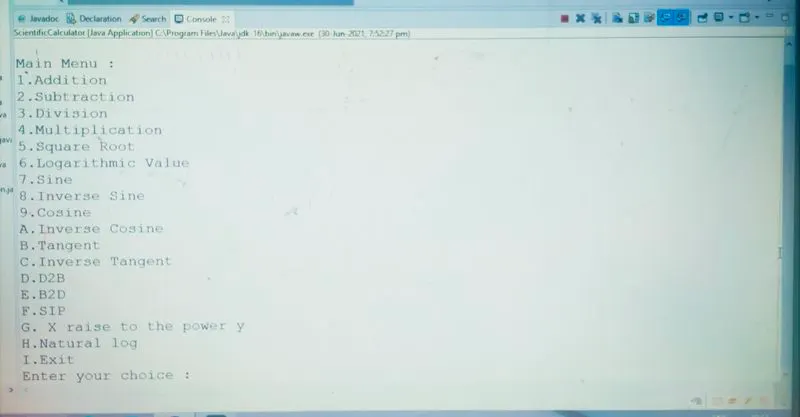
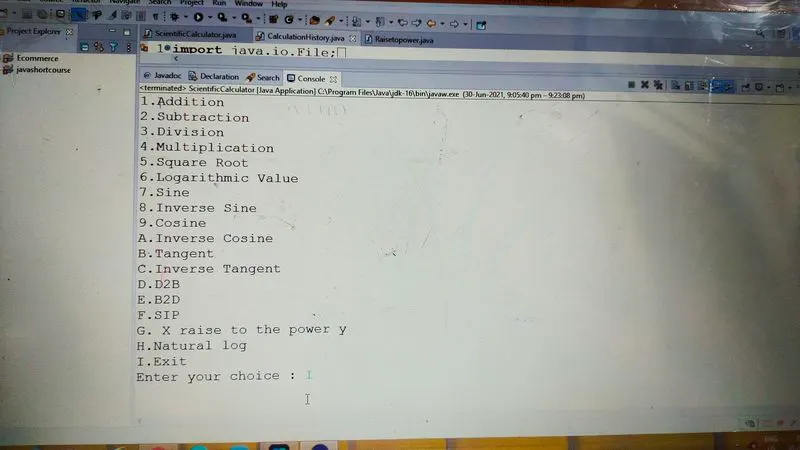
- DISPLAY OF MAIN MENUE: As shown in the image ,the below given output is displayed to the user of the CODE of Scientific Calculator.
- SOURCE CODE EXPLANATION:
import java.util.Scanner;
import java.lang.Math; // CLASSES ARE IMPORTED-
public class ScientificCalculator
{
public static void main(String[] args) {
// declare here
float a,b,res;
char choice, ch;
Scanner S=new Scanner(System.in); //ALL THE VARIABLES DECLARED
do
{
// prepare menu for the user to see multiple operations.
System.out.println("\n\nMain Menu : \n1.Addition\n2.Subtraction\n3.Division\n4.Multiplication\n5.Square Root\n6.Logarithmic Value"
+ "\n7.Sine\n8.Inverse Sine\n9.Cosine\nA.Inverse Cosine\nB.Tangent\nC.Inverse Tangent\nD.D2B\nE.B2D\nF.SIP\nG. X raise to the power y\nH.Natural log\nI.Exit");
// enter the choice
System.out.print("Enter your choice : ");
// read the input choice value.
choice=S.next().charAt(0);
// this loop will calculate different the operations value at different different values. -
//The user can choose the values as it is declared from 0-9 & A toI.
switch(choice)
{
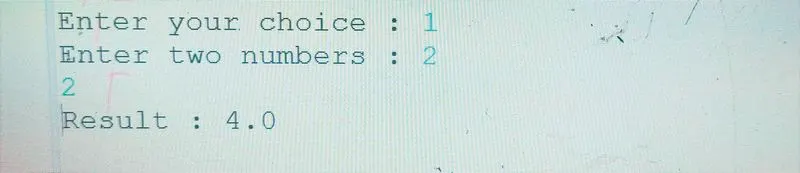
case '1':System.out.print("Enter two numbers : "); //CODE FOR ADDITION
a=S.nextFloat();
b=S.nextFloat();
res=a+b;
System.out.print("Result : " +res);
break; - OUTPUT:
case '2':System.out.print("Enter two numbers : "); //CODE FOR SUBSTRACTION
a=S.nextFloat();
b=S.nextFloat();
res=a-b;
System.out.print("Result : " +res);
break; -
OUTPUT:

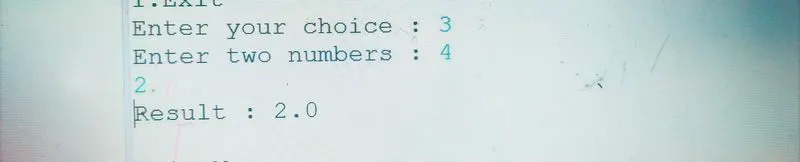
case '3':System.out.print("Enter two numbers : "); //CODE FOR DIVISION
a=S.nextFloat();
b=S.nextFloat();
res=a/b;
System.out.print("Result : " +res);
break;OUTPUT:
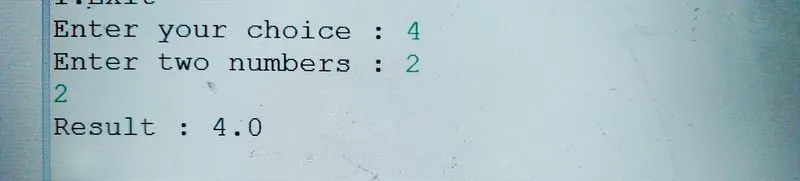
case '4':System.out.print("Enter two numbers : "); //CODE FOR MULTIPICATION
a=S.nextFloat();
b=S.nextFloat();
res=a*b;
System.out.print("Result : " +res);
break; -
OUTPUT:
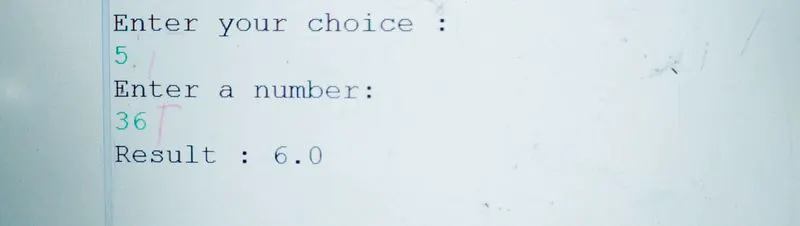
case '5':System.out.println("Enter a number:"); //CODE FOR FINDING SQUAREROOT
a=S.nextFloat();
System.out.println("Result : "+Math.sqrt(a));
break; -
OUTPUT:
-
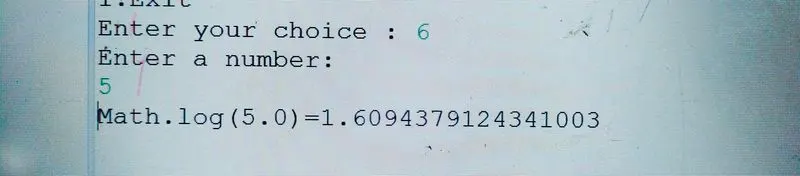
case '6':System.out.println("Enter a number:"); //CODE FOR FINDING LOG
a=S.nextFloat();
double x =a;
System.out.println("Math.log(" + x + ")=" + Math.log(x));
break; -
OUTPUT:
-
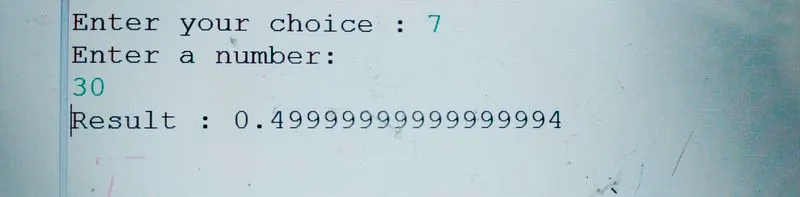
case '7':System.out.println("Enter a number:"); //CODE FOR FINDING SINE
a=S.nextFloat();
double x1 = a;
// converting values to radians
double b1 = Math.toRadians(x1);
System.out.println("Result : " +Math.sin(b1));
break; - OUTPUT:
-
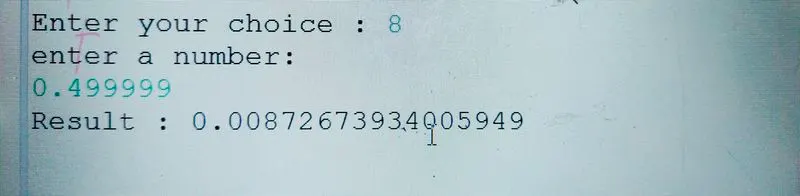
case '8':System.out.println("enter a number:"); //CODE FOR FINDING SINE INVERSE
a=S.nextFloat();
double b2= Math.toRadians(a);
System.out.println("Result : " +Math.asin(b2));
break; -
OUTPUT:
-
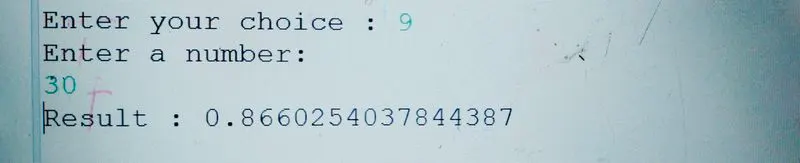
case '9' :System.out.println("Enter a number:"); //CODE FOR FINDING COSINE
a=S.nextFloat();
a=S.nextFloat();
double x2 = a;
// converting values to radian
double b3 = Math.toRadians(x2);
System.out.println("Result : " +Math.cos(b3));
break; -
OUTPUT:
-
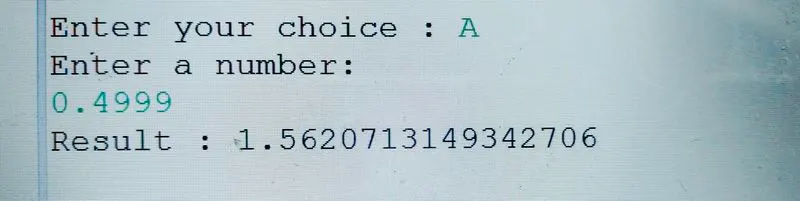
case 'A':System.out.println("Enter a number:"); //CODE FOR FINDING COSINE INVERSE
a=S.nextFloat();
double b4= Math.toRadians(a);
System.out.println("Result : " +Math.acos(b4));
break; -
OUTPUT:
-
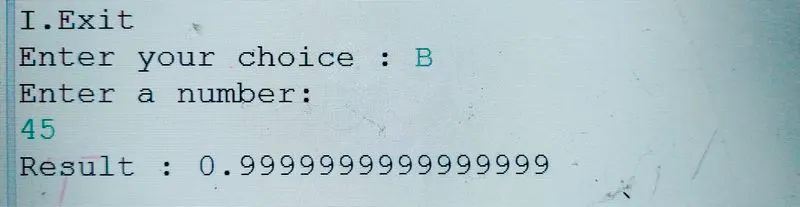
case 'B':System.out.println("Enter a number:"); //CODE FOR FINDING TANGENT
a=S.nextFloat();
double x5 = a;
// converting values to radians
double b5 = Math.toRadians(x5);
System.out.println("Result : " +Math.tan(b5));
break; -
OUTPUT:
-
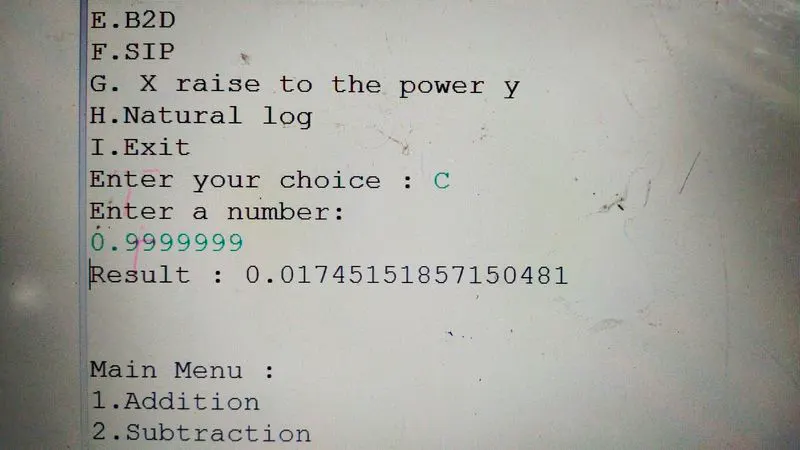
case 'C':System.out.println("Enter a number:"); //CODE FOR FINDING TANGENT INVERSE
a=S.nextFloat();
double b6= Math.toRadians(a);
System.out.println("Result : " +Math.atan(b6));
break; - OUTPUT:
-
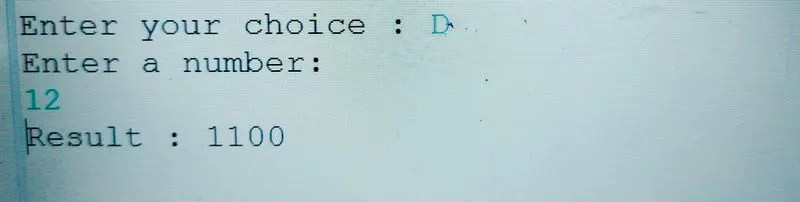
case 'D':System.out.println("Enter a number:"); //CODE FOR CONVERSION DECIMAL TO BINARY
a=S.nextInt();
System.out.println("Result : " +Integer.toBinaryString((int) a));
break; -
OUTPUT:
-
case 'E':System.out.println("Enter a binary form:"); //CODE FOR CONVERSION BINARY TO DECIMAL
String binaryString="0001";
int decimal=Integer.parseInt(binaryString,2);
System.out.println("Result : " +decimal);
break;
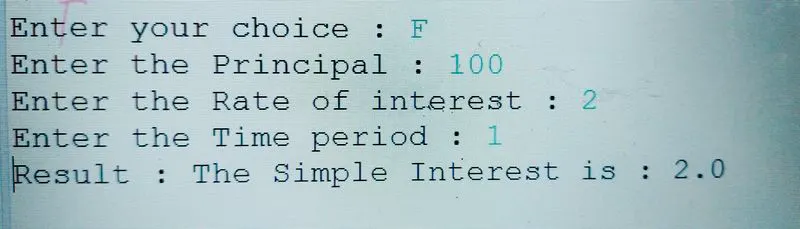
case 'F':float p, r, t;
Scanner s = new Scanner(System.in); //CODE FOR SIP CALCULATION
System.out.print("Enter the Principal : ");
p = s.nextFloat();
System.out.print("Enter the Rate of interest : ");
r = s.nextFloat();
System.out.print("Enter the Time period : ");
t = s.nextFloat();
float si;
si = (r * t * p) / 100;
System.out.print("Result : " +"The Simple Interest is : " + si);
break; -
OUTPUT:
-
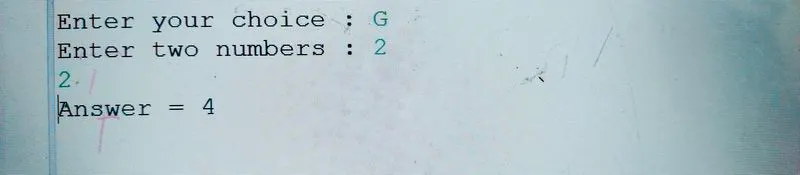
case 'G':System.out.print("Enter two numbers : "); //CODE FOR FINDING X RAISE TO POWER Y
a=S.nextFloat();
b=S.nextFloat();
Float base = a, exponent = b;long result = 1;
while (exponent != 0) {
result *= base;
--exponent;
}System.out.println("Answer = " + result);
break; -
OUTPUT:
-
case 'H':System.out.println("Enter a number:"); //CODE FOR FINDING NATURAL LOG
a=S.nextFloat();
System.out.println(Math.log(a));
break; -
OUTPUT:
-

case 'I': //CODE FOR EXITING THE CALCULATOR
System.exit(0);
break;
default : System.out.print("Wrong Choice.....\n");
break; - OUTPUT:
-
}
}
// loop works till the number I not selected.
while(choice!=17);
//WHILE LOOP WILL CONTINUE RUNNING UNTILE THE CHOICE IS NOT EQUAL TO 17.
}}
import java.util.Scanner;
	import java.lang.Math;
	public class ScientificCalculator
	{
		public static void main(String[] args) {
			// declare here
						float a,b,res;
						char choice, ch;
						Scanner S=new Scanner(System.in);

						do
						{
							// prepare menu for the user to see multiple operations.
							System.out.println("\n\nMain Menu : \n1.Addition\n2.Subtraction\n3.Division\n4.Multiplication\n5.Square Root\n6.Logarithmic Value"
									+ "\n7.Sine\n8.Inverse Sine\n9.Cosine\nA.Inverse Cosine\nB.Tangent\nC.Inverse Tangent\nD.D2B\nE.B2D\nF.SIP\nG. X raise to the power y\nH.Natural log\nI.Exit");

							// enter the choice
							System.out.print("Enter your choice : ");

							// read the input choice value.
							choice=S.next().charAt(0);

							// this loop will calculate different the operations value at different different values.
							switch(choice)
							{
							    case '1':System.out.print("Enter two numbers : ");
							    a=S.nextFloat();
							    b=S.nextFloat();
							    res=a+b;
							    System.out.print("Result : " +res);
							    break;

							     case '2':System.out.print("Enter two numbers : ");
								 a=S.nextFloat();
								 b=S.nextFloat();
								 res=a-b;
								 System.out.print("Result : " +res);
								 break;

							     case '3':System.out.print("Enter two numbers : ");
								 a=S.nextFloat();
								 b=S.nextFloat();
								 res=a/b;
								 System.out.print("Result : " +res);
								 break;

							     case '4':System.out.print("Enter two numbers : ");
								 a=S.nextFloat();
								 b=S.nextFloat();
								 res=a*b;
								 System.out.print("Result : " +res);
								 break;


								 case '5':System.out.println("Enter a number:");
								 a=S.nextFloat();
								 System.out.println("Result : "+Math.sqrt(a));
								 break;

								 case '6':System.out.println("Enter a number:");
								 a=S.nextFloat();
								 double x =a;
								 System.out.println("Math.log(" + x + ")=" + Math.log(x));
								 break;

								 case '7':System.out.println("Enter a number:");
								 a=S.nextFloat();
								 double x1 = a;

							        // converting values to radians
							        double b1 = Math.toRadians(x1);

							        System.out.println("Result : " +Math.sin(b1));
							        break;

								 case '8':System.out.println("enter a number:");
								 a=S.nextFloat();
								 double b2= Math.toRadians(a);

							        System.out.println("Result : " +Math.asin(b2));
							        break;

								 case '9' :System.out.println("Enter a number:");
								 a=S.nextFloat();
								 double x2 = a;

							        // converting values to radian
							        double b3 = Math.toRadians(x2);

							        System.out.println("Result : " +Math.cos(b3));
							        break;

								 case 'A':System.out.println("Enter a number:");
	                             a=S.nextFloat();
								 double b4= Math.toRadians(a);

							        System.out.println("Result : " +Math.acos(b4));
							        break;

								 case 'B':System.out.println("Enter a number:");
								 a=S.nextFloat();
								 double x5 = a;

							        // converting values to radians
							        double b5 = Math.toRadians(x5);

							        System.out.println("Result : " +Math.tan(b5));
							        break;


								 case 'C':System.out.println("Enter a number:");
								 a=S.nextFloat();
								 double b6= Math.toRadians(a);

							        System.out.println("Result : " +Math.atan(b6));
							        break;

								 case 'D':System.out.println("Enter a number:");
								 a=S.nextInt();
								 System.out.println("Result : " +Integer.toBinaryString((int) a));
								 break;

								 case 'E':System.out.println("Enter a binary form:");
								 String binaryString="0001";
								 int decimal=Integer.parseInt(binaryString,2);
								 System.out.println("Result : " +decimal);
								 break;

								 case 'F':float p, r, t;
							        Scanner s = new Scanner(System.in);
							        System.out.print("Enter the Principal : ");
							        p = s.nextFloat();
							        System.out.print("Enter the Rate of interest : ");
							        r = s.nextFloat();
							        System.out.print("Enter the Time period : ");
							        t = s.nextFloat();
							        float si;
							        si = (r * t * p) / 100;
							        System.out.print("Result : " +"The Simple Interest is : " + si);
							        break;

								 case 'G':System.out.print("Enter two numbers : ");
								 a=S.nextFloat();
								 b=S.nextFloat();
								 Float base = a, exponent = b;

								    long result = 1;

								    while (exponent != 0) {
								      result *= base;
								      --exponent;
								    }

								    System.out.println("Answer = " + result);

								 break;

								 case 'H':System.out.println("Enter a number:");
								 a=S.nextFloat();
								System.out.println(Math.log(a));
								break;


								 case 'I':
									 System.exit(0);
									 break;
									 default : System.out.print("Wrong Choice.....\n");
									 break;


							}
					    }
						// loop works till the number G not selected.
					  while(choice!=17);

				}

		}
-