Project 2 - V&V SW Analysis II
1Ans)
What Is Static Code Analysis
Static code analysis is a method of debugging by examining source code before a program is run. It’s done by analyzing a set of code against a set (or multiple sets) of coding rules.
* Static code analysis and static analysis are often used interchangeably, along with source code analysis.
* This type of analysis addresses weaknesses in source code that might lead to vulnerabilities. Of course, this may also be achieved through manual code reviews. But using automated tools is much more effective.
* Static analysis is commonly used to comply with coding guidelines — such as MISRA. And it’s often used for complying with industry standards — such as ISO 26262
What Are the Limitations of a Static Analysis Tool?
* Static code analysis is used for a specific purpose in a specific phase of development. But there are some limitations of a static code analysis tool.
No Understanding of Developer Intent :
  int calculateArea(int length, int width)
  {
  return (length + width);
  }
* A static analysis tool may detect a possible overflow in this calculation. But it can’t determine that function fundamentally does not do what is expected!
Rules That Aren’t Statically Enforceable :
* Some coding rules depend on external documentation. Or they are open to subjective interpretation.
For example :
Possible Defects Lead to False Positives and False Negatives
In some situations, a tool can only report that there is a possible defect.
  int divide(void)
  {
    int x;
    if(foo())
    {
        x = 0;
    }
    else
    {
        x = 5;
    }
    return (10/x);
  }
* If we know nothing about foo(), we do not know what value x will have.
* The result is undecidable. That means that tools may report defects that do not actually exist (false positives). Or they may fail to report real defects (false negatives).
What Are Static Analysis Tool Benefits?
* There are several benefits of static code analysis tools — especially if you need to comply with an industry standard.
* The best static code analysis tools offer speed, depth, and accuracy.
Speed :
* It takes time for developers to do manual code reviews. Automated tools are much faster.
* Static code checking addresses problems early on. And it pinpoints exactly where the error is in the code. So, you’ll be able to fix those errors faster. Plus, coding errors found earlier are less costly to fix.
Depth :
* Testing can’t cover every possible code execution path. But a static code analyzer can.
* It checks the code as you work on your build. You’ll get an in-depth analysis of where there might be potential problems in your code, based on the rules you’ve applied.
* Here's an example of in-depth code analysis in Helix QAC.
How to Choose a Static Analysis Tool?
* Here are a few things to consider when deciding which tool is right for you.
Programming Language :
* Analyzers are designed for many different programming languages. So, it’s important to choose a tool that supports your language.
Standards :
* One the primary uses of static analyzers is to comply with standards. So, if you’re in a regulated industry that requires a coding standard, you’ll want to make sure your tool supports that standard.
2nd Ans)
What is Integration Testing?
* Integration Testing is the type of testing when modules are integrated logically and tested in a group. A typical software project consists of multiple modules that are managed by different programmers. This testing allows you to focus on data communication between these modules. Hence it is also named as I & T (Integration & Testing), String Testing, and Thread Testing.
* If you want to test the interaction between multiple integration components, then it is termed as the component integration testing. If you want to test the interaction among integrated systems, then it is named as the system integration testing.
* This tutorial is written to learn integration testing with example and we have given a number of examples of integration testing.
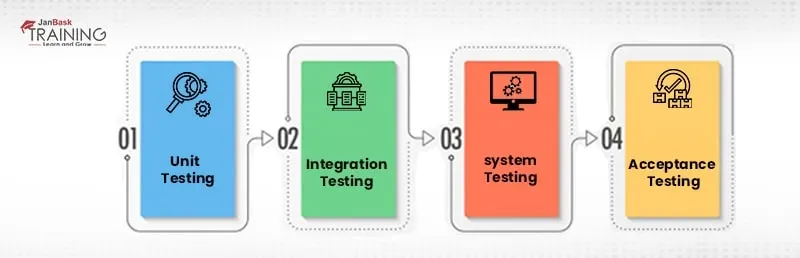
The significance of Integration Testing :
* Although each unit is tested independently, still defects may arise during integration because of the following reasons:
* A different programmer designs each unit, so their understanding and coding skills could be different. This is the reason to verify them once they are integrated.
* The client requirements frequently change at different stages of a project. These new requirements may not be tested earlier, so integration testing becomes necessary.
* Interfaces of software modules with databases could be erroneous. Integration testing makes sure either interface works correctly as desired or not.
* If there are external hardware interfaces, they could be erroneous.
* The inadequate handling of exceptions may cause issues.
Integration Test Case Examples :
* Integration testing majorly focuses on interfaces and the flow of information between software modules. So, priority is given to integrated links instead of unit functions that are tested in advance. Here is the sample integration test case for the following scenario:
* For example, there is one application with three modules, Login Page, Mailbox, and Delete emails. All these modules are integrated logically by programmers. You don’t have to focus on the testing of Login Page as it is done already in the Unit Testing. You should focus on its interface link with the Mail Box Page. In the same way, check the interface link of Mail Box and the Delete Mails Module.
Strategies/Approaches/Methodologies of Integration Testing :
* Moving ahead, let us learn how these testing strategies are executed, their benefits, and drawbacks.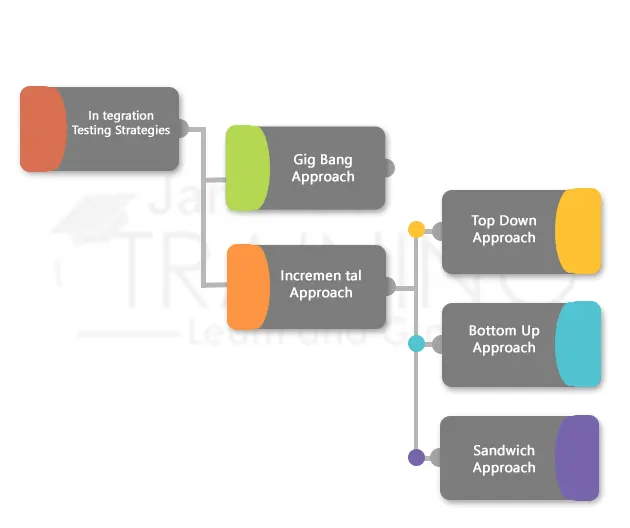
How to do Integration Testing?
Here is the procedure for integration testing on how to perform it:
* First, you should prepare the integration test plan.
* Design the test cases, test scenarios, test scripts etc.
* Now execute the test cases followed by reporting of defects.
* Track and re-test defects as soon as they arise.
* Follow the third and fourth steps again and again until the integration is complete
* It is always good performing integration tests frequently to make sure that integrated modules are working perfectly. For this purpose, various integration tools are available that assist the organization to create a framework and build integration testing suites. A list of popular Integration Testing tools is given below.
* VectorCAST/C++
* VectorCAST/Ada
* Citrus Integration Testing
* LDRA
* SMART INTEGRATION TEST ACCELERATOR (SITA)
* FitNesse
* Rational Integration Tester
* Protractor
* TESSY
* Validate MSG
* Steam
* Jasmine
* eZscript
* Spock for JAVA
* Pioneerjs