Project 2 - Measuring the distance of an object using ultrasonic sensor and also smoothen the sensor data using moving average filter
Components are used
- Arduino Uno
- LCD
- 250 k ohm Potentiometer
- 220 ohm Resistor
- Ultrasonic Distance Sensor
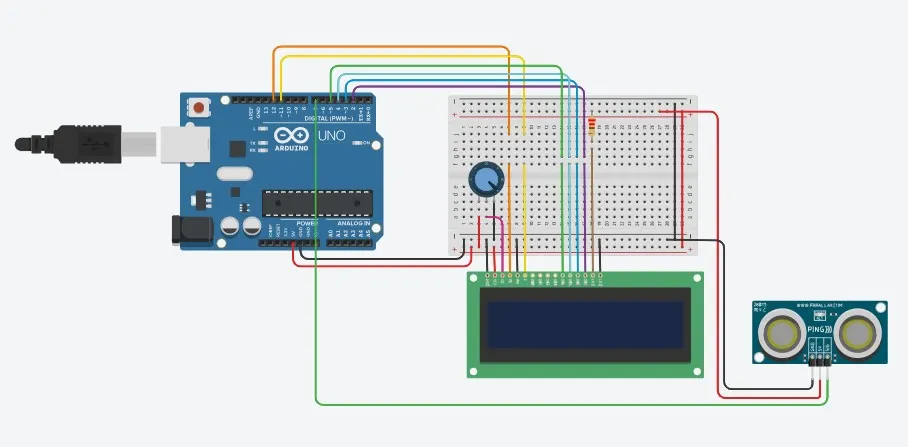
Circuit Diagram :-
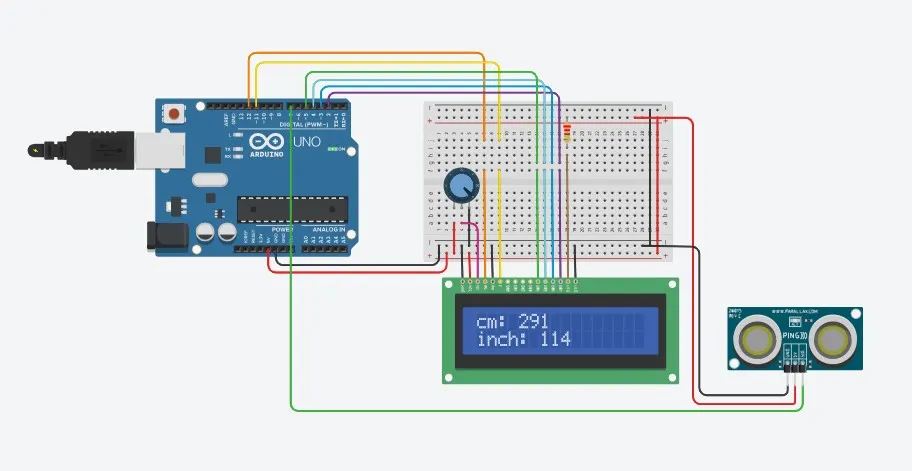
Output fig :-
Program :-
#include
const int numReadings = 10; // Number of readings to average
int readings[numReadings]; // Array to store sensor readings
int index = 0; // Index for the current reading
int total = 0; // Total sum of readings
int inches = 0; // Distance in inches
int cm = 0; // Distance in centimeters
LiquidCrystal lcd(12, 11, 5, 4, 3, 2); // LCD display object
void setup() {
lcd.begin(16, 2); // Initialize LCD display with 16 columns and 2 rows
lcd.print("New String !!!"); // Display a string on the LCD
Serial.begin(9600); // Initialize serial communication at 9600 baud rate
pinMode(7, INPUT); // Set pin 7 as input
}
void loop() {
lcd.clear(); // Clear the LCD display
cm = 0.01723 * readUltrasonicDistance(7); // Read distance from the ultrasonic sensor in centimeters
// Update the array with the latest reading
total = total - readings[index]; // Subtract the oldest reading from the total sum
readings[index] = cm; // Store the new reading in the array
total = total + readings[index]; // Add the new reading to the total sum
index = (index + 1) % numReadings; // Move to the next index or wrap around to 0 if the end is reached
// Calculate the average distance
cm = total / numReadings; // Calculate the average in centimeters
inches = cm / 2.54; // Convert centimeters to inches
Serial.print("cm: "); // Print label to the serial monitor
Serial.print(cm); // Print the distance in centimeters
lcd.setCursor(0, 0); // Set the LCD cursor to the first column of the first row
lcd.print("cm: "); // Display label on the LCD
lcd.setCursor(4, 0); // Set the LCD cursor to the fifth column of the first row
lcd.print(cm); // Display the distance in centimeters on the LCD
Serial.print("inch: "); // Print label to the serial monitor
Serial.println(inches); // Print the distance in inches
lcd.setCursor(0, 1); // Set the LCD cursor to the first column of the second row
lcd.print("inch: "); // Display label on the LCD
lcd.setCursor(6, 1); // Set the LCD cursor to the seventh column of the second row
lcd.print(inches); // Display the distance in inches on the LCD
delay(250); // Delay
}
long readUltrasonicDistance(int pin) {
pinMode(pin, OUTPUT); // Set the pin as output
digitalWrite(pin, LOW); // Set the pin to low
delayMicroseconds(2); // Delay for 2 microseconds
digitalWrite(pin, HIGH); // Set the pin to high
delayMicroseconds(10); // Delay for 10 microseconds
digitalWrite(pin, LOW); // Set the pin to low
pinMode(pin, INPUT); // Set the pin as input
return pulseIn(pin, HIGH); // Measure the pulse duration and return the result
}