Project 2 - Measuring the distance of an object using ultrasonic sensor and also smoothen the sensor data using moving average filter
Answer:
AIM: In this project the implementation of code for “Measuring distance of an object using ultrasonic distance sensor (28015 Ping) and also smoothen the sensor data using moving average filter” by using the Tinkercad.
Ultra-Sonic Sensor:
- The SEN136B5B is an ultrasonic range finder from Seeedstudio. It detects the distance of the closest object in front of the sensor (from 3 cm up to 400 cm).
- It works by sending out a burst of ultrasound and listening for the echo when it bounces off of an object.
- It pings the obstacles with ultrasound. The Arduino board sends a short pulse to trigger the detection, then listens for a pulse on the same pin using the 'pulseIn()' function.
- The duration of this second pulse is equal to the time taken by the ultrasound to travel to the object and back to the sensor. Using the speed of sound, this time can be converted to distance.
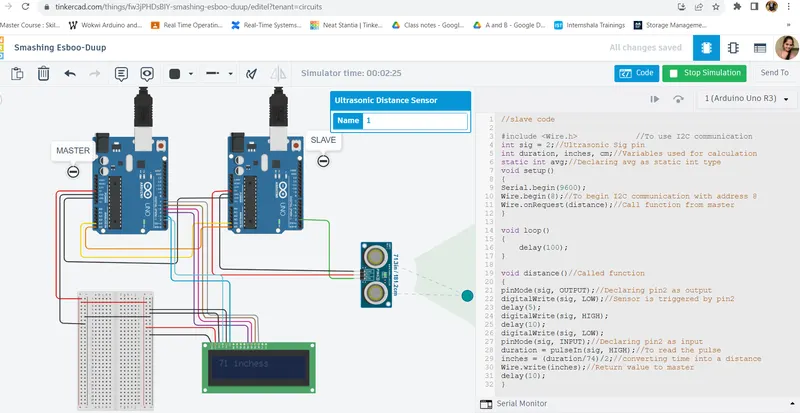
- Master Ardunio is connected to the LCD to know the Range in which we are modifying the distance.
- In the Master Arduino pins 2,3,4,5,6,7, Vcc and Ground are connected to the LCD.
- The Master and Slave Arduino boards are connected with the A4, A5 and GND pins.
- The 5V pin of the SEN136B5B is connected to the 5V pin on the Slave-board, the GND pin is connected to the Slave-GND pin, and the SIG (signal) pin is connected to digital pin 2 on the Slave-board.
While coding the microcontroller:
- In Master and Slave void setup() I have called the functions to begin the I2C Communications and LCD display.
- In the loop function, first I declared a variable named 'duration' of the datatype integer. First, in order to transmit a pulse towards the object, I declared pin 2 as an output pin and transmitted a pulse by making pin 2 LOW for 5 microseconds followed by making pin 2 HIGH for 10 microseconds.
- Then declared the same pin, pin2 as an input pin and read the incoming data from the ultrasonic range finder using the 'pulseIn()' function. The time duration for the echo was stored in the long variable named 'duration'.
- Then I convert the time duration into inches by dividing the duration value by 74 and then by 2 to get the distance between the ultrasonic transmitter and the object in inches.
CODE:
MASTER CODE:
//MASTER CODE
#include <LiquidCrystal.h> //To use LCD functions
#include <Wire.h> //To use I2C communication
LiquidCrystal lcd(2,3,4,5,6,7);
int distance;//variable to print the data from the slave
void setup()
{
Serial.begin(9600);
Wire.begin();//To begin I2C communication
lcd.begin(16,2);//To begin LCD display
lcd.clear();
}
void loop()
{
Wire.requestFrom(8,4);// adress 8 and request 4 byte
distance=Wire.read();
lcd.setCursor(0,0);//Move cursor to the first line
lcd.print(distance);//To print the received message from slave
lcd.print(" inches");
delay(50);
Wire.end();//End the transmission
}
SLAVE CODE:
//slave code
#include <Wire.h> //To use I2C communication
int sig = 2;//Ultrasonic Sig pin
int duration, inches, cm;//Variables used for calculation
static int avg;//Declaring avg as static int type
void setup()
{
Serial.begin(9600);
Wire.begin(8);//To begin I2C communication with address 8
Wire.onRequest(distance);//Call function from master
}
void loop()
{
delay(100);
}
void distance()//Called function
{
pinMode(sig, OUTPUT);//Declaring pin2 as output
digitalWrite(sig, LOW);//Sensor is triggered by pin2
delay(5);
digitalWrite(sig, HIGH);
delay(10);
digitalWrite(sig, LOW);
pinMode(sig, INPUT);//Declaring pin2 as input
duration = pulseIn(sig, HIGH);//To read the pulse
inches = (duration/74)/2;//converting time into a distance
Wire.write(inches);//Return value to master
delay(10);
}