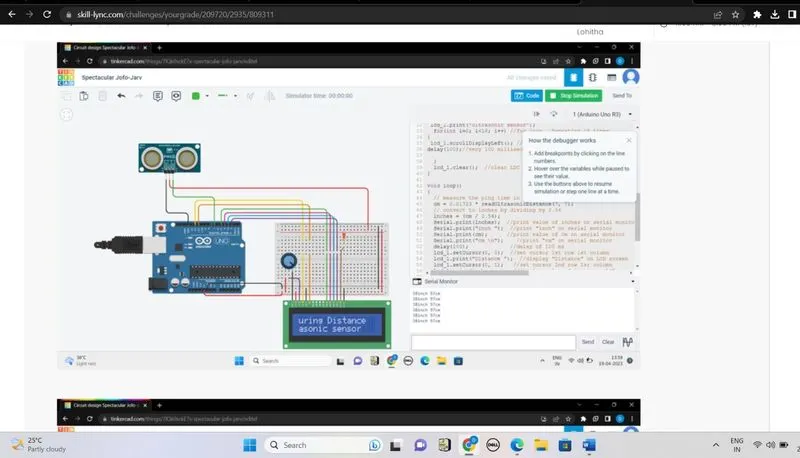
Project 2 - Measuring the distance of an object using ultrasonic sensor and also smoothen the sensor data using moving average filter
Project 2 - Measuring the distance of an object using ultrasonic sensor and also smoothen the sensor data using moving average filter
Overview of the Project:
In this project the implementation of code for “Measuring distance of an object using ultrasonic distance sensor (28015 Ping) and also smoothen the sensor data using moving average filter”.
Goals:
- Measuring the distance in terms of inches of an object using Ultrasonic Distance Sensor (28015 Ping).
- The sensor data is smoothened by using Moving average filter technique to eliminate the high frequency variations from the sensor data.
Key Highlights of the Project:
- Measuring the distance travelled by the wave to the object and gets bounced back from the object to sensor.
- Smoothening the sensor data by moving average filter technique, the filter has a window of certain size. That window determines that how many data the filter can take.
Deliverables of this project:
- The distance travelled by a wave to the object for which we want to measure the distance using Ultrasonic Distance Sensor (28015 Ping).
- Eliminate the high frequency jitters from the sensor data by Moving Average filter to smoothen the sensor data.
Expected Outcomes:
The students will get the Knowledge on Ultrasonic sensor (28015 Ping) to measure the distance travelled by wave to the object, the hardware connection of 2 Arduino’s connected to the sensor and smoothening the sensor data by removing high frequency variations using Moving Average Filter Technique.
Solution
Code:
#include <LiquidCrystal.h> //Library for LCD display functional
LiquidCrystal lcd_1(12, 11, 5, 4, 3, 2); //Define LCD Module Pins (RS, E, D4, D5, D6, and D7 )
int inches = 0; //variable (initial value of 0)
int cm = 0; //variable (initial value of 0)
long readUltrasonicDistance(int triggerPin, int echoPin) //function definition
{
pinMode(triggerPin, OUTPUT); //set trigger pin as output mode
digitalWrite(triggerPin, LOW); // sets trigger pin to LOW
delay(2); //wait for 2 ms
digitalWrite(triggerPin, HIGH); // sets trigger pin to high
delay(10); //wait for 10 ms
digitalWrite(triggerPin, LOW); // sets trigger pin to LOW
pinMode(echoPin, INPUT); //set echo pin as input mode
return pulseIn(echoPin, HIGH); //wait and return the pulseIn function value of echo pin with high
}
void setup()
{
Serial.begin(9600); //initializes the serial communication with a baud rate of 9600
lcd_1.begin(16, 2); // Set up the number of columns and rows on the LCD.
lcd_1.setCursor(0, 0); //set cursor 1st row 1st column
lcd_1.print("Measuring Distance"); //display on LCD
lcd_1.setCursor(0, 1); //set cursor 2nd row 1sr column
lcd_1.print("Ultrasonic sensor");
for(int i=0; i<16; i++) //for loop , Repeating 16 times
{
lcd_1.scrollDisplayLeft(); //scrolls the text on the LCD to the left 16 times with a delay of 100 milliseconds between each //scroll
delay(100); //very 100 milliseconds
}
lcd_1.clear(); //clear LDC screen
}
void loop()
{
// measure the ping time in cm
cm = 0.01723 * readUltrasonicDistance(7, 7);
// convert to inches by dividing by 2.54
inches = (cm / 2.54);
Serial.print(inches); //print value of inches on serial monitor
Serial.print("inch "); //print "inch" on serial monitor
Serial.print(cm); //print value of cm on serial monitor
Serial.print("cm \n"); //print "cm" on serial monitor
delay(100); //delay of 100 ms
lcd_1.setCursor(0, 0); //set cursor 1st row 1st column
lcd_1.print("Distance "); //display "Distance" on LCD screen
lcd_1.setCursor(0, 1); //set cursor 2nd row 1sr column
lcd_1.print(inches); //display value of inches on LCD screen
lcd_1.print(" inch "); //display "inch" on LCD screen
lcd_1.print(cm); //display value of cm on LCD screen
lcd_1.print(" cm "); //display "cm" on LCD screen
delay(1000); // Wait for 1000 millisecond(s)
}
Output :