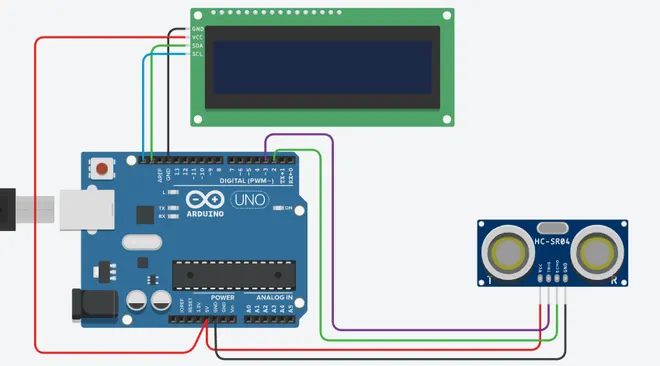
Project 2 - Measuring the distance of an object using ultrasonic sensor and also smoothen the sensor data using moving average filter
A single I/O pin is used to trigger an ultrasonic burst (well above human hearing) and then "listen" for the echo return pulse.The sensor measures the time required for the echo return and returns this value to the microcontroller as a variable-width pulsevia the same I/O pin. Ultrasonic sensors have definitely diversified functions including "detection" of what you cannot see,"measurement" of length, thickness and amount, and "destruction" of objects
Ultrasonic sensors are generally used for anti-collision and rangefinder purposes by measuring the distance to an obstacle [1]some application ideas where Ultra Sonic sensors can be used are: security systems, parking assistant systems, interactive animatedexhibits and robotic navigation
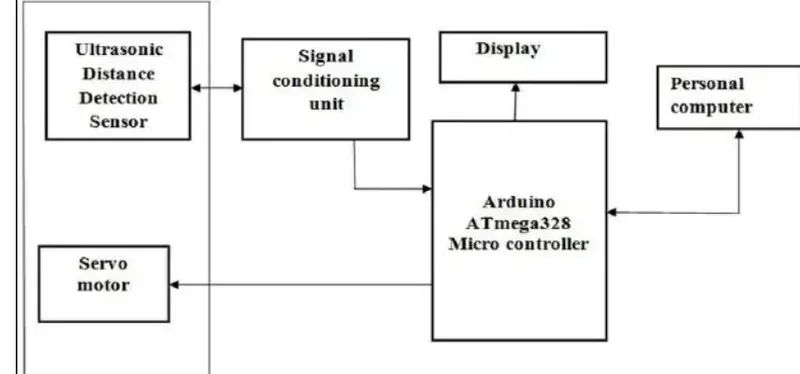
An ultrasonic Sensor is a device used to measure the distance between the sensor and an object without physical contact. This device works based on time-to-distance conversion.
Working Principle of Ultrasonic Sensor:
Ultrasonic sensors measure distance by sending and receiving the ultrasonic wave. The ultrasonic sensor has a sender to emit the ultrasonic waves and a receiver to receive the ultrasonic waves. The transmitted ultrasonic wave travels through the air and is reflected by hitting the Object. Arduino calculates the time taken by the ultrasonic pulse wave to reach the receiver from the sender.
the speed of sound in air is nearly 344 m/s,
Formula: Distance = Speed * Time
#define echoPin \ 2 // attach pin D2 Arduino to pin Echo of HC-SR04#define trigPin \ 3 // attach pin D3 Arduino to pin Trig of HC-SR04 \long duration; // Variable to store time taken to the pulse // to reach receiverint distance; // Variable to store distance calculated using // formulavoid setup(){ pinMode(trigPin, OUTPUT); // Sets the trigPin as an OUTPUT pinMode(echoPin, INPUT); // Sets the echoPin as an INPUT // Serial Communication is starting with 9600 of // baudrate speed Serial.begin(9600); // The text to be printed in serial monitor Serial.println( "Distance measurement using Arduino Uno."); delay(500);}void loop(){ digitalWrite(trigPin, LOW); delayMicroseconds(2); // wait for 2 ms to avoid // collision in serial monitor digitalWrite( trigPin, HIGH); // turn on the Trigger to generate pulse delayMicroseconds( 10); // keep the trigger "ON" for 10 ms to generate // pulse for 10 ms. digitalWrite(trigPin, LOW); // Turn off the pulse trigger to stop // pulse generation // If pulse reached the receiver echoPin // become high Then pulseIn() returns the // time taken by the pulse to reach the // receiver duration = pulseIn(echoPin, HIGH); distance = duration * 0.0344 / 2; // Expression to calculate // distance using time Serial.print("Distance: "); Serial.print( distance); // Print the output in serial monitor Serial.println(" cm"); delay(100);}