Project 2 - Measuring the distance of an object using ultrasonic sensor and also smoothen the sensor data using moving average filter
Overview of the Project:
In this project the implementation of code for “Measuring distance of an object using ultrasonic distance sensor (28015 Ping) and also smoothen the sensor data using moving average filter”.
Goals:
- Measuring the distance in terms of inches of an object using Ultrasonic Distance Sensor (28015 Ping).
- The sensor data is smoothened by using Moving average filter technique to eliminate the high frequency variations from the sensor data.
Key Highlights of the Project:
- Measuring the distance travelled by the wave to the object and gets bounced back from the object to sensor.
- Smoothening the sensor data by moving average filter technique, the filter has a window of certain size. That window determines that how many data the filter can take.
Deliverables of this project:
- The distance travelled by a wave to the object for which we want to measure the distance using Ultrasonic Distance Sensor (28015 Ping).
- Eliminate the high frequency jitters from the sensor data by Moving Average filter to smoothen the sensor data.
Expected Outcomes:
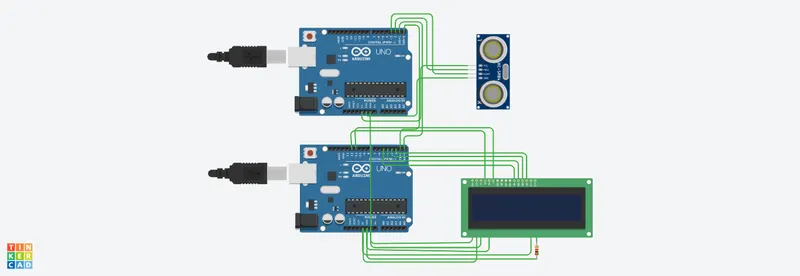
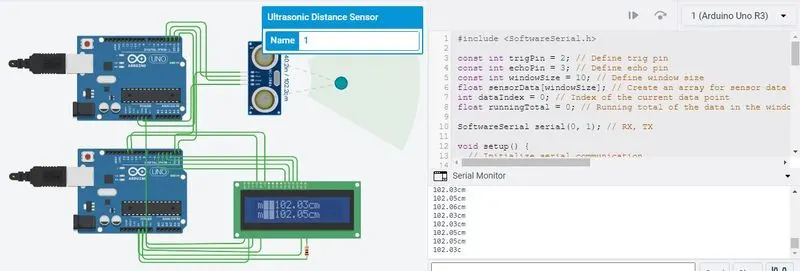
The students will get the Knowledge on Ultrasonic sensor (28015 Ping) to measure the distance travelled by wave to the object, the hardware connection of 2 Arduino’s connected to the sensor and smoothening the sensor data by removing high frequency variations using Moving Average Filter Technique.
#include <SoftwareSerial.h>
const int trigPin = 2; // Define trig pin
const int echoPin = 3; // Define echo pin
const int windowSize = 10; // Define window size
float sensorData[windowSize]; // Create an array for sensor data
int dataIndex = 0; // Index of the current data point
float runningTotal = 0; // Running total of the data in the window
SoftwareSerial serial(0, 1); // RX, TX
void setup() {
// Initialize serial communication
Serial.begin(9600);
// mySerial.begin(9600);
pinMode(trigPin, OUTPUT);
pinMode(echoPin, INPUT);
}
void loop() {
// Send a pulse to the ultrasonic sensor
digitalWrite(trigPin, LOW);
delayMicroseconds(2);
digitalWrite(trigPin, HIGH);
delayMicroseconds(10);
digitalWrite(trigPin, LOW);
// Measure the time it takes for the pulse to bounce back
float duration = pulseIn(echoPin, HIGH);
// Calculate the distance in centimeters
// Distance= (Time x Speed of Sound in Air (340 m/s))/2 or The speed of sound in air is approximately 340 meters per second, or 29.1 microseconds per centimeter
float distance = duration / 58.2;
// Read sensor data and add it to the running total
runningTotal -= sensorData[dataIndex];
sensorData[dataIndex] = distance;
runningTotal += sensorData[dataIndex];
// Calculate the moving average
float movingAverage = runningTotal / windowSize;
// Output the moving average to USART
Serial.print(movingAverage);
Serial.println("cm");
// Increment the data index
dataIndex++;
if (dataIndex == windowSize) {
dataIndex = 0;
}
// Wait a short time before taking the next sensor reading
delay(10);
}
>>>>>Arduino’s 2 code<<<<<<<<<<<<<
#include <LiquidCrystal.h>
#include <SoftwareSerial.h>
SoftwareSerial serial(0, 1); // RX, TX
LiquidCrystal lcd(12, 11, 5, 4, 3, 2); // Initialize the LCD
void setup() {
lcd.begin(16, 2); // Set up the LCD's number of columns and rows
Serial.begin(9600); // Initialize the serial communication
}
void loop() {
if (Serial.available()) { // Check if data is available to read
String distance = Serial.readStringUntil('c'); // Read the distance data until 'c'
String movingAverage = Serial.readStringUntil('c');
lcd.setCursor(1,0); // Set the cursor to the beginning of the first row
// lcd.print("Distance:"); // Print the label
lcd.print(distance); // Print the distance data
lcd.print("cm");
lcd.setCursor(1,1);
lcd.print(movingAverage); // Print the movingAverage data
lcd.print("cm");
delay(10); // Wait for a short time before updating the display
}
}