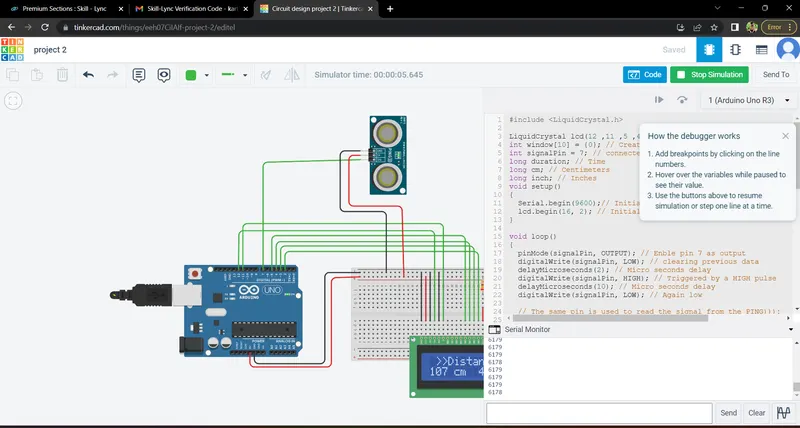
Project 2 - Measuring the distance of an object using ultrasonic sensor and also smoothen the sensor data using moving average filter
MEASURING THE DISTANCE OF AN OBJECT USING ULTRASONIC SENSOR
INTRODUCTION:
In This Project Using Arduino Ultrasonic Sensor to Measure Shorter distance precisely. use HCSR-04, Sensor it is a Low-cost Sensor. The Ultrasonic Sensor Consists of Transmitter and Receiver Modules.
Transmitter Part ejects the Pulse out and Receiver Part Receives the Pulse. Is an Obstacle or Object Placed before the Sensor the transmitted pulse ejected Strike the Object and Reflected back. The reflected pulse is Received by the receiver part. This time between Transmission and Reception is calculated. This data is Processed to calculate distance.
PROGRAM:
I2C MASTER CODE:
#include

LiquidCrystal lcd(12 ,11 ,5 ,4 ,3 ,2); //Define LCD Module Pins (RS,RN,D4,D5,D6,D7)
int window[10] = {0}; // Creating a integer array of 10 element.
int signalPin = 7; // connected signal pin of sensor to pin No.7 of Ardunio
long duration; // Time
long cm; // Centimeters
long inch; // Inches
void setup()
{
  Serial.begin(9600);// Initialize serial communication:
  lcd.begin(16, 2); // Initialize LCD
}

void loop()
{
  pinMode(signalPin, OUTPUT); // Enble pin 7 as output
  digitalWrite(signalPin, LOW); // clearing previous data
  delayMicroseconds(2); // Micro seconds delay
  digitalWrite(signalPin, HIGH); // Triggered by a HIGH pulse
  delayMicroseconds(10); // Micro seconds delay
  digitalWrite(signalPin, LOW); // Again low

  // The same pin is used to read the signal from the PING))):

  pinMode(signalPin,INPUT); // Enble pin 7 as input
  duration = pulseIn(signalPin,HIGH); //a HIGH pulse duration is the time (in microseconds
  cm = duration * 0.0346/2; // conversion
  inch = duration * 0.01348/2; // conversion
  lcd.setCursor(0, 0); // Setting cursor of LCD
  lcd.print(" >>Distance<<"); // Printing this message
  lcd.setCursor(0, 1); // Again setting cursor
  lcd.print(cm); // Printing converted value i.e. 'Time into Centimeters'
  lcd.print(" cm  ");
  lcd.print(inch);// Printing converted value i.e. 'Time into Inhes'
  lcd.print(" inch");

  // Now smoothen the sensor data
  int current_samp = 0;
  current_samp = (duration); // duration = current_samp
  delayMicroseconds(300); // taking delay
  pushVal(current_samp);// calling function
  Serial.println(takeAvg()); // calling function
}

void pushVal(int val)
{
  int i = 0;
  for(i = 1;i < 10; i++)// This for loop run for 10 time
  {
    window[i-1] = window[i]; // here setting window previous value as window new value
  }
  window[10 - 1] = val; // finally giving to val
}

int takeAvg() // this funtion is just taking simple avg of 10  element
{
  int i = 0;
  long sum = 0;
  for(i = 0; i < 10; i++) // This for loop is adding 10 element
  {
    sum += window[i]; //in each cycle sum value is incressing
  }
  return (sum / 10); // dividing sum with number of element i.e. '10'.
}
TINKERCAD SIMULATION OUTPUT:
COMPONENTS USED:
ARDUINO UNO
BREAD BOARD
HCSR-04 ULTRASONIC SENSOR
LCD 16X2 DISPLAY
CONNECTIONS:
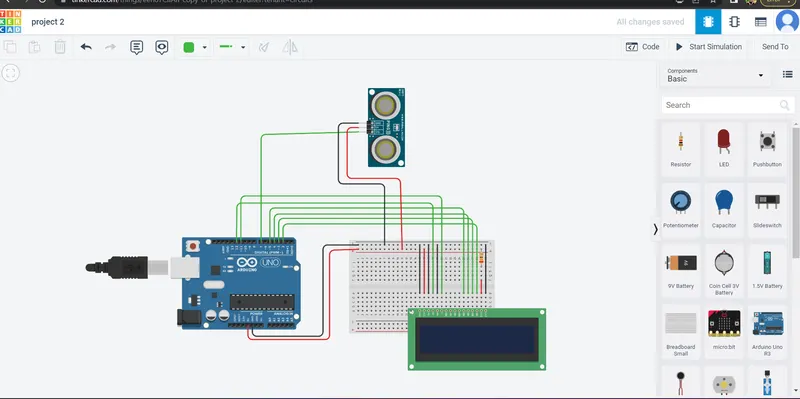
ADJUST THE OBJECT IN ULTRASONIC SENSOR CALCULATE THE DISTANCE AND DISPLAY IT:
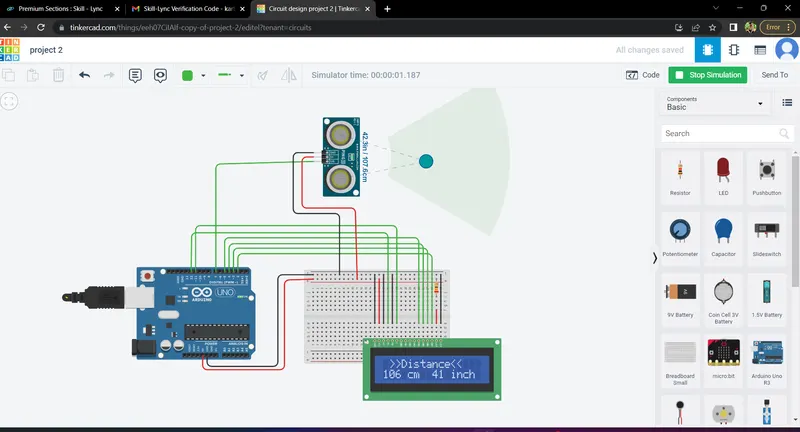
FIND DISTANCE IN CENTIMETER AND INCHES AND CALCULATE THE AVERAGE: