Project 2 - Measuring distance of an object using ultrasonic sensor (HC-SR04)
Aim:
To implement the code for measuring the distance of an object using ultrasonic distance sensor (HC-SR04).
Tools Used:
1. Ultra sonic sensor (HC-SR04)
2. Atmega 32
3. Lcd display
Software Used:
1. Simulide
2. Microchip studio
About Ultrasonic sensor:
An ultrasonic sensor is an electronic device that measures the distance of a target object by emitting ultrasonic sound waves, and converts the reflected sound into an electrical signal. Ultrasonic waves travel faster than the speed of audible sound (i.e. the sound that humans can hear). Ultrasonic sensors have two main components: the transmitter (which emits the sound using piezoelectric crystals) and the receiver (which encounters the sound after it has travelled to and from the target). It has 4PINS namely VCC, GRND, TRIG AND ECHO.
About Atmega 32:
The AVR microController is based on the advanced Reduced Instruction Set Computer (RISC) architecture. ATmega32 microController is a low power CMOS technology based controller. Due to RISC architecture AVR microcontroller can execute 1 million of instructions per second if cycle frequency is 1 MHz provided by crystal oscillator.
LCD display :
The HD44780U dot-matrix liquid crystal display controller and driver LSI displays alphanumerics
and symbols. It can be configured to drive a dot-matrix liquid crystal display
under the control of a 4- or 8-bit microprocessor. Since all the functions such as display RAM, character
generator, and liquid crystal driver, required for driving a dot-matrix liquid crystal display are internally
provided on one chip, a minimal system can be interfaced with this controller/driver.
A single HD44780U can display up to one 8-character line or two 8-character lines.
Program used:
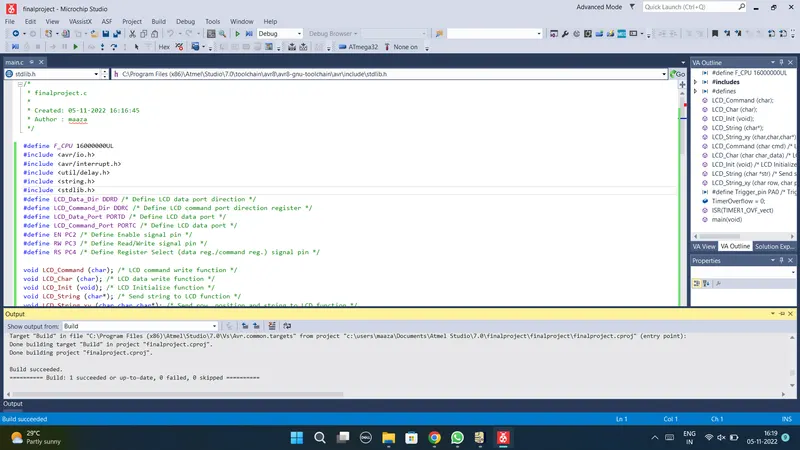
#define F_CPU 16000000UL
#include <avr/io.h>
#include <avr/interrupt.h>
#include <util/delay.h>
#include <string.h>
#include <stdlib.h>
#define LCD_Data_Dir DDRD /* Define LCD data port direction */
#define LCD_Command_Dir DDRC /* Define LCD command port direction register */
#define LCD_Data_Port PORTD /* Define LCD data port */
#define LCD_Command_Port PORTC /* Define LCD data port */
#define EN PC2 /* Define Enable signal pin */
#define RW PC3 /* Define Read/Write signal pin */
#define RS PC4 /* Define Register Select (data reg./command reg.) signal pin */
void LCD_Command (char); /* LCD command write function */
void LCD_Char (char); /* LCD data write function */
void LCD_Init (void); /* LCD Initialize function */
void LCD_String (char*); /* Send string to LCD function */
void LCD_String_xy (char,char,char*); /* Send row, position and string to LCD function */
void LCD_Command (char cmd) /* LCD command write function */
{
LCD_Data_Port = cmd; /* Write command data to LCD data port */
LCD_Command_Port &= ~((1<<RS)|(1<<RW)); /* Make RS LOW (command reg.), RW LOW (Write) */
LCD_Command_Port |= (1<<EN); /* High to Low transition on EN (Enable) */
_delay_us(1);
LCD_Command_Port &= ~(1<<EN);
_delay_ms(3); /* Wait little bit */
}
void LCD_Char (char char_data) /* LCD data write function */
{
LCD_Data_Port = char_data; /* Write data to LCD data port */
LCD_Command_Port &= ~(1<<RW); /* Make RW LOW (Write) */
LCD_Command_Port |= (1<<EN)|(1<<RS); /* Make RS HIGH (data reg.) and High to Low transition on EN (Enable) */
_delay_us(1);
LCD_Command_Port &= ~(1<<EN);
_delay_ms(1); /* Wait little bit */
}
void LCD_Init (void) /* LCD Initialize function */
{
LCD_Command_Dir |= (1<<RS)|(1<<RW)|(1<<EN); /* Make LCD command port direction as o/p */
LCD_Data_Dir = 0xFF; /* Make LCD data port direction as o/p */
_delay_ms(20); /* LCD power up time to get things ready, it should always >15ms */
LCD_Command (0x38); /* Initialize 16X2 LCD in 8bit mode */
LCD_Command (0x0C); /* Display ON, Cursor OFF command */
LCD_Command (0x06); /* Auto Increment cursor */
LCD_Command (0x01); /* Clear LCD command */
LCD_Command (0x80); /* 8 is for first line and 0 is for 0th position */
}
void LCD_String (char *str) /* Send string to LCD function */
{
int i;
for(i=0;str[i]!=0;i++) /* Send each char of string till the NULL */
{
LCD_Char (str[i]); /* Call LCD data write */
}
}
void LCD_String_xy (char row, char pos, char *str) /* Send string to LCD function */
{
if (row == 1)
LCD_Command((pos & 0x0F)|0x80); /* Command of first row and required position<16 */
else if (row == 2)
LCD_Command((pos & 0x0F)|0xC0); /* Command of Second row and required position<16 */
LCD_String(str); /* Call LCD string function */
}
#define Trigger_pin PA0 /* Trigger pin */
int TimerOverflow = 0;
ISR(TIMER1_OVF_vect)
{
TimerOverflow++; /* Increment Timer Overflow count */
}
int main(void)
{
char string[10];
long count;
double distance;
DDRA = 0x01; /* Make trigger pin as output */
PORTB = 0xFF; /* Turn on Pull-up */
LCD_Init();
LCD_String_xy(1, 0, "Ultrasonic");
sei(); /* Enable global interrupt */
TIMSK = (1 << TOIE1); /* Enable Timer1 overflow interrupts */
TCCR1A = 0; /* Set all bit to zero Normal operation */
while(1)
{
/* Give 10us trigger pulse on trig. pin to HC-SR04 */
PORTA |= (1 << Trigger_pin);
_delay_us(10);
PORTA &= (~(1 << Trigger_pin));
TCNT1 = 0; /* Clear Timer counter */
TCCR1B = 0x41; /* Capture on rising edge, No prescaler*/
TIFR = 1<<ICF1; /* Clear ICP flag (Input Capture flag) */
TIFR = 1<<TOV1; /* Clear Timer Overflow flag */
/*Calculate width of Echo by Input Capture (ICP) */
while ((TIFR & (1 << ICF1)) == 0);/* Wait for rising edge */
TCNT1 = 0; /* Clear Timer counter */
TCCR1B = 0x01; /* Capture on falling edge, No prescaler */
TIFR = 1<<ICF1; /* Clear ICP flag (Input Capture flag) */
TIFR = 1<<TOV1; /* Clear Timer Overflow flag */
TimerOverflow = 0; /* Clear Timer overflow count */
while ((TIFR & (1 << ICF1)) == 0); /* Wait for falling edge */
count = ICR1 + (65535 * TimerOverflow); /* Take count */
/* 8MHz Timer freq, sound speed =343 m/s */
distance = (double)count / 466.47;
dtostrf(distance, 2, 2, string);/* distance to string */
strcat(string, " cm "); /* Concat unit i.e.cm */
LCD_String_xy(2, 0, "Dist = ");
LCD_String_xy(2, 7, string); /* Print distance */
_delay_ms(200);
}
}
OUTPUT:
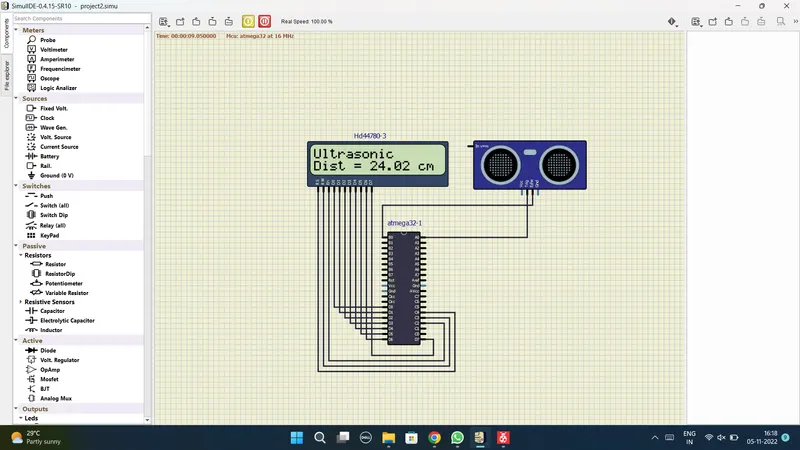
Result:
Hence we have succesfully programed to interface the sensor with MC and display the output on LCD