Project 2 - Create a report using PowerQuery, Macro VBA, List Functions and Data Validation functions for Data Reporting of Supply Chain Management companies
- Gender Ratio of Applicants
- Car Owner/ Non-Owner Ratio
- House Owner/ Non-Owner Ratio
- Client Income Type
- Client’s Level of Education
- Client’s Housing Type
- Client’s Family Status
- Client’s Occupation Type
Ans:
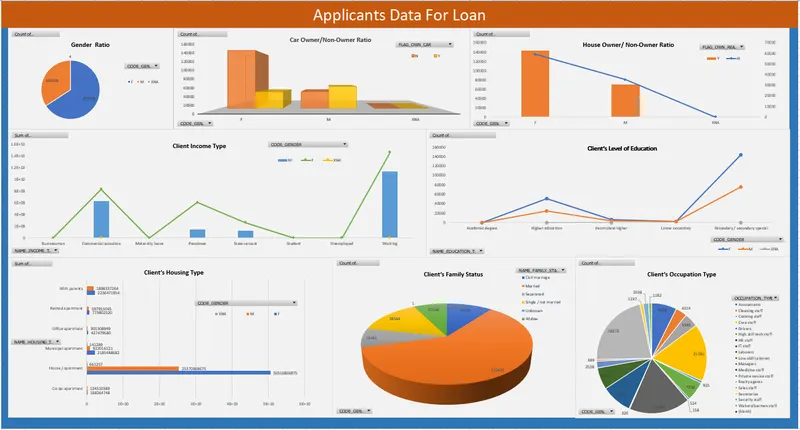
- Gender Ratio of Applicants
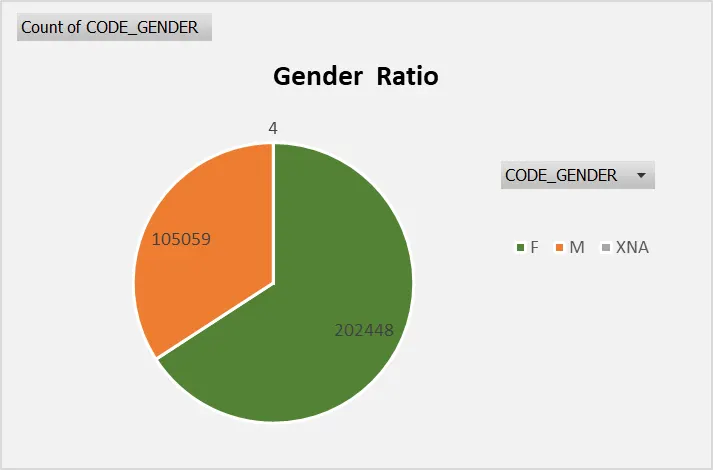
Row LabelsCount of CODE_GENDERGrand Total307511
| F | 202448 |
| M | 105059 |
| XNA | 4 |
- Car Owner/ Non-Owner Ratio
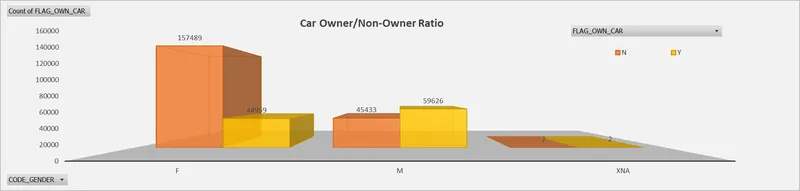
- Count of FLAG_OWN_CARColumn Labels Row LabelsNYGrand TotalGrand Total202924104587307511
F 157489 44959 202448 M 45433 59626 105059 XNA 2 2 4 - House Owner/ Non-Owner Ratio
- Count of FLAG_OWN_REALTYColumn Labels Row LabelsNYGrand TotalGrand Total94199213312307511
F 59033 143415 202448 M 35166 69893 105059 XNA 4 4 
- Client Income Type
- Sum of AMT_INCOME_TOTALColumn Labels Row LabelsFMXNAGrand TotalGrand Total315884289422031804101974700051907216961
Businessman 1665000 4860000 6525000 Commercial associate 8292618539 6242185636 247500 14535051674 Maternity leave 342000 360000 702000 Pensioner 6063812094 1487636248 7551448343 State servant 2631580926 1269272226 3900853152 Student 1399500 1669500 3069000 Unemployed 1887300 544500 2431800 Working 14595123583 11311512908 499500 25907135991 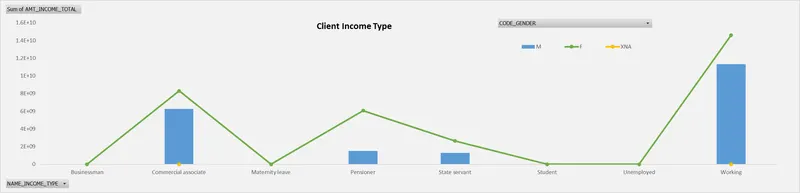
- Client’s Level of Education
- Count of NAME_EDUCATION_TYPEColumn Labels Row LabelsFMXNAGrand TotalGrand Total2024481050594307511
Academic degree 100 64 164 Higher education 50289 24573 1 74863 Incomplete higher 6283 3993 1 10277 Lower secondary 2311 1505 3816 Secondary / secondary special 143465 74924 2 218391 
- Client’s Housing Type
- Sum of SK_ID_CURRColumn Labels Row LabelsFMXNAGrand TotalGrand Total563283144592.921E+108025468.5544E+10
Co-op apartment 188264748 124510389 312775137 House / apartment 50516806975 2.537E+10 661257 7.5888E+10 Municipal apartment 2185488682 922016121 141289 3107646092 Office apartment 427479580 301308949 728788529 Rented apartment 773802520 597911045 1371713565 With parents 2236471954 1.898E+09 4134809218 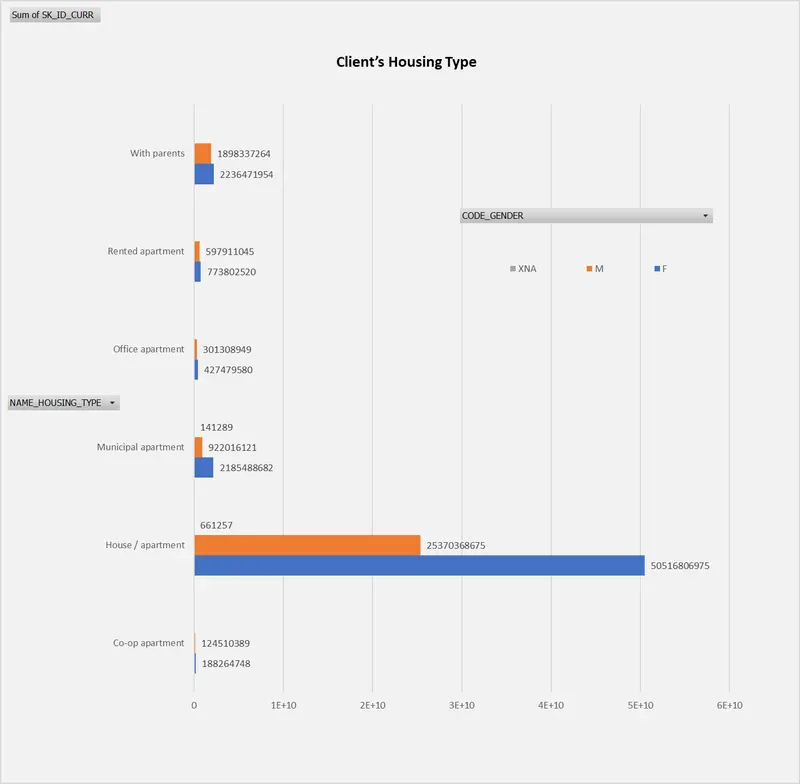
- Client’s Family Status
- Count of SK_ID_CURRColumn Labels Row LabelsFMXNAGrand TotalGrand Total2024481050594307511
Civil marriage 20769 9005 1 29775 Married 122445 73984 3 196432 Separated 15461 4309 19770 Single / not married 28584 16860 45444 Unknown 1 1 2 Widow 15188 900 16088 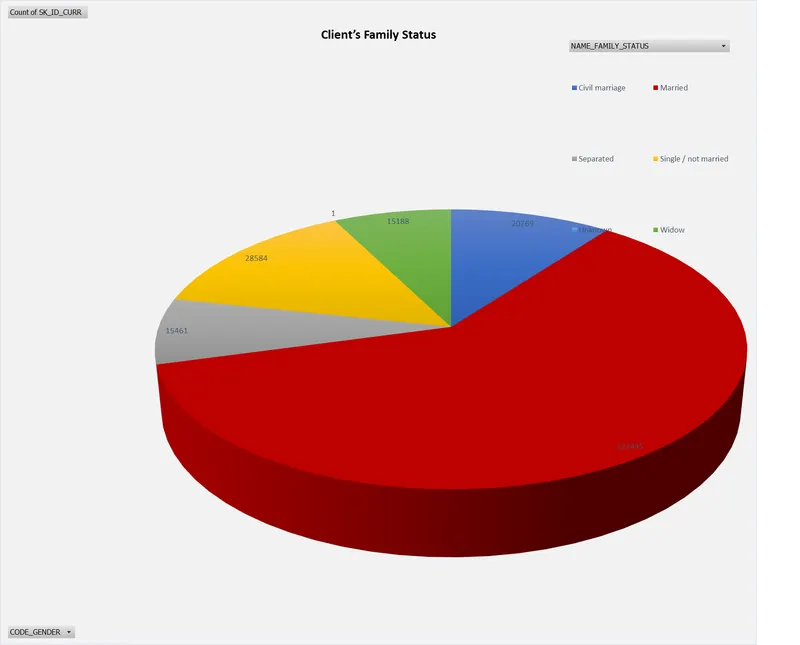
- Client’s Occupation Type
- Count of OCCUPATION_TYPEColumn Labels Row LabelsFMXNAGrand TotalGrand Total129282818362211120
Accountants 9529 284 9813 Cleaning staff 4314 339 4653 Cooking staff 5385 561 5946 Core staff 21781 5788 1 27570 Drivers 925 17678 18603 High skill tech staff 7350 4030 11380 HR staff 524 39 563 IT staff 158 368 526 Laborers 23139 32047 55186 Low-skill Laborers 320 1772 1 2093 Managers 11593 9778 21371 Medicine staff 8297 240 8537 Private service staff 2538 114 2652 Realty agents 689 62 751 Sales staff 28273 3829 32102 Secretaries 1247 58 1305 Security staff 2038 4683 6721 Waiters/barmen staff 1182 166 1348 (blank) 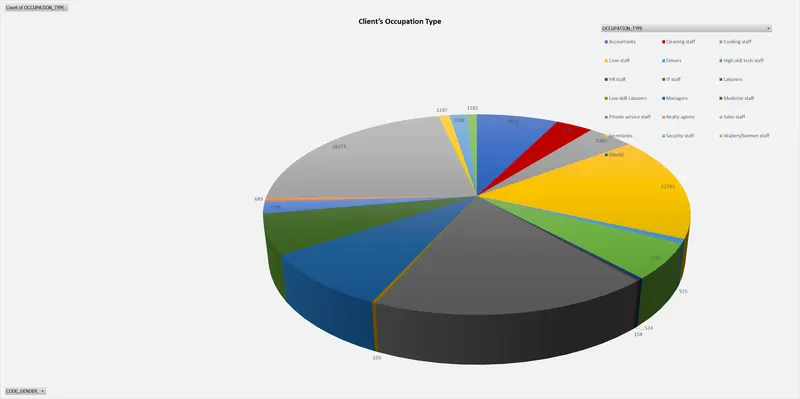
- Data Summary of All Female Client’s for Income and Loan Amount using New Functions
- Data Summary of All Male Client’s for Income and Loan Amount using List Functions
Ans:
- Data Summary for all Flag Columns like (FLAG_DOCUMENT_2, FLAG_DOCUMENT_3 etc.) using all variants of DCOUNT function.
Ans: 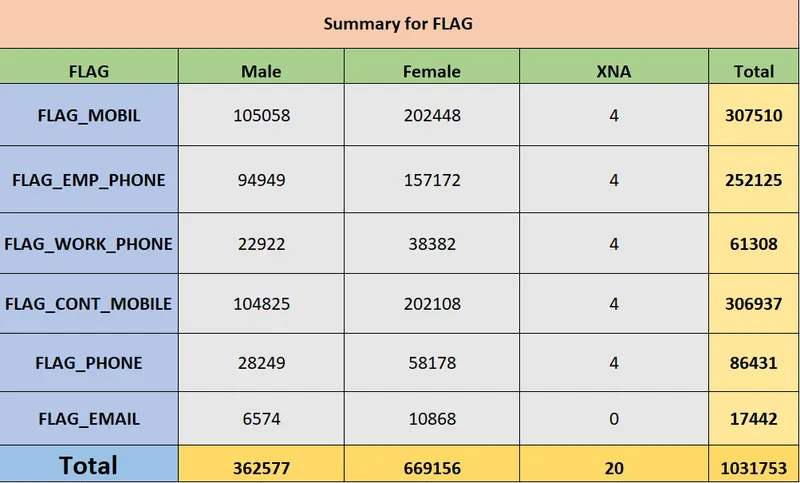
- Create a Macro for Data Formatting (Conditional Formatting, Freezing Panes) of workbook as same will be applied to the data of next quarter
Ans:
Public Sub DataFormatting()
Dim MyRange As Range
Set MyRange = range ("A1:DR307512")
MyRange . FormatConditions .Add Type:=xlCellValue, Operator:=xlBetween, _
Formula1:="100", Formula2:="=150"
MyRange.FormatConditions (1) .Interior.Color = RGB(156, 0, 0)
MyRange. FormatConditions .Add Type:=xlCellValue, Operator:=xlLess, _
Formula1:="100"
MyRange. FormatConditions (2) .Interior.Color = vbGreen
MyRange. FormatConditions .Add Type:=xlCellValue, Operator:=xlGreater, _
Formula1:="150"
MyRange. FormatConditions (3) .Interior.Color = vbViolet
MyRange. FormatConditions .Add Type:=xlCellValue, Operator:=xlLess, _
Formula1:="100"
MyRange. FormatConditions (2) .Interior.Color = vbOrange
End Sub
Create VBA Code to convert selected data into pdf from applicant data
Ans:
Public Sub SavetoPDF()
Dim ThisRng As Range
Dim strfile As String
Dim myfile As Variant
If Selection.Conut = 1 Then
Set ThisRng = Application.InPutBox("Select a range", "Get Range", Type:=8)
Else
Set ThisRng = Selection
End If
strfile = "selection" & "_"_
& Format (Now(), "yyyymmdd_hhmmss") _
& ".pdf"
strfile = ThisWorkbook.Path & "\" & strfile
Myfile = Application.GetSaveAsFilename _
(InitialFileName:=strfile,
FileFilter:="PDF Files (*.pdf), *.pdf", _
Title:="Select Folder and File Name to Save as PDF")
If Myfile <> "False" Then
ThisRng.ExportAsFixedFormat Type:=xlTypePDF, Filename:= _
Myfile, Quality:=xlQualityStandard,IncludeDocProperties:=True, _
IgnorePrintAreas:=False, OpenAfterPublish:=True
Else
MsgBox "No File selected. PDF will not be saved", vbOKonly, "no File Selected"
End If
End Sub
- Check Spelling mistakes in the workbook using VBA Code
Ans:
Public Sub SpellingCheck()
Dim cell As Range
For Each cell In ActiveSheet.UsedRange
If Not Application.Checkspelling(word:=cell.Text) Then
cell.Style = "Bad"
End If
Next cell
End Sub