Project 2 - Create a report using PowerQuery, Macro VBA, List Functions and Data Validation functions for Data Reporting of Supply Chain Management companies
features of dashboard
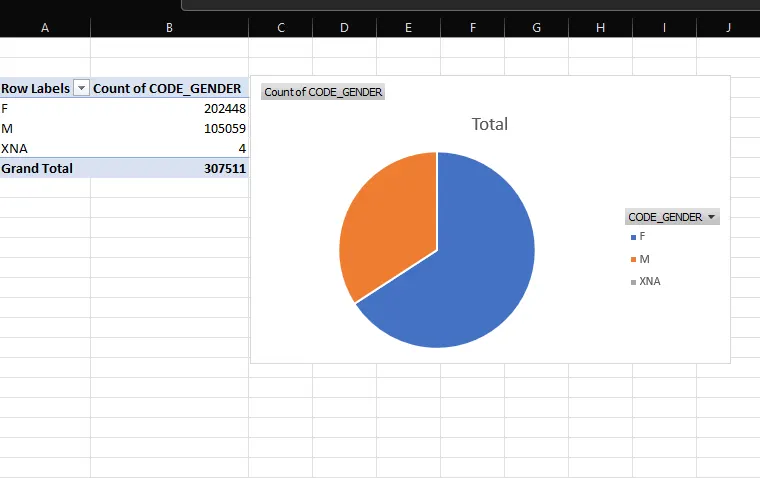
- Gender Ratio of Applicants
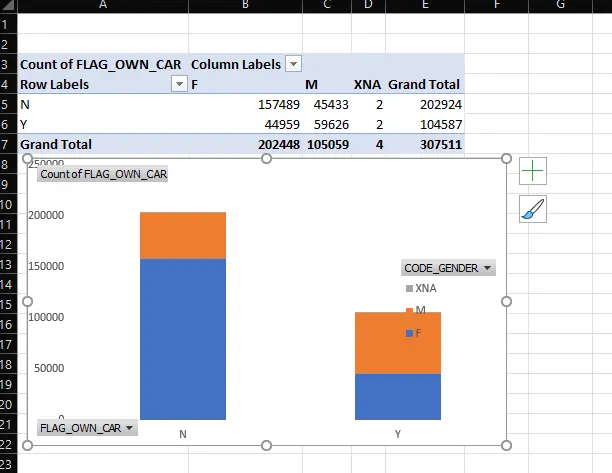
- Car Owner/ Non-Owner Ratio
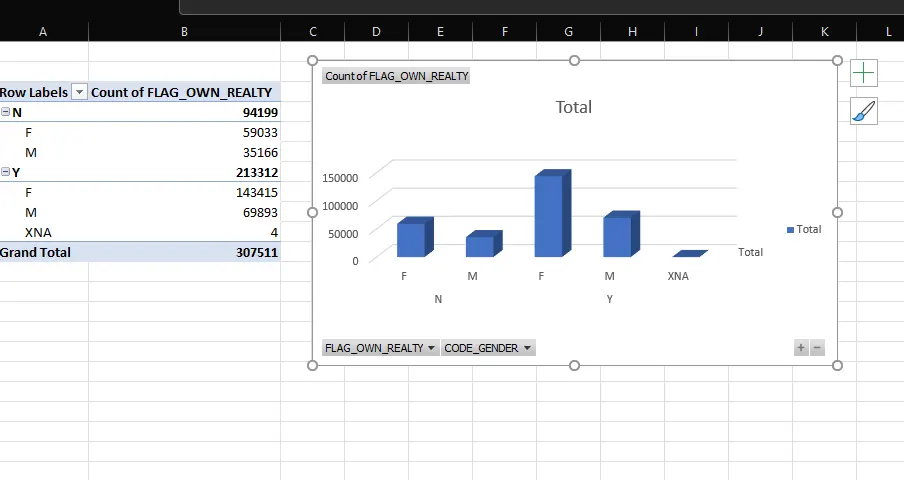
- House Owner/ Non-Owner Ratio
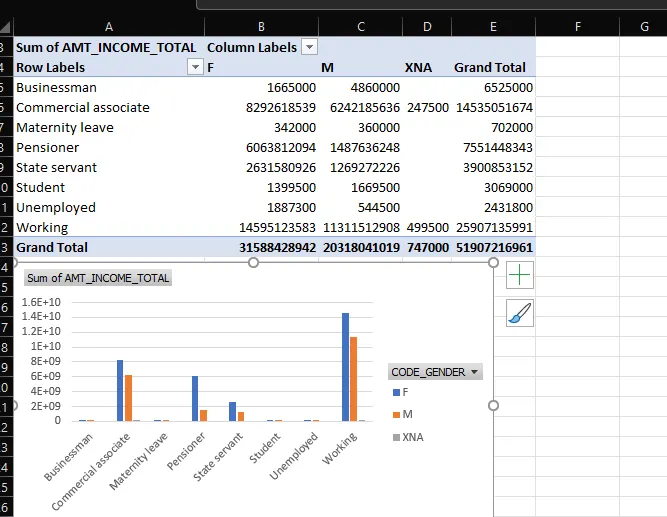
- Client Income Type
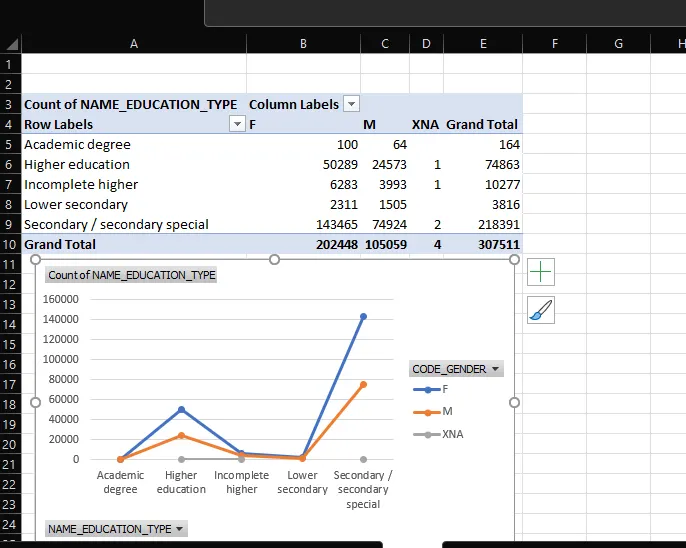
- Client’s Level of Education
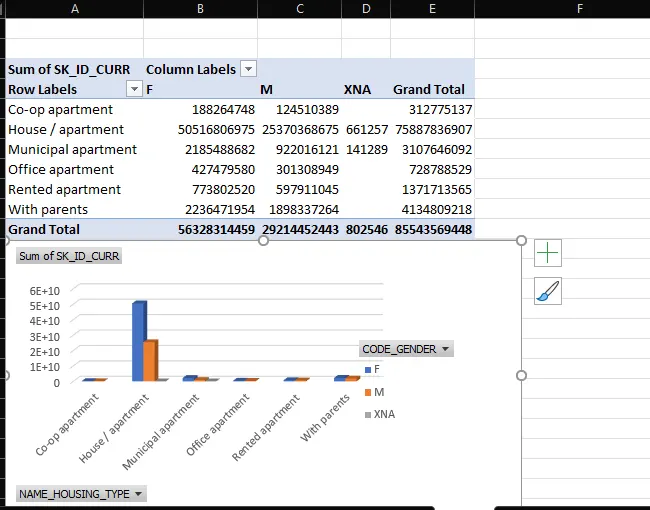
- Client’s Housing Type
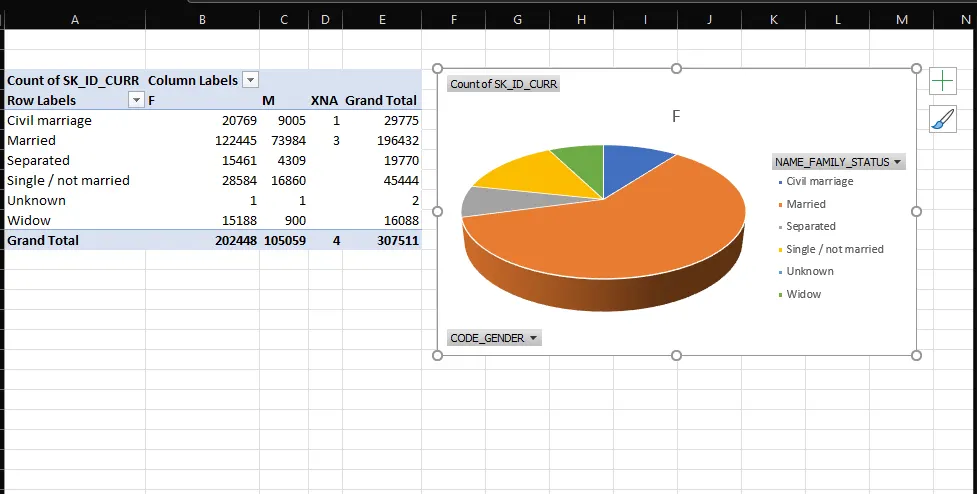
- Client’s Family Status
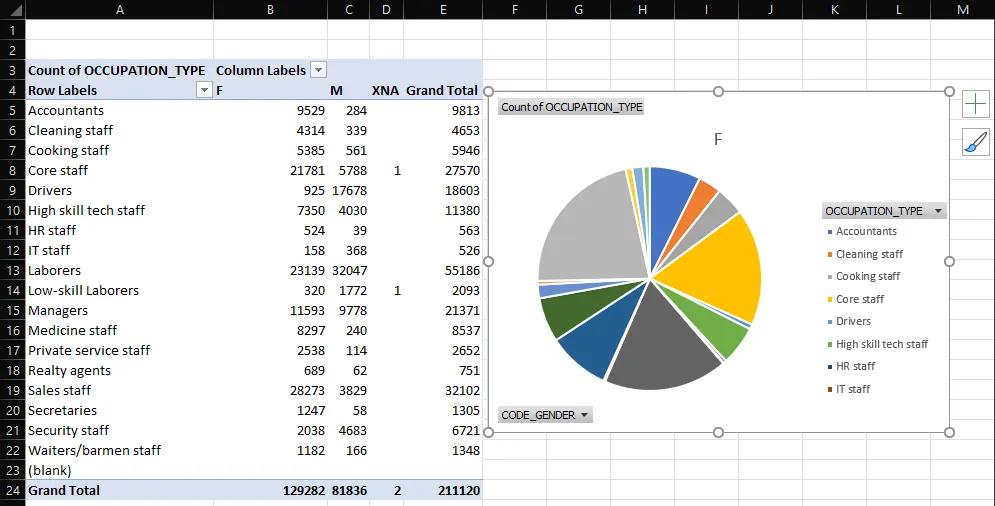
- Client’s Occupation Type
- Create a macro for conditional formatting & freezing panes
Public Sub DataFormatting ()
Dim MyRange As Range
Set MyRange = Range ("A1: DR307512")
MyRange. Format Conditions. Add Type:=xlCellValue, Operator:=xlBetween,
Formula1:="100",
Formula2:="=150"
MyRange. Format Conditions (1). Interior. Color = RGB (156, 0, 0)
MyRange. Format Conditions. Add Type:=xlCellValue, Operator:=xlLess,
Formula1:="100"
MyRange. Format Conditions (2). Interior.Color = vbGreen
MyRange. Format Conditions. Add Type:=xlCellValue, Operator:=xlGreater,
Formula1:="150"
MyRange. Format Conditions (3). Interior. Color = vbviolet
MyRange. Format Conditions. Add Type:=xlCellValue, Operator:=xlLess,
Formula1:="100"
MyRange. Format Conditions (2). Interior.Color = vborange
End Sub
- Create VBA Code to convert selected data into pdf from applicant data
Sub ExportSelectionToPDF()
Dim selectedRange As Range
Dim saveLocation As String
If TypeName(Selection) <> "Range" Then
MsgBox "Please select the data to export as PDF.", vbExclamation
Exit Sub
End If
' Set the selected range
Set selectedRange = Selection
' Open file dialog to select the save location and file name
With Application.FileDialog(msoFileDialogSaveAs)
.Title = "Save PDF As"
.FilterIndex = 2 ' PDF files
If .Show = -1 Then
saveLocation = .SelectedItems(1)
Else
Exit Sub ' User canceled
End If
End With
' Export the selected range to PDF
selectedRange.ExportAsFixedFormat Type:=xlTypePDF, Filename:=saveLocation, Quality:=xlQualityStandard
MsgBox "Data exported to PDF successfully!", vbInformation
End Sub
- Check Spelling mistakes in the workbook using VBA Code
Sub CheckSpelling()
Dim ws As Worksheet
Dim rng As Range
Dim cell As Range
' Loop through each worksheet in the workbook
For Each ws In ThisWorkbook.Worksheets
' Check spelling in used range of each worksheet
Set rng = ws.UsedRange
For Each cell In rng
If Not Application.CheckSpelling(cell.Value) Then
' Highlight cells with spelling mistakes
cell.Interior.Color = RGB(255, 0, 0) ' Red color
End If
Next cell
Next ws
MsgBox "Spelling check completed.", vbInformation
End Sub
drive link
https://drive.google.com/drive/folders/12cyeB0BBpoQ6wuQmPB-WVZwvqTkBlD_Q?usp=drive_link
https://drive.google.com/drive/folders/12cyeB0BBpoQ6wuQmPB-WVZwvqTkBlD_Q?usp=sharing