Project 2
PROJECT 2-FINAL REPORT
OBJECTIVE:
To create a file that has a collection of various data for the current model. This file has Components count, names, assigned properties and materials, element quality failed element count for each quality parameter.
PROCEDURE:
Date and Time:
To extract date and time, clock command has been used. It updates and manipulates date and time. Then clock format command is used to format time and date as the user requested format.
Here format %D will provide the date on DD/MM/YYYY format and %T HH:MM:SS format.
Component data:
To get component name and count, hm_getmark command is used and store those values in a variable. These values then used to display details. This procedure then used for properties and materials.
Assigned data:
For a component, assigned property and material details are get by hm_getvalue. This command will return ids of property and materials. Then is ID values are evaluated to finds their respective names.
Then these values are appended to variables.
Unused/Empty data:
Unused and empty entities are got by command *EntityPreviewEmpty, *EntityPreviewUnused.
The entity's id will be stores in a variable and their name are stored in a variable.
Element quality:
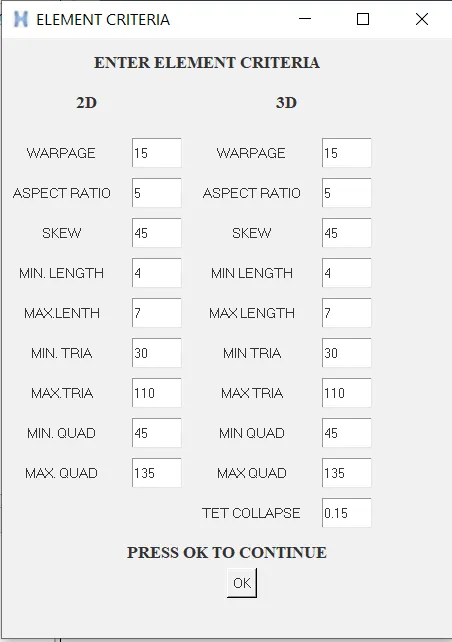
Element quality is a has-been checked for each element for its element criteria value. To these initial values criteria values are save using the set. A window (gadget) has been popped up to enter criteria value from user. This tab is used to get values for element criteria from the user.
Element check then starts with a mark of all elements. And go with each criterion check. Failed elements are stored on a respective variable name.
Final report:
A .csv file has been opened. Then each value, which got previously is dumped into the file.
TCL COMMAND USED:
*createmark - Create mark of selected entities.
clock second - Clock function import.
clock format - Time and Date values format.
hm_getmark - Get marked entities.
llength $vairable - No. of values on a list
*EntityPreviewEmpty - Return empty components.
*EntityPreviewUnused - Return unused property and materials.
hm_getvalue - Return various values like name, assigned entities, etc for entities.
Sample images:

RESULT:
The report which contains all the data discussed above will be saved in the documents folder in name of REPORT.csv.